Note
Access to this page requires authorization. You can try signing in or changing directories.
Access to this page requires authorization. You can try changing directories.
Note
This article applies to secure Virtual WAN hubs that use static routes to route traffic to Azure Firewall. Custom bypass scenarios are not supported when using routing intent.
Scenario overview
This design pattern describes scenarios in a secure Virtual WAN hub where certain traffic flows bypass Azure Firewall inspection, while other traffic continues to be inspected by Azure Firewall.
These scenarios are useful when you need selected traffic between two virtual networks, or between on-premises and specific virtual networks, to route directly instead of traversing Azure Firewall.
Virtual Network to Virtual Network selective inspection
This design pattern allows trusted virtual networks to communicate directly, while all other traffic between branches and untrusted virtual networks is routed through Azure Firewall.
Network diagram
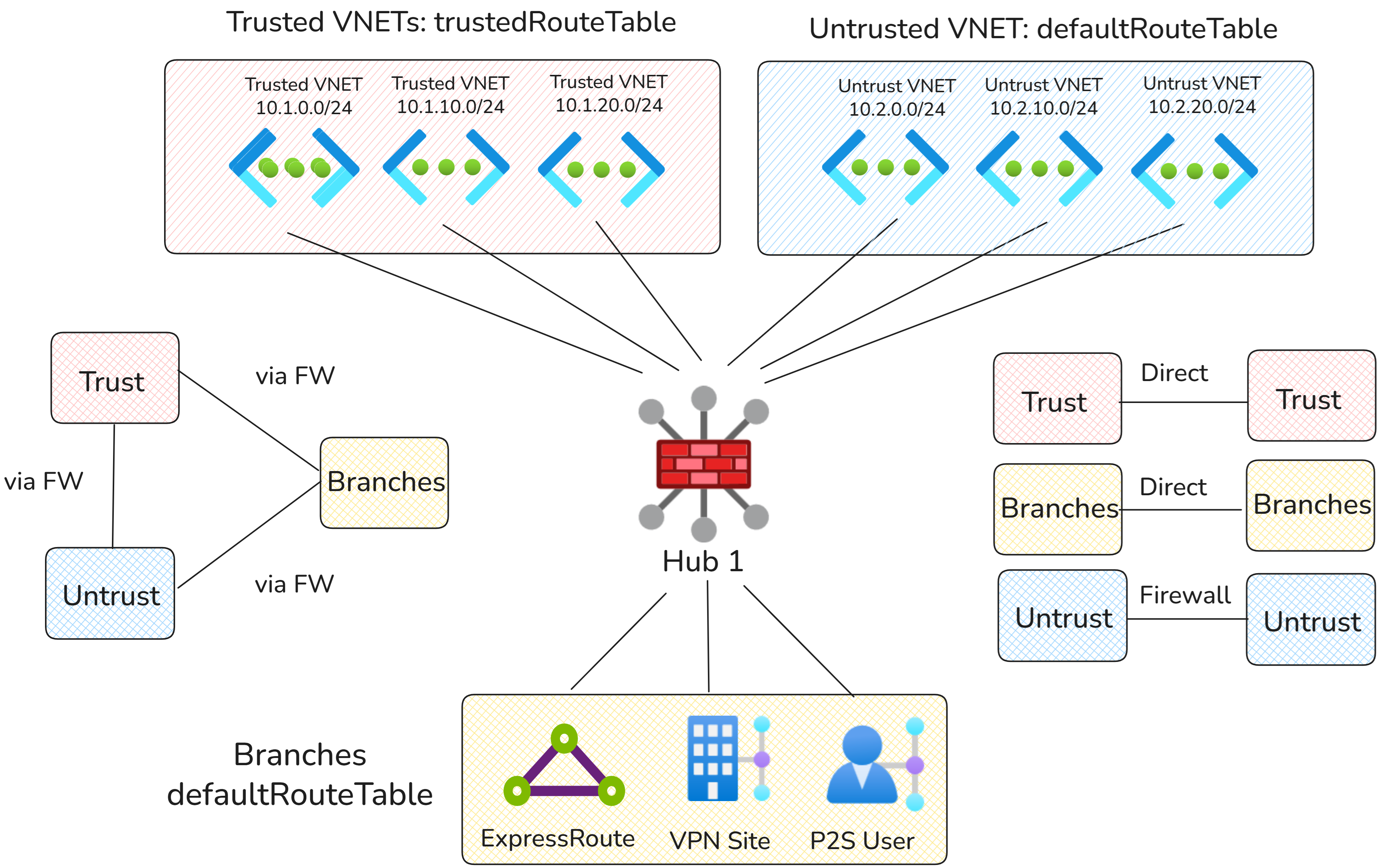
In the diagram above, virtual networks are split into two types:
- Trusted Virtual Networks: Trusted virtual networks are part of one domain that can communicate directly.
- Untrusted Virtual Networks: Traffic within the untrusted domain, and traffic between the trusted and untrusted domains, requires inspection with Azure Firewall.
Traffic flows
| Source | Trusted Virtual Networks | Untrusted Virtual Networks | Branches |
|---|---|---|---|
| Trusted Virtual Networks | Direct via Virtual WAN hub router | Via Azure Firewall | Via Azure Firewall |
| Untrusted Virtual Networks | Via Azure Firewall | Via Azure Firewall | Via Azure Firewall |
| Branches | Via Azure Firewall | Via Azure Firewall | Via Azure Firewall |
Configuration
Virtual WAN route tables
| Route table name | Associated connections | Reasoning |
|---|---|---|
| defaultRouteTable | Branches and untrusted virtual networks | Used by connections to forward traffic to Azure Firewall, including branch traffic and all traffic to or from untrusted virtual networks. No connections propagate to this route table to ensure traffic is inspected by Azure Firewall. |
| trustedRouteTable | Trusted virtual networks | Used to keep trusted virtual networks in a separate route table, routing trusted-to-trusted traffic directly and bypass Azure Firewall inspection. |
Virtual WAN routing configuration
| Connection | Associated route table | Propagated route table | Reasoning |
|---|---|---|---|
| Trusted virtual networks | trustedRouteTable | trustedRouteTable | Trusted virtual networks associate and propagate to a dedicated route table so trusted-to-trusted traffic can bypass Azure Firewall. |
| Untrusted virtual networks | defaultRouteTable | noneRouteTable | Untrusted virtual networks can only be reached via Azure Firewall. |
| Branches | defaultRouteTable | noneRouteTable | Branch traffic must be routed via Azure Firewall. |
Static routes
| Route table | Address prefix | Next hop | Reasoning |
|---|---|---|---|
| trustedRouteTable | 10.0.0.0/8, 192.168.0.0/16, 172.16.0.0/12 | Azure Firewall | Virtual WAN advertises trusted Virtual Networks ranges to other trusted Virtual Networks (allowing for Firewall bypass). All other traffic is routed via Azure Firewall. |
| defaultRouteTable | 10.0.0.0/8, 192.168.0.0/16, 172.16.0.0/12 | Azure Firewall | All branch and untrusted Virtual Networks utilize static routes to route all traffic to Azure Firewall for inspection. |
On-premises to Virtual Network selective inspection
This design pattern builds on the previous design by allowing branches to directly access trusted virtual networks. All other traffic patterns remain the same.
Network diagram
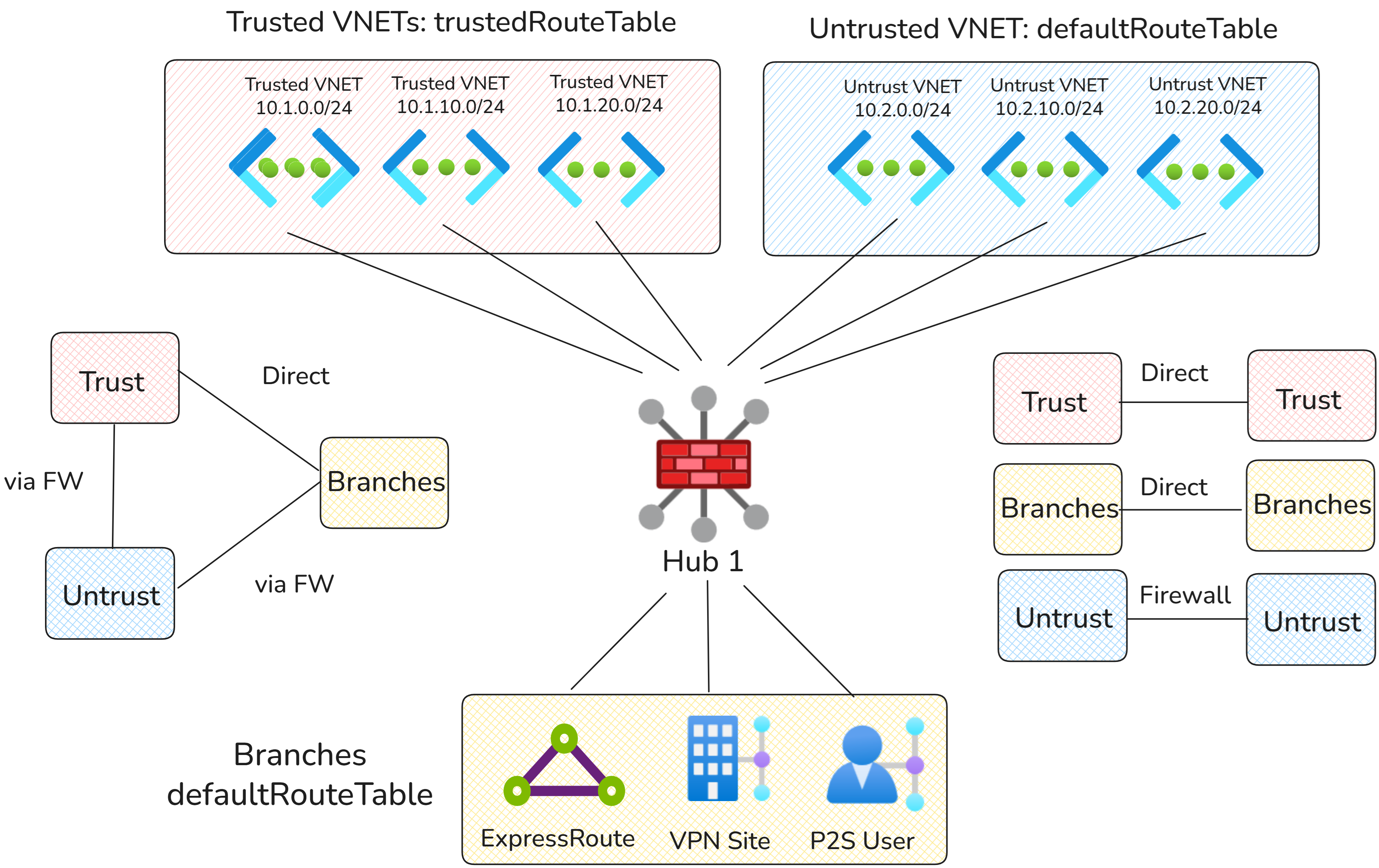
As before, virtual networks are split into two types:
- Trusted Virtual Networks: Trusted virtual networks are part of one domain that on-premises connections can communicate with directly.
- Untrusted Virtual Networks: Traffic from on-premises to untrusted virtual networks requires inspection with Azure Firewall.
Traffic flows
Note
Because all on-premises connections must associate and propagate to the same route tables, all on-premises connections must send traffic to trusted or untrusted virtual networks through the same routing path. On-premises connection-level traffic customization isn't supported.
| Source | Trusted Virtual Networks | Untrusted Virtual Networks | Branches |
|---|---|---|---|
| Trusted Virtual Networks | Direct via Virtual WAN hub router | Via Azure Firewall | Direct |
| Untrusted Virtual Networks | Via Azure Firewall | Via Azure Firewall | Via Azure Firewall |
| Branches | Direct via Virtual WAN hub router to trusted Virtual Networks, otherwise via Azure Firewall | Via Azure Firewall | Direct |
Configuration
Virtual WAN route tables
| Route table name | Associated connections | Reasoning |
|---|---|---|
| defaultRouteTable | Branches and untrusted virtual networks | Used by connections that must forward traffic to Azure Firewall, including branch traffic to untrusted virtual networks and all traffic to or from untrusted virtual networks. |
| trustedRouteTable | Trusted virtual networks | Used by trusted virtual networks to forward traffic directly to other trusted virtual networks and on-premises. |
Virtual WAN routing configuration
| Connection | Associated route table | Propagated route table | Reasoning |
|---|---|---|---|
| Trusted virtual networks | trustedRouteTable | trustedRouteTable, defaultRouteTable | Trusted virtual networks associate with and propagate to trustedRouteTable so trusted virtual networks can communicate directly. Trusted virtual networks also propagate to defaultRouteTable so branches can reach trusted virtual networks directly. |
| Untrusted virtual networks | defaultRouteTable | noneRouteTable | Untrusted virtual networks can only be reached via Azure Firewall. |
| Selected branches | defaultRouteTable | trustedRouteTable, defaultRouteTable | Branch connections must associate to defaultRouteTable. Branches propagate to the trusted route table so branch-to-trusted-virtual-network traffic bypasses Azure Firewall. |
Static routes
| Route table | Address prefix | Next hop | Reasoning |
|---|---|---|---|
| trustedRouteTable | 10.0.0.0/8, 192.168.0.0/16, 172.16.0.0/12 | Azure Firewall | Virtual WAN advertises more specific routes for Virtual Network trusted prefixes and on-premises to trusted spokes. All other traffic is routed to Azure Firewall using static routes. |
| defaultRouteTable | 10.0.0.0/8, 192.168.0.0/16, 172.16.0.0/12 | Azure Firewall | All traffic for untrusted virtual networks and non-bypassed branch connectivity is routed to Azure Firewall for inspection. |