Note
Access to this page requires authorization. You can try signing in or changing directories.
Access to this page requires authorization. You can try changing directories.
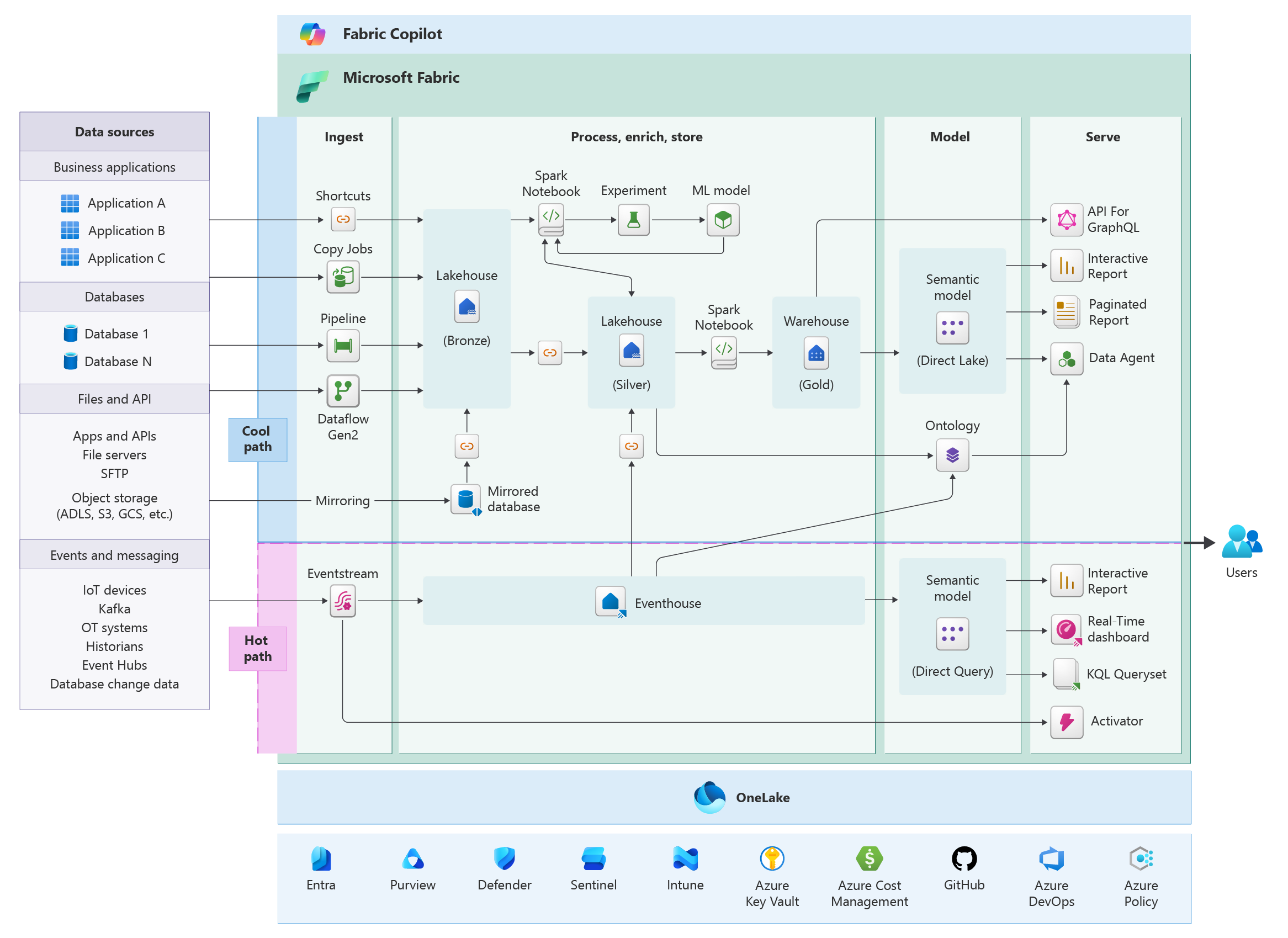
Microsoft Fabric is a unified data platform that brings together data movement, ingestion, transformation, real-time processing, and reporting in a single environment. Teams can build complete analytics solutions from raw data handling to business insights on a shared platform and storage layer.
Because Fabric combines many analytics capabilities in one platform, architectural decisions have wide impact. Capacity sizing affects both pipelines and queries. Data design influences refresh times and report performance. Security configuration determines how teams collaborate and how data is governed.
Across these workloads, architects face the same challenge: building solutions that remain reliable, secure, performant, and cost-efficient while operating smoothly at scale.
This document provides design guidance to solution architects who want to design and optimize their workloads on Microsoft Fabric. The guidance is organized by the five pillars of the Well-Architected Framework that help architects design balanced, production-ready systems.
Architecture pattern
| Pillar | Focus |
|---|---|
| Reliability | Design workloads in Fabric that maintain predictable availability for users and recover gracefully from platform or workload failures, while leveraging multi-region capacities, data replication, and failover strategies. |
| Security | Protect data, identities, and workloads in Fabric through workspace isolation, role-based access, managed identities, encryption, secure networking, and continuous monitoring. |
| Cost Optimization | Control Fabric spending by aligning capacity sizing to workloads, sharing resources strategically, automating scaling and pauses, monitoring utilization, and governing retention and workloads across environments. |
| Operational Excellence | Deploy and operate Fabric workloads with confidence by combining Deployment Pipelines, version control, automated testing, progressive rollouts, logging, and proactive monitoring. |
| Performance Efficiency | Ensure Fabric workloads scale and respond efficiently by right-sizing capacities, isolating heavy workloads, optimizing queries and pipelines, and leveraging caching, incremental refresh, and bursting. |
Common architectural challenges
Microsoft Fabric supports multi-workload architecture and that breadth can introduce challenges. Here are some common ones:
It's easy for teams to create and share data across Lakehouse, Warehouse, Real-Time Analytics, and semantic models. Without strong governance, this flexibility can lead to unchecked data growth and uncontrolled usage.
Microsoft Fabric brings together multiple compute engines on a single data foundation. While this unification is powerful, it also requires careful design to ensure consistent performance across different workloads.
You can run multiple workloads on shared capacity in Microsoft Fabric, but this also means those workloads compete for the same compute resources. Without careful planning, this can lead to unpredictable performance.
When integrating Microsoft Fabric with on-premises systems, SaaS applications, and other cloud platforms, there's complexity in how data is ingested and managed. Selecting suboptimal integration patterns may result in higher operational overhead and maintenance difficulties.
There's also a need to adapt team structures, roles, and ways of working. Without a well-defined operating model, adoption can slow and usage can become inconsistent across teams.
Design methodology
Use a simple design methodology that keeps decisions aligned with business requirements and the Well-Architected pillars. When architectural choices become difficult, returning to this approach helps keep the design focused.
Focus on critical workflows
Begin by identifying the main workflows in the system. In analytics platforms, these typically include data ingestion, transformation, and serving.
Understanding these flows helps determine where latency matters, where failures have the greatest impact, and where compute demand will concentrate.
Design for shared capacity
Fabric workloads run on capacities, which can share their resources across multiple workload types. Spark jobs, pipelines, queries, and refresh operations all consume compute from the same pool.
Architectures should prevent heavy workloads from starving interactive operations. Isolation, scheduling, and workload separation across capacities and workspaces help maintain predictable performance.
Keep workloads modular
Break large solutions into smaller components such as independent pipelines, datasets, and processing stages. Modular workloads reduce the impact of failures, simplify scaling, and allow teams to evolve parts of the solution without affecting the whole system.
Observe and adapt
Workloads evolve as data volumes and usage grow. Monitoring capacity utilization, query performance, and operational signals helps identify when the architecture needs optimization or scaling.
Next steps
Review the best practices, organized by pillars. We recommend that you start with Reliability.