Note
Access to this page requires authorization. You can try signing in or changing directories.
Access to this page requires authorization. You can try changing directories.
[This article is prerelease documentation and is subject to change.]
The Contact Center Intelligence universal connector is a Microsoft-hosted WebSocket server that bridges any non-Microsoft contact center platform with Microsoft AI services. This article is a developer reference for non-Microsoft contact center platform developers who are integrating using the universal connector.
Your platform connects to the connector as a WebSocket client and exchanges JSON messages using an envelope called the Activity Protocol. The protocol is language-agnostic: implement your WebSocket client in any language, with no SDK required. One WebSocket connection carries all messages for a session, and each channel has its own URL, so a single organization can have multiple channels.
Important
This article describes the AI agent experience. Your platform connects a call or chat to a Microsoft-hosted AI agent that converses with the customer. Build your integration against the AI agent described here.
The connector supports two session types, declared in the session.open message:
| Session type | Use case | Status |
|---|---|---|
audio |
Voice call. Streams real-time audio in both directions; the AI agent responds with audio. | Live |
text |
Chat. Exchanges text messages; the AI agent replies with text. | Live |
The same WebSocket URL, authentication, and session.open/session.close handshake are used for both session types. The sessionType field in session.open tells the connector about the modality to activate.
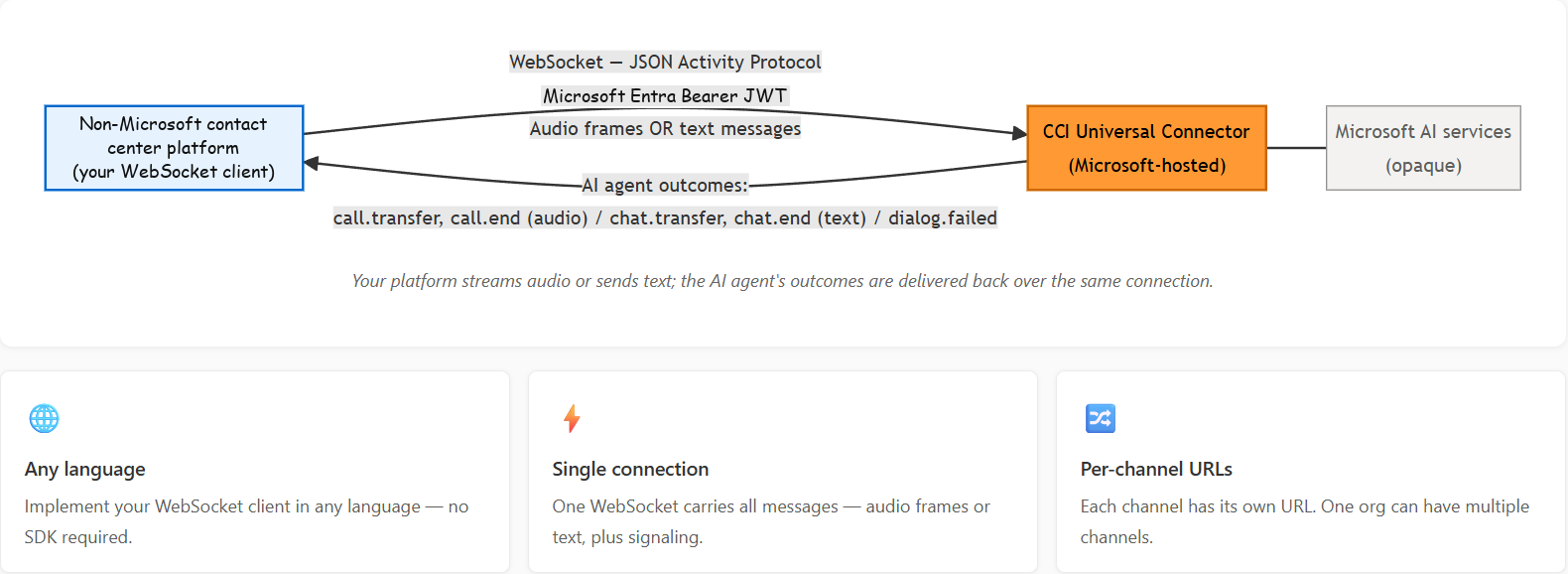
Your platform streams audio or sends text, and the AI agent's outcomes are delivered back over the same connection.
Onboard
Before your platform can connect, you must complete a one-time provisioning process with Microsoft. Onboarding is the same for both audio and text sessions.
Create a service principal in Power Platform tenant
The Contact Center Intelligence service derives the token issuer from the Microsoft Entra tenant that owns the Power Platform environment. Your token must therefore be issued by that same tenant, not your own corporate tenant.
In the Azure portal, in the Microsoft Entra tenant, create an app registration or grant consent to a multitenant app you own, which creates a guest service principal in the tenant. You need:
- Application (client) ID: The app registration's client ID.
- Tenant ID: The Power Platform environment's Microsoft Entra tenant ID.
- Service principal object ID: The enterprise application object ID in the tenant (not the app registration object ID).
- A credential. Choose one of the following:
- Client secret: simplest option; many enterprise tenants disable this.
- Certificate: stronger option; also subject to tenant policy.
- Federated credential: no secret stored in Microsoft Entra ID; uses your workload identity (managed identity, GitHub OIDC, Kubernetes workload identity).
Important
The token must be issued by the Power Platform tenant. The Contact Center Intelligence service validates the token issuer against the Microsoft Entra tenant of the Power Platform environment. A token issued by a different tenant, including your own corporate tenant, is rejected with HTTP 401 even if the signature is valid and the audience matches. Use authority = https://login.microsoftonline.com/<power-platform-tenant-id>.
Submit your app registration to Microsoft
Provide these values in the Contact Center Intelligence admin page:
- Application (client) ID: used as the expected JWT audience.
- Service principal object ID: validated against the
oidclaim on every connection.
Microsoft validates the registration and provisions your organization and channel.
Receive your connection details
After provisioning, Microsoft provides:
- Service endpoint: the WebSocket host (the format varies by environment).
- Org ID: a GUID used in the WebSocket URL path.
- Channel ID: one per configured channel.
Tip
Credential rotation. Rotate client secrets or certificates in your own Microsoft Entra tenant at any time. If your application (client) ID changes, submit your app registration again.
Authenticate
Authentication is the same for audio and text sessions. Tokens are acquired via the OAuth 2.0 client credentials flow and sent on every WebSocket upgrade.
Acquire a token
POST https://login.microsoftonline.com/<power-platform-tenant-id>/oauth2/v2.0/token
Content-Type: application/x-www-form-urlencoded

grant_type=client_credentials
&client_id=<your-app-client-id>
&client_secret=<your-client-secret>
&scope=<your-app-client-id>/.default
Note
Token scope. Use your own application (client) ID as the resource: scope=<your-app-client-id>/.default. The resulting token's aud claim is your raw application (client) ID GUID. The Contact Center Intelligence service validates this against msdyn_appid in the CSAC vendor registration. No admin consent for a Microsoft-owned app is required.
Get a token with a federated credential
Use this flow if secrets and certificates are disabled in your tenant.
POST https://login.microsoftonline.com/<power-platform-tenant-id>/oauth2/v2.0/token
Content-Type: application/x-www-form-urlencoded

grant_type=urn:ietf:params:oauth:grant-type:jwt-bearer
&client_id=<your-app-client-id>
&client_assertion_type=urn:ietf:params:oauth:client-assertion-type:jwt-bearer
&client_assertion=<external-identity-token>
&scope=<your-app-client-id>/.default
Token requirements
| Requirement | Value |
|---|---|
| Flow | Client credentials (no user involvement). |
Audience (aud) |
Your own Microsoft Entra application (client) ID. |
| Required claims | aud, appid, oid, iss. |
| Accepted issuers | The Microsoft Entra tenant that owns the Power Platform environment. Both V1 (sts.windows.net/<tid>/) and V2 (login.microsoftonline.com/<tid>/v2.0) are accepted. |
oid validation |
Validated against your registered service principal object ID (msdyn_objectid). A mismatch returns HTTP 401. |
| Credential placement | Authorization: Bearer <token> header, or the bearer.<token> WebSocket subprotocol entry (see Present credentials on the upgrade). Never place the token in the URL. |
| Lifetime | Validated at WebSocket upgrade only. A mid-session expiry doesn't disconnect an active session. |
| On reconnect | A non-expired token is required on every upgrade. The same token can be reused as long as it hasn't expired (5-minute clock skew tolerance). |
Connect over WebSocket
The connection setup is identical for audio and text sessions.
URL format
wss://<host>/connector/universal/api/v1/ws/<orgId>/<channelId>/<sessionId>
| Segment | Description |
|---|---|
<host> |
The endpoint that Microsoft provides at provisioning. Always use the provisioned value; don't construct URLs manually. |
<orgId> |
Your org GUID. The server looks up your registered credentials using this value. |
<channelId> |
The channel ID for this integration. |
<sessionId> |
A UUID v4 that your platform generates. It's stable across reconnects for the same call or chat. Non-UUID values are rejected with HTTP 400. |
Present credentials on the upgrade
Credentials can be presented in one of two ways. Both are validated identically: token validation, replay protection, and the reconnect rules are the same regardless of the transport you use.
Option A: HTTP headers (server-to-server clients). Set these headers on the upgrade request.
| Header | Required | Description |
|---|---|---|
Authorization: Bearer <token> |
Must | The Microsoft Entra bearer token described in Authenticate. |
Request-ID: <uuid> |
Must | A new UUID on every connection attempt. Together with the <sessionId> URL segment, this forms a replay-prevention nonce. |
Option B: Sec-WebSocket-Protocol subprotocol (browser clients). Browsers can't set arbitrary headers (Authorization, Request-ID) on a WebSocket handshake, so the bearer token and request ID are carried as subprotocol entries instead.
Sec-WebSocket-Protocol: bearer.<token>, requestid.<uuid>, <connector-subprotocol>
| Subprotocol entry | Required | Description |
|---|---|---|
bearer.<token> |
Must | The Microsoft Entra bearer token described in Authenticate, prefixed with bearer. (case-insensitive). Replaces the Authorization header. |
requestid.<uuid> |
Must | A new UUID on every connection attempt, prefixed with requestid.. Replaces the Request-ID header. |
<connector-subprotocol> |
Must | A protocol name (for example, cci.universal.v1) that the server selects and echoes back to complete subprotocol negotiation. A handshake with only bearer.*/requestid.* entries and no connector subprotocol is rejected with HTTP 400. |
In both options, the session ID is taken from the <sessionId> URL segment. The server echoes only <connector-subprotocol> in the Sec-WebSocket-Protocol response; the bearer.* and requestid.* entries are credentials and are never echoed back.
Note
When to use which option. Use Option A for server-side integrations. Use Option B only when your client (such as an in-browser single-page application) can't set custom request headers on a WebSocket. A JWT contains only base64url characters and dots, all valid WebSocket subprotocol-token characters, so it can be carried as a subprotocol entry. The token is still sent only over the encrypted wss:// channel.
Upgrade examples
Option A: headers
GET wss://<host>/connector/universal/api/v1/ws/<orgId>/<channelId>/<sessionId>
Upgrade: websocket
Connection: Upgrade
Sec-WebSocket-Version: 13
Sec-WebSocket-Key: <base64-nonce>
Authorization: Bearer eyJ0eXAiOiJKV1Qi...
Request-ID: aaaaaaaa-0b0b-1c1c-2d2d-333333333333
Option B: subprotocol (browser)
GET wss://<host>/connector/universal/api/v1/ws/<orgId>/<channelId>/<sessionId>
Upgrade: websocket
Connection: Upgrade
Sec-WebSocket-Version: 13
Sec-WebSocket-Key: <base64-nonce>
Sec-WebSocket-Protocol: bearer.eyJ0eXAiOiJKV1Qi..., requestid.aaaaaaaa-0b0b-1c1c-2d2d-333333333333, cci.universal.v1
From the browser WebSocket API, the subprotocols are the second argument:
const ws = new WebSocket(
  `wss://<host>/connector/universal/api/v1/ws/${orgId}/${channelId}/${sessionId}`,
  [`bearer.${token}`, `requestid.${requestId}`, 'cci.universal.v1']);
Success returns HTTP/1.1 101 Switching Protocols (for Option B the response carries Sec-WebSocket-Protocol: cci.universal.v1).
Upgrade failure codes
| HTTP status | Cause | Action |
|---|---|---|
400 |
Missing or malformed header, sessionId isn't a valid UUID, or (browser) the Sec-WebSocket-Protocol lacks the connector subprotocol. |
Fix the request. |
401 |
Token expired, invalid signature, wrong audience, or the token's appid/oid doesn't match the registered service principal. |
Refresh the token; verify the app registration. |
404 |
Org not provisioned, or org/channel not found. | Verify the org ID and channel ID with Microsoft. |
409 |
Replay: the (sessionId, Request-ID) pair was already used. |
Generate a new Request-ID and retry. |
429 |
Reconnect rate limit exceeded. | Apply exponential backoff before retrying. |
500 |
Internal server error. | Apply exponential backoff before retrying. |
Message protocol
All messages are JSON text frames using the Activity Protocol envelope. One WebSocket connection carries all messages: audio frames, text messages, and signaling.
Envelope structure
{
  "type":     "event" | "command",
  "id":       "<uuid-v4>",
  "name":     "<message-name>",
  "from": {
    "id":   "<uuid-v4>",
    "role": "caller" | "agent" | "bot",
    "name": "<optional display label>"
  },
  "value":    { },
  "entities": [ ]
}
| Field | Required | Notes |
|---|---|---|
type |
Must | "event" (notification) or "command" (request). |
id |
Must | UUID v4, unique per message. Used for log correlation. |
name |
Must | The message identifier. See Message reference for the full list. |
from |
Must for media.chunk, dtmf, text.message |
Sender identity. from.id must be a stable UUID per participant. from.role identifies the speaker's part in the call: "caller" (customer) or "agent" (human agent). from.name is an optional free-form display label. May be omitted for session control messages (session.open, session.close). |
value |
Must when carrying a payload | The message-specific payload object. |
entities |
May | For media.chunk, carries streamSequence and sampleOffset. Omit if empty. |
Tip
Forward compatibility. Both sides must silently ignore unknown JSON fields and unknown message name values. Build your receive path defensively.
Voice calls stream real-time audio in; the AI agent responds with audio. The following sections cover session setup, audio streaming, speaker identification, DTMF, AI agent events, reconnection, and full call flows for audio sessions.
Open an audio session
Send the session open request
session.open must be the first application message sent after every WebSocket upgrade, on both the initial connect and all reconnects. The server expects it within 5 seconds; otherwise the connection is closed.
{
  "type": "command",
  "id":   "aaaaaaaa-0000-1111-2222-bbbbbbbbbbbb",
  "name": "session.open",
  "value": {
    "sessionType": "audio",
    "audioFormat": "pcmu",
    "contextVariables": {
      "ani":                "+14255550100",
      "dnis":               "+18005550123",
      "language":           "en-US",
      "sipUui":             "<optional SIP UUI value>",
      "customKey":          "customValue"
    }
  }
}
| Field | Required | Description |
|---|---|---|
sessionType |
Yes, must be "audio" |
Declares this as a voice session. The server initializes the audio codec pipeline, paced sender, and liveness watchdog. |
audioFormat |
Yes | One of "pcm16k", "pcm24k", "pcmu", "pcma". Declares the encoding you send and that the server uses for AI agent audio. See Supported audio formats. |
contextVariables |
No | A string-to-string map of call metadata passed to the AI agent. Maximum 50 keys, 64-character key name, 256-character value. Set once at session start; incremental updates aren't supported. |
Important
Validation errors close the session immediately. The following conditions close the WebSocket with code 1002 (protocol error):
sessionTypeabsent or unrecognized.sessionType: "audio"withoutaudioFormat.- An unrecognized
audioFormatvalue.
Use context variables
The following key in contextVariables has a well-known meaning:
| Key | Format | Description |
|---|---|---|
ani |
E.164, for example +14255550100 |
The caller ANI (originating number). |
dnis |
E.164, for example +18005550123 |
The dialed DNIS (destination number). |
Important
ani and dnis are personal data. Your platform is responsible for handling them in compliance with applicable data protection requirements.
Receive the session opened acknowledgment
{
  "type": "event",
  "name": "session.opened",
  "value": {
    "sessionId": "bbbbbbbb-1111-2222-3333-cccccccccccc",
    "requestId": "aaaaaaaa-0b0b-1c1c-2d2d-333333333333",
    "startPaused": false
  }
}
value field |
Notes |
|---|---|
sessionId |
Echoes the session ID for this connection. |
requestId |
Echoes the Request-ID presented on the upgrade. |
startPaused |
Optional, default false. When true, the session opens paused: don't stream media.chunk frames yet. The connector accepted the session but deferred starting the AI stream until it's resumed out-of-band (see the following note). When false or absent, stream immediately per the normal first-frame rule. |
When startPaused is false or absent, begin sending media.chunk frames within 5 seconds. The server closes the connection with code 1002 if no audio arrives within this window.
Note
Paused sessions (deferred streaming). Some session modes open paused: the connector acknowledges session.opened with startPaused: true but doesn't connect the AI back end until a separate, out-of-band trigger starts the stream. While paused, you must not stream audio; pause your recording. The 5-second first-frame timeout doesn't apply while paused. If your platform sends media.chunk frames anyway, the connector ignores them (and logs a warning); no audio is delivered to the AI until the session resumes. When the connector resumes the session, it begins accepting audio. When the connector is ready to start, or later pause or resume, the stream, it sends a session.resume or session.pause event on the same WebSocket: on session.resume, resume sending media.chunk; on session.pause, stop.
Handle session pause and resume
The connector sends session.pause and session.resume events to control whether you stream audio. They're the counterpart to a paused open (startPaused: true): a paused session streams nothing until the connector sends the first session.resume.
{ "type": "event", "name": "session.resume", "value": {} }
{ "type": "event", "name": "session.pause", "value": {} }
| Event | Your platform's action |
|---|---|
session.resume |
Begin (or resume) sending media.chunk frames. After a paused open, the first session.resume is what starts the AI stream. |
session.pause |
Stop sending media.chunk frames until the next session.resume. Audio sent while paused is ignored by the connector. |
Close an audio session
{
  "type": "command",
  "id":   "<uuid>",
  "name": "session.close",
  "value": { "reason": "normal" }
}
reason |
When to use |
|---|---|
"normal" |
The call ended cleanly. |
"transfer" |
Your platform is executing a transfer. |
"error" |
Your platform encountered an error. |
The reason field is informational; teardown behavior is the same regardless of value. The server immediately evicts the session and closes the WebSocket with code 1000. The sessionId can't be reused for reconnection after session.close.
Stream audio
Supported audio formats
| Format | Sample rate | Frame size | Interval | Notes |
|---|---|---|---|---|
pcm16k |
16 kHz | 640 bytes | 20 ms | PCM 16-bit mono; no transcoding. |
pcm24k |
24 kHz | 960 bytes | 20 ms | PCM 16-bit mono; no transcoding. |
pcmu |
8 kHz | 160 bytes | 20 ms | G.711 mu-law; server transcodes internally. |
pcma |
8 kHz | 160 bytes | 20 ms | G.711 A-law; server transcodes internally. |
PCM specification
| Property | Value |
|---|---|
| Encoding | Linear PCM, 16-bit signed integer. |
| Byte order | Little-endian (LE). |
| Channels | Mono (1 channel) only. Stereo and multichannel audio isn't supported. A channels parameter in value.contentType, if present, must be 1; omitting it also means mono. |
| Silence representation | PCM zeros (all bytes 0x00). |
Strict frame sizes. Frames must be exactly 640 bytes (
pcm16k), 960 bytes (pcm24k), or 160 bytes (G.711). An oversized frame is rejected with anerrorevent (code 4002); a frame whose size isn't aligned to the format's sample unit is rejected with anerrorevent (code 4000). Either way, the connection is then closed (1002).Mono audio only. All audio is single-channel (mono). Stereo and multichannel audio isn't supported: the connector doesn't de-interleave or mix channels, so a stereo payload would play back garbled. If you include a
channelsparameter invalue.contentType, it must be1; omitting it also means mono. A frame that declareschannelsnot equal to 1 is rejected with anerrorevent (code 4000) and the connection is closed (1002). Multiple speakers are sent as separate mono streams distinguished byfrom.id(see Identify speakers), never as interleaved stereo channels.
Keep the audio stream alive
The server enforces two timeouts. Both are reset by any received media.chunk frame:
- First-frame timeout (5 s): The first
media.chunkmust arrive within 5 seconds ofsession.opened. If none arrives, the connection is closed with code 1002. - Audio liveness timeout (5 s): A 5-second watchdog is reset by each frame. If no frame arrives within this window, the connection is closed with code 1001.
Hold or mute: Send silence frames (PCM zeros); don't pause the stream. A pause that exceeds the liveness timeout closes the session.
- Send at least every 100-200 ms per speaker. The 5-second timeout is a bare minimum to keep the connection alive, not a target rate. Large bursts (for example, one batch every 4 seconds) produce severely degraded speech recognition. For best quality, send at ~20 ms intervals. The minimum acceptable quality rate is every 100-200 ms.
Tip
No ping/pong needed. The audio stream is the liveness signal. WebSocket-level ping/pong isn't required or supported.
Send audio with the media chunk message
{
  "type": "event",
  "id":   "<uuid>",
  "name": "media.chunk",
  "from": { "id": "bbbbbbbb-1111-2222-3333-cccccccccccc", "role": "caller" },
  "value": {
    "contentType": "audio/x-mulaw;rate=8000",
    "content": "<base64-encoded audio - exactly one 20 ms frame>"
  },
  "entities": [
    { "streamSequence": 42, "sampleOffset": 672000 }
  ]
}
| Field | Description |
|---|---|
from.id |
UUID, stable per speaker for the entire call. See Identify speakers. |
from.role |
The speaker's part in the call: "caller" (customer) or "agent" (human agent). See Identify speakers. |
from.name |
Optional free-form display label. See Identify speakers. |
value.contentType |
Optional. The MIME type for the frame. If omitted, the audioFormat declared in session.open is authoritative. If sent, it must match that format (media type and rate), and any channels must be 1. See Match content type to the audio format. |
value.content |
Base64-encoded audio bytes: exactly one frame at the declared format. |
entities[0].streamSequence |
A per-connection monotonic counter starting at 0. Resets on reconnect. Debug use only. |
entities[0].sampleOffset |
The absolute sample index since session.open. Monotonically increases across the full session, including reconnects. Computed from a monotonic clock. |
Note
sampleOffset formula: sampleOffset = elapsed_seconds_since_session_open x sample_rate. Example at 16 kHz, 30 seconds into the session: 30 x 16000 = 480000. Advance by 320 samples per frame (pcm16k) or 480 (pcm24k). Do not reset on reconnect; continue from where you left off.
Match content type to the audio format
The contentType field is optional. The audio encoding is authoritatively set by audioFormat in session.open; if you omit contentType, that declared format is used. If you do send contentType, it must be consistent with your declared audioFormat: its media type must match (case-insensitive), its rate parameter (if present) must equal your format's sample rate, and its channels parameter (if present) must be 1 (the protocol is mono-only).
audioFormat |
Required contentType |
|---|---|
pcm16k |
audio/L16;rate=16000;channels=1 |
pcm24k |
audio/L16;rate=24000;channels=1 |
pcmu |
audio/x-mulaw;rate=8000 |
pcma |
audio/x-alaw;rate=8000 |
Note
Why audio/L16 for pcm24k? In audio/L16 the number is the bit depth, not the sample rate (RFC 2586). pcm24k is 16-bit PCM sampled at 24 kHz, so the media type is audio/L16 and the rate parameter carries 24000. audio/L24 means 24-bit audio and is rejected.
A contentType that contradicts the declared audioFormat, such as the wrong media type (for example, audio/x-alaw on a pcmu session, or audio/L24 on a pcm24k session), the wrong rate, or channels not equal to 1, ends the call with an error event (code 4000) and WebSocket close 1002, the same handling as a non-mono channels value.
Identify speakers
Every media.chunk and dtmf message must include a from field. Use a stable UUID per participant for the entire call: the same value on every frame, including after reconnects. The connector uses from.id as a pipeline key to keep each speaker's audio isolated. Set from.role to identify the speaker's part in the call: "caller" for the customer, "agent" for a human agent. from.name is an optional free-form display label.
from.id |
from.role |
from.name |
Meaning |
|---|---|---|---|
UUID v4, for example "bbbbbbbb-1111-2222-3333-cccccccccccc" |
"caller" |
(optional label) | Caller (customer) audio. |
UUID v1, for example "bbbbbbbb-1c1c-2d2d-3e3e-444444444444" |
"agent" |
(optional label) | Human agent audio (if present on the call). |
Note
Backward compatibility. Earlier versions of this guide put the "caller"/"agent" label in from.name with from.role: "user". That form is still supported: when from.role isn't "caller" or "agent", the connector falls back to the label in from.name. New integrations should send the label in from.role.
A valid UUID is required. The server rejects media.chunk and dtmf frames that have a non-UUID from.id; the connection is closed with code 1002 (protocol error). Generate one UUID per participant at call start and reuse it.
Send DTMF digits
DTMF must be sent out-of-band as a dtmf event. The connector doesn't perform in-band tone detection on the audio stream; the dtmf event is the only guaranteed delivery path for digits to the AI agent.
{
  "type": "event",
  "id":   "<uuid>",
  "name": "dtmf",
  "from": { "id": "bbbbbbbb-1111-2222-3333-cccccccccccc", "role": "caller" },
  "value": { "digit": "5" }
}
Valid digit values are "0"-"9", "*", and "#". Send one event per keypad press. from.id must be a valid UUID; set from.role to "caller" or "agent" (from.name is an optional display label).
Receive AI agent audio
While the AI agent is speaking, the server delivers audio as media.chunk events. When the AI agent is silent, no frames are sent; the absence of frames means silence.
- Identify AI agent audio by
from.role = "bot"(a protocol field value; don't change it). Thefrom.idis server-generated; don't parse or validate its format. - Encoding matches the
audioFormatyou declared insession.open. - Frames arrive in 200 ms batches (10 x 20 ms). Buffer and play them continuously to the caller.
- When
call.transferorcall.endarrives, the server already drained all buffered AI agent audio.
{
  "type": "event",
  "id":   "<uuid>",
  "name": "media.chunk",
  "from": { "id": "<server-generated>", "role": "bot" },
  "value": {
    "contentType": "audio/x-mulaw;rate=8000",
    "content": "<base64-encoded AI agent audio - 200 ms (10 x 20 ms frames)>"
  }
}
Plan for bandwidth
Unlike a raw-binary transport (for example, the Genesys connector), the Universal Connector carries every audio frame as a JSON media.chunk envelope with the audio Base64-encoded in value.content. Two sources of overhead sit on top of the raw media rate:
- Base64 encoding: inflates the audio payload by ~33% (4 wire bytes per 3 audio bytes).
- Activity Protocol JSON envelope: roughly 230-280 bytes per frame (
type,id,name,from,value,entities; the two UUIDs alone are ~72 bytes).value.contentTypeis optional; omitting it trims ~40 bytes per frame. - WebSocket text framing: ~2-14 bytes per frame (negligible).
The overhead is asymmetric because of how frames are batched:
- Inbound (your platform to the connector): one 20 ms frame per
media.chunk, so 50 frames/s, meaning the per-frame JSON overhead is paid 50 times a second. - Outbound (connector to your platform): AI agent audio arrives in 200 ms batches (10 x 20 ms), so 5 frames/s, meaning the same envelope overhead is amortized over 10 times more audio.
Effective per-call wire bitrate
Raw media rate compared to after Base64 encoding plus a ~250-byte-per-frame envelope:
audioFormat |
Raw media rate | Inbound (50 fps) | Outbound (5 fps) | Per call (full duplex) |
|---|---|---|---|---|
pcmu / pcma (8 kHz G.711) |
64 kbps | ~185 kbps | ~95 kbps | ~0.28 Mbps |
pcm16k (16 kHz PCM, default) |
256 kbps | ~440 kbps | ~350 kbps | ~0.79 Mbps |
pcm24k (24 kHz PCM) |
384 kbps | ~610 kbps | ~520 kbps | ~1.13 Mbps |
Tip
Prefer G.711 when bandwidth is constrained. The raw media rate is the audio payload only; the wire rate is what actually crosses the network after Base64 encoding and the JSON envelope. Choosing pcmu/pcma (G.711) roughly quarters the wire bandwidth of pcm16k. Prefer it when network capacity is the constraint and 8 kHz telephony quality is acceptable.
At scale: 1,000 concurrent calls
audioFormat |
Inbound | Outbound | Total (full duplex) | Minimum external bandwidth* |
|---|---|---|---|---|
pcmu / pcma |
~185 Mbps | ~95 Mbps | ~280 Mbps | ~285 Mbps |
pcm16k (default) |
~440 Mbps | ~350 Mbps | ~790 Mbps | ~805 Mbps |
pcm24k |
~610 Mbps | ~520 Mbps | ~1.13 Gbps | ~1.15 Gbps |
* Includes ~2% headroom for TCP/IP overhead, WebSocket control frames, signaling (session.open/session.opened, speech.transcript, and so on), and DTMF.
Summary. Plan for roughly ~0.3 Mbps per call at 8 kHz G.711 (pcmu/pcma) or ~0.8 Mbps per call at 16 kHz (pcm16k, the default): about 280 Mbps or 800 Mbps respectively for ~1,000 concurrent calls. Because of the Base64 encoding plus JSON envelope, this is materially higher than a raw-binary connector at the same codec. Select the lowest audioFormat that meets your quality bar to minimize it.
Deployment considerations:
- Azure side: no changes or additional requirements are expected for this bandwidth profile.
- Customer side: bandwidth and network capacity should scale proportionally with concurrent call volume and with the chosen
audioFormat. Size forpcm16k(the default) unless you explicitly negotiated G.711.
Handle server events
These events are sent by the server and apply to both audio and text sessions unless noted. call.transfer and call.end are audio sessions only; text sessions receive the modality-equivalent chat.transfer and chat.end events with the same { "contextVariables": {} } payload and terminal semantics. dialog.failed and error apply to both session types.
Handle barge-in signals
request.update is informational; no action is required. The server manages AI agent audio interruption internally.
{
  "type": "event",
  "id":   "<uuid>",
  "name": "request.update",
  "value": { "state": "detected" }
}
state |
Meaning |
|---|---|
"detected" |
The caller started speaking while the AI agent was speaking (barge-in). |
"processing" |
The server is processing the caller's utterance. |
Handle transfers
The AI agent can request a transfer with call.transfer. The server closes the WebSocket with code 1000 immediately after sending; don't send session.close.
Note
Text sessions. Text sessions receive chat.transfer instead of call.transfer, with the identical { "contextVariables": {} } payload and semantics. Route the chat to transferDestination using your platform's handoff mechanism; the server then closes the WebSocket with code 1000.
{
  "type": "event",
  "id":   "<uuid>",
  "name": "call.transfer",
  "value": {
    "contextVariables": {
      "transferDestination": "agent-queue-01",
      "customOutputVar":     "some-value"
    }
  }
}
- Read
value.contextVariables.transferDestination. Route the call to that destination using your platform's transfer mechanism. - If
transferDestinationis empty or unrecognized, apply a fallback (for example, a catch-all queue). Don't drop the call.
Warning
transferDestination might be empty. Always implement a fallback. Never drop the call when the destination value is empty or unrecognized.
Output variable constraints
These constraints apply to call.transfer/chat.transfer and call.end/chat.end.
| Constraint | Value |
|---|---|
| Structure | A flat string-to-string map under contextVariables. |
| Max keys | 50 |
| Max key length | 64 characters |
| Max value length | 256 characters |
Handle conversation end
The AI agent completed the conversation with call.end. The server closes the WebSocket with code 1000 immediately after sending.
Note
Text sessions. Text sessions receive chat.end instead of call.end, with the identical { "contextVariables": {} } payload and semantics. Read the output variables and apply your post-chat logic; the server then closes the WebSocket with code 1000.
{
  "type": "event",
  "id":   "<uuid>",
  "name": "call.end",
  "value": {
    "contextVariables": {
      "callOutcome":     "resolved",
      "customOutputVar": "some-value"
    }
  }
}
Read any output variables from value.contextVariables and apply your post-call logic.
Handle AI errors
The AI service encountered an unrecoverable error, reported as dialog.failed. The server closes the WebSocket with code 1001 immediately after sending.
{
  "type": "event",
  "id":   "<uuid>",
  "name": "dialog.failed",
  "value": {
    "reason":  "BotError",
    "message": "The bot returned an unrecoverable error."
  }
}
Apply your fallback (for example, route to a human agent). See Dialog failed reason codes for all reason codes.
Receive real-time transcripts
speech.transcript carries real-time transcription of caller speech (speech-to-text) and AI agent speech. The plumbing is complete, and this event is enabled in all environments.
{
  "type": "event",
  "id":   "<uuid>",
  "name": "speech.transcript",
  "value": {
    "origin": "user",
    "text":   "Hello, I need help with my account"
  }
}
Valid origin values: "user" (caller speech), "agent" (AI agent response).
Reconnect an audio session
Your platform is solely responsible for detecting disconnects and reconnecting. The server preserves session state for a 15-second grace window after a disconnect.
Follow the reconnect procedure
- Detect the WebSocket disconnection.
- Connect to the same URL with the same
sessionId, a newRequest-ID, and a valid (non-expired) bearer token. - Send
session.openwith the exact samesessionType: "audio"andaudioFormat. Changing either closes the connection with a protocol error. - Resume sending
media.chunk. Do not resetsampleOffset; continue from where you left off.
Note
sampleOffset continuity across reconnects. Continue the sample offset counter across a reconnect instead of resetting it. For example:
t=30.0s: sampleOffset = 480000   <- last frame before disconnect
[2.5s disconnect]
t=32.5s: sampleOffset = 520000   <- first frame after reconnect (gap = 2.5 s encoded)
Reconnect scenarios
| Scenario | Behavior |
|---|---|
| Reconnect within the 15 s grace window | The session is reattached, and the AI agent resumes the conversation. |
| Reconnect after the grace window expires | The server treats it as a new session; prior context is lost. |
Same sessionId and same Request-ID |
HTTP 409, replay rejected. Use a new Request-ID. |
Same sessionId and new Request-ID (old connection still open) |
The server closes the old WebSocket (1001) and accepts the new connection. |
| Reconnect rate limit exceeded | HTTP 429; apply exponential backoff. |
Full audio call flow
Normal call: AI agent requests transfer
sequenceDiagram
    autonumber
    participant P as 3P Platform
    participant C as Contact Center Intelligence Universal Connector

    P  ->> C: GET wss://.../ws/orgId/channelId/sessionId (Authorization, Request-ID)
    C -->> P: 101 Switching Protocols
    P  ->> C: session.open { sessionType: "audio", audioFormat: "pcmu", contextVariables: {...} }
    C -->> P: session.opened
    loop Every 20ms
        P  ->> C: media.chunk { caller audio, sampleOffset: N }
        C -->> P: media.chunk { AI agent audio } (while AI agent is speaking)
    end
    C -->> P: call.transfer { contextVariables: { transferDestination: "agent-queue-01" } }
    C -->> P: WebSocket close (1000)
    P  ->> P: Route call to "agent-queue-01"
Normal audio call: session open, then audio streaming, then the AI agent requests a transfer, and the third-party platform routes to the destination.
Normal call: AI agent ends the conversation
sequenceDiagram
    participant P as 3P Platform
    participant C as Contact Center Intelligence Universal Connector

    P  ->> C: 101 + session.open { sessionType: "audio", audioFormat: "pcmu" }
    C -->> P: session.opened
    loop Every 20ms
        P  ->> C: media.chunk { caller audio }
        C -->> P: media.chunk { bot speech audio } (while speaking)
    end
    C -->> P: call.end { contextVariables: { ... } }
    C -->> P: WebSocket close (1000)
The bot completes the conversation and signals call.end.
AI error: fall back to a human agent
sequenceDiagram
    participant P as 3P Platform
    participant C as Contact Center Intelligence Universal Connector

    P  ->> C: 101 + session.open { sessionType: "audio" }
    C -->> P: session.opened
    loop Every 20ms
        P  ->> C: media.chunk { caller audio }
    end
    C -->> P: dialog.failed { reason: "BotError" }
    C -->> P: WebSocket close (1001)
    P  ->> P: Apply fallback (route to human agent)
On an AI error, the platform receives dialog.failed and applies its fallback.
Reconnect within the grace window
sequenceDiagram
    participant P as 3P Platform
    participant C as Contact Center Intelligence Universal Connector

    Note over P,C: Network drop
    P  -x C: WebSocket drops
    Note over C: Grace window: 15 seconds
    P  ->> C: GET wss://... SAME sessionId, NEW Request-ID, valid token
    C -->> P: 101 Switching Protocols
    P  ->> C: session.open { SAME sessionType: "audio", SAME audioFormat }
    C -->> P: session.opened
    Note over P,C: Resume audio - sampleOffset continues from pre-disconnect value
On reconnect: same sessionId, new Request-ID, and sampleOffset never resets.
Text sessions use chat over WebSocket. Your platform sends text messages, and the AI agent replies with text; there's no audio in either direction. The WebSocket upgrade and token acquisition are identical to audio sessions; only the session.open value differs.
Open a text session
Tip
Bot requirements for text sessions. The channel must be configured with a Classic Copilot Studio chat bot, not a voice or GPT-Realtime (speech-to-speech) bot. Voice-only bots don't have a text/messaging interface and cause the session to fail.
Send the session open request for text
{
  "type": "command",
  "id":   "cccccccc-2222-3333-4444-dddddddddddd",
  "name": "session.open",
  "value": {
    "sessionType": "text",
    "contextVariables": {
      "ani":        "+14255550100",
      "custom_key": "custom_value"
    }
  }
}
| Field | Required | Description |
|---|---|---|
sessionType |
Yes, must be "text" |
Declares this as a text session. The connector skips all audio infrastructure. Including audioFormat with sessionType: "text" is a protocol error. |
audioFormat |
Must be absent | Including audioFormat in a text session closes the connection with code 1002. |
contextVariables |
No | Same as audio sessions: a string-to-string map, maximum 50 keys, 64-character key, 256-character value. |
After session.open, the server responds with session.opened (see Receive the session opened acknowledgment). For text sessions, don't send media.chunk; the server closes the connection with code 1002 (protocol error).
Close a text session
Closing a text session is identical to audio sessions (see Close an audio session). The reason field accepts the same values.
Server events on text sessions
The following server events apply to text sessions:
| Event | Meaning for text sessions |
|---|---|
session.opened |
The session is accepted; ready to send text.message. |
text.message |
The AI agent's text response. See Receive text. |
chat.transfer |
The AI agent requests a chat transfer. Same payload and semantics as call.transfer; route to transferDestination, then the server closes the WebSocket (1000). See Handle transfers. |
chat.end |
The AI agent ends the chat. Same payload and semantics as call.end; apply post-chat logic, then the server closes the WebSocket (1000). See Handle conversation end. |
dialog.failed |
An AI service error. The server closes the WebSocket (1001). Apply your fallback. See Handle AI errors. |
error |
A protocol violation. See Error event codes. |
Note
Text terminal events. call.transfer and call.end remain audio-only names. Text sessions receive chat.transfer/chat.end instead, with the same contextVariables payload shape and terminal close behavior (WebSocket close 1000).
Exchange text
Send text
Send a text.message event any time during an active text session. The from field is required and must carry a stable UUID identifying the sender.
{
  "type": "event",
  "id":   "<uuid>",
  "name": "text.message",
  "from": { "id": "bbbbbbbb-1111-2222-3333-cccccccccccc", "role": "caller" },
  "value": {
    "content": "I need to update my billing address"
  }
}
| Field | Required | Description |
|---|---|---|
from.id |
Yes | A valid UUID, stable for the session lifetime. Non-UUID values are rejected; the connection is closed with code 1002 (protocol error). |
from.role |
Yes | The speaker's part in the call: "caller" (customer) or "agent" (human agent). |
from.name |
No | An optional free-form display label. |
value.content |
Yes | A non-empty text string. Blank or whitespace-only content is silently dropped. |
Note
Audio sessions reject text.message. Sending text.message on a sessionType: "audio" session closes the connection with code 1002.
Receive text
When the AI agent produces a text response, the server delivers it as a text.message event.
{
  "type": "event",
  "id":   "<uuid>",
  "name": "text.message",
  "value": {
    "content": "Your appointment is confirmed for Monday at 2 PM."
  }
}
| Field | Description |
|---|---|
value.content |
The AI agent's text response. Display this to the end user. |
Note
No from field on server-sent text.message. Outbound text.message events (server to your platform) don't include a from field. They're always AI agent responses.
Full text session flow
sequenceDiagram
    autonumber
    participant P as 3P Platform
    participant C as Contact Center Intelligence Universal Connector

    P  ->> C: GET wss://.../ws/orgId/channelId/sessionId (Authorization, Request-ID)
    C -->> P: 101 Switching Protocols
    P  ->> C: session.open { sessionType: "text", contextVariables: {...} }
    C -->> P: session.opened
    P  ->> C: text.message { from: { id: "UUID", role: "caller" }, value: { content: "Hello" } }
    C -->> P: text.message { value: { content: "Hi! How can I help you?" } }
    P  ->> C: text.message { from: { id: "UUID", role: "caller" }, value: { content: "Update my address" } }
    C -->> P: text.message { value: { content: "Sure, what is your new address?" } }
    alt Bot transfers chat
        C -->> P: chat.transfer { contextVariables: { transferDestination: "agent-queue-01" } }
        C -->> P: WebSocket close (1000)
        P  ->> P: Route chat to "agent-queue-01"
    else Bot ends chat
        C -->> P: chat.end { contextVariables: { ... } }
        C -->> P: WebSocket close (1000)
        P  ->> P: Apply post-chat logic
    end
In a text session, the bot either transfers the chat (chat.transfer) or ends it (chat.end), and the server then closes the WebSocket (1000).
Handle text session inactivity and reconnects
Inactivity timeout
If no text.message is received for 30 minutes, the server closes the session with code 1001 (going away). This mirrors the audio liveness mechanism.
| Session type | Liveness signal | Timeout | Close code |
|---|---|---|---|
| Audio | media.chunk frames |
5 s gap | 1001 |
| Text | text.message events |
30 min inactivity | 1001 |
Tip
Keep text sessions alive during idle periods. If your platform may have extended gaps between messages (for example, a user who opens a chat window and goes idle), send a periodic text.message to prevent the 30-minute timeout.
Follow the reconnect procedure for text sessions
Reconnection for text sessions follows the same 15-second grace window as audio sessions (see Reconnect an audio session).
- Detect the WebSocket disconnection.
- Connect to the same URL with the same
sessionId, a newRequest-ID, and a valid bearer token. - Send
session.openwith the exact samesessionType: "text". ChangingsessionTypeon reconnect closes the connection with a protocol error. - Resume sending
text.message. The 30-minute inactivity timer resets on reconnect.
Error codes, the complete message catalog, and integration checklists follow.
Error and close code catalog
WebSocket close codes
| Code | Meaning | Action |
|---|---|---|
1000 |
Normal closure. The AI agent ended (call.end/chat.end) or transferred (call.transfer/chat.transfer) the session, or you sent session.close. |
No action needed. |
1001 |
Going away. Audio liveness timeout (5 s), text session inactivity timeout (30 min), dialog.failed, or the server force-closing the previous connection when a newer one is accepted for the same session. |
Reconnect if the session is still active. |
1002 |
Protocol error. A first-frame timeout; a reconnect whose sessionType/audioFormat doesn't match the original; or any inbound validation failure (malformed JSON, invalid session.open, invalid media.chunk/dtmf/text.message, or a binary frame). |
Fix the implementation; don't retry the same payload. |
1008 |
Policy violation. A second connection was opened while this session was already active. | Keep a single connection per session. |
1011 |
Internal server error. The server failed during teardown (for example, draining or sending the final audio). | Reconnect or start a new session. |
4000 |
Session not found. sessionId unknown, or the reconnect grace window (15 s) expired. |
Start a new session. |
Error event codes
The connector emits only two error event codes. Many protocol violations are reported purely by closing the WebSocket with code 1002 and carry no error event (for example, a missing or unrecognized sessionType, a sessionType/audioFormat mismatch, a message type that doesn't match the session, a non-UUID from.id, malformed JSON, or a binary frame). Build your handling around the close code and treat any error event as extra detail.
code |
Meaning | Action |
|---|---|---|
4000 |
A protocol or validation error the server reports before closing: the first message wasn't session.open; the session.open payload couldn't be parsed; a reconnect's session.open didn't match the original; a media.chunk contentType contradicted the declared audioFormat (wrong media type, rate, or non-mono channels); invalid base64; or an empty or size-misaligned audio frame. The connection is then closed with 1002. |
Fix the payload and reconnect. |
4002 |
An audio frame exceeded the maximum size for the declared format. The connection is then closed with 1002. | Send exactly 640, 960, or 160 bytes per frame. |
Dialog failed reason codes
reason |
Meaning |
|---|---|
"BackendUnavailable" |
The AI back end was unreachable or failed to initialize. |
"BotError" |
The bot returned an unrecoverable error. |
"AuthExpired" |
AI service session credentials expired. |
"Unknown" |
An unclassified failure. Check the message field for details. |
Message reference
The following tables catalog every message name that the connector recognizes or emits. Status Live means production-ready; status In progress means not yet available in production.
Inbound messages
Messages your platform sends to the server.
| Name | type |
Session | Status | Value schema |
|---|---|---|---|---|
session.open |
command |
Both | Live | { "sessionType": "audio"|"text", "audioFormat": "..." (audio only), "contextVariables": {} }. See Send the session open request and Send the session open request for text. |
media.chunk |
event |
Audio only | Live | { "contentType": "audio/...", "content": "<base64>" } plus entities[0] with streamSequence, sampleOffset. See Send audio with the media chunk message. |
dtmf |
event |
Audio only | Live | { "digit": "0"-"9" | "*" | "#" }. One per keypad press. See Send DTMF digits. |
session.close |
command |
Both | Live | { "reason": "normal"|"transfer"|"error" }. Informational only. See Close an audio session. |
text.message |
event |
Text only | Live | { "content": "<string>" }. from.id is a valid UUID; from.role is "caller"/"agent". Blank content is silently dropped. See Send text. |
Outbound messages
Messages the server sends to your platform.
| Name | type |
Session | Status | Value schema and action |
|---|---|---|---|---|
session.opened |
event |
Both | Live | { "sessionId": "...", "requestId": "..." }. Audio: begin sending media.chunk within 5 s. Text: ready to send text.message. |
media.chunk |
event |
Audio only | Live | { "contentType": "...", "content": "<base64>" }. from.role = "bot" (identifies AI agent audio). 200 ms batches. Play to the caller. See Receive AI agent audio. |
request.update |
event |
Audio only | Live | { "state": "detected"|"processing" }. A barge-in signal. Informational; no action. See Handle barge-in signals. |
call.transfer |
event |
Audio only | Live | { "contextVariables": {} }. Route to transferDestination (may be empty). The server closes the WebSocket (1000). See Handle transfers. |
chat.transfer |
event |
Text only | Live | { "contextVariables": {} }. Route to transferDestination (may be empty). The server closes the WebSocket (1000). See Handle transfers. |
call.end |
event |
Audio only | Live | { "contextVariables": {} }. Apply post-call logic. The server closes the WebSocket (1000). See Handle conversation end. |
chat.end |
event |
Text only | Live | { "contextVariables": {} }. Apply post-chat logic. The server closes the WebSocket (1000). See Handle conversation end. |
dialog.failed |
event |
Both | Live | { "reason": "...", "message": "..." }. Apply a fallback. The server closes the WebSocket (1001). See Handle AI errors and Dialog failed reason codes. |
error |
event |
Both | Live | { "code": <int>, "message": "..." }. A protocol violation. See Error event codes. |
speech.transcript |
event |
Audio only | Live | { "origin": "user"|"agent", "text": "..." }. Real-time transcription of caller and AI agent speech. See Receive real-time transcripts. |
text.message |
event |
Text only | Live | { "content": "..." }. The AI agent's text response. No from field. See Receive text. |
Integration checklists
Common checklist
Applies to both session types.
- [ ] Microsoft Entra app registration created in the customer's Power Platform tenant.
- [ ] App submitted to Microsoft for provisioning; org ID and channel ID received.
- [ ] Token acquired via the client credentials flow using
scope=<your-app-client-id>/.default. - [ ] Token placed in the
Authorization: Bearerheader, never in the URL. - [ ]
sessionIdin the URL is a UUID v4 (the session ID is taken from the URL; there's nosessionIdheader). - [ ]
Request-IDis a new UUID on every connect attempt (initial and reconnects). - [ ] (Browser clients only) Credentials sent via
Sec-WebSocket-Protocolinstead:bearer.<token>,requestid.<uuid>,<connector-subprotocol>(see Present credentials on the upgrade, Option B). - [ ]
session.openis the first message sent after every WebSocket upgrade. - [ ]
sessionTypeis present insession.open. - [ ] After
dialog.failed: apply a fallback (for example, route to a human agent); the server closes the WebSocket (1001) automatically. - [ ] Unknown inbound message
namevalues are silently ignored. - [ ] On reconnect: same
sessionId, newRequest-ID, samesessionType. - [ ] HTTP 409 handled: new
Request-IDand retry. - [ ] HTTP 429 handled: exponential backoff.
- [ ] WebSocket close 1001 handled: reconnect if the session is still active.
- [ ] WebSocket close 4000 handled: start a new session.
Audio session checklist
Additional checks for audio sessions.
- [ ]
sessionType: "audio"withaudioFormatpresent insession.open. - [ ] After
call.transfer: readcontextVariables.transferDestinationand route; the server closes the WebSocket (1000) automatically. - [ ] After
call.end: apply post-call logic; the server closes the WebSocket (1000) automatically. - [ ] First
media.chunksent within 5 s ofsession.opened. - [ ] Audio sent continuously: silence frames (PCM zeros) sent during hold/mute, and the stream is never paused.
- [ ] PCM frames are little-endian; frame sizes are 640 bytes (
pcm16k), 960 bytes (pcm24k), 160 bytes (G.711). - [ ]
from.idis a stable UUID per participant for the entire call lifetime. - [ ]
from.roleidentifies the speaker:"caller"(customer) or"agent"(human agent). - [ ]
from.nameis an optional free-form display label. - [ ] DTMF sent out-of-band as
dtmfevents, not relied on from in-band tone detection. - [ ]
sampleOffsetcomputed from a monotonic clock; doesn't reset on reconnect. - [ ] On reconnect:
session.opensent with the exact sameaudioFormat. - [ ] No
text.messagesent on audio sessions.
Text session checklist
Additional checks for text sessions.
- [ ]
sessionType: "text"with noaudioFormatinsession.open. - [ ] Channel configured with a Classic Copilot Studio chat bot (not a voice or GPT-Realtime bot).
- [ ] No
media.chunksent on text sessions. - [ ]
text.messagefrom.idis a valid UUID, stable for the session lifetime. - [ ]
text.messagefrom.roleis"caller"or"agent". - [ ] Inbound
text.message(server to platform)value.contentdisplayed to the end user. - [ ] After
chat.transfer: readcontextVariables.transferDestinationand route; the server closes the WebSocket (1000) automatically. - [ ] After
chat.end: apply post-chat logic; the server closes the WebSocket (1000) automatically. - [ ] WebSocket close 1000 handled after
chat.transfer/chat.endor yoursession.close. - [ ] Platform sends a periodic
text.messageif idle periods might exceed 30 minutes. - [ ] WebSocket close 1001 handled: reconnect (text inactivity timeout or disconnect).
- [ ] On reconnect:
session.opensent with the samesessionType: "text".