Note
Access to this page requires authorization. You can try signing in or changing directories.
Access to this page requires authorization. You can try changing directories.
[This article is prerelease documentation and is subject to change.]
The Microsoft Dataverse plugin connects Cowork to a Dataverse environment so you can build on Dataverse in natural language. Describe what you need, and Cowork designs tables and relationships, loads sample data, sets up access, and builds an app on top of your data, the way an experienced Dataverse maker would.
Important
This is a preview feature. These features are subject to supplemental terms of use, and are available before an official release so that customers can get early access and provide feedback.
For example, you can ask Cowork to:
- Create tables for event registrations that reuse the contacts already in Dataverse.
- Add a relationship between projects and the accounts they belong to.
- Load sample records so you can test the app before real data arrives.
- Plan and create a security role for coordinators, with the exact privileges each table needs.
- Build an app on the new tables and publish it.
You stay in control. The plugin signs in as you, so Cowork can only see and change what your Dataverse security roles allow. Dataverse checks every request on the server, and every change comes to you first as an approval card.
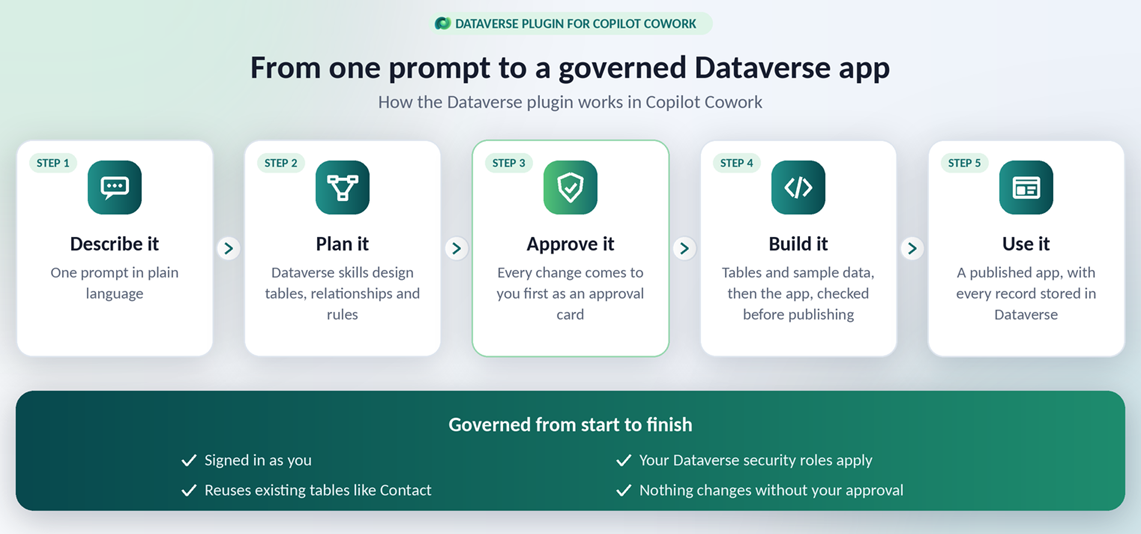
The Dataverse plugin is for building on Dataverse: data models, data, security, business logic, and apps. Learn how to act on existing Dynamics 365 and Power Apps business data in natural language in Use the Business Applications in Work IQ plugin in Cowork (preview).
Prerequisites
- Access to Cowork. To build and publish apps in Cowork, you need to be enrolled in the Frontier program.
- A Power Platform environment with a Dataverse database. For trying things out, use a sandbox or managed developer environment rather than production.
- A security role in that environment that allows the work you want to do. For example, creating tables requires the System Customizer or System Administrator role.
You don't need to add Cowork as an allowed MCP client in the Power Platform admin center. Cowork connects through the Power Platform Dataverse connector, which is already allowed.
Install the Microsoft Dataverse plugin
An admin must install the Microsoft Dataverse plugin for users. Users can't add the plugin in Cowork until an admin installs it for them.
Sign in to the Microsoft 365 admin center.
Select Agents > Tools > Plugins.
In the Name column, select Microsoft Dataverse.
In the Microsoft Dataverse pane, select Install.
In the Installed for field, select All users or Specific users and groups.
Select Next.
In the Review and install pane, review your choices and select Install.
When the installation finishes, a green message confirms that it completed successfully.
Close the Microsoft Dataverse pane.
Set up the Microsoft Dataverse plugin
After an admin installs the plugin, you can add it to Cowork and connect it to your environment.
Open Copilot and select Cowork > Customize.
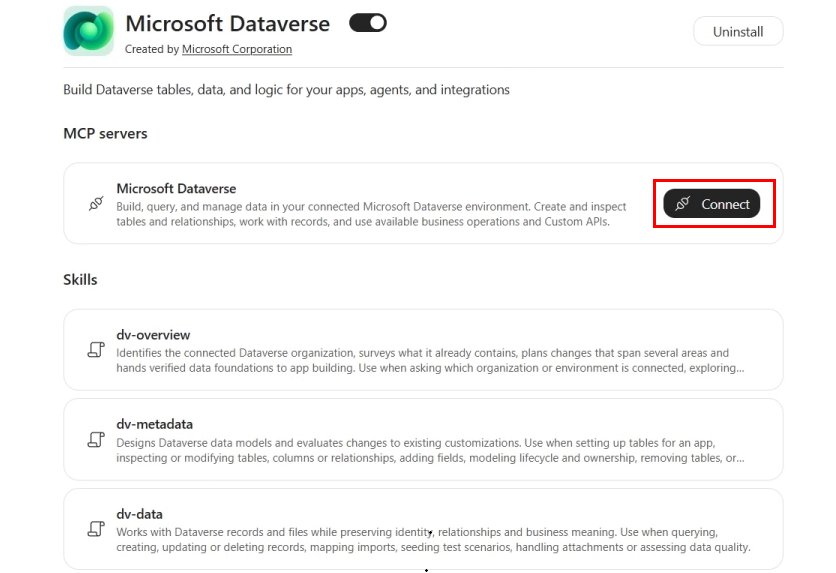
Select Microsoft Dataverse. The plugin page lists the Microsoft Dataverse MCP server and the Dataverse skills the plugin adds to Cowork. These are the same open-source skills used by the Dataverse plugin for AI coding agents.
Next to the MCP server, select Connect.
Enter your Dataverse environment URL, for example
https://contoso.crm.dynamics.com.To find it, open Power Apps, select the environment, then select Settings (gear icon) > Session details and copy the Instance url.
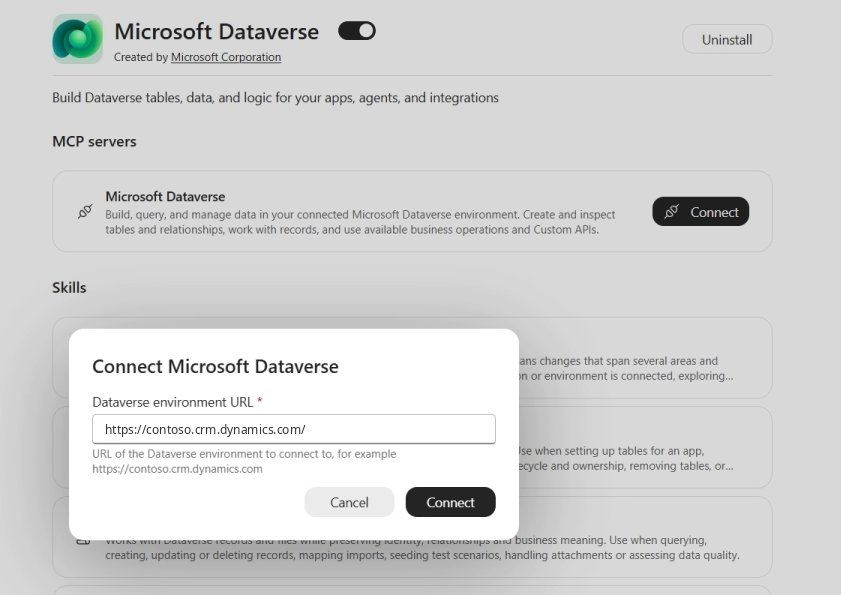
Select Connect, and then sign in with your Microsoft work account.
The connection is tied to the environment URL you enter. To work in a different environment, disconnect and connect again with that environment's URL.
Use case: Build a data model from a description
In Cowork, select New task and describe the data you need. For example:
Create tables for an event registration app. Events need a venue, a date, start and end times, and a capacity. Registrations should use our existing contacts, and each person can register only once per event.
Before changing anything, Cowork checks what your environment already has, so it reuses existing tables instead of creating duplicates. In this example, it links registrations to the existing Contact table.
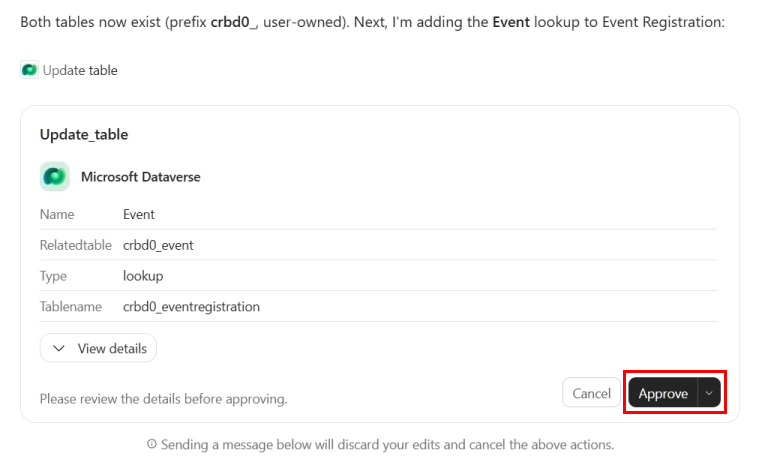
Cowork then shows its plan, including the target environment, the solution and publisher prefix, and each table's columns. You can't change settings such as table ownership and the publisher prefix later, so review them before you approve. Cowork creates the tables first and adds relationships in separate steps, each with its own approval card. Review the details on each card, and then select Approve or Cancel.
Use case: Load sample data
Ask Cowork to load sample records so you can try the app before real data arrives. For example:
Add four sample events with registrations. Fill one event to capacity so we can test the waitlist.
Cowork marks the rows it creates as sample data, so you can find and remove them later. Loading sample data doesn't give Cowork permission to delete data. Deleting records always needs a separate, explicit approval.
Use case: Set up security
Tables alone don't make a usable app. People who use the app need a security role with privileges on every table it uses. Ask Cowork to plan the role, for example:
Create a security role for event coordinators that can read all events and create and update registrations.
Cowork creates the role and gives you the exact privileges to set on each table, including the Append and Append To privileges that lookups need, and explains why each one is there. It doesn't grant broader roles to work around an access error.
Cowork can't add privileges to a role, so a new role grants no access until you finish it in the Power Platform admin center:
- In the Power Platform admin center, open your environment and select Settings > Users + permissions > Security roles.
- Open the role Cowork created and set the privileges it listed.
- Assign the role together with Basic User. Where possible, assign it to a team, such as one linked to a Microsoft Entra group, rather than to individual people.
Use case: Build and publish an app
When the data model is ready, ask Cowork to build an app on it. For example:
Build an app for organizers to manage events and check people in, using the event tables.
Cowork builds the app in the same environment as its data, connects it to your Dataverse tables and checks the build before publishing. The published app runs in Microsoft Copilot Managed Runtime (preview), uses Microsoft Entra sign-in and follows your tenant's governance policies. Admins can see and manage it in the Microsoft 365 admin center.
If the environment Cowork would use for the app has no Dataverse database, Cowork asks you which environment to use instead of guessing.
Note
Sharing an app doesn't grant access to its Dataverse data. Each person who uses the app needs a security role in the environment that allows the app's operations.
More use cases
- What tables in this environment relate to customer onboarding, and how are they connected?
- Add a status choice column to the project table with the values Planned, Active, and Closed.
- Make the email column on the vendor table unique so we don't get duplicates.
- Prevent registrations after an event's start date, even if someone uses a different app.
- Put the event tables in a solution so we can move them to our test environment.
How Cowork keeps you in control
- Your identity, your permissions: The plugin signs in as you. Cowork can't see or change anything your Dataverse security roles don't allow, and the plugin can't bypass or escalate permissions.
- Approval before every change: Each create, update, or delete appears as an approval card. Cowork makes changes one at a time and waits for each result.
- Your environment, your lifecycle: Tables Cowork creates are ordinary Dataverse tables, ready for your existing security roles, solutions, and application lifecycle management.
- Business logic still runs: Changes Cowork makes can trigger plug-ins, flows, and other logic in the environment, just like changes from any other app.
- No workarounds: If an operation isn't available yet, Cowork tells you and gives you the steps to finish it, rather than going around a security control.
Limitations
- Cowork can create security roles but can't add privileges to them yet. Set a role's privileges in the Power Platform admin center, as described in Use case: Set up security.
- Each connection targets one Dataverse environment. To use another environment, disconnect and connect with that environment's URL.
- Other Cowork plugins and built-in tools that use Dataverse might be connected to a different environment. When you ask about or change Dataverse data, name the environment you mean, and check the environment shown on approval cards.
- Building and publishing apps requires the Frontier program.
Troubleshooting
| Problem | Solution |
|---|---|
| You can't find the Microsoft Dataverse plugin in Cowork | Ask your admin to install it for you in the Microsoft 365 admin center. |
| Cowork says the Dataverse connection isn't working | Check that the environment URL is the Instance url from Power Apps Session details and that the environment has a Dataverse database. Ask your admin to confirm the Dataverse MCP server is turned on for the environment. Then reconnect and start a new task. |
| A request fails with a permission error | Your security role doesn't allow that operation. Ask your Power Platform administrator for the needed privileges. |
| Cowork changed data in a different environment than you expected | Check which environment the plugin is connected to under Customize > Microsoft Dataverse. Reconnect with the right URL if needed. |
| People can open a shared app but see no data | Each user needs a security role with privileges on the app's tables in that environment. |
| A role Cowork created grants no access | Cowork can't add privileges to a role yet. Set the privileges Cowork listed in the Power Platform admin center. |
Related information
- Use the Business Applications in Work IQ plugin in Cowork (preview)
- Microsoft Dataverse plugin for AI coding agents (preview)
- Microsoft Dataverse plugin for AI coding agents reference
- What is Microsoft Copilot Managed Runtime (preview)?
- Connect to Dataverse with Model Context Protocol
- What is Microsoft Dataverse?
- From one prompt to a governed Dataverse app: the Dataverse plugin lands in Copilot Cowork (blog)