Note
Access to this page requires authorization. You can try signing in or changing directories.
Access to this page requires authorization. You can try changing directories.
This article explains how to connect Finance Agent with Enterprise Resource Planning (ERP) to engage with ERP data.
Finance Agent works within Microsoft Copilot to help you use natural language to connect with your data. Finance Agent can connect with an ERP, which allows it to engage with data (queries, obtain insights) and perform some related actions, such as updates to vendor and customer information, while directly in the flow of work. Current ERP integration supports Accounts Receivable (AR) and Accounts Payable (AP). Through the ERP connection, Finance Agent can also combine public and internal ERP data for suppliers and customers when creating Business Intelligent Briefs and more.
Connecting Finance Agent to an ERP requires the use of Model Context Protocol (MCP), an open standard that connects AI agents to various data systems to enhance the relevance of agent responses. MCP standardizes how applications provide context to large language models (LLM).
Connect Finance Agent to Dynamics 365 Finance
Learn how to create a connection to finance and operations apps in the Prerequisites section in the Use Model Context Protocol for finance and operations apps article.
The following premium licenses are exempt from the tool execution billing:
- Dynamics 365 Finance Premium
- Dynamics 365 Finance Enterprise
Allow Microsoft 365 Copilot access to the MCP server
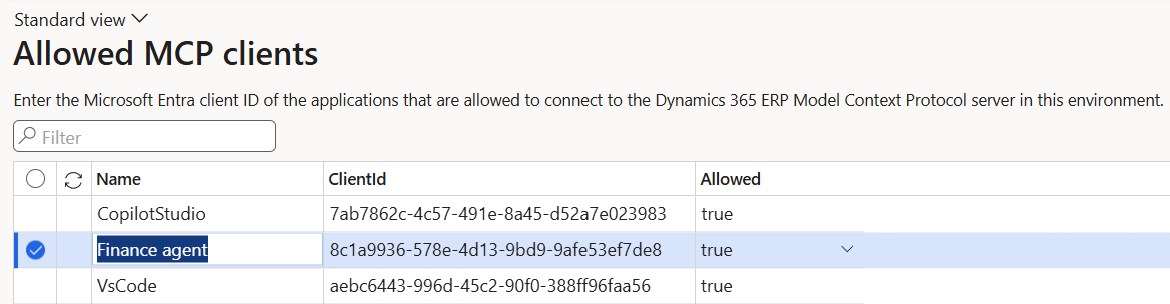
In step 3 of the listed prerequisites, "Add the agent platform on which you're building your agent in the Allowed MCP Clients page", add the Finance Agent to the list of Allowed MCP Clients by entering the following values into the table:
- Name: Finance Agent
- ClientId: 8c1a9936-578e-4d13-9bd9-9afe53ef7de8 (which is the Microsoft 365 Copilot client ID)
- Allowed: set to
true
For more information, see the Allowed MCP clients section of Use Model Context Protocol for finance and operations apps.
Connect Finance Agent to other ERP applications and services
Connecting the Finance Agent to other ERP applications and services isn't supported at this time.