Note
Access to this page requires authorization. You can try signing in or changing directories.
Access to this page requires authorization. You can try changing directories.
Cloud discovery data can now be enriched with Microsoft Entra username data. When you enable this feature, the username, received in discovery traffic logs, is matched and replaced by the Microsoft Entra username. Cloud discovery enrichment enables the following features:
- You can investigate Shadow IT usage by Microsoft Entra user. The user will be shown with its UPN.
- You can correlate the Discovered cloud app use with the API collected activities.
- You can then create custom reports based on Microsoft Entra user groups. For example, a Shadow IT report for a specific Marketing department.
Note
As Microsoft Defender moves toward a fully unified identity platform, some Defender for Cloud Apps data pipelines remain separate. Cloud discovery user enrichment uses a separate data pipeline that isn't yet integrated with the Identity inventory. Correlations defined in the Identity inventory don't affect cloud discovery user enrichment. For a full list of affected features, see Enable Identity inventory integration.
Prerequisites
- Data source must provide username information
- Microsoft 365 app connector connected
Enabling user data enrichment
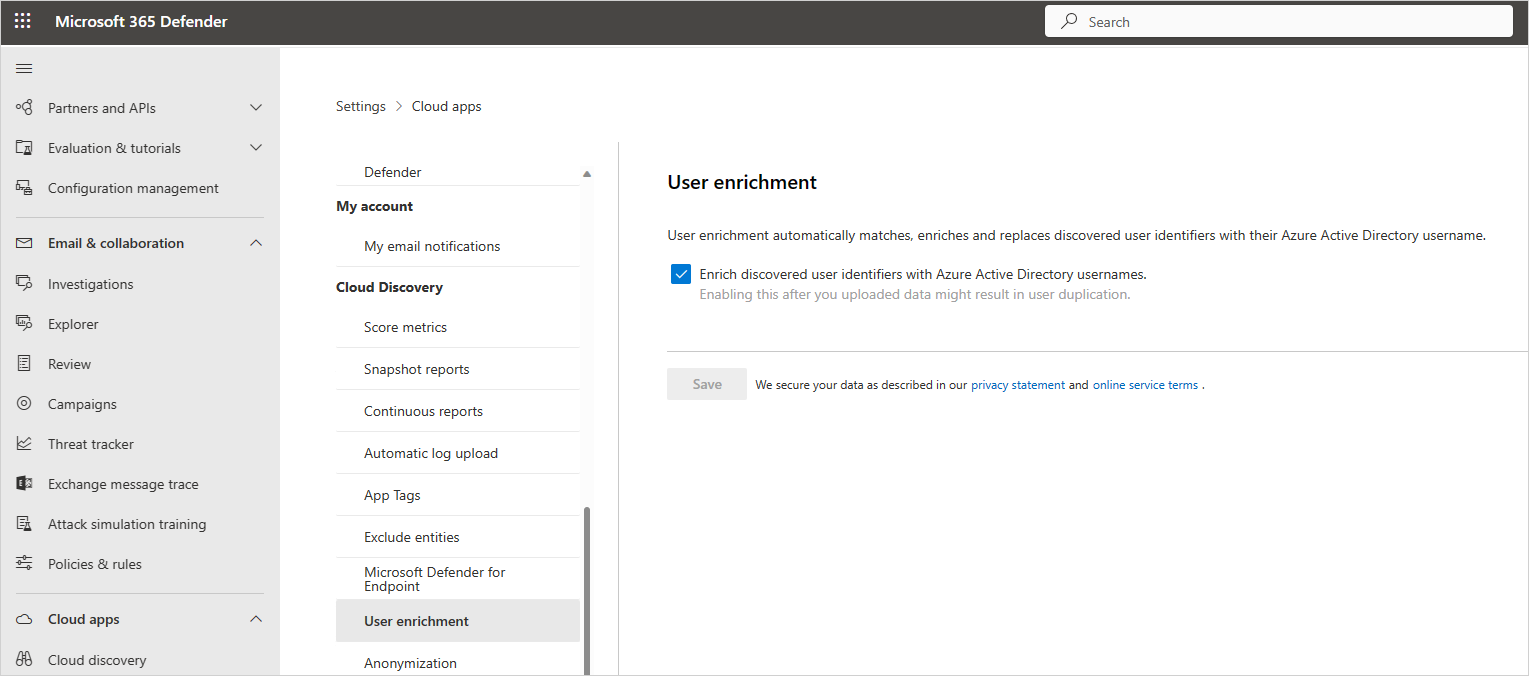
In the Microsoft Defender Portal, select Settings. Then choose Cloud Apps.
Under Cloud Discovery, select User enrichment.
In the User enrichment tab, select Enrich discovered user identifiers with Microsoft Entra ID usernames. This option enables Defender for Cloud Apps to use Microsoft Entra ID data to enrich usernames by default.
Next steps
If you run into any problems, we're here to help. To get assistance or support for your product issue, please open a support ticket.