Ignored
Is attack surface reduction part of Windows?
Yes. Attack surface reduction (ASR) rules are a feature of Microsoft Defender Antivirus, which is included in all current editions of Windows. However, centralized management and reporting for ASR rules requires Microsoft Defender for Endpoint. For more information, see Attack surface reduction rules overview.
Do I need an enterprise license to run attack surface reduction rules?
No. ASR rules are a feature of Microsoft Defender Antivirus, so they work on all current editions of Windows. However, centralized management and reporting through Microsoft Intune or Microsoft Configuration Manager requires Microsoft Defender for Endpoint and the corresponding enterprise licensing.
To learn more about Windows licensing, see https://www.microsoft.com/licensing/product-licensing/windows.
What additional attack surface reduction capabilities are available with Microsoft Defender for Endpoint?
Microsoft Defender for Endpoint provides centralized management and monitoring for ASR rules, including:
- Centralized deployment and configuration of ASR rules across devices.
- ASR rule reporting and alert visibility in the Microsoft Defender portal.
- Advanced hunting queries for ASR rule events.
These capabilities require a Defender for Endpoint license (for example, as part of Microsoft 365 E3 or E5). For more information, see Deployment and configuration methods for ASR rules.
What are the currently supported attack surface reduction rules?
For more information, see Attack surface reduction rules reference.
Do I need to turn on all attack surface reduction rules at the same time, or can I turn on individual rules?
You can enable ASR rules individually. We recommend that you first enable most rules in Audit mode to determine the possible effect to your organization (for example, to your line-of-business applications).
How do attack surface reduction rule exclusions work?
ASR rules support the following types of exclusions:
- Global ASR rule exclusions apply to all ASR rules. All ASR rule configuration methods support global exclusions.
- Per-ASR rule exclusions apply to individual rules, so you can assign different exclusions to different rules. Only Group Policy and endpoint security policies in Microsoft Intune support per-rule exclusions.
Not all ASR rules honor Microsoft Defender Antivirus exclusions. For a full breakdown of exclusion support per rule, see File and folder exclusions for ASR rules.
How do I know what I need to exclude?
Different attack surface reduction rules have different protection flows. Always think about what the attack surface reduction rule protects against, and how the execution flow works. For example, reading directly from the local security authority subsystem (LSASS) process can be a security risk, because it might expose corporate credentials.
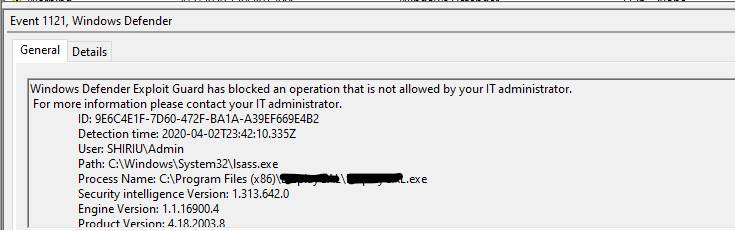
The Block credential stealing from the Windows local security authority subsystem (lsass.exe) rule prevents untrusted processes from having direct access to LSASS memory. When a process with the PROCESS_VM_READ access right tries to use the OpenProcess() function to access LSASS, the rule specifically blocks that access right as shown in the following screenshot:
If you need to create an exception for the process that was blocked, use the file name and full path as shown in the following screenshot:
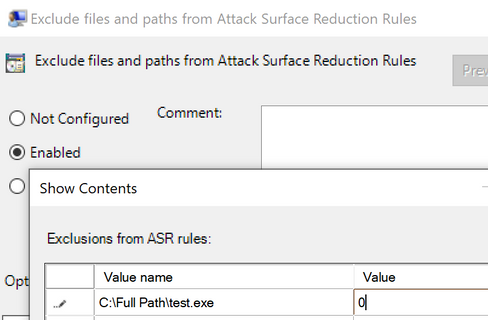
The value 0 means ASR rules ignore the specified file or process and don't block or audit it.
How do I configure per-rule exclusions?
Per-ASR rule exclusions are supported only in Group Policy and endpoint security policies in Microsoft Intune. For configuration instructions, see Enable attack surface reduction rules. For information about the different types of exclusions, see File and folder exclusions for ASR rules.
Which attack surface reduction rules does Microsoft recommend?
Generally, we recommend enabling all rules, but with the following considerations:
Typically, you can enable the following standard protection rules in Block mode without testing in Audit mode:
- Block abuse of exploited vulnerable signed drivers (Device)
- Block credential stealing from the Windows local security authority subsystem Note: If you enabled Local Security Authority (LSA) protection (which we recommend, along with Credential Guard), this rule is redundant.
- Block persistence through WMI event subscription Note: The Microsoft Configuration Manager (or previous versions) client relies heavily on WMI, so we recommend extensive testing in Audit mode before you activate this rule in Block mode.
For details about each of these rules, see Standard protection rules.
All other rules require testing in Audit mode before you activate them in Block mode. For details about each of these rules, see Other ASR rules.
What are some recommendations for getting started with attack surface reduction?
Test attack surface reduction rules in Audit mode to identify any line-of-business applications that you need to exclude from attack surface reduction.
Large organizations should consider rolling out attack surface reduction rules in expanding "rings" where you audit and enable rules to more devices. You can organize devices into rings by using Microsoft Intune or a Group Policy management tool.
For instructions, see Attack surface reduction rules deployment overview.
How long should I test an attack surface reduction rule in audit mode before I enable it?
A rule in Audit mode for about 30 days should provide a good baseline for how the rule operates. You can identify any line-of-business applications that require exclusions.
I'm switching from a non-Microsoft security solution to Microsoft Defender for Endpoint. Is there an easy way to import my old rules to attack surface reduction?
In most cases, it's easier and better to start with the baseline recommendations suggested by Defender for Endpoint than to attempt to import rules from another security solution. Use Audit mode, monitoring, and analytics to configure Defender for Endpoint.
The default configuration for most attack surface reduction rules, combined with Defender for Endpoint's real-time protection, protects against a large number of exploits and vulnerabilities.
In Defender for Endpoint, you can update your defenses with custom indicators to allow and block specific software behavior. ASR rules also support file and folder exclusions. Generally, test a rule in Audit mode to identify exclusions that might be required for line-of-business applications.
Does attack surface reduction support file or folder exclusions that include system variables and wildcards in the path?
Yes. For more information, see the following articles:
Do attack surface reduction rules cover all apps?
It depends on the rule. Most rules cover the behavior of Microsoft Office products and services, for example, Word, Excel, PowerPoint, OneNote, or Outlook. Some rules (for example, Block execution of potentially obfuscated scripts) are more general in scope.
Does attack surface reduction support non-Microsoft security solutions?
No. Attack surface reduction uses Microsoft Defender Antivirus to block apps. You can't configure attack surface reduction to use another security solution.
I have a Windows Enterprise E5 license and I enabled some attack surface reduction rules with Defender for Endpoint. Is it possible for an attack surface reduction event not to appear in the event timeline in Defender for Endpoint?
When an attack surface reduction rule locally triggers a notification, a report on the event is also sent to the Defender for Endpoint portal. If you're having trouble finding the event, you can filter the events timeline using the search box.
You can also view attack surface reduction events by selecting Go to attack surface management from Configuration management in the Microsoft Defender for Cloud taskbar. The attack surface management page includes a tab for report detections, which includes a full list of attack surface reduction rule events reported to Defender for Endpoint.
I applied a rule using Group Policy. When I try to check the indexing options for the rule in Microsoft Outlook, I get an 'Access denied' error.
Try opening the indexing options directly from Windows 10 or later by entering Indexing options in the search box.
For the rule named 'Block executable files from running unless they meet a prevalence, age, or trusted list criterion', can I manually configure the criteria?
No. Microsoft cloud protection maintains the criteria using data gathered from around the world. You can customize the rule by adding apps to the exclusions list to prevent the rule from being triggered.
The rule named 'Block executable files from running unless they meet a prevalence, age, or trusted list criterion' is in Block mode in my organization. The rule started blocking a previously unblocked app after I updated the app. Is something wrong?
This rule determines the reputation of an app using prevalence, age, or inclusion in a list of trusted apps. Assessment of these criteria by Microsoft cloud protection ultimately determines the decision to block or allow an app.
Typically, cloud protection can determine that a new version of an app is similar enough to previous versions of the app, so a lengthy reassessment of the app isn't required. However, it might take time for the new version of the app to build a reputation, particularly after a major update. In the meantime, you can add the app to the exclusions list. If you frequently update and work with new versions of apps, you might consider configuring this rule in Audit mode.
I recently enabled the attack surface reduction rule named Block credential stealing from the Windows local security authority subsystem, and I am getting a large number of notifications. What's going on?
A notification generated by this rule doesn't necessarily indicate malicious activity. But this rule is still useful for blocking malicious activity. Malware often targets lsass.exe to gain illicit access to accounts. The lsass.exe process stores user credentials in memory after a user signs in. Windows uses these credentials to validate users and apply local security policies.
Because many legitimate processes call on lsass.exe for credentials, this rule can be especially noisy. If a known, legitimate app causes this rule to generate an excessive number of notifications, you can add it to the exclusion list. Most other attack surface reduction rules generate a relatively smaller number of notifications.
Is it a good idea to enable the rule named Block credential stealing from the Windows local security authority subsystem alongside LSA protection?
No. If you enabled Local Security Authority (LSA) protection (which we recommend, along with Credential Guard):
- This rule isn't required.
- This rule doesn't provide extra protection (the rule and LSA protection work similarly).
- This rule is classified as not applicable in Defender for Endpoint management settings in the Microsoft Defender portal.
If you can't enable LSA protection and/or Credential Guard, you can configure this rule to provide equivalent protection against malware that targets lsass.exe.