Note
Access to this page requires authorization. You can try signing in or changing directories.
Access to this page requires authorization. You can try changing directories.
This article describes how to apply Microsoft Defender for Identity entity tags, for sensitive, Exchange server, or honeytoken accounts.
You must tag sensitive accounts for Defender for Identity detections that rely on an entity's sensitivity status, for example, sensitive group modification detections.
While Defender for Identity automatically tags Exchange servers as high-value, sensitive assets, you can also manually tag devices as Exchange servers.
Tag honeytoken accounts to set traps for malicious actors. Since honeytoken accounts are usually dormant, any authentication associated with a honeytoken account triggers an alert.
Prerequisites
To set Defender for Identity entity tags in Microsoft Defender XDR, you'll need Defender for Identity deployed in your environment, as described in the Defender for Identity deployment guide, and administrator or user access to Microsoft Defender XDR.
For more information, see Microsoft Defender for Identity role groups.
Tag entities manually
To manually tag an entity in Microsoft Defender XDR, such as a honeytoken account or an entity not automatically tagged as Sensitive, use the following steps:
Sign into Microsoft Defender XDR and select Settings > Identities.
Select the type of tag you want to apply: Sensitive, Honeytoken, or Exchange server.
The page lists the entities already tagged in your system, listed on separate tabs for each entity type:
- The Sensitive tag supports users, devices, and groups.
- The Honeytoken tag supports users and devices.
- The Exchange server tag supports devices only.
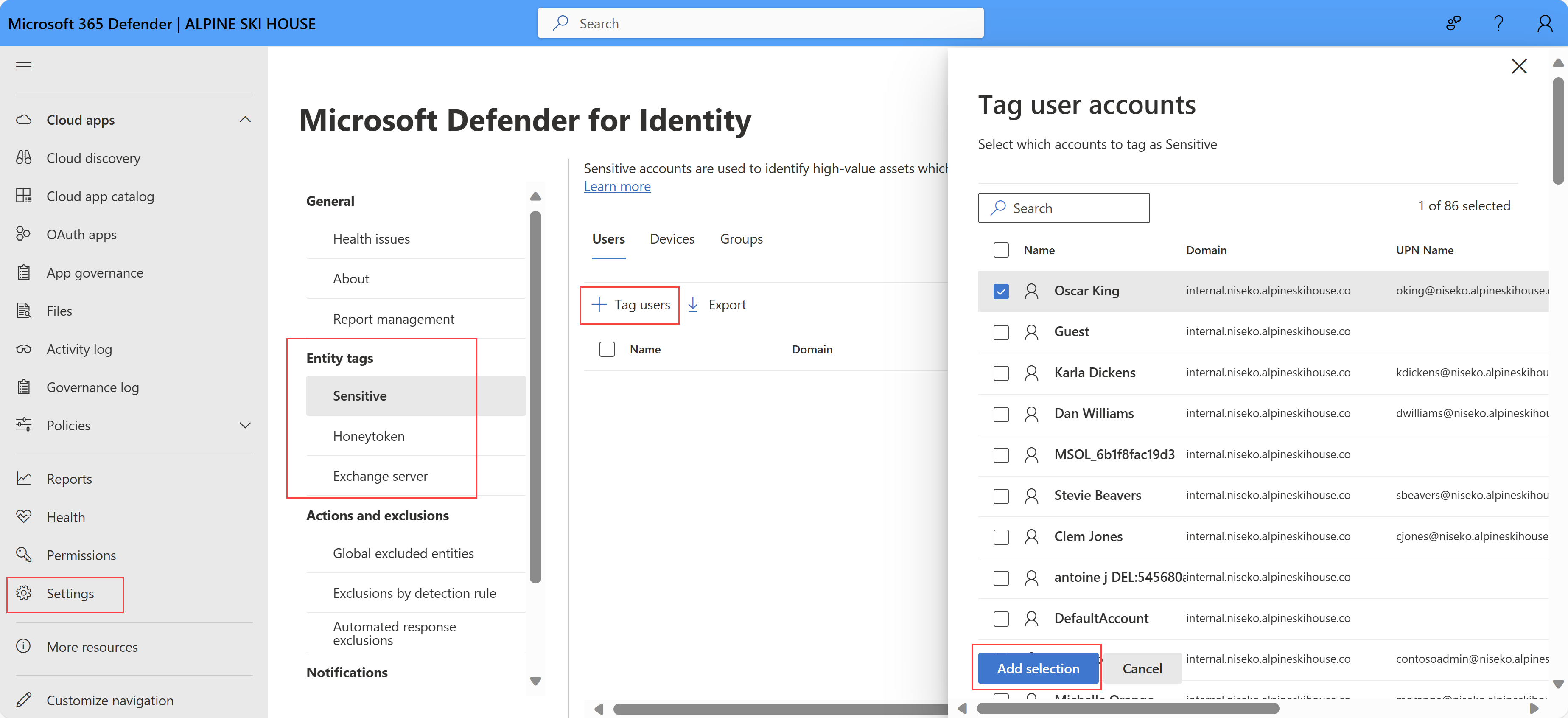
To tag additional entities, select the Tag ... button, such as Tag users. A pane opens on the right listing the available entities for you to tag.
Use the search box to find your entity if you need to. Select the entities you want to tag, and then select Add selection.
For example:
Default sensitive entities
The groups in the following list are considered Sensitive by Defender for Identity. Any entity that is a member of one of these Active Directory groups, including nested groups and their members, is automatically considered sensitive:
Administrators
Power Users
Account Operators
Server Operators
Print Operators
Backup Operators
Replicators
Network Configuration Operators
Incoming Forest Trust Builders
Domain Admins
Domain Controllers
Group Policy Creator Owners
Read-only Domain Controllers
Enterprise Read-only Domain Controllers
Schema Admins
Enterprise Admins
Microsoft Exchange Servers
Note
Until September 2018, Remote Desktop Users were also automatically considered sensitive by Defender for Identity. Remote Desktop entities or groups added after this date are no longer automatically marked as sensitive while Remote Desktop entities or groups added before this date may remain marked as Sensitive. This Sensitive setting can now be changed manually.
In addition to these groups, Defender for Identity identifies the following high value asset servers and automatically tags them as Sensitive:
- Certificate Authority Server
- DHCP Server
- DNS Server
- Microsoft Exchange Server
- Replicating Directory Changes Permissions
Supported integrations for entity tags
The following roles are designated as Sensitive by Microsoft Defender for Identity. Any entity assigned membership in these roles is automatically classified as sensitive.
Okta sensitive roles
The following Okta roles are designated as Sensitive by Defender for Identity:
- Super Administrator
- Application Administrator
- Group Administrator
- API Access Management Administrator
- Group Membership Administrator
- Help Desk Administrator
- Mobile Administrator
- Organization Administrator
- Read-only Administrator
- Report Administrator
CyberArk Identity sensitive roles
The following CyberArk Identity roles are designated as Sensitive by Defender for Identity:
- Administration Role
- Cloud Onboarding Admin
- Connector Management Admin
- Flows Admin
- Privilege Cloud Administrators
- Privilege Cloud Administrators Basic
- Privilege Cloud Administrators Lite
- Privilege Cloud Safe Managers
- Privilege Cloud Safe Managers Basic
- Privilege Cloud Safe Managers Lite
- Privilege Cloud Session Admin
- Privilege Cloud Session Risk Managers
- System Administrator
SailPoint Identity Security Cloud sensitive roles
Entra ID roles used for tagging
The following Entra ID roles are designated as Sensitive by Defender for Identity:
- Global Administrator
- User Administrator
- Authentication Administrator
- Privileged Authentication Administrator
- Helpdesk Administrator
- Agent ID Administrator
- Application Administrator
- Directory Writers
- Domain Name Administrator
- Password Administrator
- Privileged Role Administrator
- Hybrid Identity Administrator
- Cloud Application Administrator
SailPoint Identity Security Cloud roles used for tagging
The following SailPoint Identity Security Cloud role is designated as Sensitive by Defender for Identity:
- IdentityNow Administrator
Related content
For more information, see Investigate Defender for Identity security alerts in Microsoft Defender XDR.