Note
Access to this page requires authorization. You can try signing in or changing directories.
Access to this page requires authorization. You can try changing directories.
Important
Some information relates to prereleased product that may be substantially modified before it's commercially released. Microsoft makes no warranties, express or implied, with respect to the information provided here.
Microsoft Defender enriches entity pages with threat intelligence data from Microsoft Threat Intelligence, so analysts get in-context intelligence during investigations. Instead of switching between separate tools, you can access reputation data, threat actor attribution, infrastructure relationships, and other intelligence directly on entity pages in the Microsoft Defender portal.
Entity enrichments bring globally observed threat intelligence into the investigation workflow. When you investigate an IP address, domain, URL, or file in an incident, the entity page surfaces relevant intelligence that helps you assess risk and make faster, more informed decisions.
Prerequisites
All Microsoft Defender XDR customers can access entity enrichments with publicly available Microsoft Threat Intelligence data at no extra cost.
Supported entity types
You can get entity enrichments for the following entity types. Each entity type surfaces different intelligence data depending on what's relevant:
| Entity type | Enrichment data available |
|---|---|
| IP address | Reputation, attributed threat reports, infrastructure relationships (DNS, WHOIS, host pairs, subdomains), services, TLS/SSL certificates, components, trackers, cookies |
| Domain | Reputation, attributed threat reports, infrastructure relationships (DNS, WHOIS, host pairs, subdomains), services, TLS/SSL certificates, components, trackers, cookies |
| URL | Reputation, attributed threat reports, sandbox analysis |
| File | Reputation, attributed threat reports, sandbox analysis |
Note
IP addresses and domains provide a broader set of enrichment data because of the additional infrastructure relationship data available for these entity types.
How to access entity enrichments
You can access enriched entity pages through several entry points in the Microsoft Defender portal:
- Incident investigation - Select an entity (IP, domain, URL, or file) from an incident's evidence or alert details to open its enriched entity page.
- Global search - Search for an IP address, domain, URL, or file hash in the Defender portal search bar to navigate directly to the entity page.
- Advanced hunting - Select an entity value in advanced hunting query results to open the entity page.
- Direct navigation - Navigate to an entity page directly from any link in the portal.
Threat Intelligence Insights tab
The Threat Intelligence Insights tab on entity pages is the primary surface for enrichment data. This tab consolidates threat intelligence from Microsoft Threat Intelligence into a single view, organized into the following sections depending on the entity type:
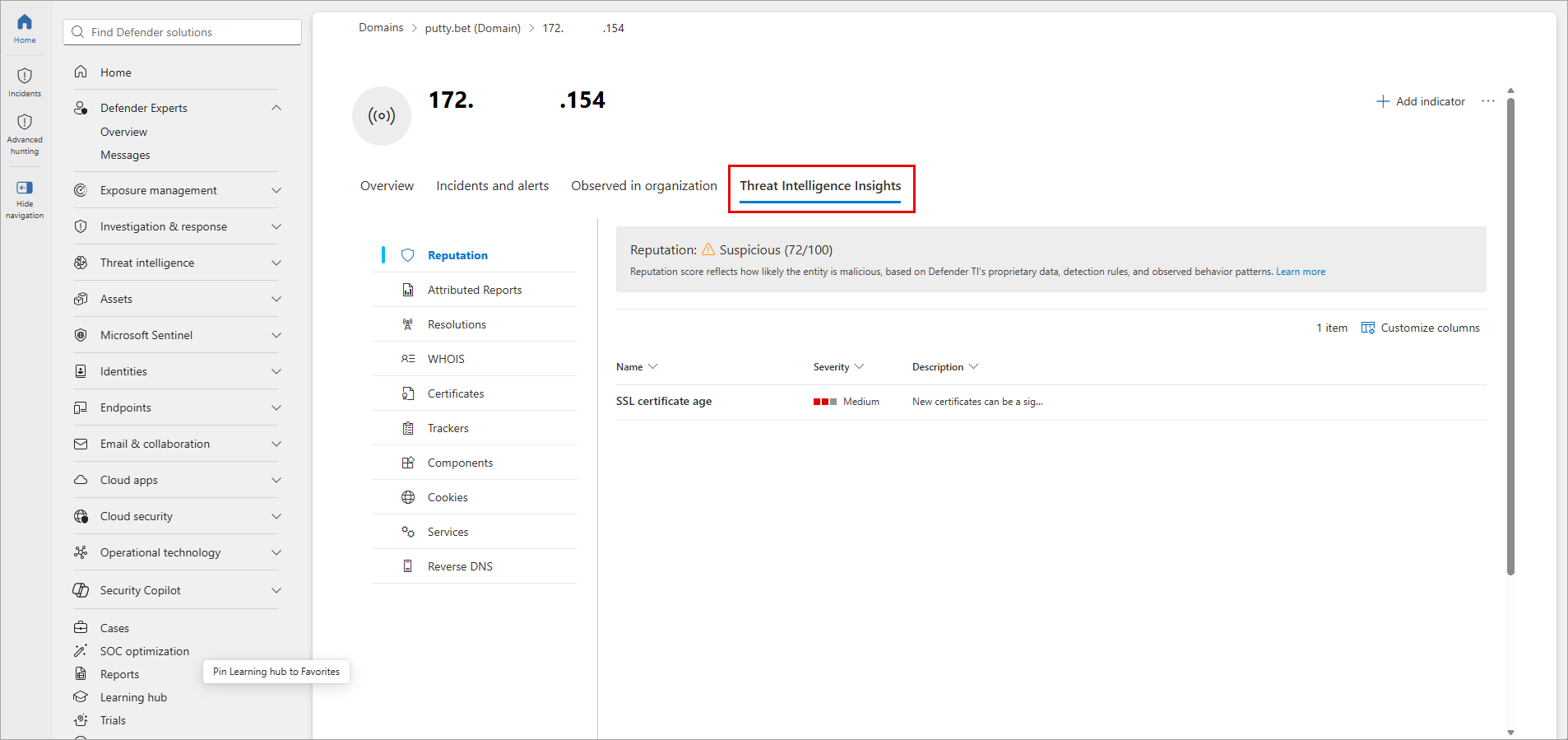
Reputation
The reputation section provides a risk assessment for the entity based on Microsoft's detection rules and intelligence. Reputation scores help analysts quickly determine whether an entity is known to be malicious, suspicious, or benign.
Attributed threat reports
When Microsoft links an entity to a known threat actor or campaign, the attributed threat reports section shows related threat analytics reports. These reports provide context about the threat actor's tactics, techniques, and procedures (TTPs) and help analysts understand the broader threat landscape.
Infrastructure relationships (IP addresses and domains)
For IP address and domain entities, the infrastructure relationships section includes:
- DNS records - Historical and current DNS resolution data.
- WHOIS information - Domain registration details including registrant, dates, and registrar.
- Host pairs - Relationships between hosts based on observed connections in web content.
- Subdomains - Known subdomains associated with a domain.
- TLS/SSL certificates - Certificate details including issuer, validity, and subject alternative names.
- Services - Detected network services running on the infrastructure.
- Components - Web technologies and frameworks identified on the infrastructure.
- Trackers - Web analytics and tracking codes observed on the infrastructure.
- Cookies - Cookie names observed in responses from the infrastructure.
Sandbox analysis (URLs and files)
For URL and file entities, sandbox analysis provides detonation results showing behavioral indicators observed when the entity was executed in a controlled environment.
Investigation workflow
Entity enrichments integrate directly into the incident investigation workflow in Microsoft Defender. A typical investigation flow includes:
- Open an incident in the Microsoft Defender portal and review the incident's evidence.
- Select an entity (IP address, domain, URL, or file) to open its entity page.
- Review the Overview tab for key details about the entity.
- Select the Threat Intelligence Insights tab to view enrichment data from Microsoft Threat Intelligence.
- Use the intelligence to assess risk, identify threat actor attribution, and understand infrastructure relationships.
- Pivot to related entities and reports to continue your investigation.