Note
Access to this page requires authorization. You can try signing in or changing directories.
Access to this page requires authorization. You can try changing directories.
Microsoft Edge for Business already provides tools to strengthen your organization's extension security posture. Extensions monitoring gives you visibility into installed extensions and their risk, while Extensions management lets you control which extensions users can install and configure their permissions.
Extension leak control builds on these capabilities with an additional layer of data protection. It restricts how user-installed extensions interact with sensitive content on pages protected by supported data protection policies, without blocking their use on every website. This doc explains how to configure and use Extension leak control alongside your existing extension controls.
How protection works
Microsoft Edge uses the page's data protection state to restrict content scripts and supported extension APIs. An extension can remain installed and available while its access to a protected tab is restricted.
For example, an extension that reads page text might work on an unprotected page but be unable to read content from a protected work page.
Note
Extensions your organization force installs are trusted under this control. Review those extensions and their permissions separately. For installation policies and other extension settings, see Extensions management in the Microsoft Edge management service. Extension leak control is not an extension approval or risk-assessment service.
Before you begin
You need:
- A supported data protection policy, such as a Microsoft Purview DLP policy, that identifies protected pages.
- Access to configure the feature in the Microsoft Edge management service.
- Targeted Release enabled for your tenant.
Installing Edge or signing in with a work account does not, by itself, configure the page protection that this feature uses.
Enable Extension leak control
- In the Microsoft Edge management service, create a configuration policy and assign it to the intended users. For instructions, see Get started with configuration policies. If you already have a configuration policy for these users, open it.
- In the policy, go to Customization settings > Security settings.
- Enable the Extension leak control setting and save your changes.
After the policy applies, confirm that a user-installed extension's access is restricted on a protected page and that your organization's force-installed extensions continue to work as expected.
Note
This control restricts access to protected content. It does not uninstall extensions or block their use on every website.
What users experience
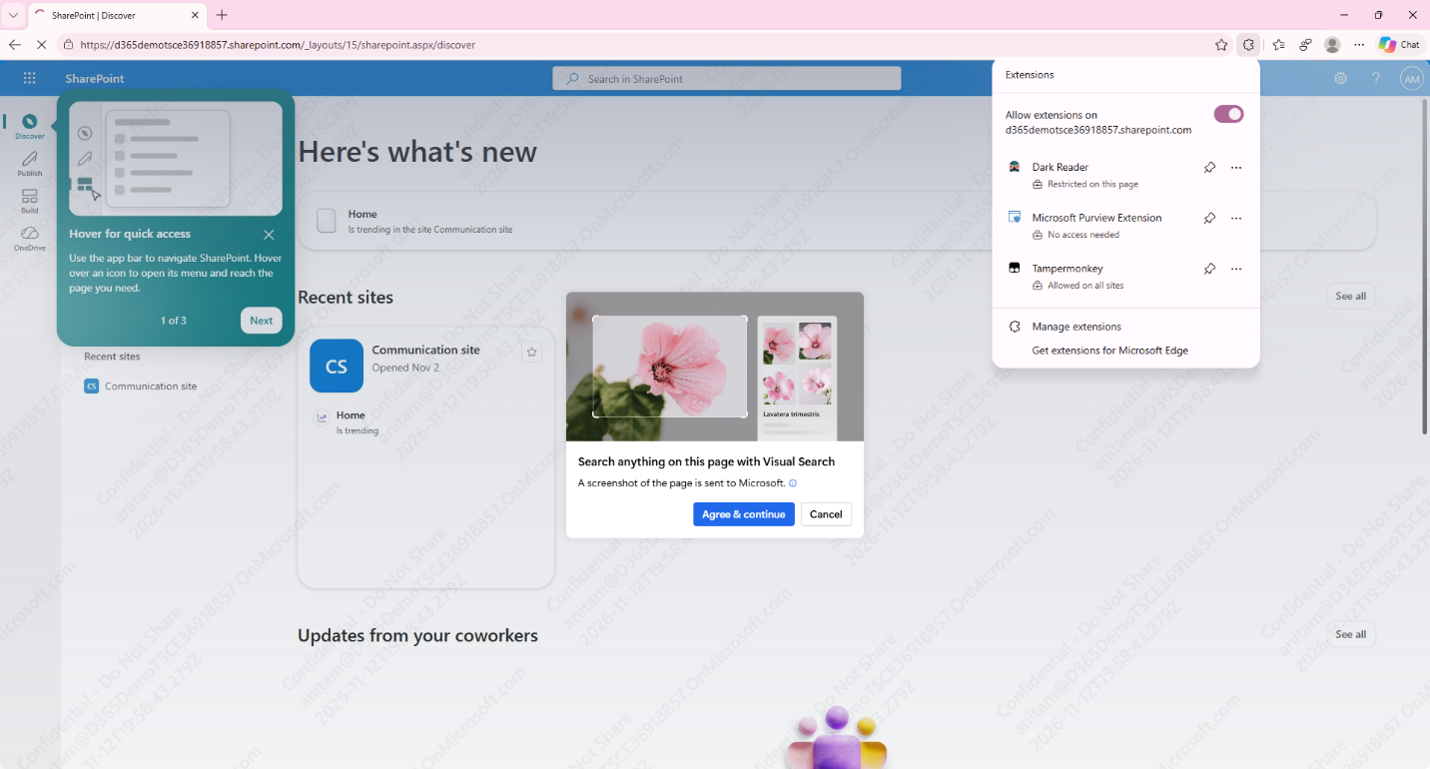
An extension might remain visible in the toolbar and its menu might still open, even when it cannot interact with the current page. The extensions flyout will display a message explaining that the organization's data protection policy restricts the extension's access to the tab. Extension leak control does not otherwise change the extension's user interface.
How an extension handles restricted access depends on the extension itself. It might display its own error message or handle the restriction without a visible message. Users should not expect the same error or behavior across extensions.
If an extension doesn't work on a protected page, the user should contact their administrator. Users should not move protected content to an unprotected page to work around the restriction.
Example of a Dark Reader extension which has limitation on a DLP protected page like SharePoint.
Limitations and considerations
Extension leak control applies to supported extension interactions on recognized protected pages. It is not a guarantee that every extension API or data-transfer path is covered.
Continue to manage extension installation, permissions and trust through Extensions management. Use Extensions monitoring to understand installed extensions and their risk. Neither replaces the protected-page restrictions provided by Extension leak control.