Note
Access to this page requires authorization. You can try signing in or changing directories.
Access to this page requires authorization. You can try changing directories.
Note
Protected sessions are available in public preview starting with Microsoft Edge version 158. Functionality and availability can change before general availability.
Introduction
Protected session let users summarize, rewrite, ask questions, and reason over supported sensitive content in Microsoft Copilot in Microsoft Edge for Business while keeping generated responses within a protected session.
When an administrator enables the feature through the Microsoft Edge management service portal, opening Copilot on a supported protected page automatically starts a protected session associated with that tab. Users can work with the page's content without moving generated responses outside the protected experience.
During public preview, the session is temporary and uses only the current protected tab. For details about current limitations and capabilities, see Public preview limitations.
Note
Protected sessions do not override policies that explicitly block Copilot or AI access to content. Enabling this feature does not grant users access to content they aren't authorized to view.
Prerequisites
Your organization must enable protected sessions in the Microsoft Edge management service portal. Users need access to Microsoft Copilot in Edge for Business and a page covered by a supported data protection policy.
Existing policies for Copilot, browser-content access, and data protection continue to apply.
What users experience
Work in a protected session
- Open a protected page in your Microsoft Edge work profile.
- Open Copilot in Microsoft Edge. The protected-session notice indicates that the conversation is protected and temporary.
- Ask Copilot to summarize, rewrite, or answer a question about the current page.
- Continue working within the protected session. To leave the session, switch to another tab or close the source tab.
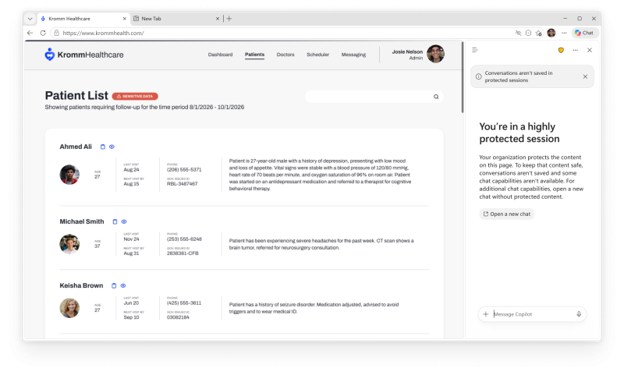
Protected Session notice and controls
The session displays a notice identifying the protected state. Users can ask questions and work with the protected page, but some Copilot controls are disabled or unavailable to keep content within the session.
The navigation menu is visible but disabled. Hovering over it displays a message that it isn't available in a protected session. Other controls can also be disabled or absent during preview; this doesn't necessarily indicate a browser error.
Temporary chat
Protected sessions aren't saved to Copilot chat history. Leaving the source tab ends the session. Starting a new chat in the same protected tab starts another protected conversation, not an unrestricted chat.
Note
Temporary sessions without saved chat history apply to the public preview. Support for saved protected conversations is planned for general availability as protection capabilities continue to evolve based on customer feedback.
Temporary chat describes the user experience and chat-history behavior. It doesn't mean that all service-side records, compliance records, or diagnostic data are immediately deleted.
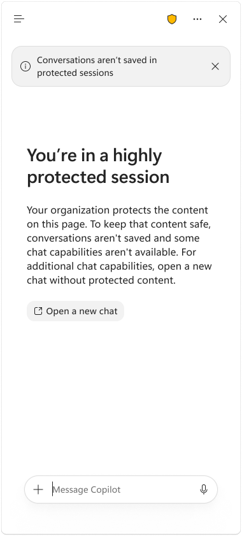
Public preview limitations
The following capabilities aren't available in a protected session during public preview:
- Moving responses outside the session: Copying or pasting responses out of the chat, printing, screen capture, downloading, sharing, exporting, saving responses, and Edit in Pages.
- Adding context or using other experiences: The composer + menu, including additional tabs, files, people, agents, and skills; and switching to Cowork or Code.
- Voice and capture experiences: Voice, Vision, read aloud, and dictation.
- Returning to previous conversations: Opening chat history or recovering the protected conversation after leaving the source tab.
Note
Additional capabilities are planned beyond public preview, including more granular behavior based on the source page's data protection policies. Saved protected history is planned for general availability, while multi-tab grounding is planned for after general availability. These capabilities aren't available in the public preview, and plans can evolve based on customer feedback.
Protected sessions don't create a new sensitivity label for a response or authorize sharing it with other destinations. Carrying source labels and usage rights into generated content is a longer-term direction, not a public preview capability.
Troubleshoot access
If Copilot can't use the page, check the following with your administrator:
- The user is in the intended work profile and has access to Copilot.
- Protected sessions are enabled for that profile.
- The page and protection policy are supported.
- An AI-access or browser-content policy doesn't prohibit the requested use.
Enabling protected sessions is not a way to bypass an explicit restriction.