SKPaint Class
Definition
Important
Some information relates to prerelease product that may be substantially modified before it’s released. Microsoft makes no warranties, express or implied, with respect to the information provided here.
Holds the style and color information about how to draw geometries, text and bitmaps.
public class SKPaint : SkiaSharp.SKObject- Inheritance
Examples
Simple Example
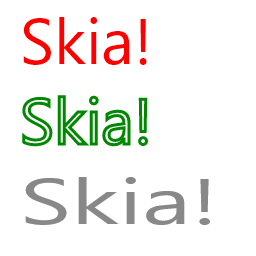
The following example shows three different paints, each set up to draw in a different style. The caller can intermix these paints freely, either using them as is, or modifying them as the drawing proceeds.
var info = new SKImageInfo(256, 256);
using (var surface = SKSurface.Create(info)) {
    SKCanvas canvas = surface.Canvas;

    canvas.Clear(SKColors.White);

    using var font = new SKFont { Size = 64.0f };
    using var scaledFont = new SKFont { Size = 64.0f, ScaleX = 1.5f };

    using var paint1 = new SKPaint {
        IsAntialias = true,
        Color = new SKColor(255, 0, 0),
        Style = SKPaintStyle.Fill
    };

    using var paint2 = new SKPaint {
        IsAntialias = true,
        Color = new SKColor(0, 136, 0),
        Style = SKPaintStyle.Stroke,
        StrokeWidth = 3
    };

    using var paint3 = new SKPaint {
        IsAntialias = true,
        Color = new SKColor(136, 136, 136)
    };

    var text = "Skia!";
    canvas.DrawText(text, 20.0f, 64.0f, SKTextAlign.Left, font, paint1);
    canvas.DrawText(text, 20.0f, 144.0f, SKTextAlign.Left, font, paint2);
    canvas.DrawText(text, 20.0f, 224.0f, SKTextAlign.Left, scaledFont, paint3);
}
The example above produces the following:
Effects Example
The following example draws using a gradient instead of a single color. To do,
this a SKShader is assigned to the paint. Anything drawn with that paint
will be drawn with the gradient specified in the call to
SKShader.CreateLinearGradient.
var info = new SKImageInfo(256, 256);
using (var surface = SKSurface.Create(info)) {
    SKCanvas canvas = surface.Canvas;

    canvas.Clear(SKColors.White);

    // create a gradient
    var colors = new[] {
        SKColors.Blue,
        SKColors.Yellow
    };
    var shader = SKShader.CreateLinearGradient(
        new SKPoint(0.0f, 0.0f),
        new SKPoint(256.0f, 256.0f),
        colors,
        null,
        SKShaderTileMode.Clamp);

    // assign the gradient to the paint
    var paint = new SKPaint {
        Shader = shader
    };

    canvas.DrawPaint(paint);
}
The example above produces the following:

Remarks
Anytime you draw something in SkiaSharp, and want to specify what color it is, or how it blends with the background, or what style or font to draw it in, you specify those attributes in a paint.
Unlike SKCanvas, an paint object does not maintain an internal stack of state. That is, there is no save/restore on a paint. However, paint objects are relatively light-weight, so the client may create and maintain any number of paint objects, each set up for a particular use.
Factoring all of these color and stylistic attributes out of the canvas state, and into (multiple) paint objects, allows the save and restore operations on the SKCanvas to be that much more efficient, as all they have to do is maintain the stack of matrix and clip settings.
Effects
Beyond simple attributes such as color, strokes, and text values, paints support effects. These are subclasses of different aspects of the drawing pipeline, that when referenced by a paint, are called to override some part of the drawing pipeline.
There are five types of effects that can be assigned to an paint object:
| Effect | Details |
|---|---|
| Blend Mode | Blend modes and Duff-Porter transfer modes. |
| Color Filter | Modification of the source colors before applying the blend mode. |
| Mask Filter | Modification of the alpha mask before it is colorized and drawn (for example, blur). |
| Path Effect | Modification of the geometry (path) before the alpha mask is generated (for example, dashing). |
| Shader | Gradients and bitmap patterns. |
Constructors
| Name | Description |
|---|---|
| SKPaint() |
Initializes a new instance of the SKPaint class with the default settings. |
Properties
| Name | Description |
|---|---|
| Blender |
Gets or sets the custom SKBlender for compositing. |
| BlendMode |
Gets or sets the blend mode. |
| Color |
Gets or sets the paint's foreground color. |
| ColorF |
Gets or sets the paint's color as an SKColorF (floating-point RGBA). |
| ColorFilter |
Gets or sets the paint's color filter. |
| Handle |
Gets or sets the handle to the underlying native object. (Inherited from SKObject) |
| IgnorePublicDispose |
Gets a value indicating whether the call the public Dispose() should be no-op. (Inherited from SKNativeObject) |
| ImageFilter |
Gets or sets the image filter. |
| IsAntialias |
Gets or sets a value indicating whether anti-aliasing is enabled. |
| IsDisposed |
Gets a value indicating whether the object has already been disposed. (Inherited from SKNativeObject) |
| IsDither |
Gets or sets a value indicating whether dithering is enabled. |
| IsStroke |
Gets or sets a value indicating whether to paint a stroke or the fill. |
| MaskFilter |
Gets or sets the mask filter to use when painting. |
| OwnsHandle |
Gets or sets a value indicating whether this object owns its handle and should destroy the native object when it is disposed. (Inherited from SKNativeObject) |
| PathEffect |
Gets or sets the path effect to use when painting. |
| Shader |
Gets or sets the shader to use when painting. |
| StrokeCap |
Gets or sets a value indicating how the start and end of stroked lines and paths are treated. |
| StrokeJoin |
Gets or sets the path's join type. |
| StrokeMiter |
Gets or sets the paint's miter limit. |
| StrokeWidth |
Gets or sets the paint's stroke width. |
| Style |
Gets or sets the painting style. |
Methods
| Name | Description |
|---|---|
| Clone() |
Creates a copy of the current paint. |
| Dispose() |
Releases all resources used by this SKNativeObject. (Inherited from SKNativeObject) |
| Dispose(Boolean) |
Releases the unmanaged resources used by the SKPaint and optionally releases the managed resources. |
| DisposeInternal() |
Triggers a dispose, ignoring the value of IgnorePublicDispose. (Inherited from SKNativeObject) |
| DisposeManaged() |
Implemented by derived SKObject types to destroy any managed objects. (Inherited from SKObject) |
| DisposeNative() |
Implemented by derived SKObject types to destroy any native objects. |
| DisposeUnownedManaged() |
Implemented by derived SKObject types to dispose managed objects that are not owned by this instance. (Inherited from SKObject) |
| GetFillPath(SKPath, Single) |
Creates a new path from the result of applying any and all effects to a source path. |
| GetFillPath(SKPath, SKMatrix) |
Creates a new path from the result of applying any and all effects to a source path with a transformation matrix. |
| GetFillPath(SKPath, SKPath, Single) |
Obsolete.
Applies any and all effects to a source path, returning the result in the destination. |
| GetFillPath(SKPath, SKPath, SKMatrix) |
Obsolete.
Applies any and all effects to a source path with a transformation matrix, writing the result to the destination. |
| GetFillPath(SKPath, SKPath, SKRect, Single) |
Obsolete.
Applies any and all effects to a source path, returning the result in the destination. |
| GetFillPath(SKPath, SKPath, SKRect, SKMatrix) |
Obsolete.
Applies any and all effects to a source path with culling and transformation, writing the result to the destination. |
| GetFillPath(SKPath, SKPath, SKRect) |
Obsolete.
Applies any and all effects to a source path, returning the result in the destination. |
| GetFillPath(SKPath, SKPath) |
Obsolete.
Applies any and all effects to a source path, returning the result in the destination. |
| GetFillPath(SKPath, SKPathBuilder, Single) |
Computes the filled geometry of the source path at the specified resolution scale and writes the result to the destination path builder. |
| GetFillPath(SKPath, SKPathBuilder, SKMatrix) |
Computes the filled geometry of the source path after applying a transformation matrix and writes the result to the destination path builder. |
| GetFillPath(SKPath, SKPathBuilder, SKRect, Single) |
Computes the filled geometry of the source path within the cull rectangle at the specified resolution scale, and writes the result to the destination path builder. |
| GetFillPath(SKPath, SKPathBuilder, SKRect, SKMatrix) |
Computes the filled geometry of the source path within the cull rectangle after applying a transformation matrix, and writes the result to the destination path builder. |
| GetFillPath(SKPath, SKPathBuilder, SKRect) |
Computes the filled geometry of the source path within the cull rectangle and writes the result to the destination path builder. |
| GetFillPath(SKPath, SKPathBuilder) |
Computes the filled geometry of the source path using this paint's style and writes the result to the destination path builder. |
| GetFillPath(SKPath, SKRect, Single) |
Creates a new path from the result of applying any and all effects to a source path. |
| GetFillPath(SKPath, SKRect, SKMatrix) |
Creates a new path from the result of applying effects to a source path with culling and transformation. |
| GetFillPath(SKPath, SKRect) |
Creates a new path from the result of applying any and all effects to a source path. |
| GetFillPath(SKPath) |
Creates a new path from the result of applying any and all effects to a source path. |
| Reset() |
Resets all the paint properties to their defaults. |
| SetColor(SKColorF, SKColorSpace) |
Sets the paint's color using a floating-point color value in the specified color space. |
