Note
Access to this page requires authorization. You can try signing in or changing directories.
Access to this page requires authorization. You can try changing directories.
When you migrate from Dynamics NAV to Business Central online, all C/AL code customizations must be converted to AL extensions. This article provides a playbook for planning and executing the customization conversion as part of your migration project.
What Microsoft requires
Business Central online runs extensions only. Before migration, all C/AL customization code must be rewritten as AL extensions.
The following diagram illustrates the architectural shift from the C/AL custom base application model (version 14) to the AL extension model (version 20 and later):
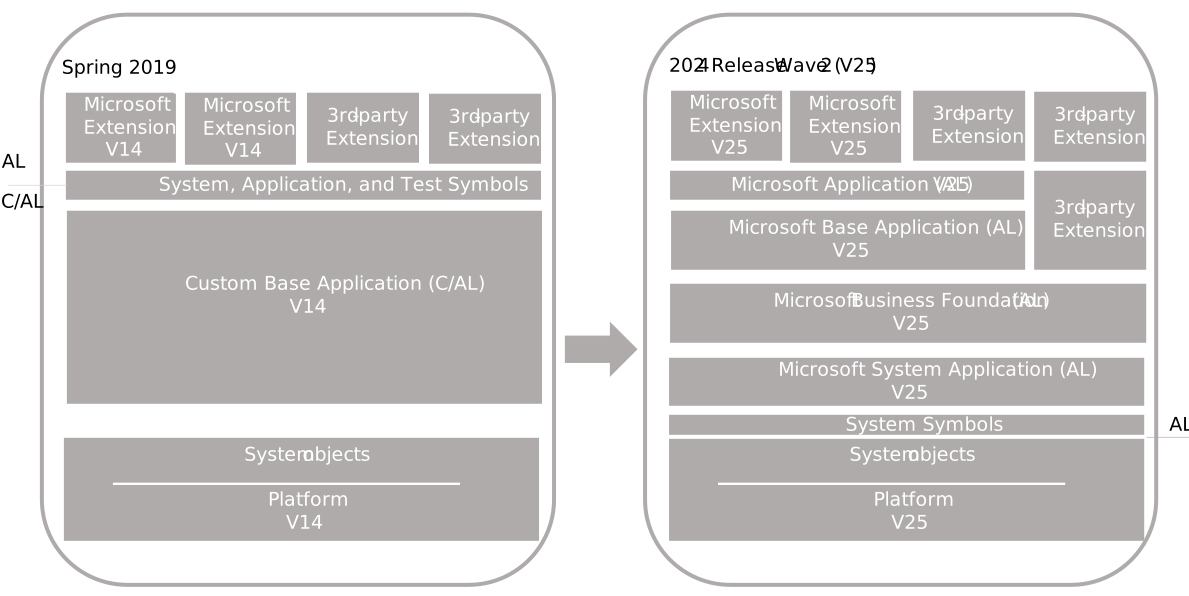
Keep in mind the following points:
- Data from tables with code customizations can't be carried forward from Dynamics NAV unless the customizations are handled by extensions installed on both on-premises and online.
- Breaking schema changes (such as removing or renaming fields) prevent extension synchronization. Plan carefully to avoid data loss.
- Per-tenant extensions and AppSource extensions are the two deployment models available online. Decide early which model fits each customization.
Code-conversion workflow
The high-level workflow for converting C/AL customizations to AL is:
- Export C/AL objects using the
Export-NAVApplicationObjectcmdlet with the-ExportToNewSyntaxflag. - Use the Txt2Al conversion tool (use the version that ships with Business Central version 14) to generate initial AL files from the exported text.
- Create a development database to use as a baseline for resolving dependencies and compiling AL code.
- Set up AL projects in Visual Studio Code with the AL Language extension.
- Resolve compilation errors, refactor objects, and reorganize code into extensions.
- Test extensions against a Business Central sandbox environment.
For the complete step-by-step procedure, see Code conversion from C/AL to AL.
Migration treatment by object type
The following table summarizes how to handle each Dynamics NAV object type during conversion.
| C/AL object type | AL approach | Notes |
|---|---|---|
| Pages | Page extensions or new AL pages | Use page extensions to modify base pages. Create new pages in AL for custom pages. |
| Tables | Table extensions | Use table extensions to add fields or keys to base tables. Custom tables become new AL table objects. |
| Codeunits | Refactor to AL codeunits using events | Subscribe to integration and business events instead of modifying base codeunits directly. |
| Reports | AL report objects or report extensions | Reimplement custom reports in AL. Use report extensions where available. |
| Enums | AL enum objects | Replace Option fields with enum types where possible. |
| XMLports and queries | Reimplement in AL | These objects must be recreated as AL objects. |
| .NET add-ins | Redesign for SaaS | .NET interop isn't available in Business Central online. Use control add-ins, Azure Functions, or external APIs instead. |
Upgrade considerations affecting customizations
Several platform changes between Dynamics NAV and Business Central affect how customizations are converted:
- Codeunit 1 (ApplicationManagement) is retired: Trigger logic formerly in Codeunit 1 has moved to system events. Refactor any dependencies on Codeunit 1 to use the corresponding event subscribers.
- V1 extensions aren't supported: Only V2 (AL-based) extensions are supported. If you have existing V1 (C/AL) extensions, they must be rewritten in AL.
- MenuSuite is deprecated: Navigation is now handled through pages and page extensions. Remove MenuSuite objects and define navigation in AL page objects.
For more information, see Upgrade considerations.
Customization workstream and checkpoints
Use the following workstream to organize the customization conversion as part of the overall migration project:
- Inventory and classify: Catalog all modified objects, ISV add-ons, and integrations. Classify each item by complexity (simple field addition, complex business logic, third-party dependency).
- Separate data from behavior: Identify which customizations carry data (custom tables, added fields) versus behavior-only changes (page layouts, report logic). Data-carrying customizations must be handled as extensions before migration to avoid data loss.
- Create an extension roadmap: Decide how to package customizations into extensions. Group related objects, plan the extension dependency chain, and determine whether each extension is a per-tenant extension or an AppSource app.
- Pilot conversion: Convert a representative subset of objects to validate the workflow, estimate effort, and identify common issues.
- Regression testing: Test converted extensions against business scenarios in a sandbox environment. Include key business users in validation.
- Freeze before cutover: Stop C/AL development before the final cutover. All new work should be done in AL extensions.