Note
Access to this page requires authorization. You can try signing in or changing directories.
Access to this page requires authorization. You can try changing directories.
This article outlines some of the things you should consider and decide on before you install Business Central.
Most of the topics discussed in this article can be changed at any time after the initial installation.
Network Topology
A Business Central deployment consists of various components that support the production, development, and testing. These components can be installed on various computers. The deployment process varies depending on the topology that you implement.
For more information, see Deployment Topologies.
Single-tenancy and Multitenancy
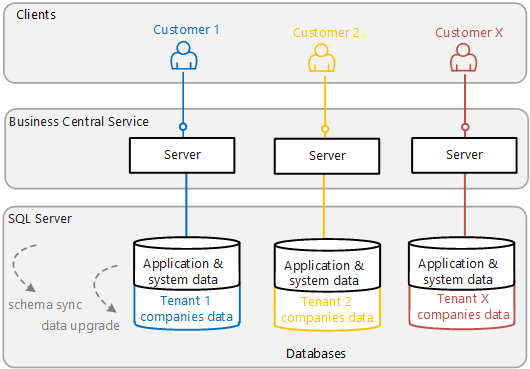
A Business Central solution consists of an application (the code) and business data (the customer's data). This information is stored in a database and accessed through a Business Central Server instance. There are two different two deployment architectures to choose from: single-tenant and multitenant.
Note
For this discussion, a customer refers to a business or a group of legal entities whose data can be stored in one database, isolated from other customers. In Business Central, a customer can consist of one or more companies.
Single-tenant architecture
Business Central is installed as a single-tenant deployment by default. In a single-tenant deployment, the application and the business data are stored in the same database. Each customer solution has its own Business Central Server and database.
Multinenant architecture
In a multitenant deployment, the application and business data are stored in separate databases. There's a single Business Central Server and application database for multiple customers. But each individual customer has their own database for storing business data, which is referred to as a tenant.
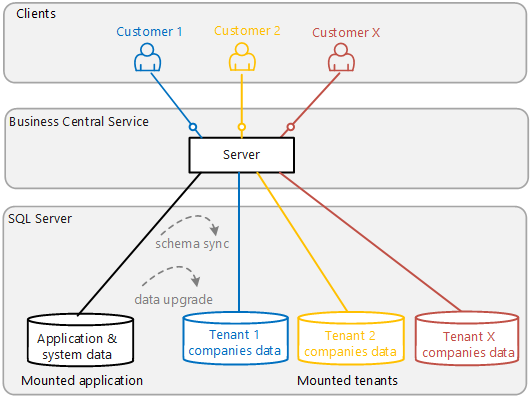
Multitenancy centralizes the maintenance of the application and isolates each tenant at the same time. This architecture makes upgrading easier compared with a single-tenant deployment. For more information, see Multitenant Deployment Architecture.
User Authentication
Business Central supports several credential mechanisms for authorizing users trying to access data. By default, Windows authentication is used.
For more information, see Authentication and Credential Types.
Business Central Server Service Account
The central component of a Business Central deployment is the Business Central Server, which handles all communication between the client and the databases. The Business Central Server requires a log on account, referred to as the service account. By default, the Network Service Account is used. The Network Service Account is acceptable in a test environment, but we recommend that you use a domain account in your production environment.
For more information, see Provisioning the Business Central Server Service Account.
Enhancing Connection Security
Business Central offers features that help secure connections over a wide area network (WAN), such as connections from the Business Central Web Server, Dynamics NAV Client connected to Business Central, and web services to the Business Central Server. The implementation of these security features requires that you obtain a certificate from a certification authority or trusted provider.
For more information, see:
Using Security Certificates with Business Central On-Premises
Configuring SSL to Secure the Business Central Web Client Connection
Related information
Upgrading to Business Central
Business Central Components
System Requirements