Note
Access to this page requires authorization. You can try signing in or changing directories.
Access to this page requires authorization. You can try changing directories.
[This article is prerelease documentation and is subject to change.]
APPLIES TO: Business Central online
Edit with Copilot helps you complete tasks in Business Central by using natural language. Use this section to get started, try the feature, and provide feedback to Microsoft. The preview helps you prepare for the feature, and your feedback helps shape it.
Important
- This feature is available only in early access preview environments, which require a Dynamics 365 Business Central Partner Sandbox license and support only the United States (US), United Kingdom (GB), and Germany (DE) versions.
- These environments are for evaluation only. Partners can use them to try features before public release and provide feedback.
- Preview features aren't meant for production use, might have restricted functionality, and are subject to supplemental terms of use.
About Edit with Copilot
With update 29.0, Business Central customers received the new Microsoft Copilot Chat in Business Central, including the ability to ground every task in Business Central data. Learn more in Chat with Copilot.
Now, partners can experience the next wave of innovation that builds on that foundation. New tools enable Copilot to:
- Create records, such as recording a new return order.
- Edit records, such as updating a customer address.
- Delete records, such as removing a duplicate contact.
- Run actions, such as applying a payment or posting an order.
With your instructions, Copilot reasons over the Business Central UI to solve the task you give it. Data changes are committed immediately to Business Central while Copilot works.
This capability includes any extensions you installed. Copilot can also reason over your custom pages, tables, and data in that environment.
Prerequisites
Environment requirements:
- You have an early access preview environment with version 30.0.56564.0 or later. These sandboxes are only available for the United States (US), Germany (DE), and United Kingdom (GB) country/region versions. Learn more about early access preview environments in Prepare for major updates with preview environments.
- Your tenant has an eligible Microsoft 365 subscription, such as Microsoft 365 Business Premium. Learn about eligible plans in Microsoft Copilot Chat eligibility.
- Copilot Chat is enabled in your Business Central environment. Depending on the country or region, some environments require administrators to opt in to Copilot Chat. Learn more in Configure Copilot and agent capabilities.
User requirements:
- Users have a valid Business Central license. A Microsoft 365 Copilot license isn't required for this feature, but it is required to experience the full range of Copilot capabilities.
- Users have access to Microsoft Copilot in the Microsoft 365 tenant. Learn more in Manage Microsoft Copilot settings in the Microsoft 365 admin center.
No additional setup, settings, configuration, MCP connectivity, or model training is required to begin editing with Copilot.
Find inspiration for prompts
Try the following examples with Cronus evaluation company data. These prompts are illustrative. Some prompts require you to add example emails, files, images, or supporting evaluation data before you can try them effectively. Use these examples as inspiration for more diverse and challenging prompts.
- "Add a 12% discount to my open sales order"
- "Find a local supplier for this item, create a purchase order for 20 boxes, and draft an email requesting delivery date confirmation"
- "Register Alex as a new salesperson and reassign all of Jim's customers to Alex"
- "Create a new subscription based on the mail thread about Alpine Ski House"
- "Update the expected delivery dates for these three orders based on the supply delay"
- "Add the details to the latest inspection of lot number 10512"
- "Update Adatum's address in the system using the mail signature from their latest email"
- "Post the four purchases for the new coffee tables that were received"
- "Add Adventure Works' premium surfboard to Business Central and populate all product attributes from their website."
- "Set up non-deductible VAT"
- "Increase the price by 10% on products sourced from outside the EU"
- "Review and block vendors that are no longer used, such as vendors with no activity in the last year"
AI consumption and billing
During the early access preview, you can try Edit with Copilot without incurring pay-as-you-go or consumption-based billing. Fair use limits apply to ensure a consistent experience for all users. This preview doesn't constitute a commitment or indication from Microsoft about pricing or licensing requirements at general availability.
However, Microsoft Copilot is generally available and includes advanced AI capabilities that are metered, such as Copilot Cowork or agents. Metered features might result in billing. Learn more in Usage-based billing and cost management for Copilot Credits.
Safeguards
Copilot is built on Microsoft's comprehensive approach to enterprise security, privacy, compliance, and responsible AI. For more information, see FAQ for Copilot data security and privacy for Dynamics 365.
Edit with Copilot builds on these principles with safeguards that support the new use cases:
- Security: Copilot runs under your context, inheriting your user permissions, profile, and UI personalization in Business Central. It works within these boundaries and never has access to more than you do. Copilot can't edit a field that you can't see or edit yourself.
- Observability: While Copilot finds pages and edits Business Central data, the Chat pane indicates what Copilot is doing in Business Central.
- Transparency: When Copilot finishes editing, a log of records that were created, modified, or deleted appears directly in the Copilot Chat pane. You can review what changed and go to records for further review. Affected records indicate that Copilot made the change. Fields display info tips that show what Copilot changed and why.
- Control: Copilot always pauses before deleting a record and asks you to approve the deletion.
- Auditability: Administrators can view the entire, detailed action log in Business Central. They can also use the log to troubleshoot or understand how Copilot solved a task.
- Governance: Microsoft Copilot in Business Central is subject to the same tenant settings for Copilot that administrators govern in the Microsoft 365 admin center.
Preview feedback
We welcome all feedback and appreciate the time you take to try this feature and share your findings.
How to provide feedback
For community discussion, post to the Dynamics 365 Business Central Partner Community Network on Viva Engage.
To report an issue with a specific chat conversation, including errors or inaccurate or undesirable outcomes, submit feedback directly from the Chat pane:
Open the Chat menu and select Send feedback.
Select the feedback type.
When possible, select the option to share relevant prompts. This information gives Microsoft the best possible context to troubleshoot the issue.
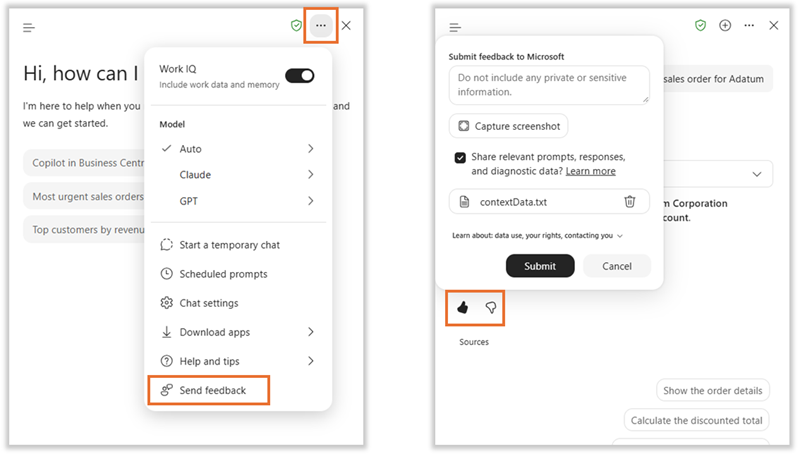
You can also use the thumbs-up or thumbs-down controls in your conversation with Copilot.
Note
The ability to provide feedback directly from Business Central or Microsoft 365 is governed outside Business Central as part of general Copilot settings. In the Microsoft 365 admin center, go to Copilot feedback and select Allow users to send feedback. Also select Include log files and relevant content samples when users submit feedback.
Preview limitations
The following limitations apply to this preview. This list is for information only and doesn't constitute a commitment that any limitation will be addressed before general availability.
- This feature supports only English. You can use it in other languages, but it might not work as intended. Language quality can vary based on your interaction or system settings, which might affect accuracy and the user experience.
- The feature is available only when you use Microsoft Copilot chat in Business Central. Outside Business Central, such as in Microsoft Outlook or the Copilot app, you can't connect to Business Central data and functionality.
- Copilot works only with your current company and environment. To read or edit data in another company, first change the company in Business Central.
- You can't read or edit Business Central data with Copilot Cowork or other advanced AI features.
- Page and record citations often don't appear in the Chat pane after Copilot edits Business Central data.
- Copilot can't iterate through or operate over long lists, use FactBoxes, or upload or download files to Business Central.
- Granular administrative settings or permissions for Edit with Copilot aren't yet available.
- Copilot might misinterpret dates if the Work Date in Business Central isn't set to Today.
Responsible AI FAQ for Edit with Copilot
These frequently asked questions (FAQ) describe the responsible AI considerations for Edit with Copilot in Business Central. The feature is developed in accordance with Microsoft's Responsible AI Standard.
For information about the underlying Copilot integration, including its read-only capabilities and responsible AI practices, see Application Card for Microsoft Copilot in Business Central. This FAQ covers the additional risks and controls for preview capabilities that change data and run actions.
What is Edit with Copilot?
Edit with Copilot extends Microsoft Copilot in Business Central by enabling Copilot to create, modify, and delete Business Central data and run actions on your behalf.
What are the capabilities?
Edit with Copilot extends Microsoft Copilot in Business Central with action-taking capabilities. It can:
- Create, modify, and delete Business Central records.
- Run actions available on Business Central pages.
- Work with pages, fields, and actions provided by the Business Central base application and installed extensions.
- Perform multistep tasks that involve working with Business Central data.
Copilot performs these operations in the context of the signed-in user and is subject to the user's permissions, profile, and UI personalization.
What is the intended use?
- Edit with Copilot is intended for people in any role who sign in to and work with Business Central in the desktop browser experience.
- It helps users complete Business Central tasks by using natural language to create, modify, and delete records and run actions.
- During the early access preview, the feature is intended only for evaluation in sandbox environments using demonstration or test data. It isn't intended for production use.
What are the AI limitations?
- Language: In this preview, Copilot supports only English. It might work in other languages, but it hasn’t been evaluated in those languages.
- Grounding: In this preview, Copilot might occasionally return fabricated business data if it fails to recognize that the work must be done inside Business Central. Always review Copilot's output for accuracy.
- Transparency: In this preview, Copilot responses might not include a complete list of the data that was changed in Business Central. This behavior will be improved in a later release with citations and in-app UI that displays the change log for quick review. In the meantime, inspect Copilot's logs to ensure it has changed only the requested data.
- Impact on external systems: Copilot can trigger standard Business Central actions that contact external systems or send data to or receive data from them, including third-party and production systems. To mitigate this risk, Business Central forcibly blocks all external calls from the Business Central base application and application extensions. You can unblock external calls for each extension from the Extension Management page in Business Central. Be aware that unblocking an extension allows users and Copilot to use actions that make external calls.
For general limitations of Microsoft Copilot in Business Central, see Limitations.
How was it evaluated?
Edit with Copilot was evaluated using manual and automated tests involving multiple conversational turns. The tests covered different tasks and ways of expressing requests, including how Copilot works with and reasons about Business Central data. The team assessed the outcomes for accuracy, relevance, and safety.
What does it offer for safety, security, and controls?
- Copilot operates in your user context and is subject to your Business Central permissions, profile, and UI personalization. It can't use Business Central pages, fields, or actions that aren't available to you.
- Microsoft Copilot in Business Central is also subject to applicable Microsoft Copilot tenant settings managed in the Microsoft 365 admin center.
- While Copilot works, the Copilot pane indicates the operations it's performing in Business Central. After completing a task, Copilot provides information about records it created, modified, or deleted. Affected records identify Copilot as the actor, and field information can show what changed and why.
- Administrators can review detailed information about actions performed by Copilot in Business Central. This information can help administrators understand what Copilot did and investigate unexpected results.
- Operational monitoring and user feedback: Microsoft uses automated systems to monitor the quality and safety of Copilot-generated content and detect potential abuse. Users can provide feedback and report inaccurate or inappropriate content to help Microsoft improve the experience.
For general information about safeguards and controls for Microsoft Copilot in Business Central, see Safety components and mitigations.
What data does Microsoft collect, and how is it used?
Microsoft collects diagnostic and usage data to operate and improve the preview. This data doesn't include prompts or responses. When you submit feedback, you include prompts, responses, screenshots, and diagnostic content only when you choose to share the relevant content. Microsoft doesn't use customer prompts, feedback, and Business Central data to train foundation models.
Learn more in FAQ for Copilot data security and privacy for Dynamics 365 and Power Platform and Data, privacy, and security for web search in Microsoft Copilot and Microsoft Copilot Chat.
Related information
Use Microsoft Copilot in Business Central (preview)
Create a new sandbox environment
Early access preview features in Business Central