Note
Access to this page requires authorization. You can try signing in or changing directories.
Access to this page requires authorization. You can try changing directories.
This article provides an overview of the architecture and configuration of the Microsoft Dynamics 365 Commerce runtime (CRT). The CRT is a collection of portable .NET libraries that encapsulate business logic. It serves as the engine for the commerce channel.
Commerce runtime architecture
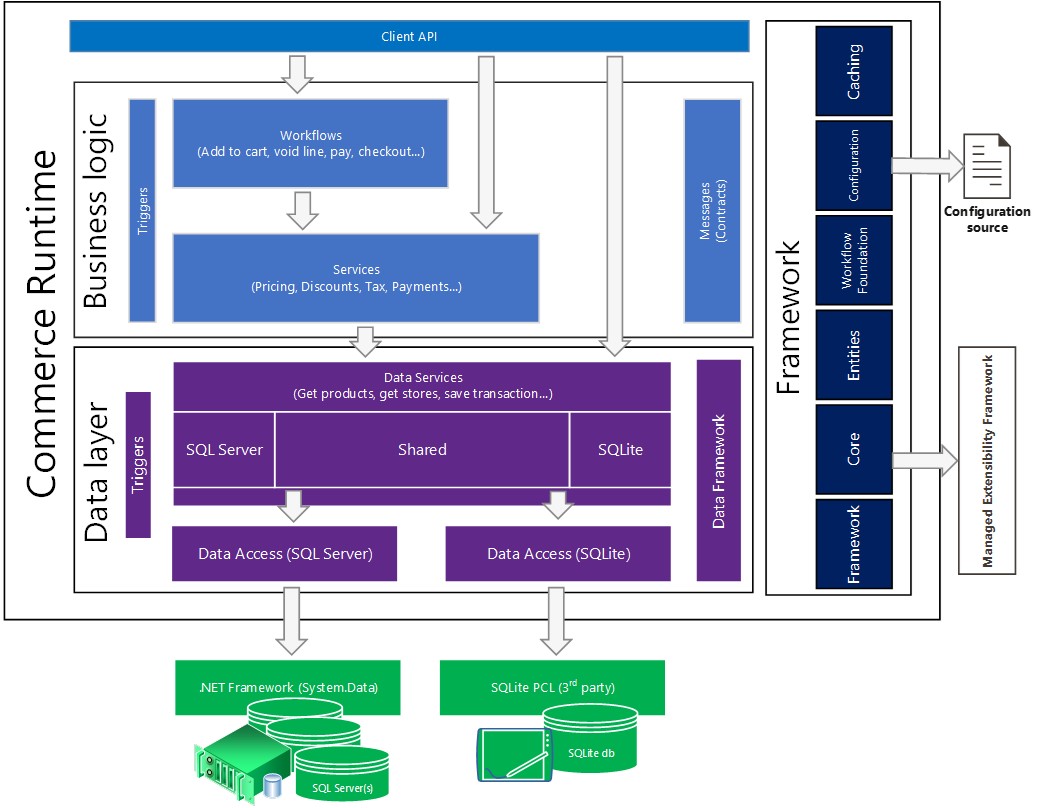
The following diagram shows the components of the Microsoft Dynamics 365 Commerce runtime (CRT).
Data access
A data access layer sits on top of the database. In the data access layer, raw data is translated into objects in memory. For example, an object might be a product. Products have attributes, such as price and color. The data access layer has functions that you can use to manipulate the objects. Stored procedures pass packets of data from the database to data entities that services and workflows can use. You can update the packets of data to include new fields that you add in Commerce.
Services
A services layer sits on top of the data access layer. Services query for real-time data. You can use these services to customize existing functionality, or you can add your own services that include new functionality.
Workflows
A workflow layer sits on top of the services layer. A workflow is a collection of services and business logic that, together, define business processes. For example, when a customer adds an item to the cart, you can use a workflow to get the price, perform validation, check the inventory quantity, calculate shipping charges, calculate tax, and calculate discounts. You can use the workflows that are included in Commerce, or you can create new workflows. You can even use a workflow to connect to a partner system as part of your business processes.
API
An application programming interface (API) layer sits on top of the workflow layer. You can use the API for tasks such as getting information about items, calculating prices, calculating shipping charges, and placing orders. You can extend the API to fit your business processes.
Commerce runtime configuration
The CRT configuration file lists services as types. Add types to the CRT configuration file to control which services the CRT loads. The CRT loads services in the order they appear in the configuration file. The CRT automatically loads all the default services. However, if you add a new service above one of the default services, the new service replaces the default service.