Note
Access to this page requires authorization. You can try signing in or changing directories.
Access to this page requires authorization. You can try changing directories.
Labor captured in Field Service through time entries directly contributes to project execution and financials once approved.
After technicians enter and submit time in Field Service for work associated with a project or project task, the time entries flow into Project Operations. These entries follow Project Operations pricing and approval workflows, regardless of the Calculate Price in Field Service setting. Once approved, the approval status syncs back to Field Service.
Time entered directly to project tasks and at the project level without a work order also follow the Project Operations pricing and approval workflows. All approved labor, regardless of how it's captured, is reflected in project execution and financial reporting.
Time entries
In Field Service, access time entries from the Time Entries page. Select Show as > Modern Time Entry Grid.
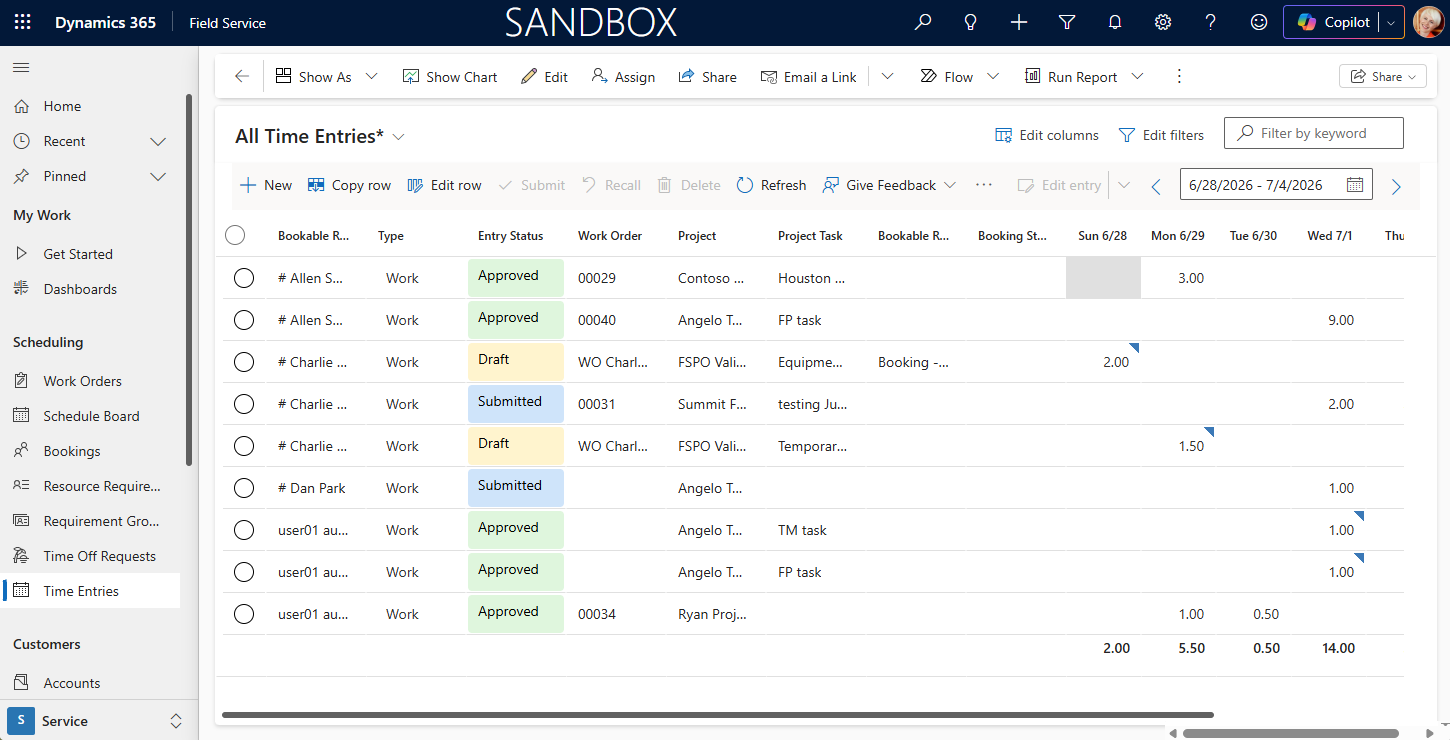
Time entry approval
To approve time entries, the user must be a team member on the project and have the Project Approver field on their team member record set to yes. Learn more in Security and approvals.
Only approved entries generate financial actuals and update task progress. Learn more in: Approvals overview.
Project task progression
The only signal to update task execution progress on the Work break down Structure (WBS) is approved time entries.
When project managers approve time:
- The system reduces the effort remaining based on approved hours.
- The project automatically recalculates metrics such as effort completed, percent complete, and estimate at completion.
Planned effort stays the same, so execution tracking reflects actual work performed rather than scheduled activity. Learn more in: Project effort tracking.
Financial impact
Once approved, time entries generate full financial impact on the project, including:
- Actual labor cost
- Unbilled sales based on project pricing rules
For time entries that come from Field Service, Project Operations calculates pricing by using role-based pricing. The system determines the role associated with the resource assignment on the project task and applies the appropriate cost and bill rates from the configured price lists. Time off entered in Field Service doesn't affect the project's financials.
Learn more in: Set up labor bill-rate sales prices and Set up labor cost rates.
Field Service doesn't independently calculate labor pricing or cost rates. Instead, Project Operations centrally manages pricing logic to ensure consistent financial calculations across project-based work. Pricing and financial calculations are handled entirely within the project, including exchange rates for different currencies.
Labor estimates
Project Operations tracks labor estimates and provides visibility into the expected labor costs for each project task. To estimate labor, create tasks in the task grid in Project Operations. Learn more in: Labor cost tracking on projects and Project sales tracking.
Labor estimates transfer to finance and operations as hour forecast lines. Learn more in: Master planning with demand forecasts.