Note
Access to this page requires authorization. You can try signing in or changing directories.
Access to this page requires authorization. You can try changing directories.
Note
Community interest groups have now moved from Yammer to Microsoft Viva Engage. To join a Viva Engage community and take part in the latest discussions, fill out the Request access to Finance and Operations Viva Engage Community form and choose the community you want to join.
[This article is prerelease documentation and is subject to change.]
The guidance applies to Dynamics 365 finance and operations version 10.0.47.
This article describes how to use Agent feed in Dynamics 365 finance and operations to create, update, read, and customize feed items surfaced in Immersive Home. Agent feed enables ERP agents to post actionable feed items through Dataverse Custom APIs, store them natively in Dynamics 365 finance and operations, and render them as cards that respect security, ranking, and personalization.
Overview
Agent feed provides a platform capability that allows agents and applications to surface contextual work items to users in Immersive Home. Agents create feed items, they get ranked using AI-assisted logic, secured using Dynamics 365 finance and operations menu items, and rendered through configurable card providers.
How to send data to the Agent feed in Immersive Home
Enable Dynamics 365 finance and operations features
In Dynamics 365 finance and operations, go to Feature management and enable the features:
- Immersive Home (production ready preview)
- Agent feed for Immersive Home (preview)
- Custom API generation (preview)
These features are required for both feed rendering and agent‑driven integration.
Use Custom APIs to create and update feed items
Feed items are created and maintained via Dataverse custom APIs, delivered as part of the Copilot for finance and operations solution (version 1.0.03291.1 or later).
Supported APIs:
- msdyn_AgentFeedCreateFeedItemCustomApi
- msdyn_AgentFeedUpdateFeedItemCustomApi
These APIs write and update feed data into Dynamics 365 finance and operations tables through an orchestrated X++ implementation that maintains transactional integrity across related Agent feed tables.
Read feed items using Virtual Entity (optional)
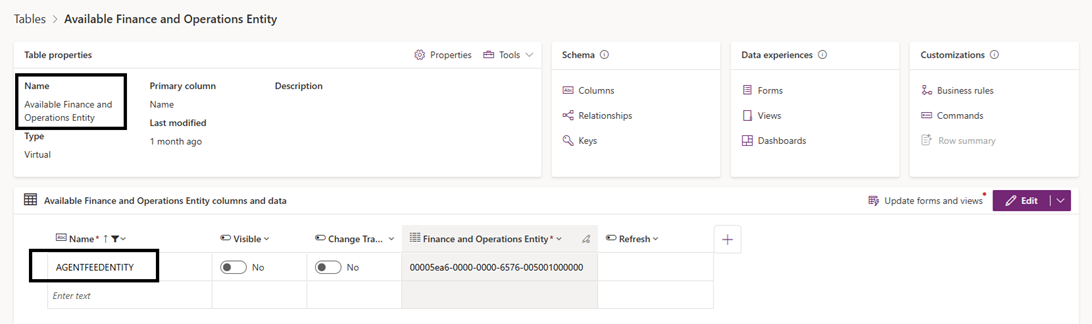
If your agent needs to read feed items, enable the virtual entity AgentFeedEntity.
Enable virtual entity
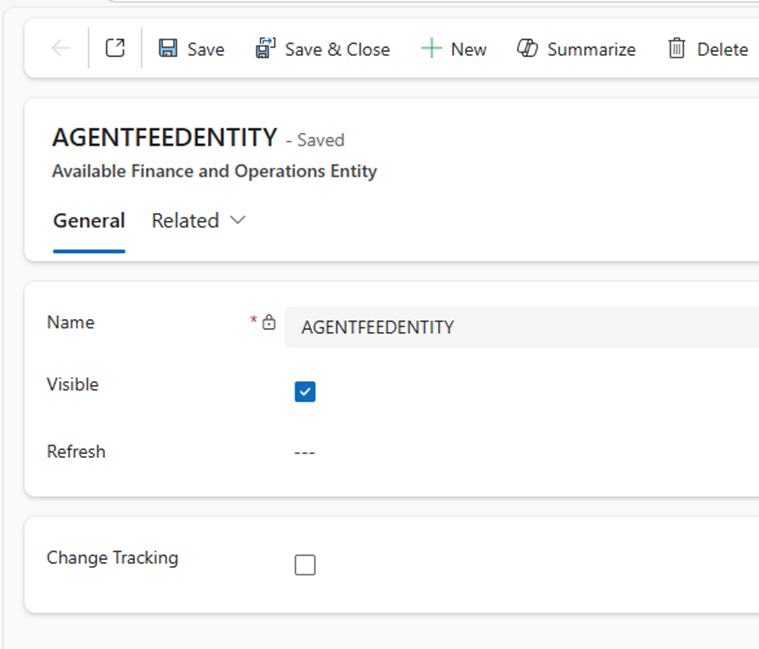
- Open the Available Finance and Operations Entity Dataverse table.
- Locate the row AgentFeedEntity.
- Set the column Visible to Yes.
- Save the change.
Once enabled, feed items can be queried using standard Dataverse OData endpoints.
Control rendering of the Agent feed card
Render feed items using the default card
Agent feed items are rendered in the Immersive Home through card providers. The default card default provider is sufficient for many scenarios.

By default, feed items use the DefaultAgentFeedCardProvider, which renders:
- Title
- Subtitle
- Summary
- Status and due date

The default card provider doesn't support any actions.
How to create custom card designs for feed items in Immersive Home
Step 1: Register a Card Provider enum Create a new value in: AgentFeedCardProviderType (Application Common).
For example: ExpenseCardProvider

Step 2: Implement Card Provider class Create an X++ class implementing the CardProvider interface, for example create a new XPP class called "ImmersiveHomeExpenseCardProvider".
Card providers use the Web component library to render content. This example for a card provider renders expense related Agent feed items.
using System.ComponentModel.Composition;

[ExportAttribute(identifierStr(Dynamics.AX.Application.AgentFeedICardProvider))]
[ExportMetadataAttribute(classStr(AgentFeedICardProvider), enumLiteralStr(AgentFeedCardProviderType, ExpenseCardProvider))]
internal final class ImmersiveHomeExpenseCardProvider extends ImmersiveHomeBaseAgentFeedCardProvider
{
    public List addCardActions(AgentFeedIFeedDetails _agentFeedData)
    {
        List feedActions = new List(Types::Class);
        ImmersiveHomeAgentFeedAction action;
        AgentFeedMenuItem menuItem;

        // Use FeedItemId from the AgentFeedData to load any configured menu items
        str feedItemId = '';
        if (_agentFeedData && _agentFeedData.parmFeedItemId())
        {
            feedItemId = _agentFeedData.parmFeedItemId();
        }

        if (feedItemId)
        {
            // Find AgentFeedMenuItem rows linked to this FeedItemId and create menu actions
            while select menuItem where menuItem.FeedItemId == feedItemId
            {
                action = ImmersiveHomeAgentFeedAction::startBuilding(menuItem.MenuItem);
                action.parmActionType(ImmersiveHomeAgentFeedActionType::Menu);
                action.parmMenuItemName(menuItem.MenuItem); // AOT menu item name
                action.parmText(menuItem.MenuItem);
                feedActions.addEnd(action);
            }
        }

        return feedActions;
    }

    /// <summary>
    /// Customized card that renders the header, summary and an optional Due Date,
    /// and renders footer buttons from addCardActions.
    /// </summary>
    public Object generateCard(AgentFeedData _agentFeedData)
    {
        // Build header detail string: "Due by {DueDate} | {Subtitle}"
        str headerDetail;
        if (_agentFeedData.parmDueDate() != utcdatetimeNull())
        {
            // Use a simple string conversion for the datetime; replace with a formatter helper if desired
            str dueDateText = strFmt("%1", _agentFeedData.parmDueDate());
            headerDetail = strFmt("Due by %1 | %2", dueDateText, _agentFeedData.parmSubTitle());
        }
        else
        {
            headerDetail = _agentFeedData.parmSubTitle();
        }

        // Header (title + composed detail)
        var cardHeader = WebComponentHeaderDetail::startBuilding(_agentFeedData.parmTitle())
            .withDetail(headerDetail);

        // Body: column layout with summary and optional due date (still shown in body as well)
        var bodyLayout = WebComponentColumnLayout::startBuilding();
        bodyLayout.withColumn(WebComponentStaticText::startBuilding(_agentFeedData.parmSummary()));

        // Build card from header and attach body
        WebComponentCard feedCard = WebComponentCard::startBuildingFromHeader(cardHeader)
            .withBody(bodyLayout);

        // Footer: build from actions provided by addCardActions
        List immersivehomeFeedActions = this.addCardActions(_agentFeedData);
        if (immersivehomeFeedActions && immersivehomeFeedActions.elements() > 0)
        {
            var cardButtonGroup = WebComponentColumnLayout::startBuilding();

            ListIterator feedActionIterator = new ListIterator(immersivehomeFeedActions);
            while (feedActionIterator.more())
            {
                ImmersiveHomeAgentFeedAction feedAction = feedActionIterator.value();

                if (!feedAction)
                {
                    feedActionIterator.next();
                    continue;
                }

                if (feedAction.parmActionType() == ImmersiveHomeAgentFeedActionType::Menu)
                {
                    WebComponentButton button = WebComponentButton::newForMenuItem(feedAction.parmMenuItemName(), MenuItemType::Display, feedAction.parmArgs())
                        .withText(feedAction.parmText())
                        .withTooltip(feedAction.parmTooltip())
                        .withData(feedAction.parmData());

                    cardButtonGroup.withColumn(button);
                }
                else
                {
                    WebComponentAction action = WebComponentAction::construct(feedAction.parmTarget(), feedAction.parmEventName());
                    var button = WebComponentButton::startBuilding(feedAction.parmText(), action)
                        .withTooltip(feedAction.parmTooltip())
                        .withData(feedAction.parmData());

                    cardButtonGroup.withColumn(button);
                }

                feedActionIterator.next();
            }

            feedCard.withFooter(cardButtonGroup);
        }

        return feedCard;
    }

}
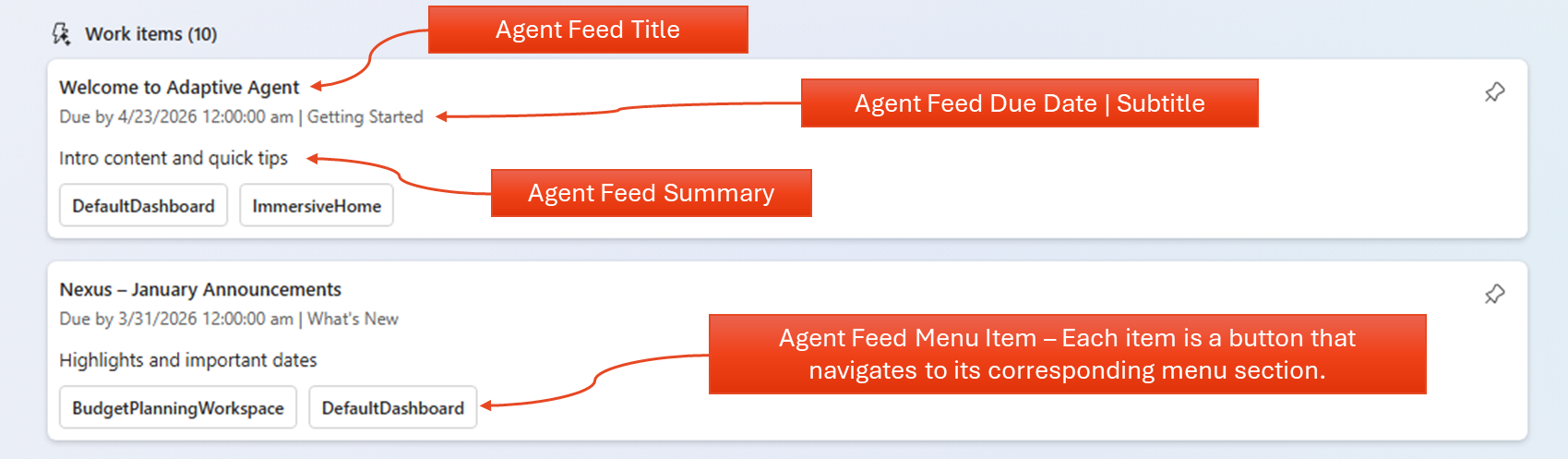
The example custom ExpenseCardProvider renders cards with the Agent feed title, the due date, subtitle, the agent feed summary, and multiple agent feed menu items, each appearing as a button that navigates accordingly.
Using hooks of the card in the provider
Card providers support three hooks:
- onLoad
- onExpand
- onSecure
Use these hooks to respond to the respective life cycle changes and interaction events.
Each hook executes within the logged‑in user context and must enforce security checks defined via PermissionsCheck.
The life cycle of feed items
A feed item moves through the following lifecycle stages, from creation until ready to display.
- A feed item is created or updated via Custom API.
- BaseRank is calculated from AIContext (Release 10.0.47).
- Records are stored in AgentFeed tables.
- Security is enforced using menu items.
- Cards are rendered in Immersive Home.
- Ranking is computed dynamically at runtime.
In this release, BaseRank uses a temporary deterministic mapping:
- High → 0.99
- Medium / default → 0.66
- Low → 0.33. [ERP Agent Feed | Word]
Feed item security model
- Security is delegated to application teams via PermissionsCheck.
- Menu items are validated during card rendering (onSecure).
- Dataverse security roles control access to virtual entities.
- No plugin steps are registered directly on virtual entities by design.
Endpoint - create feed item
POST {organizationUrl}/api/data/v9.2/msdyn_CreateAgentFeedItemCustomApi
Parameters in the namespace msdyn_AgentFeedCreateFeedItemCustomApi_....
Required parameters - create feed item
| Parameter | Type | Description |
|---|---|---|
| Title | String | Primary card title shown to users. It should be short, human-readable headline displayed as the primary card title. Example: "Supplier invoice overdue". |
| Subtitle | String | Secondary contextual line, providing immediate context to the title (phase, action, or focus) Example: "Invoice PD 1042 is past due by five days." |
| Correlationid | String | GUID for idempotency and tracing across systems. Example: "7c2a4f64 8d3b 4b8d 9c11 1af33bb234d7" |
| Summary | String | Summary is a concise description of the business situation or task the agent assists with. Plain text; aim for one or two sentences. |
| Status | String | Status is the current lifecycle state of the feed item. Allowed values: not started, in progress, completed, canceled |
| Permissionscheck | String | A comma-separated list of MenuItems used to drive security checks for the feed item and determine if action controls are rendered. Example: "PURCHTABLE,VENDTABLE,IMMERSIVEHOME" |
| cardprovider | Text | Card Provider is the identifier of the UI/component provider that renders the interactive card. Must match a registered provider name. Example: "DefaultAgentFeedCardProvider" |
| aicontext | String | JSON string with required keys TaskType, AgentSchema, RecordType, Priority, Category. Optional: BusinessImpact, SourceApp, WorkspaceLink. Must be valid JSON and provide user/app context. Example: json{"TaskType":"Approval","AgentSchema":"msdyn_expenseagent","RecordType":"VendInvoice","Priority":"High","Category":"Procurement","BusinessImpact":"Avoid late fees","SourceApp":"FinanceAndOperations","WorkspaceLink":"https://contoso.com/workspace/123"} |
Optional parameters - create feed item
| Parameter | Type | Description |
|---|---|---|
| duedate | DateTime | Expected completion date/time for the task. ISO 8601 format: YYYY-MM-DD or YYYY-MM-DDThh:mm:ssZ. Leave blank if not time-bound. Example: "026-01-12" |
| fnorecord | String | Allowing navigation, a JSON array referencing Finance and Operations entities. Example: json[{"RefRecId":5637144576,"RefTableId":"VendInvoiceTable"},{"RefRecId":5637144588,"RefTableId":"PurchTable"}] |
Example parameter payload - create feed item
{
  "msdyn_AgentFeedCreateFeedItemCustomApi_title": "Quarterly Budget Review",
  "msdyn_AgentFeedCreateFeedItemCustomApi_subtitle": "Review and finalize budget allocations",
  "msdyn_AgentFeedCreateFeedItemCustomApi_correlationid": "42d72a99-9786-4c28-8ab5-66a1451d27a5",
  "msdyn_AgentFeedCreateFeedItemCustomApi_summary": "Submitted expense reports require auditing for accuracy and compliance with company policy.",
  "msdyn_AgentFeedCreateFeedItemCustomApi_status": "Active",
  "msdyn_AgentFeedCreateFeedItemCustomApi_permissionscheck": "VENDTABLE, PURCHTABLE",
  "msdyn_AgentFeedCreateFeedItemCustomApi_cardprovider": "DefaultAgentFeedCardProvider",
  "msdyn_AgentFeedCreateFeedItemCustomApi_duedate": "2025-12-31",
  "msdyn_AgentFeedCreateFeedItemCustomApi_aicontext": "{\"TaskType\": \"Expense Validation\", \"AgentSchema\": \"msdyn_expenseagent\", \"RecordType\": \"Purchase Order\", \"Priority\": \"High\", \"Category\": \"Procurement\", \"BusinessImpact\": \"Payment Blocked\", \"User\": \"jane.smith@microsoft.com\", \"LastViewed\": \"2025-09-17T20:57:52Z\", \"SourceApp\": \"Excel\", \"WorkspaceLink\": \"aka.ms/workspace1\"}",
  "msdyn_AgentFeedCreateFeedItemCustomApi_fnorecord": "[{\"RefRecId\":5637150639,\"RefTableId\":\"CustInvoiceJour\"},{\"RefRecId\":5637150642,\"RefTableId\":\"CustInvoiceJour\"}]"
}
Output - create feed item
| Parameter | Type | Description |
|---|---|---|
| feeditemrecid | RecId / Decimal | Identifier for feed item |
| correlationid | String | GUID for idempotency and tracing across systems |
Example Output Payload
{
  "@odata.context": "[environment URL]/api/data/v9.2/$metadata#Microsoft.Dynamics.CRM.msdyn_AgentFeedCreateFeedItemCustomApiResponse",
  "msdyn_AgentFeedCreateFeedItemCustomApi_feeditemrecid": 1342198406,
  "msdyn_AgentFeedCreateFeedItemCustomApi_correlationid": "42d72a99-9786-4c28-8ab5-66a1451d27a5"
}
Endpoint - update feed item
POST {organizationUrl}/api/data/v9.2/msdyn_UpdateAgentFeedItemCustomApi
Parameters in the namespace msdyn_AgentFeedUpdateFeedItemCustomApi_....
Required parameters - update feed item
| Parameter | Type | Description |
|---|---|---|
| feeditemrecid | RecId / Decimal | Identifier for feed item |
Optional parameters - update feed item
| Parameter | Type |
|---|---|
| Title | String |
| Subtitle | String |
| Summary | String |
| Status | String |
| Permissionscheck | String |
| duedate | DateTime |
| aicontext | String |
Example parameter payload - update feed item
{
  "msdyn_AgentFeedUpdateFeedItemCustomApi_feeditemrecid": "5637170826",
  "msdyn_AgentFeedUpdateFeedItemCustomApi_title": "HkH Quarterly Budget Review",
  "msdyn_AgentFeedUpdateFeedItemCustomApi_subtitle": "HkH Review and finalize budget allocations",
  "msdyn_AgentFeedUpdateFeedItemCustomApi_status": "Completed",
  "msdyn_AgentFeedUpdateFeedItemCustomApi_baserank": 0.72,
  "msdyn_AgentFeedUpdateFeedItemCustomApi_permissionscheck": "DIMENSIONFOCUSTABLE",
  "msdyn_AgentFeedUpdateFeedItemCustomApi_duedate": "2026-01-31",
  "msdyn_AgentFeedUpdateFeedItemCustomApi_aicontext": "{'AgentSchema': 'msdyn_AgentFeedUpdateFeedItemCustomApi_expenseagent', 'RecordType': 'Purchase Order', 'Priority': 'High', 'Category': 'Procurement', 'BusinessImpact': 'Payment Blocked', 'SourceApp': 'Excel', 'WorkspaceLink': 'aka.ms/workspace1'}",
  "msdyn_AgentFeedUpdateFeedItemCustomApi_cardprovider": "AgentFeedDefaultCard"
}
Output - update feed item
| Parameter | Type | Description |
|---|---|---|
| feeditemrecid | RecId / Decimal | Identifier for feed item |
| correlationid | String | GUID for idempotency and tracing across systems |
Example output payload
{
  "@odata.context": "[environment URL]/api/data/v9.2/$metadata#Microsoft.Dynamics.CRM.msdyn_AgentFeedUpdateFeedItemCustomApiResponse",
  "msdyn_AgentFeedUpdateFeedItemCustomApi_correlationid": "42d72a99-9786-4c28-8ab5-66a1451d27a5",
  "msdyn_AgentFeedUpdateFeedItemCustomApi_feeditemrecid": "5637170826"
}
Virtual entity documentation - AgentFeedEntity
To retrieve list of AgentFeed data, use the standard (out-of-the-box) Virtual Entity API endpoints provided by Dataverse. {organizationUrl}/api/data/v9.2/mserp_agentfeedentities
To retrieve AgentFeed data for a single record, use the standard (out-of-the-box) Virtual Entity API endpoints provided by Dataverse. {organizationUrl}/api/data/v9.2/mserp_agentfeedentities(mserp_agentfeedentityid)
Table Schema of AgentFeedEntity
| Column Name | Type | Description |
|---|---|---|
| TimeToLive | UTC | Controls feed item expiration; helps with cleanup and relevance. Exact datetime. |
| Title | 250 - string | Human-readable label for the feed item |
| Summary | Memo | Brief description of the feed item’s content or intent |
| Subtitle | 250 - string | Subtitle is the secondary line providing immediate context to the title (phase, action, or focus) |
| AIContext | Memo | Natural language context for personalization and agent ranking. Example: json{"TaskType":"Approval","AgentSchema":"msdyn_expenseagent","RecordType":"VendInvoice","Priority":"High","Category":"Procurement","BusinessImpact":"Avoid late fees","SourceApp":"FinanceAndOperations","WorkspaceLink":"https://contoso.com/workspace/123"} |
| PermissionsCheck | Memo | PermissionsCheck is a comma-separated list of MenuItems used to drive security checks for the feed item and determine if action controls are rendered. Example: “PURCHTABLE,VENDTABLE,IMMERSIVEHOME” |
| CardProvider | 250 - string | Builder class or handler responsible for rendering the card. (Accepts friendly name and backend handles the correct name) Card Provider is the identifier of the UI/component provider that renders the interactive card. Must match a registered provider name. Example: “DefaultAgentFeedCardProvider” |
| FeedItemRecId | recId | recID of the record in FnO System Unique identifier for the feed item. |
| FeedItemID | Sysguidstring - string | Guid for virtual entity creation. Auto generated via CustomAPI |
| Status | ENUM | Status is the current lifecycle state of the feed item. Allowed values: not started, in progress, completed, canceled. |
| DueDate | UTC Date/time | Expected completion date/time for the task. ISO 8601 format: YYYY-MM-DD or YYYY-MM-DDThh:mm:ssZ. Blank if not time-bound. |
| CorrelationId | Sysguidstring - string | Correlation Id is a GUID used for idempotency and traceability across systems (logging, deduplication, retries). Populated by app teams on feed item creation |
| BaseRank | Decimal | The Priority tag in the AI Context field influences the value of BaseRank. Value definition: If Priority is "High," Base Rank = 0.99. If Priority is "Low," Base Rank = 0.33. For "Medium," blank, or any other value, the default Base Rank is 0.66. |