Note
Access to this page requires authorization. You can try signing in or changing directories.
Access to this page requires authorization. You can try changing directories.
Note
Community interest groups have now moved from Yammer to Microsoft Viva Engage. To join a Viva Engage community and take part in the latest discussions, fill out the Request access to Finance and Operations Viva Engage Community form and choose the community you want to join.
This article provides a brief overview of synchronous and asynchronous integration.
Synchronous services
Synchronous integrations are straightforward. Any entity that has Is public enabled is automatically available as a service application programming interface (API) at the following URL: https://[BaseURL]/Data/<<Data Entity Public Collection Name>>.
The OData protocol exposes endpoints where you can interact with all public-enabled entities.
Supported protocol: OData V4.0
Data format: JSON
Metadata URL: https://[BaseURL]/Data/$metadata
Data import/export and recurring integration scenarios
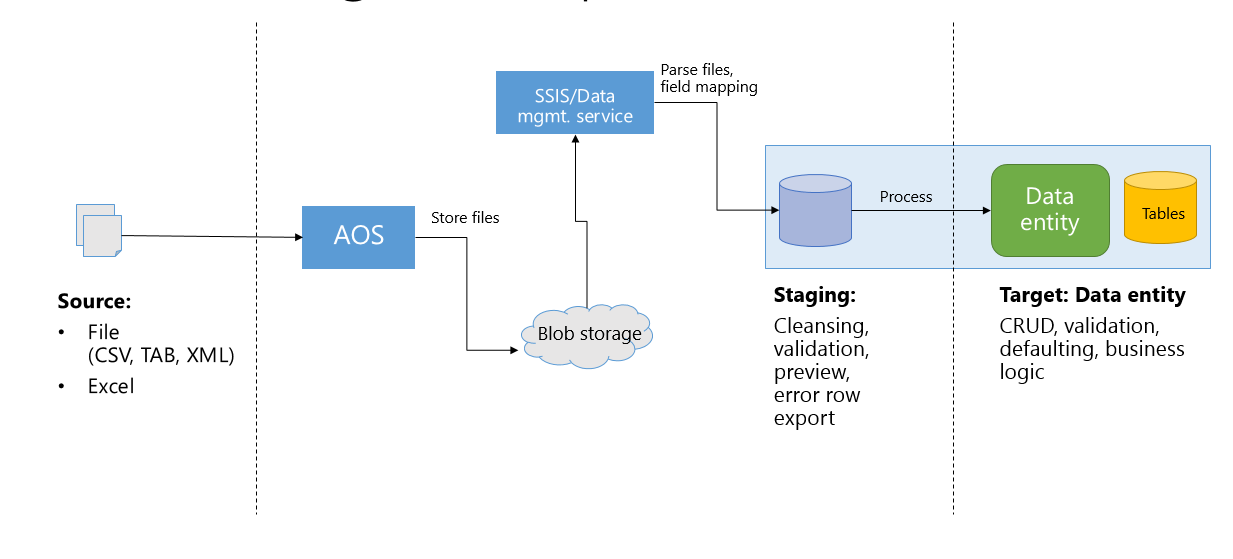
Integration through the data management platform provides more capabilities and higher throughput for inserting and extracting data through entities. Typically, data goes through three phases in this integration scenario:
- Source – These are inbound data files or messages in the queue. Typical data formats include CSV, XML, and tab-delimited.
- Staging – These are automatically generated tables that map closely to the data entity. When Data management enabled is true, staging tables are generated to provide intermediate storage. This lets the framework do high-volume file parsing, transformation, and some validations.
- Target – This is the data entity where data is imported.
The following diagram shows an inbound flow.
Known limitations in data import/export
When you import text files, string sizes are limited to 32,768 characters. If there's a string larger than this, the imported string is truncated. This is a limitation in the underlying implementation and is due to SQL Server Integration Services (SSIS).
If you need to import strings that are larger than 32,768 characters, we recommend that you use container entity fields.
For more information, watch the FastTrack Tech Talk video: Dynamics 365 for Operations – Tech Talk: Integration.