Note
Access to this page requires authorization. You can try signing in or changing directories.
Access to this page requires authorization. You can try changing directories.
Note
Community interest groups have now moved from Yammer to Microsoft Viva Engage. To join a Viva Engage community and take part in the latest discussions, fill out the Request access to Finance and Operations Viva Engage Community form and choose the community you want to join.
You can deploy finance and operations apps in the cloud or on-premises. Cloud deployments offer an ERP service that Microsoft fully manages, while on-premises deployments are deployed locally within a customer's data center.
Important
On-premises deployments aren't supported on any public cloud infrastructure, including Azure. However, they support running on Microsoft Azure Stack HCI and Microsoft Azure Stack Hub.
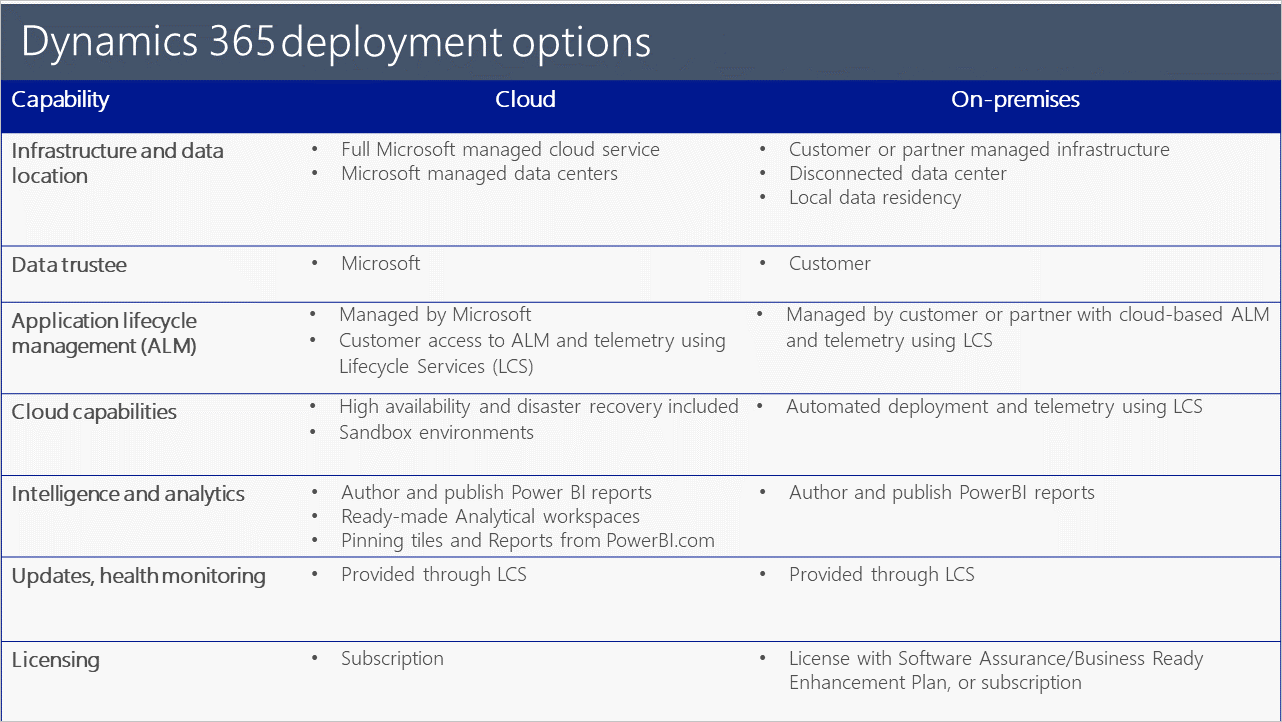
The following table provides a comparison of the capabilities provided by the two deployment options.
Why cloud
Cloud deployments provide a cloud service that you can easily scale up or down as needed, as well as data centers that Microsoft fully manages. You can significantly shorten the time spent implementing finance and operations apps, require fewer customizations, and lower the costs of IT hardware and infrastructure.
Cloud deployments include high availability, disaster recovery, sandbox environments, and application lifecycle management combined with cloud-based systems of intelligence, infrastructure, compute, and database services in a single offering. When needed, data failover in the cloud, automated deployment and continuous updates, and elastic compute capacity are available. A cloud deployment also provides data aggregation, financial reporting, and intelligence.
The cloud service provides customers with the greatest value, the broadest range of functionality, the best application lifecycle experience, the easiest and broadest integration with Microsoft Azure services, the best option for business insights and intelligence, and the most value for customers’ technology investments.
Why on-premises
By using an on-premises deployment, you can leverage your existing data center investments. You can also configure your enterprise preferences to meet the regulatory and compliance needs of your business, comply with data sovereignty rules in regions where there are no Azure Data Centers, or ensure business continuity in areas with limited public infrastructure.
Your business data and processes are disconnected from the cloud and are stored and run locally in your data center or your partner’s data center. Some connectivity is required for system management and updates, which Microsoft Dynamics Lifecycle Services, a cloud-based application lifecycle management service, enables. You might store customer data that relates to the configuration and application customization in the cloud.
For customers who choose to run finance and operations apps in their own data center, the on-premises deployment option has a similar user interface and application functionality as other deployment options. However, you must take on the following responsibilities:
- Stand up your own infrastructure.
- Configure your own high-availability and disaster recovery solutions.
- Stand up sandbox environments.
- Manage your infrastructure, including scheduling operating system updates.
The additional costs to deploy and manage these capabilities might lead to higher deployment costs and a greater total cost of ownership (TCO). Partners and customers can use Lifecycle Services to access tools for deploying the finance and operations apps and updates. Unlike the cloud deployment option, Advanced Analytics and Azure Machine Learning aren't included in the on-premises deployment option.