Note
Access to this page requires authorization. You can try signing in or changing directories.
Access to this page requires authorization. You can try changing directories.
This article describes the process of eliminating transactions for a fixed asset that you dispose of as scrap. The transaction types that you can eliminate include an asset's acquisition and accumulated depreciation transactions, along with other fixed asset transactions. When you eliminate these transactions, you affect balance sheet accounts such as acquisition adjustment, depreciation adjustment, revaluation, write-up, and write-down accounts.
| Transaction | Debit (Dr.) | Credit (Cr.) |
|---|---|---|
| Dr. Accumulated depreciation | X | |
| Cr. Fixed assets gain/loss | X | |
| Dr. Fixed assets gain/loss | X | |
| Cr. Fixed asset acquisition account | X | |
| Dr. Fixed assets gain/loss (net book value [NBV]) | X | |
| Cr. Fixed assets gain/loss (NBV) | X |
Note
Work closely with your company's chief financial officer (CFO) or controller to identify the correct accounts for each transaction type. Also verify that the disposal process and the transactions it generates update those accounts correctly.
Before you dispose of a fixed asset as scrap, create ledger accounts that are associated with:
- the asset's acquisition value
- depreciation for the current year
- depreciation for previous years
- the asset's NBV
The Fixed assets posting profile page lists the fixed asset transaction types. Go to Fixed assets > Setup > Fixed asset posting profiles, and then, on the Disposal FastTab, select Scrap in the field above the grid. The following illustration shows the list of fixed asset transaction types on the Fixed asset posting profiles page.

The disposal posting profile has two ways to account for the acquisition values during the disposal process:
The lump sum of all acquisitions that has an Acquisition value posting type.
Differentiate between acquisitions this year or prior years that have the Acquisitions this and Acquisition prior years posting types.
Acquisition value combines all acquisition transactions at all times into one transaction line. The disposal transaction posts it to the corresponding account for acquisition value in the posting profile. Use this option if you don't want to break down the acquisitions of this year and prior years. In this case, set the Post disposal transactions in detail option on the Fixed assets parameters page to No.
Acquisition this year and Acquisition prior years break down the acquisition values when different acquisitions are posted to the disposed asset this year or prior years. Set the Post disposal transactions in detail option on the Fixed assets parameters page to Yes, to validate against detailed posting types in the posting profile.
Note
You can’t define both options of posting types Acquisition value and Acquisition this year or Acquisition prior year in the disposal sale/scrap at the same time to ensure accurate disposal posting.
For the following example, you acquired a fixed asset on January 1, 2024, and you scrap it on March 31, 2025.
- Acquisition price: 24,000.00 US dollars (USD)
- Service life: Two years
- Depreciation method: Straight line service life
- Depreciation amount: 1,000.00 USD per month
Calculate the NBV of a fixed asset by using the following formula:
Net book value = Acquisition price – Depreciation
In this example, you acquired and depreciated the fixed asset for 15 months, from January 2024 through March 2025. Therefore, the asset's NBV is 9,000.00 USD (24,000.00 USD – 15,000.00 USD).

To create a disposal journal, go to Fixed assets > Journal entries > Fixed assets journal, on the Action Pane, select Lines. Select Disposal – scrap, and select a fixed asset ID. To fully dispose of the asset, don't enter a value in either the Debit field or the Credit field.

The fixed asset disposal scrap transaction changes the field values for the fixed asset book in the following ways:
- In the Balance section, the Status field is updated to Scrapped.
- In the Issue section, set the Disposal date field to the date when you scrap the asset.

The following illustration shows the fixed asset balance.

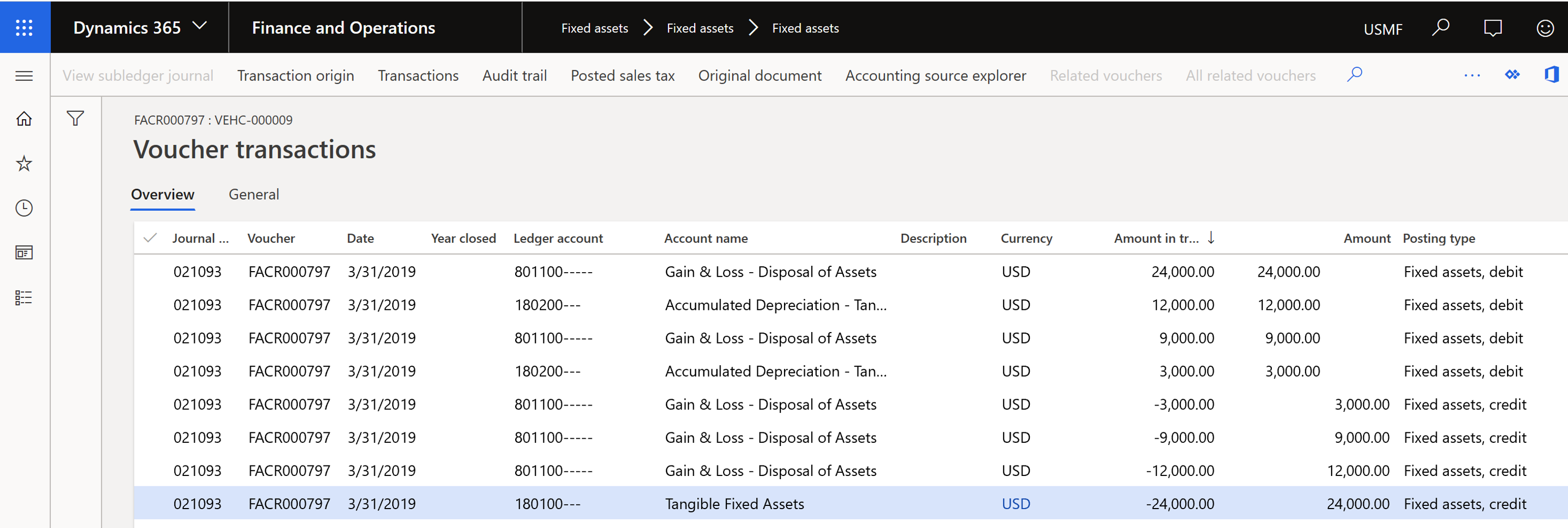
The following illustration shows the voucher that you post.