Note
Access to this page requires authorization. You can try signing in or changing directories.
Access to this page requires authorization. You can try changing directories.
Use the Fixed asset reporting currency adjustment feature to generate and post reporting currency adjustment entries on demand for historical fixed asset depreciation transactions where the Reporting currency amount isn't populated.
Rather than modifying historical depreciation transactions directly, the feature creates a dedicated depreciation adjustment transaction that backfills the missing reporting currency values while preserving the integrity and auditability of existing financial records. The result is a transparent and repeatable way to create, review, and post reporting currency corrections, helping ensure that fixed asset balances and net book values are accurately reflected in the correct currency.
Capabilities
The Fixed asset reporting currency adjustment feature gives you greater flexibility by enabling you to:
- Identify fixed assets that contain depreciation transactions with missing reporting currency amounts.
- Generate reporting currency adjustment proposals when needed, rather than relying on a one-time automatic correction process.
- Review proposed adjustments before posting.
- Post the adjustments through a controlled process that creates the required reporting currency correction entries in the system.
- Re-run the process as needed to validate and maintain reporting currency consistency.
After you enable the feature, access the Fixed asset reporting currency adjustment feature from the Fixed assets periodic tasks menu.
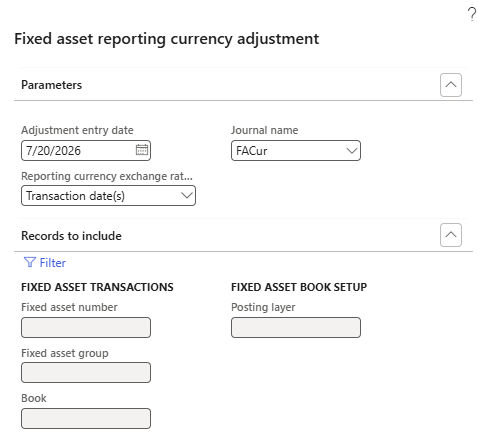
- Adjustment entry date - this field determines the transaction date that the process assigns to the generated adjustment journal lines. This date serves as the default posting date for the adjustment entries that the process creates.
- Journal name - specifies which fixed asset journal to use when you generate the adjustment proposal. You can configure a dedicated journal specifically for reporting currency adjustments or use an existing journal based on your accounting requirements.
- Reporting currency exchange rate source - determines how the system calculates reporting currency amounts during the adjustment process. Depending on your business requirements, choose to:
- Use the exchange rate associated with the original asset acquisition.
- Use exchange rates based on when the underlying fixed asset transactions were originally created. Choose how to align adjustment calculations with your reporting and audit requirements.
Filtering options
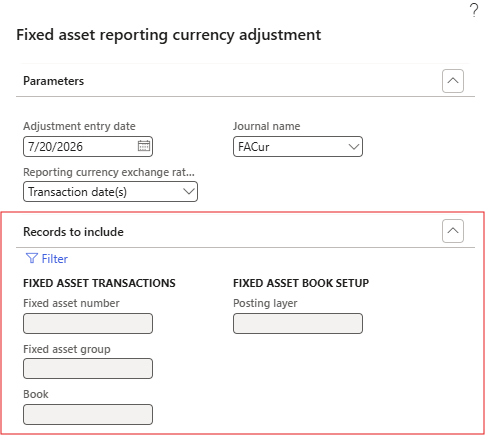
Standard filtering options are available to help you target only the records that require correction. You can generate adjustments for:
- Specific fixed assets
- Specific asset groups
- Specific asset books
You can process adjustments incrementally instead of correcting all assets at once.
Journal review and posting
When the process runs, the system creates an unposted adjustment journal, and these accounting entries aren't automatically posted.
After generation, follow these steps:
- Open the generated journal.
- Review the proposed reporting currency adjustments.
- Validate the journal.
- Post the journal.
This review step ensures that you maintain full control over the correction process before accounting entries are committed to the ledger.
Adjustment consolidation
The system summarizes adjustment entries rather than creating an individual adjustment line for every affected transaction. If an asset book contains numerous depreciation transactions that are missing reporting currency amounts, the system consolidates those corrections into a summarized adjustment entry for the asset book. This approach simplifies journal review while still ensuring that reporting currency balances are corrected.
For example, if an asset book contains 100 depreciation transactions with missing reporting currency amounts, the system generates a single summarized adjustment entry rather than 100 separate adjustment lines.