Note
Access to this page requires authorization. You can try signing in or changing directories.
Access to this page requires authorization. You can try changing directories.
Applies to: Dynamics 365 Finance, Dynamics 365 Guides, Dynamics 365 Human Resources, Dynamics 365 Project Operations, Dynamics 365 Supply Chain Management, Azure Service Bus, Azure Key Vault, Microsoft Entra ID
This reference architecture describes hybrid integration patterns for connecting Dynamics 365 finance and operations apps to on-premises systems through BizTalk Server and Azure services. Use these patterns to preserve existing integrations while enabling secure, scalable, and resilient cloud ERP dataflows.
Introduction
Integrating cloud-based Dynamics 365 with on-premises legacy systems (such as BizTalk Server or custom ERPs) requires a mix of real-time APIs, messaging, and batch techniques. Hybrid integration ensures data consistency and process flow across environments while addressing challenges of data synchronization, real-time messaging, event-driven communication, and secure connectivity between cloud and on-premises systems. In scenarios like linking a cloud ERP with an on-premises warehouse or payroll system, solutions often leverage BizTalk Server, Azure Service Bus queues, and Azure Logic Apps in tandem. The following list outlines key integration patterns, architectural approaches, best practices, and examples of inbound and outbound flows for Dynamics 365 in hybrid environments, tailored for enterprise architects and technical leaders.
Real-time API integration (synchronous)
Direct, immediate data exchange via REST or SOAP services (for example, OData or custom service). Ideal for low-latency, low-volume needs requiring instant consistency.
Asynchronous messaging integration
Decoupled message queues or middleware to buffer and relay data (for example, Azure Service Bus + BizTalk or Logic Apps). Supports reliable, near-real-time communication and higher volumes.
Event-driven integration
Trigger-based flows using Dynamics 365 business events or change events. External systems react to events via Azure Event Grid, Service Bus, or Logic Apps for real-time updates.
Batch or recurring data integration
Scheduled bulk data transfers using the Data Management Framework (DMF). Suitable for large volumes, periodic sync (nightly jobs, master data loads) via files or packages.
Architecture
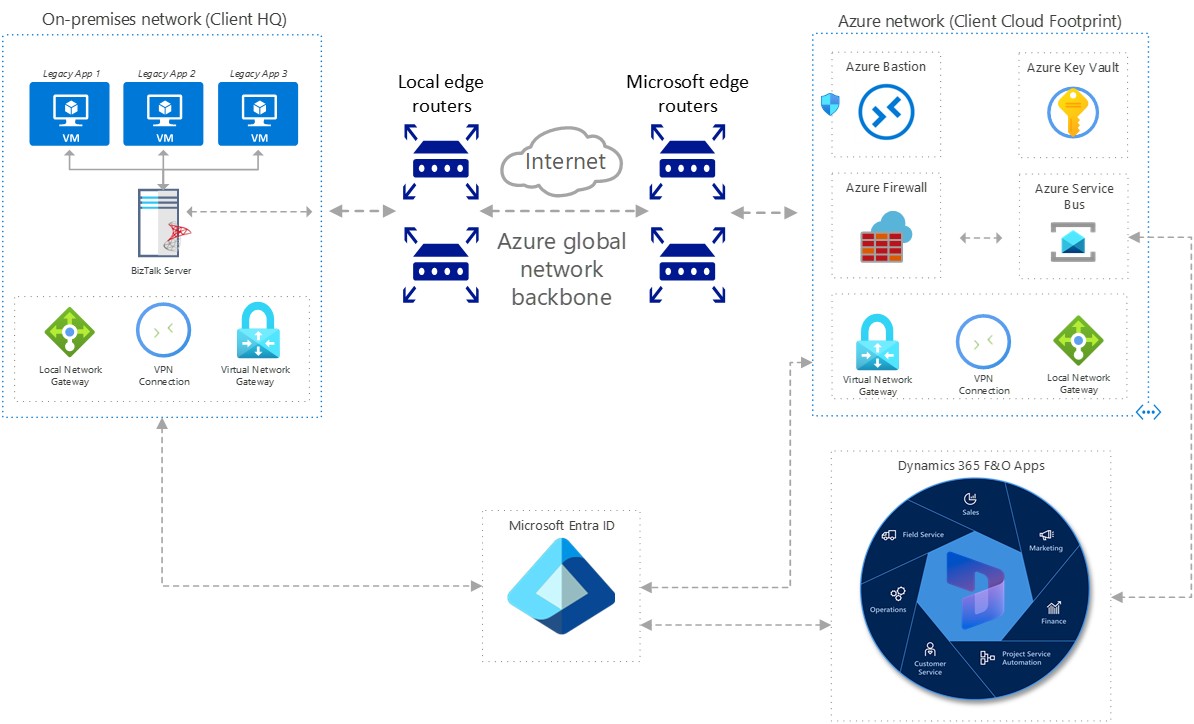
The following diagram illustrates the architecture for the solution.
Dataflow
In this architecture, data flows both ways.
Inbound integration flow
First, let's look at the inbound dataflow.
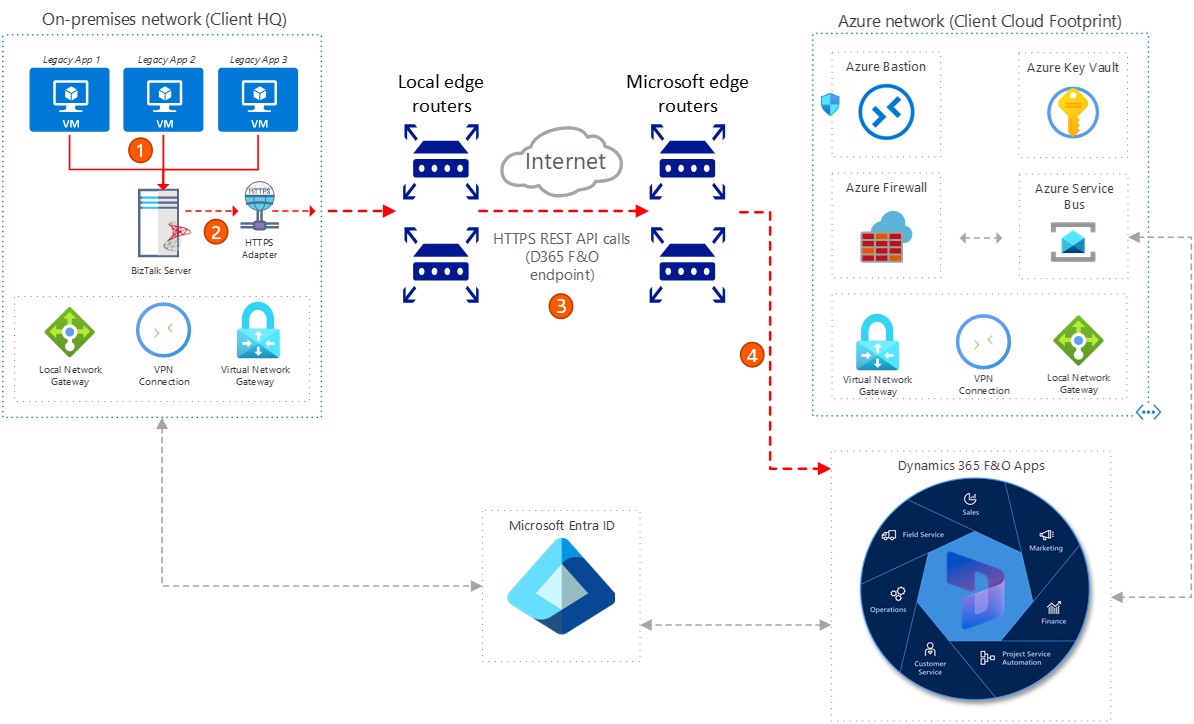
On-premises legacy subsystems push new data into BizTalk Server through existing upstream interface processing logic.
BizTalk Server transforms the data into JSON request body format and initiates a HTTPS POST REST API service call to the Dynamics 365 custom service endpoint.
The HTTPS REST API service call goes through the public network and is secured through OAuth 2.0 client credentials authorization flow, facilitated by Microsoft Entra ID as the Identity and Access Management (IAM) service.
The target Dynamics 365 solution receives the JSON request body payload through the inbound integration call, processes the record by reusing existing legacy processing logic (lifted and shifted from Dynamics AX 2012 to Dynamics 365), and returns a JSON response body to BizTalk Server.
Outbound integration flow
Next, we look at the outbound data flow.
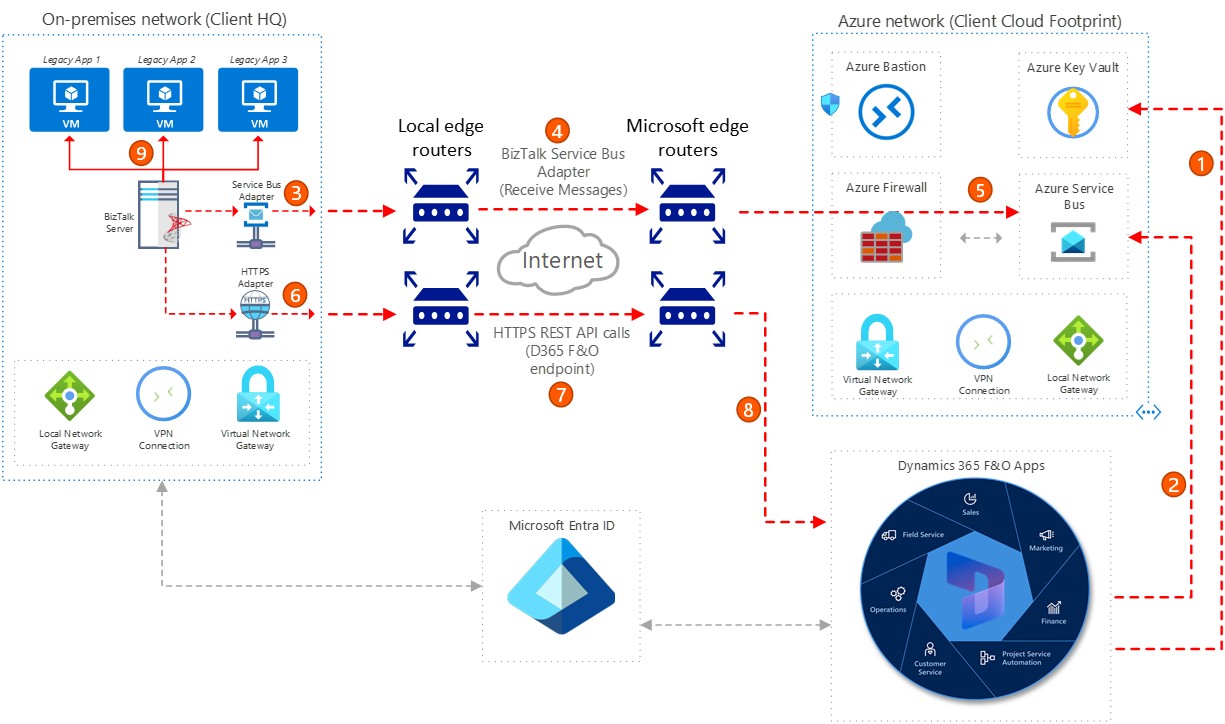
When new data is available to transfer to the on-premises legacy subsystems, Dynamics 365 initiates a secure HTTPS connection to the Azure Key Vault to retrieve the connection string for the Azure Service Bus Queue.
Dynamics 365 establishes a secure connection to the Azure Service Bus Queue and creates a message to notify the subscriber (BizTalk Server) that new data is available for retrieval.
BizTalk Server Service Bus Adapter picks up the new messages from the Azure Service Bus Queue based on the subscription event trigger and polling mechanism.
The connection between BizTalk Server and Azure Service Bus over the public internet is secured by using the Service Bus Adapter integration protocol.
A Receive and Delete Message (Destructive Read) is processed as a handshake and acknowledgement from the subscriber (BizTalk Server).
BizTalk Server creates a data retrieval request in the form of a JSON request body and initiates a HTTPS POST REST API call to the Dynamics 365 custom service endpoint.
The HTTPS REST API service call over the public internet is secured through OAuth 2.0 client credentials authorization flow, facilitated by Microsoft Entra ID as the IAM service.
Dynamics 365 receives and processes the JSON data retrieval request body, gathers the data, packs it into a JSON response body, and sends it back to BizTalk Server.
BizTalk Server redistributes the data to the legacy subsystems by using the existing downstream integration processing logic.
Components
The reference architecture uses the following components:
Dynamics 365 is the cloud-based replacement ERP system for financial and operational processes.
BizTalk Server (On-Premises) acts as the legacy middleware used for interlacing with on-premises legacy subsystems.
Azure Service Bus is the cloud-based messaging service used for asynchronous communication between Dynamics 365 apps and BizTalk Server.
Azure Key Vault is configured as a secure storage and retrieval of secrets such as Service Bus connection strings and app registration secrets.
Microsoft Entra ID (formerly known as Azure Active Directory) acts as the identity management for securing API calls via OAuth 2.0 client credentials authorization flow integration requirements.
Scenario details
Business problem and motivation: This reference architecture is based on an enterprise transitioning from a legacy Dynamics AX 2012 system (nearing end of life) to Dynamics 365 in the cloud. The organization saw an opportunity to modernize its ERP platform to unlock new business capabilities and reduce operational costs by moving to a cloud-based solution. However, most of the company’s critical subsystems and data services still resided on-premises (in the corporate data center). This situation created a need for a hybrid integration approach to securely bridge Dynamics 365 finance and operations apps with on-premises applications in near real-time or asynchronous pattern depending on specific data flows. The primary driver was to avoid major disruptions and minimize redevelopment: the team aimed to preserve existing integrations and investments – especially the Microsoft BizTalk Server middleware that coordinated data flows – rather than rebuild those integrations from scratch. In the legacy solution, BizTalk Server interfaced with Dynamics AX 2012 (legacy ERP) via synchronous SOAP web services for inbound data and MSMQ-based messaging for outbound data. The challenge was to replicate and modernize these patterns by using cloud technology, enabling Dynamics 365 to connect with on-prem systems seamlessly and securely.
Solution overview and services used: To solve this problem, the organization implemented a hybrid integration architecture that connects Dynamics 365 (cloud) with legacy subsystems via the existing on-premises BizTalk Server and new Azure services. The solution reuses BizTalk for its reliable integration workflows and introduces Microsoft Azure components to handle cloud connectivity.
Potential use cases
This solution was created for a wholesale parts distribution business serving retailers, repair shops, and commercial customers. As the primary driver for this hybrid integration architecture pattern is to bridge the on-premises and cloud ecosystems, it can also be applied to any industries that face similar challenges or partake in comparable cloud transformation journeys. Any organization can use this solution when considering employing a mix of integration patterns to handle the spectrum of enterprise integration needs.
Considerations
These considerations help you implement a solution that includes Dynamics 365. Learn more at Dynamics 365 guidance documentation:
Security and Identity Management: Ensure all integration endpoints are secured by using Microsoft Entra ID for authentication and OAuth 2.0 for token-based access. Store sensitive credentials like Service Bus connection strings in Azure Key Vault to maintain compliance and reduce risk.
Rebuilding Instead of Reusing: Rewriting existing BizTalk interfaces or data contracts unnecessarily increases complexity and cost. Reuse proven integration logic where possible to reduce rework and accelerate deployment.
Scalable and Resilient Architecture: Use Azure Service Bus for asynchronous, event-driven communication to decouple systems and improve reliability. Design for scalability and fault tolerance by implementing retry policies, dead-letter queues, and monitoring for integration health.
Cost optimization
One of the primary goals and outcomes for the organization that is embarking on this migration project is to modernize their ERP platform and infrastructure while preserving past investments and processes. They want to take advantage of the newer capabilities in Dynamics 365 and One Version service updates, and at the same time avoid a costly, risky rebuild of all their integration points. They reduce operational costs by moving to a cloud-based ERP solution with Dynamics 365 that reduces their on-premises server footprint and takes advantage of the efficiencies of Microsoft's cloud platform. The hybrid integration approach also lowers development costs by reusing existing BizTalk Server processes and existing Dynamics AX 2012 developed data contracts and integration processing logics (minimizing custom redevelopment).
Related resources
Review the following related architecture guides, solutions, and other guidance content:
TechTalk: Integration patterns for Dynamics 365 finance and operations applications
Integration between Dynamics 365 finance and operations apps and third-party services
Dynamics 365 finance and operations apps - service endpoints overview
Contributors
Microsoft maintains this article. The following contributors originally wrote the article.
Principal author:
- Jason Lee | Dynamics 365 Enterprise Architect