Note
Access to this page requires authorization. You can try signing in or changing directories.
Access to this page requires authorization. You can try changing directories.
Applies to: Dynamics 365 Finance, Dynamics 365 Supply Chain Management, Power Automate
This solution combines Dynamics 365 Finance, Dynamics 365 Supply Chain Management, and Power Automate with standard Dynamics 365 workflow functionality to support approvals for purchase requisitions and supplier invoices when an organization relies on an external project management application. A SQL table is populated by the external application with the dynamic approver reference information for issuing detailed approval requests via the Standard approvals connector that manages the notifications in Teams and Outlook. This architecture isn't specific to any industry but is suitable for organizations that have established external applications, where replicating static approvals (groups or security roles) in Dynamics 365 standard workflow isn't possible.
Introduction
In implementations with Dynamics 365 Finance and Supply Chain Management, organizations frequently have established processes for approvals in relation to expenditure. This process often exists in an external custom application that evolved into exactly what the customer wants, with no real control over changes and processes. This situation makes it harder for an organization to make amendments to the ‘to-be’ process. Furthermore, interruption of this process, particularly if the number of users is large and the change management capability isn't available within the organization, can cause real issues for business continuity and adoption. The desire to maintain the status quo can impact project implementations being able to leverage the standard, often more robust, process in the Dynamics 365 Finance and Supply Chain Management application. Use this architecture approach in circumstances where the organization isn't ready, for whatever reason, to restructure the approvals process that most of the organization is used to. It's evident that at the start of the project when the scope of delivery has been identified that there are open questions about approvals. Options provided to the organization might include the ability to complete some approvals in the Dynamics 365 Finance and Dynamics 365 Supply Chain Management application and then complete others in the external application and integrate the records. This approach proves more difficult than the approval architecture approach, purely because the finance control around dimensions and postings is controlled within the Dynamics 365 Finance application and would need to be replicated in the external system.
For the architecture approach, you need the cooperation of any external system developers or administrators to expose the information required from the application. The partner and customer solution architects must be aligned for process and configuration. This architecture doesn't replace the need for change management and requires the engagement of the customers’ change management and training team to ensure effective communication and support for those using it. By default, project managers need to be involved in the scheduling of the work and planning of the release, training and support of the process by the business and partner.
Architecture
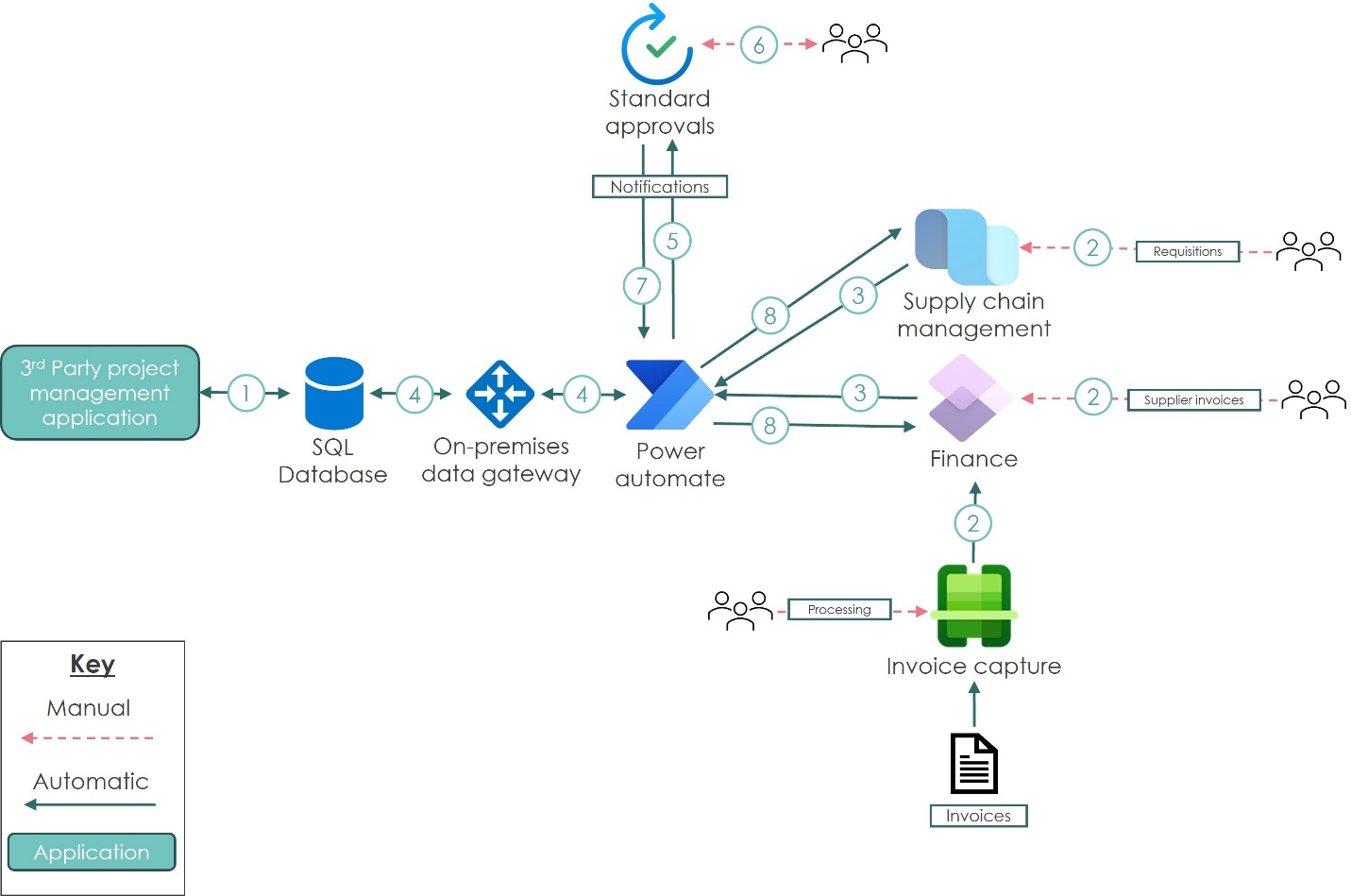
The following diagram illustrates the architecture for the solution.
Dataflow
A SQL database and database table that updates periodically with projects and associated approvers, levels, and email addresses.
Users process invoices through Invoice capture and directly into Dynamics 365 Finance and Dynamics 365 Supply Chain Management, purchase requisitions, and supplier invoice records.
A business event triggered by
Workflow WorkItem - Approveso that it triggers only for specific scenarios. Architecturally, theApprovalwork item in the standard workflow in Dynamics 365 must be the only one in the flow to avoid multiple business event triggers. This requirement results in the use of sub-workflows to minimize unnecessary triggers and use standard business events.Power Automate retrieves the approvers based on the level required from the SQL table through the on-premises data gateway.
Power Automate processes the line in Dataverse added for the approval, leveraging the connector that issues the notifications to Teams and Outlook, monitors the responses, and progresses them if they take action in either application.
Dataverse user record retrieved based on email addresses found and notifications issued and actioned, which is then processed by standard approvals.
Power Automate takes and records confirmation of the processing decision.
The action taken from the approval is passed back to Dynamics 365 to complete the workflow action.
Components
The reference architecture uses the following components:
Dynamics 365 Finance: Process supplier invoices and configure the standard workflow trigger for business events.
Invoice capture: Handle inbound invoice processing before invoices reach Dynamics 365 Finance.
Dynamics 365 Supply Chain Management: Originate purchases for both project and non-project expenditure.
Power Automate: Hold conditional decisions and criteria based on the required approval levels. Receive the initial request and process the response back into Dynamics 365 Finance.
On-premises gateway: Authenticate Power Automate to retrieve the information required for the approval notifications.
Standard approvals: Manage the approval notifications via Teams and Outlook, then process the responses back to the entry in Dataverse.
External project management application: Store users (email addresses) and project IDs for periodic population into the SQL table. Power Automate flow uses this table as the point of reference to retrieve users for notification through standard approvals.
Scenario details
During the project implementation, the customer underestimated the level of business change. The customer relied on the current way of working to keep business activities uninterrupted. This reliance was critical to the success of the project landing well in the organization. The main complication for managing the business change was that the organization had a well-established, loosely controlled application that did everything required, except give visibility to the finance team of open purchases (commitments).
The desire to use Dynamics 365 Supply Chain Management for creating purchase requisitions directly in the application was hindered significantly by the project-related purchases, which are the majority, and the unstructured nature of the approvers allocated to the projects needed during the approval process. The same issue was present for the approval of supplier invoices in relation to project-related expenditure. Dynamics 365 Finance and Dynamics 365 Supply Chain Management standard workflow and business events act as a trigger for Power Automate, which orchestrates the detailed conditional approval flow. The conditional approval uses values within the financial dimensions on the record to determine who needs to be retrieved for the approval. By using the on-premises gateway to access a SQL table of the projects in the external project management application with users and approval levels, the Standard approvals process retrieves the Dataverse users based on the unique email address record. The approvals are presented to the users in Outlook and Teams for processing, with the outcome of the process passed back to Power Automate for final update in Dynamics 365 Finance and Dynamics 365 Supply Chain Management.
Potential use cases
This solution was created for a multi-discipline property and construction consultancy organization. It can also be applied to industries like manufacturing, healthcare, energy, telecommunications, education, automotive, nonprofit, game, media, travel, and facilities. It can be used by any organization that wants the robust functionality of Dynamics 365 Finance and D365 Supply Chain Management but doesn't have the capability to rebuild static approval groups and conditions within the application without significant business change management.
You can use this solution to:
Mitigate the volume of business change required where there are a disproportionate number of users that aren't used to working within a finance application.
Remove the need to replace or integrate directly with external applications that are critical to business-as-usual activity.
Enable flexibility with the project implementation, and ensure robust finance processes aren't compromised based on the wider business change limitations.
Ensure that future proofing of the solution allows for the gradual transition of users from the external application, while supporting users that didn't yet transition.
Considerations
These considerations help you implement a solution that includes Dynamics 365. Learn more at Dynamics 365 guidance documentation.
Cost optimization
Cost optimization is about finding ways to reduce unnecessary expenses and improve operational efficiencies. Learn more at Overview of the cost optimization pillar.
The following table provides an overview of the involved products.
| Product and license type | Description |
|---|---|
| Power Automate (per user or per process) | Required for SQL integration, gateway use, Dynamics 365 connectors, and automation flows. |
| Dynamics 365 Finance | For Finance team users and Finance workflows. |
| Dynamics 365 Supply Chain Management | For Supply Chain Management users and their workflows. |
| Dynamics 365 Team member licenses | For requisition and invoice approvals that happen directly in the Dynamics 365 Finance and Supply Chain Management application. |
The requirements map to the diagram as outlined in the following list:
At point 2 in the diagram, the processing (approval) directly in the Dynamics 365 Finance or Dynamics 365 Supply Chain Management part of the application requires a Team member license for processing. The creation of invoices directly requires a full license.
A service account processes the triggers and subsequent updates back into Dynamics 365 Finance and Dynamics 365 Supply Chain Management at points 3 and 8 in the diagram requires a Power Automate Premium license.
For the users approving notifications at point 6 in the architecture diagram, as the approvals occur within Teams or Outlook, no license is required.
Implementing Dynamics 365 and Power Automate for purchase requisitions and supplier invoices with external project management application
For this architecture, it's assumed that your organization has a solution with Dynamics 365 finance and operations applications and Power Platform. The following steps focus on the additional components required to support the implementation of the reference architecture.
Purchase requisition header workflow, with sub workflow configuration for triggering business events and activation of the workflow element in business events.
Supplier invoice header workflow, with sub workflow configuration for triggering business events and activation of the workflow element in business events.
Configure the automated cloud flow in Power Automate to run approval conditional decisions based on information retrieved from the SQL database populated by the external project management application.
Manage and monitor the approvals in Power Automate and Standard approvals.
Related resources
Review the following related architecture guides, solutions, and other guidance content:
Contributors
Microsoft maintains this article. The following contributors originally wrote the article.
Principal author:
- Lorna Goodman| Solution Architect
Other contributors:
Anthony Blake| Technical Architect
Raf Aziz| Finance Functional Consultant