Note
Access to this page requires authorization. You can try signing in or changing directories.
Access to this page requires authorization. You can try changing directories.
This article provides guidance on the different deployment options available for the voice channel.
Traditional contact center deployment
Traditional contact centers require complex infrastructure across telephony, media, networking, and compute, often involving multiple vendors and environments. This leads to challenges with compatibility, maintenance, and scalability.
Microsoft Dynamics 365 Contact Center offers a simplified cloud-native solution with minimal infrastructure overhead. It supports rapid deployment, centralized voice and chat integration, and advanced capabilities like IVR/ACD flows, web-based softphones, and AI tools (ASR, TTS, NLP) via Microsoft Copilot Studio.

Inbound calling deployment approaches
Bring your own telephony: Azure Communication Services-based direct routing or Teams direct routing
Connect SIP trunks via Azure Communication Services or Microsoft Teams direct routing.
Benefits of the approach
Reuse existing carriers and numbers
Control call flows, branding
Preserves SIP context (caller ID, intent, auth tokens)
Microsoft SLA
Microsoft responsibility starts after call enters Azure Communication Services or Teams. If the call is transferred back to your Session Border Controller (SBC), SIP context, and call quality become your responsibility.
Best for
SIP context-dependent workflows (blind transfers, callback workflows, or handoffs to non-Microsoft systems—where losing SIP context can break continuity and degrade customer experience).
Organizations with existing telephony investments.

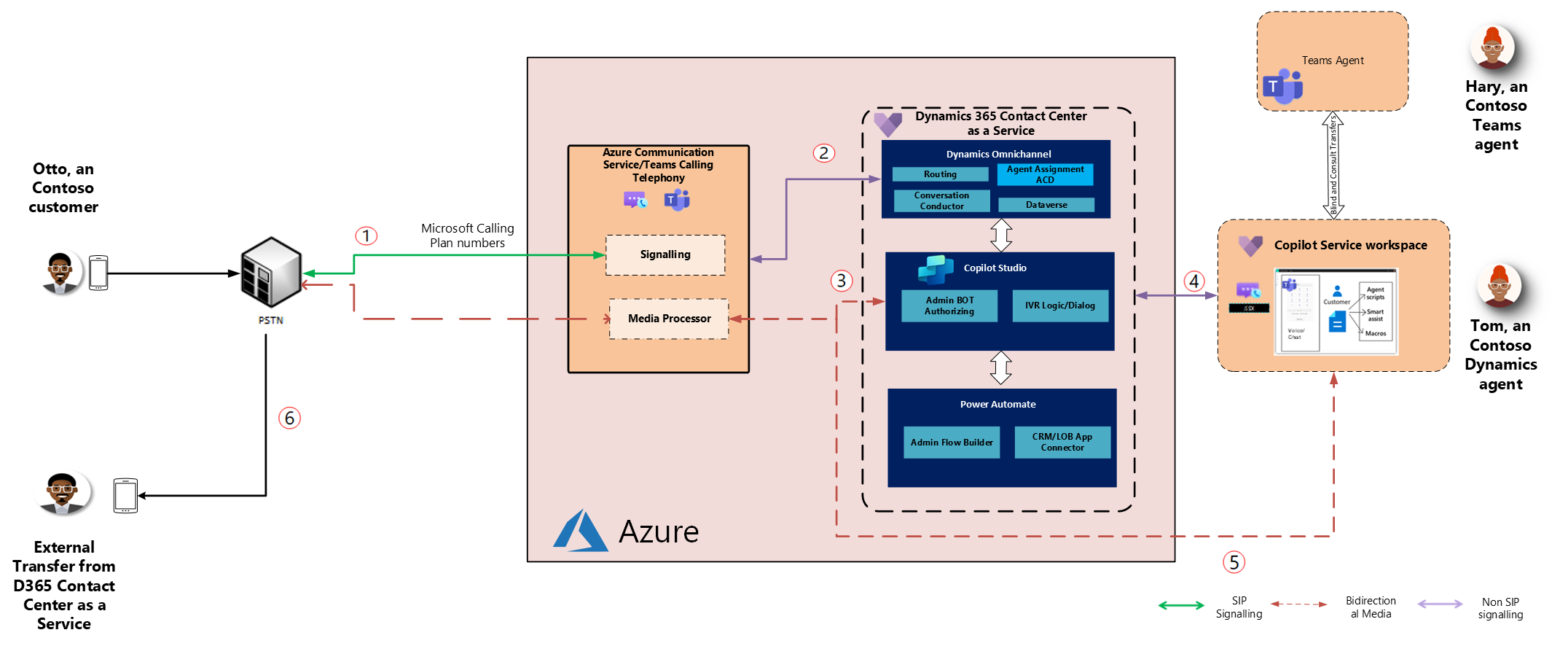
Microsoft calling plan numbers with Azure Communication Services direct offer or Teams calling plan
Use Microsoft-managed PSTN numbers via Azure Communication Services direct offer or Teams.
Benefits of the approach
Simplified provisioning, billing, and compliance
Global reach with SLA-backed reliability
Integrated with Dynamics 365 features (routing, analytics, transcription)
Consideration
SIP context (caller ID, intent, authentication tokens) might be stripped by PSTN carriers outside Microsoft network.
Best for
Cloud-first businesses
Use cases not requiring full SIP metadata
Outbound contact center deployment
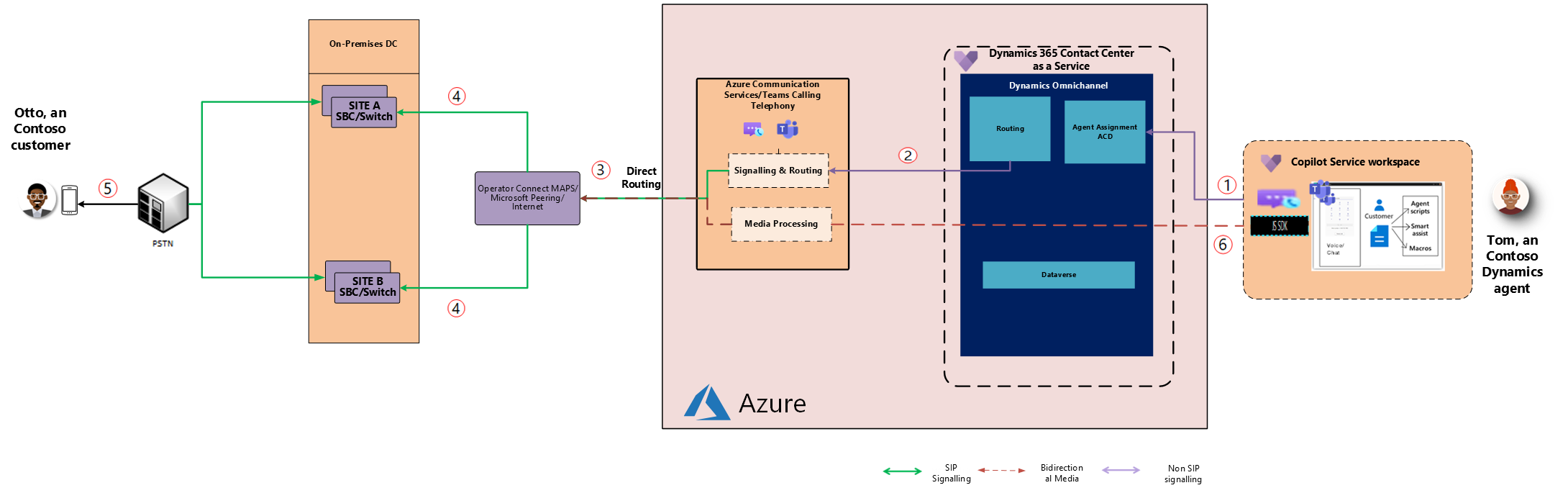
Bring your own telephony for outbound voice
Route outbound calls using existing telephony via Azure Communication Services or Teams.
Benefits of the approach
Customizable campaign routing
SIP metadata preservation (caller ID, context)
Integration with existing monitoring and compliance tools
Microsoft SLA
Microsoft doesn't have an SLA. You manage call quality outside Microsoft boundary.
Microsoft calling plan numbers for outbound voice
Use Microsoft-provided numbers for agent or automated outbound calls.
Benefits of the approach
Easy provisioning, global scale
Enterprise reliability
D365 integration for campaign automation
Consideration
SIP context might be lost when calls are handed off through PSTN networks to non-Microsoft platforms.

Related information
Introduction to the voice channel
Manage phone numbers in Dynamics 365 Contact Center