Note
Access to this page requires authorization. You can try signing in or changing directories.
Access to this page requires authorization. You can try changing directories.
Important
This content is archived and is not being updated. For the latest documentation, go to Welcome to Dynamics 365 Customer Service. For the latest release plans, go to Dynamics 365, Power Platform, and Cloud for Industry release plans.
| Enabled for | Public preview | Early access | General availability |
|---|---|---|---|
| Users by admins, makers, or analysts |  Dec 20, 2024
 |
- | - |
Business value
The performance of Copilot is highly correlated to the quality of knowledge it can access. This feature enables customers to integrate with various knowledge management platforms without having to ingest the content into the Dynamics 365 knowledge base. The expanded knowledge coverage improves Copilot response quality, thereby the agents' experience and productivity.
Feature details
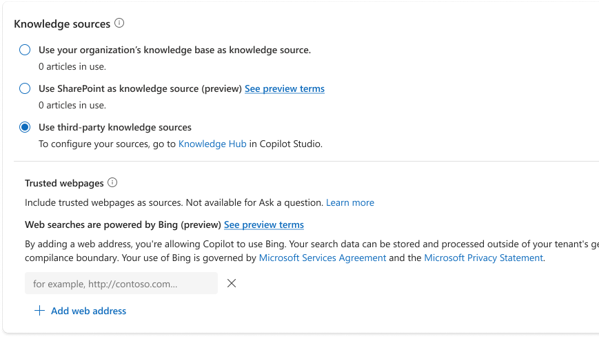
Leveraging Knowledge Hub in Microsoft Copilot Studio, Dynamics 365 Customer Service will now enable admins to configure knowledge management platforms beyond the Dynamics 365 knowledge base to further enhance the relevancy and usefulness of Copilot responses.
This cohesive, intuitive, and high-performing solution improves the customers’ Copilot experience by searching, consolidating, and summarizing knowledge from multiple sources. To enable it, administrators can choose Knowledge Hub as a knowledge source option in the Customer Service admin center and follow the instructions in the Knowledge Hub to configure the knowledge sources of their choice. Once configured, content from the newly set-up knowledge sources will be used to power the Copilot experience in Dynamics 365 Customer Service seamlessly.
Additional resources
Enable knowledge sources from Microsoft Copilot Studio (docs)