Note
Access to this page requires authorization. You can try signing in or changing directories.
Access to this page requires authorization. You can try changing directories.
| Enabled for | Public preview | General availability |
|---|---|---|
| Users, automatically | - |  Apr 1, 2025
 |
Business value
Businesses deal with multiple customer and vendor contacts who are responsible for different areas of operation. For example, accountants, purchasers, and warehouse staff. Because their interests typically differ, you'll probably want to generate and send different types of documents to them. You can now save time when you send documents to different customer or vendor contacts by setting up specific contacts to use with specific documents. For example, send service invoices to accountant contacts and service orders to your customers' purchasers.
Feature details
You can now populate the Document Layouts page for vendors and customers based on settings on the Report Selection page. To send specific documents to specific company contacts, choose the company contacts to use for specific document layouts.
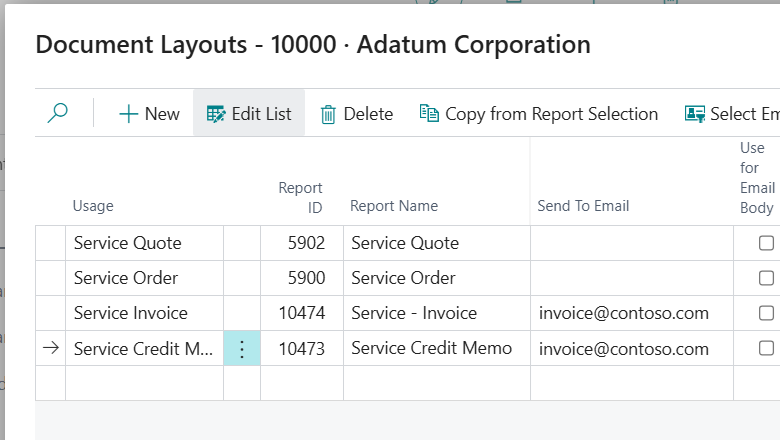
The Document Layouts page for a customer now contains additional usage options for service quotes, orders, invoices, and credit memos.
We'd like to thank our community for your valuable contributions to Microsoft’s open source BusinessCentralApps repo on GitHub.
Tell us what you think
Help us improve Dynamics 365 Business Central by discussing ideas, providing suggestions, and giving feedback. Use the forum at https://aka.ms/bcideas.