Note
Access to this page requires authorization. You can try signing in or changing directories.
Access to this page requires authorization. You can try changing directories.
Define how often the Sales Opportunity Agent refreshes its research data to provide up-to-date insights on opportunities.
Follow these steps:
Under Advanced, select Refresh frequency.
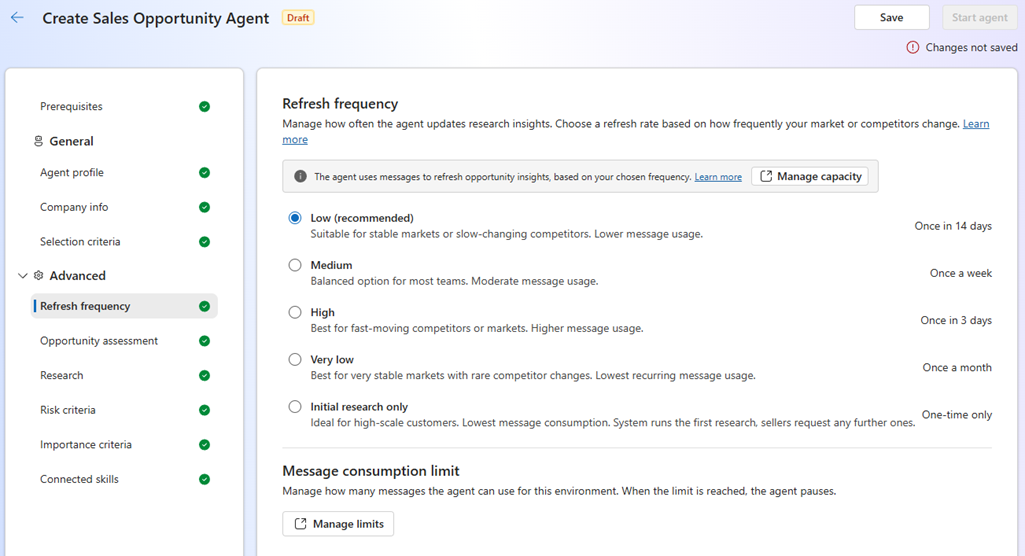
In the Refresh frequency page, specify how often the agent should refresh its research data.
Refresh frequency Schedule When to use Low (recommended) Every 14 days When your business doesn't need frequent updates and wants to save capacity. This option consumes the least capacity. High Every three days When your business always needs the latest information. This option consumes more capacity. Medium Once a week When your business needs regular updates but doesn't require daily insights. This option balances performance and data accuracy. Very low Every 30 days When your business rarely needs updates and wants to minimize capacity usage. This option consumes very little capacity. Initial research only When the agent is first assigned to an opportunity. Sellers can request additional research on demand. For stable markets with minimal changes in competitive information. This option consumes the least capacity because the agent conducts research only once per opportunity. To limit the capacity the agent can use, in the Manage consumption limit section, select Manage limits. The Copilot Studio page opens in a new tab. Open the Sales Opportunity Agent for the environment to set up a usage limit. Rate-limiting configuration controls message usage per agent and sets monthly consumption limits for the agents. Set up a message limit at the agent level and enable the Stop Usage option to automatically stop the agent once the configured token or message threshold is exceeded.
When the message limit is reached, the Sales Opportunity Agent automatically pauses and prevents any further usage. Processing resumes once you increase the threshold or when message capacity is available in the next usage cycle. To learn more about managing consumption limits, see Manage monthly consumption limits for Copilot Studio agents.
How the agent processes records
The Sales Opportunity Agent processes opportunities based on the defined selection criteria and refresh frequency. Here's how it works:
- The agent selects opportunities that meet the defined selection criteria and prioritizes them using factors such as estimated revenue, expected close date, and research freshness.
- Refresh frequency determines how often the agent updates its research data and re-evaluates opportunity priority. Opportunity prioritization is dynamic and can change with each refresh based on the latest data. For example:
- When set to High, the agent refreshes its research every three days and might reprioritize opportunities based on the latest information.
- When set to Initial research only, the agent doesn't refresh its research after the initial run, so prioritization stays based on the original data.
- The agent processes up to a maximum number of opportunities per refresh cycle, which varies by region. If more opportunities match the criteria than the refresh cycle allows, the agent prioritizes and researches the highest-ranked opportunities first. To know your daily processing capacity based on your refresh frequency, see the Daily refresh limit section in the Selection criteria settings page.
- The agent defers any remaining opportunities that exceed the refresh cycle limit. These opportunities might become eligible for processing during the next refresh cycle depending on its priority. For example, if 10,000 opportunities match the criteria and refresh cycle is set to High, the agent processes the top 6,480 opportunities based on prioritization factors in three days. The remaining 3,520 opportunities are deferred and might be processed in the next refresh cycle based on their priority ranking at that time including the opportunities that are processed in the current cycle.
Next step
Configure importance and risk assessment.