Note
Access to this page requires authorization. You can try signing in or changing directories.
Access to this page requires authorization. You can try changing directories.
The Sales Development agent uses a modular, cloud-based architecture that combines enterprise data, AI reasoning, business workflows, and governance controls to support seller engagement scenarios.
The architecture is organized into four core layers:
- Data ingestion and grounding services
- Orchestration and reasoning components
- Business logic and playbook execution services
- Integrated action systems connected to sales and productivity platforms
At runtime, Sales Development agent retrieves and grounds responses by using authorized business data and customer signals. It then applies organizational playbooks and operational guidelines, and uses AI models to generate recommendations, insights, and next-best actions. Orchestration services coordinate workflows across connected systems while enforcing security, privacy, compliance, and responsible AI controls.
The architecture is designed for extensibility and integration. Organizations can connect Sales Development agent to CRM systems, communication channels, productivity tools, and custom business processes. Built-in observability, governance, and guardrail mechanisms support reliable operation, policy adherence, and continuous improvement over time.
This layered design enables Sales Development agent to deliver scalable, secure, and governable AI-assisted sales engagement experiences while preserving human oversight and organizational control.
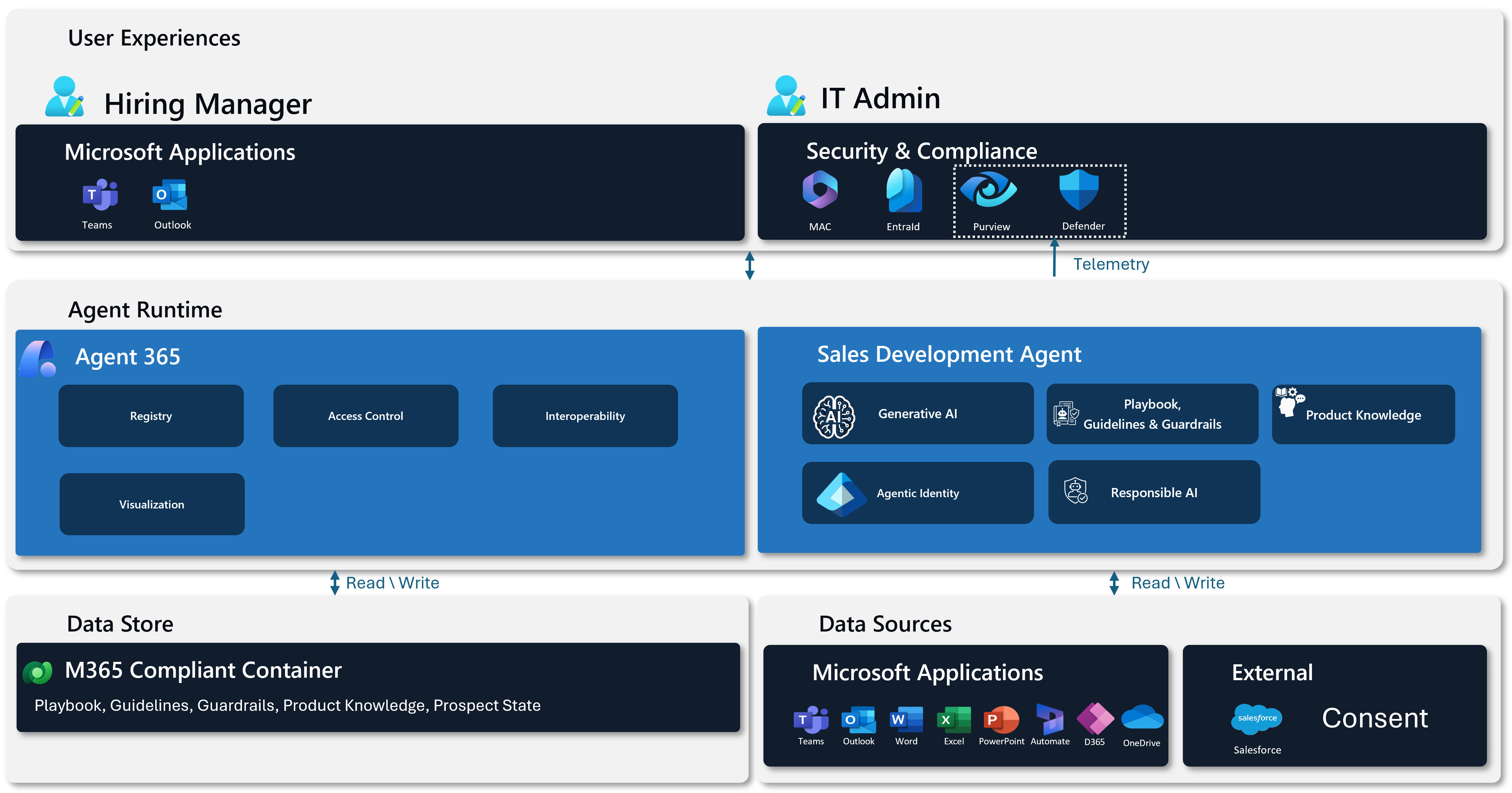
User experiences
The User experiences layer defines how people interact with Sales Development agent and how governance is applied across those interactions. It separates end-user productivity from IT administrator control while ensuring both operate on the same secure foundation.
User experience in Microsoft applications
End users interact with Sales Development agent through familiar Microsoft applications such as Teams, Outlook, Word, Excel, and PowerPoint. Instead of being introduced as a separate tool, the agent appears as a contextual digital worker within day-to-day sales workflows.
From the user perspective, the agent:
- Responds to natural language prompts.
- Supports research, follow-up tasks, and lead qualification.
- Produces in-context drafts, summaries, and recommendations.
- Operates by using its own Entra ID identity within assigned permissions.
This experience is designed for low friction and high trust. Users do not need to manage backend services, identity flows, or data integrations; they can focus on sales work while using the agent as a productivity accelerator in Microsoft 365.
IT administrator controls for security and compliance
For IT administrators, this layer provides centralized security, compliance, and governance controls. Administrators maintain full visibility and authority over:
- Who can access the agent.
- What data the agent can access.
- Which actions the agent can perform.
- How usage and activity are audited and logged.
Security and compliance policies are enforced consistently across all experiences. This helps ensure the agent aligns with enterprise requirements such as conditional access, data loss prevention, retention, and auditability.
Agent runtime
The Agent runtime layer defines how agents are executed, governed, and scaled across Microsoft 365. It includes both the shared enterprise platform (Agent 365) and the domain-specific implementation (Sales Development agent).
Agent 365
Agent 365 is the enterprise agent platform that enables, governs, and operationalizes agents at scale. It provides the shared infrastructure and control plane required to run agentic workloads safely across Microsoft 365.
Registry
The registry defines which agents, skills, and tools are available. Only approved and versioned components can be invoked, which helps prevent unauthorized expansion of capabilities and uncontrolled behavior.
Access control
Agent 365 enforces identity-based access through Entra ID. All agent actions are executed in the context of a specific user and tenant, supporting least-privilege operation and helping prevent cross-tenant or cross-user data leakage.
Governance
Agent 365 provides a centralized governance control plane for managing agents throughout their lifecycle. It helps administrators:
- Maintain an authoritative inventory of Microsoft-built, custom-registered, and shadow agents.
- Enforce organizational policies for where agents can run and what they can access.
- Monitor activity for reliability, risk, and compliance.
This governance layer supports operational oversight, including telemetry review, issue investigation, and action auditing, so organizations can scale agent adoption without losing security or administrative control.
Interoperability
This component enables consistent integration across Microsoft applications and services. It abstracts differences across surfaces, such as Teams, Outlook, and web clients, so agent behavior remains predictable regardless of entry point.
Visualization
Centralized monitoring surfaces operational insights such as usage, performance, and reliability. These insights help product teams and administrators understand adoption patterns and prioritize improvements.
Sales Development agent
Sales Development agent is the domain-specific digital worker built on Agent 365. It delivers sales-focused intelligence, workflows, and guardrails while relying on the platform for runtime execution and governance.
Generative AI
Generative AI enables the agent to reason, summarize, draft, and converse naturally. It interprets user intent, synthesizes information, and produces human-readable outputs for scenarios such as lead research, outreach preparation, and opportunity insights.
Responsible AI
Responsible AI capabilities help keep outputs safe, explainable, and policy-aligned. These controls include safeguards for sensitive data, transparency in responses, and constrained behavior in ambiguous or high-risk scenarios.
Agentic identity
The agent runs under a dedicated agentic identity (Microsoft Entra Agent ID) that exists as its own security principal in the tenant. Access is explicitly granted and policy-scoped so the agent operates only with assigned permissions. When user context is required, for example for conditional access, auditing, or delegated access, that context can be included without treating the agent as a human user or granting unrestricted long-lived credentials.
Knowledge
The knowledge component grounds the agent in authoritative enterprise data and approved content. This improves contextual accuracy and reduces the risk of hallucinations or outdated responses.
Together, these components enable Sales Development agent to operate as a trusted, autonomous assistant rather than a simple chatbot.
Playbooks, guidelines, and guardrails
Playbooks define recommended workflows, actions, and engagement strategies to support consistent and effective execution. Guidelines provide best practices that improve quality, accuracy, and policy adherence. Guardrails establish enforceable boundaries that promote responsible use, protect data, satisfy compliance requirements, and reduce the risk of unintended outcomes.
Together, these mechanisms help keep AI-assisted experiences effective, trustworthy, and aligned with organizational objectives.
Data Store
The Data Store layer defines how agent data is securely stored, governed, and made available for reliable grounding and compliant operations.
M365 Compliant Container
The M365 Compliant Container is the secure runtime boundary for the agent and its supporting services. It ensures that all execution takes place within Microsoft 365 security and compliance controls.
This container enforces the following requirements:
- Tenant isolation
- Data residency requirements
- Secure networking and execution boundaries
- Microsoft 365 security baseline compliance
Running the agent inside this compliant container provides enterprise-grade protections by default, removing the need to implement custom security controls for each integration.
Data Sources
The Data Sources layer defines where Sales Development agent retrieves context, where it writes outputs, and how data handling remains secure, compliant, and auditable across Microsoft 365 and external systems.
Microsoft applications
Microsoft 365 applications are the primary interaction surfaces and data sources for Sales Development agent. Teams, Outlook, Word, Excel, PowerPoint, and related apps provide the day-to-day context that powers agent-assisted workflows.
The agent can:
- Read business context from these applications when permissions are granted.
- Write outputs back to these applications, including drafts, summaries, and updates.
- Enhance existing user workflows without replacing familiar tools.
This integration helps Sales Development agent feel native to Microsoft 365 experiences rather than external to them.
Data residency
Sales Development agent processes customer data within the geographic region associated with the customer's Microsoft 365 tenant. Data remains within the applicable residency boundary and is handled according to Microsoft privacy, security, and compliance commitments.
Data retention
Retention behavior is aligned to Microsoft 365 and tenant-level policies:
- Prospect data is stored in the M365 Compliant Container within the customer's tenant and follows tenant retention policies.
- Email content is stored in Outlook and retained according to the customer's tenant retention policies.
- Conversation history between managers and agents in Teams follows tenant's Teams retention policies.
- RAG knowledge sources, such as product knowledge files, are stored in the agent's OneDrive and remain until deleted by a manager.
External systems
External systems, such as Salesforce and other third-party services, are connected through controlled integrations. These integrations are governed through secure APIs, identity federation, and policy enforcement.
Sales Development agent does not bypass enterprise controls to access external data. Instead:
- Access is explicitly configured.
- Permissions are scoped.
- Activity is logged and auditable.
This approach supports interoperability while preserving security and compliance requirements.