Note
Access to this page requires authorization. You can try signing in or changing directories.
Access to this page requires authorization. You can try changing directories.
Importance criteria help the agent determine which opportunities deserve the most attention from sellers and sales managers. While risk criteria identify deals that might be in trouble, importance criteria identify deals that have the greatest business value or strategic significance.
The agent evaluates multiple importance signals and calculates an overall importance indicator for each opportunity.
As an administrator, you can:
- Review the default importance criteria used by the agent.
- Modify the values and thresholds that determine the significance of an opportunity.
- Align importance criteria with your organization's sales methodology, business processes, and strategic priorities.
- Fine-tune importance evaluation so the opportunities surfaced by the agent reflect what matters most to the business.
- Create custom importance criteria that reflect your organization's unique business priorities. For more information, see Create custom importance criteria.
The agent evaluates each configured importance criterion, assigns a significance rating, and calculates an overall importance score for the opportunity. This score helps prioritize opportunities that deserve the most attention from sellers.
For example:
An organization might consider opportunities important when they:
- Belong to strategic customer accounts.
- Have high revenue potential.
- Support a key product line.
- Align with current business objectives.
You can configure the importance criteria to reflect these priorities, ensuring that the most valuable opportunities are surfaced and prioritized by the agent.
Configure the importance criteria
Under the Advanced settings section, select Importance criteria.
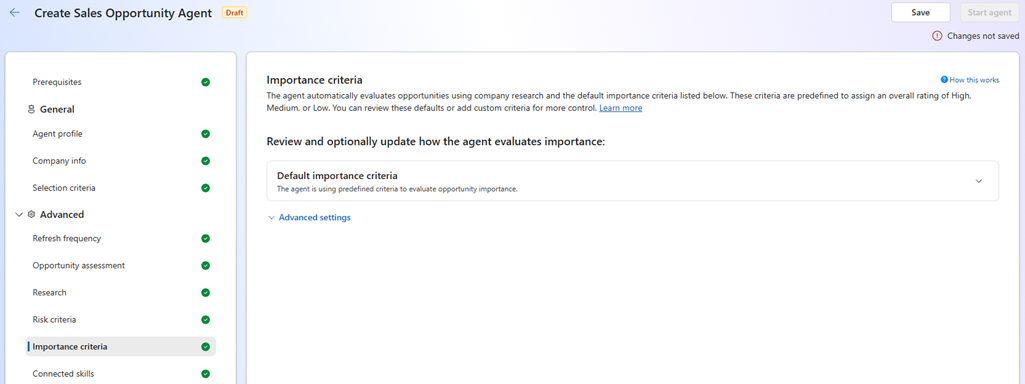
The default importance criteria are preconfigured to help you quickly assess the significance of opportunities. Review and adjust these criteria based on your organization's priorities.
Importance criteria Description Existing customer Indicates that opportunities linked to existing accounts based on the configured account-age threshold are important. High account win history Indicates that opportunities linked to accounts with a historical win rate above the configured threshold are important. Top 500 Account Indicates that opportunities linked to Fortune 500 accounts are important. Strategic references Indicates that opportunities referenced as strategic in email conversations or CRM notes are important. Large deal size Indicates that opportunities with unusually large estimated revenue compared to past wins for the same account are important. Executive visibility Indicates that opportunities involving executive-level stakeholders, signaling C-suite visibility or sponsorship, are important. If you don't want to use a criterion in importance assessment, turn off the toggle next to it under Use in assessment.
Create custom importance criteria
Under Advanced, select Importance criteria.
In the Advanced settings section, open the Custom importance criteria (Optional) section.
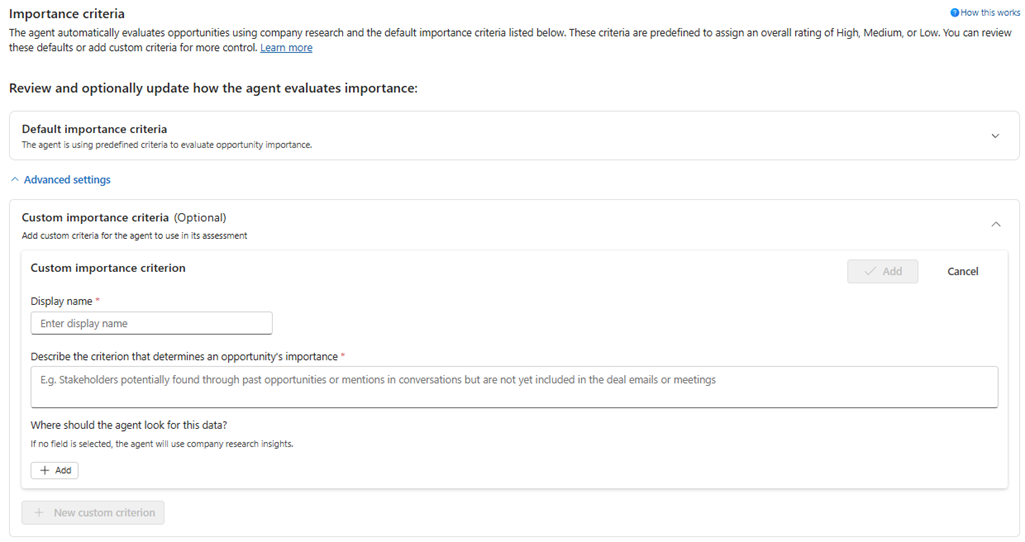
Enter the name and description for the new importance criterion.
Add fields to map to the new custom importance criterion.
- Select Add.
- In the Select field to map pane, select the field that you want to map to the new custom importance criterion. Choose opportunity-related fields or fields from related entities.
Repeat Step 5 for each additional field you want to map to the new custom importance criterion.
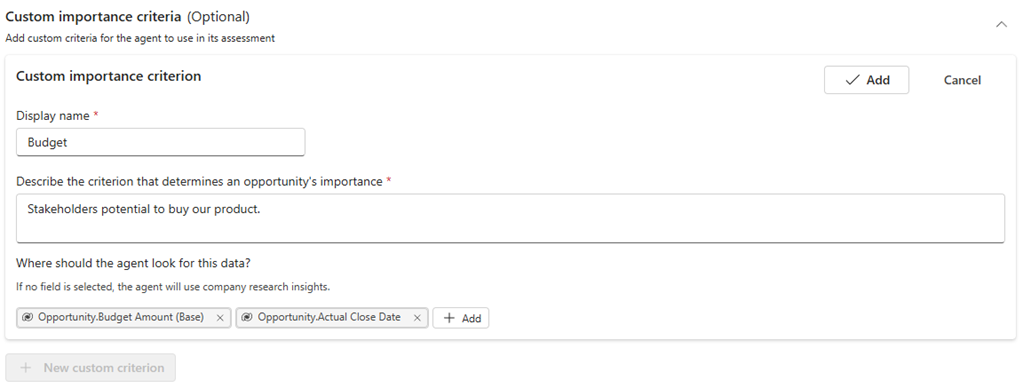
After adding the necessary fields to the new custom importance criterion, from the top-right corner of the section, select Add.
The custom importance criterion is now added and available for use in importance assessments.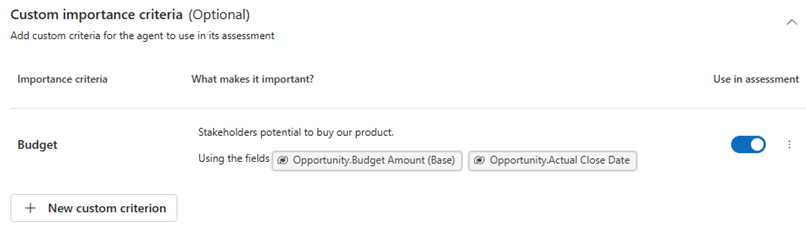
To edit or delete the existing custom importance criterion, select the More options (ellipsis) icon next to it.
To disable a criterion from importance assessment, turn off the toggle next to it under the Use in assessment column.