Note
Access to this page requires authorization. You can try signing in or changing directories.
Access to this page requires authorization. You can try changing directories.
Note
Community interest groups have now moved from Yammer to Microsoft Viva Engage. To join a Viva Engage community and take part in the latest discussions, fill out the Request access to Finance and Operations Viva Engage Community form and choose the community you want to join.
[This article is prerelease documentation and is subject to change.]
This article explains how impact analysis determines whether a purchase order line change has downstream impact. It runs automatically based on configured sources, but you can also run it manually.
Impact analysis considers the following purchase order line changes:
- Delayed delivery dates (changes to the Confirmed delivery date)
- Quantity decreases
- Cancellations (where quantity is changed to 0)
Supplier communications features of the Procurement Agent detect the following kinds of changes in supplier emails, but these changes don't trigger an impact analysis:
- Unit of measure
- Price
- Quantity increases
- Earlier delivery dates
How impact analysis determines impact
Impact analysis evaluates planning and inventory data to place changes into one of the following categories:
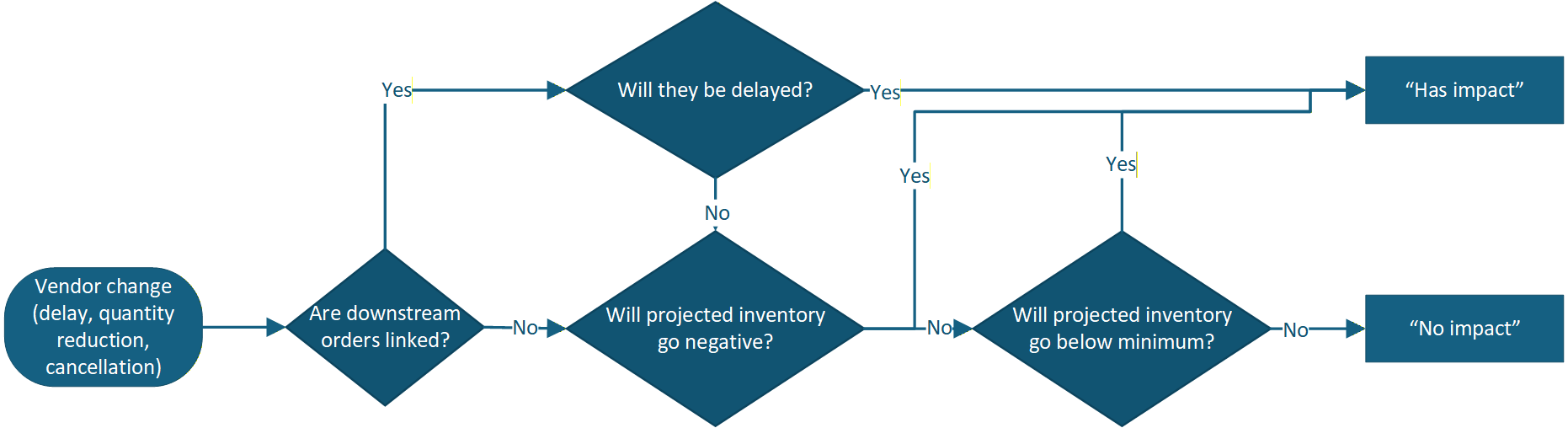
- Has impact – The change delays downstream orders or causes inventory levels to fall below zero or the minimum level configured for that item.
- No impact – The change doesn't delay downstream orders or cause inventory to drop below minimum levels.
Impact analysis considers the following types of downstream orders when determining impact:
- Sales orders – Customer orders that might be delayed or can't be fulfilled.
- Production orders – Manufacturing orders that depend on the supply.
- Transfer orders – Transfers that rely on the item.
- Forecast orders – Demand forecast requirements used by the planning system to anticipate and prepare for expected future demand.
- Safety stock requirements – Planned requirements generated by the planning system to maintain minimum inventory levels. These requirements appear when the planning system creates planned orders to replenish safety stock, and the purchase order change affects the ability to fulfill those planned requirements.
Has impact scenarios
Impact analysis flags impact when:
- Downstream orders are delayed – The supply date moves after the delivery date required by connected demand.
- Inventory threshold breaches – The change is projected to cause inventory levels to drop below one of the following critical thresholds:
- Below minimum – On-hand inventory falls below the configured safety stock level (but remains positive).
- Negative – On-hand inventory goes below zero, resulting in a complete stock-out.
No impact scenarios
A change has no impact when it meets one of the following conditions:
- No downstream orders found – The purchase order isn't linked to any dependent demand.
- Sufficient buffer exists – Inventory levels stay above the minimum level you set for that item.
- Change is an improvement – The purchase order date moves earlier or quantity increases (positive changes don't flag impact).
The following diagram illustrates how impact analysis evaluates whether a change has impact or not based on the downstream orders and inventory levels.
Planning data used for the impact analysis
Impact analysis works regardless of whether you use the master planning features of Supply Chain Management or an external planning system. What differs is how impact analysis traces the changed purchase order through the available planning data to find downstream demand linked to that supply.
If you use external planning systems, impact analysis traces downstream orders based on explicitly defined relationships (markings) only.
If you use the master planning features of Supply Chain Management, then in addition to markings, impact analysis also follows the supply-demand chain through pegging relationships in the active dynamic plan to find which planned and confirmed orders depend on this changed supply. When pegging data is available, impact analysis can trace dependency chains to identify indirectly affected orders, such as:
- Purchase order > production order > production order > sales order
- Purchase order > transfer order > sales order
Pegging enables broader, multi‑level impact tracing. When you use the master planning features of Supply Chain Management, the available planning data is richer, which enables deeper and broader impact visibility.