Note
Access to this page requires authorization. You can try signing in or changing directories.
Access to this page requires authorization. You can try changing directories.
Note
Community interest groups have now moved from Yammer to Microsoft Viva Engage. To join a Viva Engage community and take part in the latest discussions, fill out the Request access to Finance and Operations Viva Engage Community form and choose the community you want to join.
[This article is prerelease documentation and is subject to change.]
The Procurement Agent in Dynamics 365 Supply Chain Management works with procurement teams to manage supplier changes that affect purchase orders and supply commitments. By streamlining routine supplier communication and automating impact evaluation, the Procurement Agent enables purchasers to spend less time on manual updates and analysis, and more time on informed decision‑making and exception handling.
Important
- This is a production-ready preview feature.
- Production-ready previews are subject to supplemental terms of use.
The Procurement Agent includes the following capabilities that work together in the procurement workflow:
- Supplier communications
- Impact analysis
You can choose to enable and use both capabilities together or just one of them.
Supplier communications
Supplier communications features of the Procurement Agent manage inbound and outbound updates tied to purchase orders. With it, teams can quickly coordinate with vendors and keep purchase records aligned with supplier commitments.
The inbound functionality monitors and classifies emails from vendors. For those related to purchase orders, it identifies which messages are confirmations and which are change requests. For change requests, it identifies the changed fields. Purchasers can confirm and apply changes without having to find and open the purchase orders, ensuring purchase orders are up-to-date.
Supplier communications also supports outbound communication, enabling teams to automate outgoing or follow-up communication.
Learn more about supplier communications in Supplier communications features of the Procurement Agent.
Impact analysis
The Impact analysis features of the Procurement Agent evaluate how supplier changes affect inventory, production schedules, and customer deliveries. When you receive a supplier change through configured sources, impact analysis automatically assesses the downstream effects on orders and inventory. This process helps procurement teams understand the consequences of a change before deciding whether to accept it or take further action.
Vendors might send change requests through various channels. Impact analysis supports change requests arriving through emails processed by supplier communications and changes submitted through the vendor collaboration interface. It classifies each change as either Has impact or No impact. Learn more in Review the impact of purchase order changes from vendors.
You can also manually initiate impact analysis for a selected purchase order. Learn more in Impact simulation.
Learn more about impact analysis in Impact analysis overview.
How the Procurement Agent capabilities work together
Procurement Agent capabilities fit into the procurement workflow differently based on whether supplier communications or the vendor collaboration interface is used to communicate with suppliers.
When you process emails through supplier communications together with impact analysis
The following diagram illustrates how the supplier communications and impact analysis capabilities of the Procurement Agent work together when you receive change requests through emails processed by supplier communications. The Procurement Agent detects changes in supplier emails, runs impact analysis for relevant changes, and surfaces the impact analysis result back in the Emails from vendors workspace to help purchasers make informed decisions.
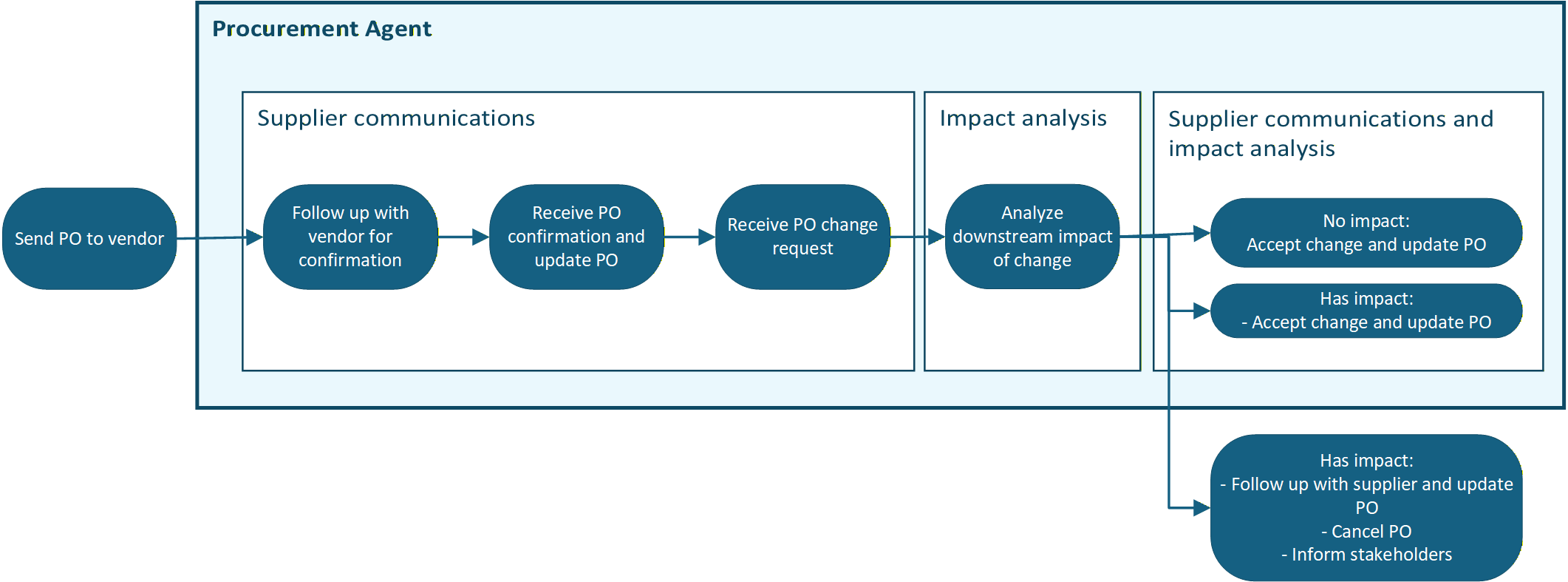
- Send purchase order to vendor
- Follow up with vendor for confirmation (supplier communications)
- Receive purchase order confirmation and update purchase order (supplier communications)
- Receive purchase order change request and view changed fields in the Emails from vendors workspace (supplier communications)
- Analyze downstream impact of the change and view result in the Emails from vendors workspace (impact analysis)
- Make a decision based on the impact analysis result (supplier communications + impact analysis)
- No impact – The purchaser can accept the change and update the purchase order (supplier communications)
- Has impact – The purchaser can view more details about the impact (impact analysis) and determine how to proceed. This action can be to follow up with the supplier, accept the change and update the purchase order if nothing can be done (supplier communications), cancel the purchase order, and inform stakeholders.
When you use the vendor collaboration interface together with impact analysis
The following diagram shows how the supplier communications and impact analysis capabilities of the Procurement Agent work together when you receive change requests through the vendor collaboration interface. The Procurement Agent runs impact analysis for changes received through the vendor collaboration interface and surfaces the impact analysis result in the Purchase order preparation workspace to help purchasers make informed decisions.
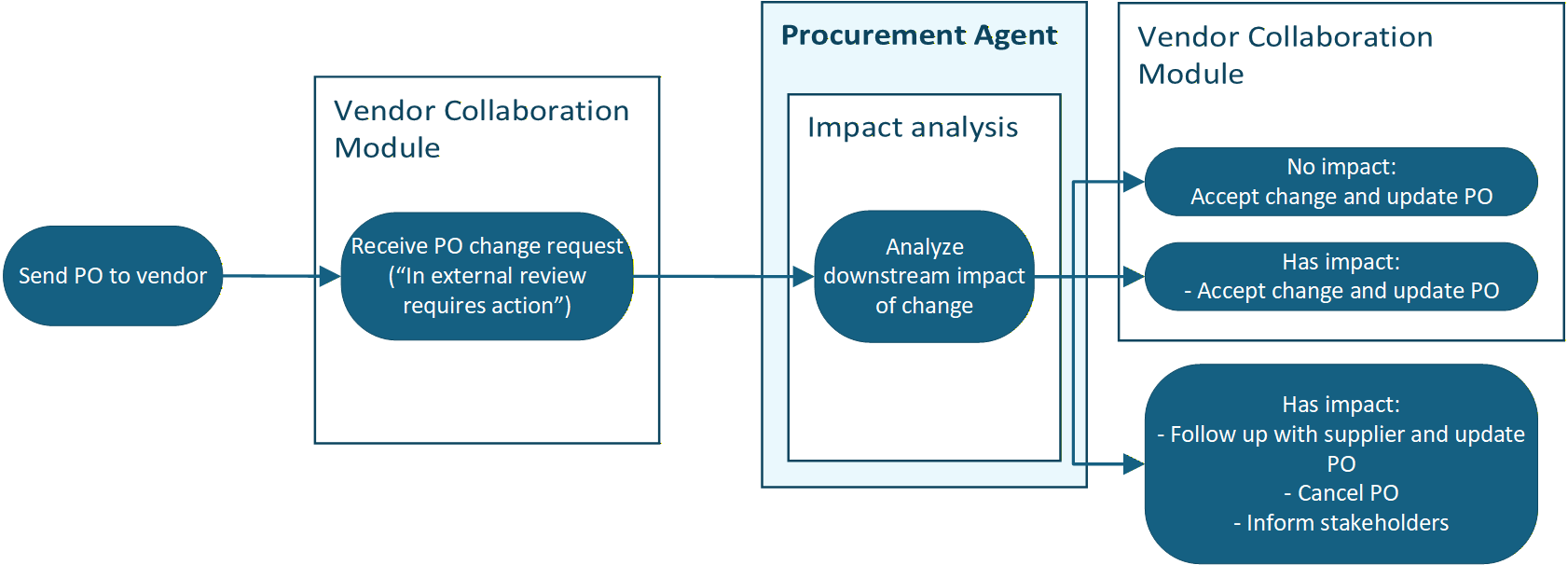
- Send purchase order to vendor.
- Receive purchase order change request via the vendor collaboration interface's In external review requires action tab in the Purchase order preparation workspace.
- Analyze downstream impact of the change (impact analysis).
- Make a decision based on the impact analysis result (impact analysis).
- No impact – The purchaser can accept the change and update the purchase order.
- Has impact – The purchaser can view more details about the impact (impact analysis) and determine how to proceed. This action can be to follow up with the supplier, accept the change and update the purchase order if nothing can be done, cancel the purchase order, as well as informing stakeholders.
Cost
The Procurement Agent incurs charges based on the number of Microsoft Copilot Studio credits you use when running it. The agent has a fixed cost per run and a variable cost that depends on the resources it consumes. The agent management configurations control this cost.
For information about how charges apply to each capability, see Cost for supplier communications and Cost for impact analysis.
Learn about the billing rates and management for Copilot Studio in Billing rates and management.