Note
Access to this page requires authorization. You can try signing in or changing directories.
Access to this page requires authorization. You can try changing directories.
[This article is prerelease documentation and is subject to change.]
This article describes how to integrate the Traceability Add-in for Dynamics 365 Supply Chain Management with external systems through its API.
Authentication
The platform security token is required to call the Traceability public API. The following example uses an Insomnia configuration. Learn more in Use Insomnia with Dataverse Web API.
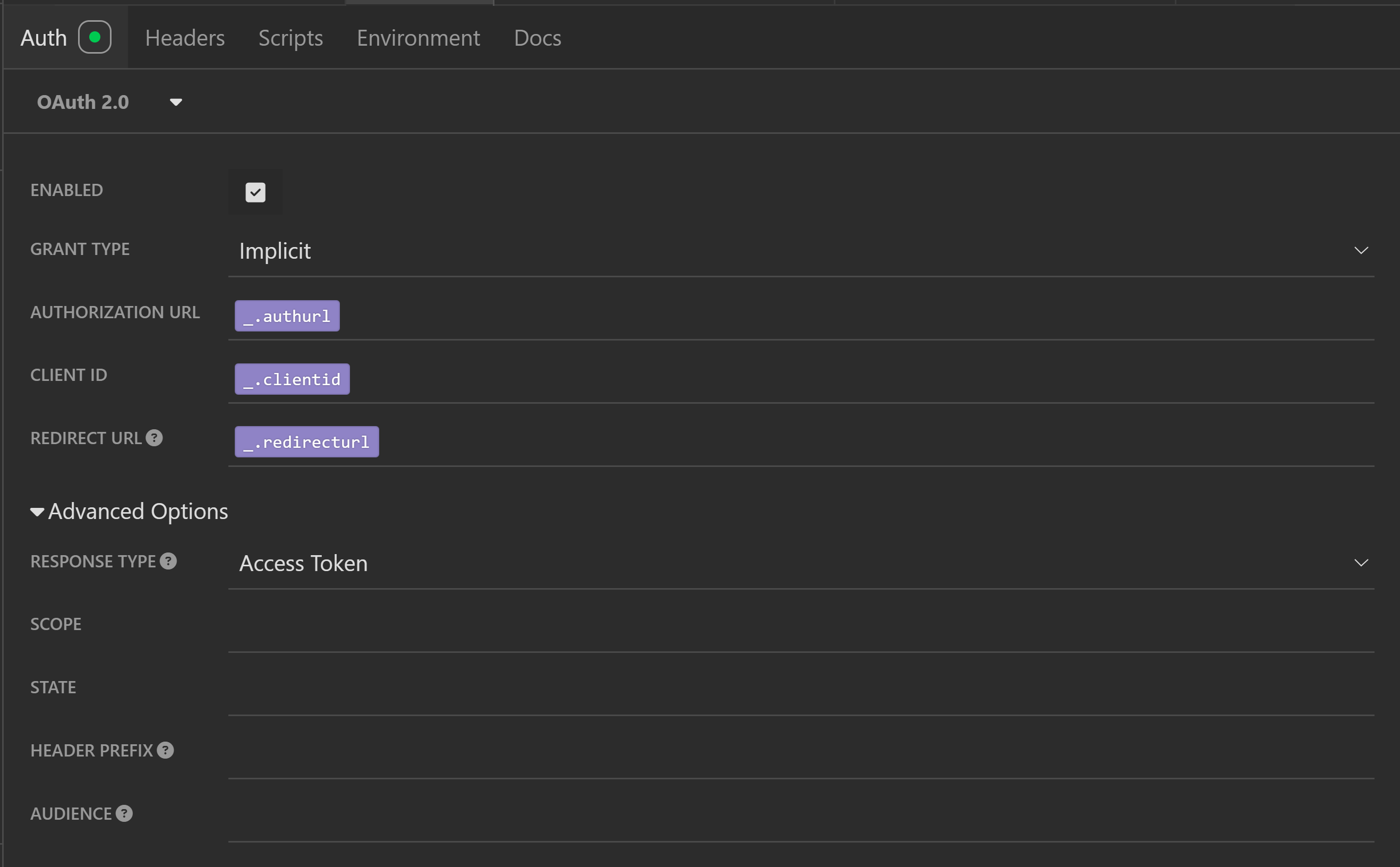
Use Insomnia to fetch a Microsoft Entra token by submitting an HTTP request that has the following properties:
| Key | Value |
|---|---|
| Grant type | Implicit |
| Authorization URL | https://login.microsoftonline.com/common/oauth2/authorize?resource={Traceability URL}. Where {Traceability URL} is the URL for your Traceability installation, which resembles https://operationsxxx.crm.dynamics.com |
| Client ID | The Application ID (client ID) registered in Azure portal. |
| Response type | Access Token |
The following image shows an example of an Insomnia configuration. You can configure the keys mentioned in the previous table into the Auth tag of a specific HTTP request in Insomnia.
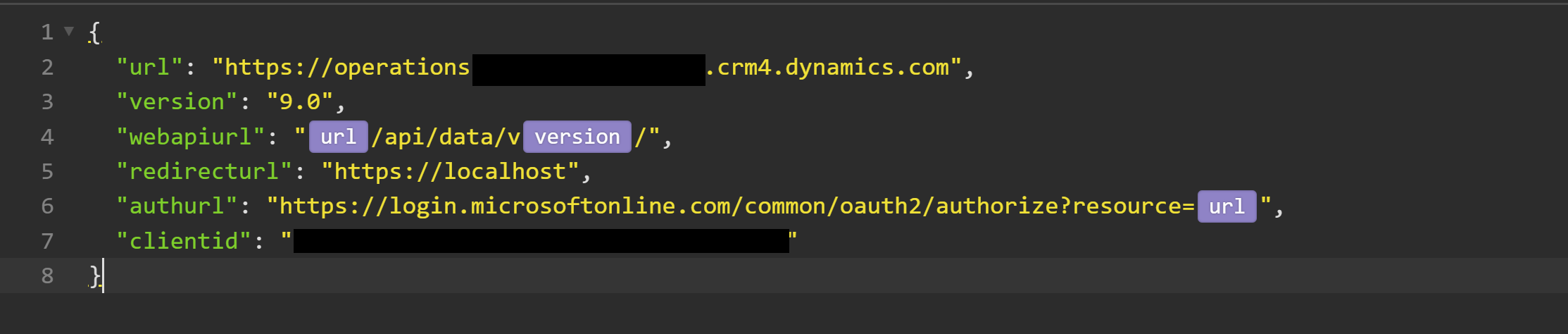
You can create the following JSON file as global environment for an Insomnia project. The version and webapiurl fields are used to build the path of the specific API.
Available APIs
The following table lists the APIs available for Traceability.
| Path | Method | Description |
|---|---|---|
| /api/data/v9.0/msdyn_sctquerytrace_v1 | Post | Query by tracking ID |
The remaining sections provide detailed information about each API.
Single query API
This API accepts queries for traceability information and returns genealogy, activity, and data collection information.
- Path – Specify the traceability URL. For example:
https://operationsxxx.crm.dynamics.com/api/data/v9.0/msdyn_sctquerytrace_v1 - Method –
POST
Single query request payload
{
    "tracingDirection": "Forward/Backward",
    "eventDetailOption": "EventIdOnly",
    "traceNodeOption": "BuildNodeDictionary",
    "shouldGenerateSummary": true/false,
    "itemNumber": "BIKE-DEMO",
    "serialNumber": "BIKE-S0001",
    "batchNumber": "",
    "company": "USMF",
    "trackingId": "",
    "shouldIncludeEvents": true/false
}
Single query request field descriptions
| Field | Description |
|---|---|
tracingDirection |
Controls the search direction: Backward or Forward. Backward means from top finished good to raw materials; Forward means from raw materials to top finished good. |
trackingId |
Key value for the genealogy node. It's a combination of the itemNumber,company, batchNumber, and serialNumber. |
company |
The company of the top finished good. For Supply Chain Management, this field maps to the legal entity. |
itemNumber |
The item number of the top finished good. |
serialNumber |
The serial number of the top finished good. |
batchNumber |
The batch number of the top finished good. |
ShouldIncludeEvents |
Controls whether event details should be included. Default is false. |
ShouldGenerateSummary |
Set to True to include the copilot summary for where-used search. |
ShouldIncludeEvents |
Specify one of the following values:
|
TraceNodeOption |
Specify one of the following values:
|
Single query response header field descriptions
| Field | Description |
|---|---|
TracingDirection |
Controls the search direction: Backward or Forward. Backward means from top finished good to raw materials; Forward means from raw materials to top finished good. Only returns one level above or below the result. |
Single query response root element field descriptions
| Field | Description |
|---|---|
trackingId |
Key value for the genealogy node. It's a combination of the itemId,companyCode, batchId, and serialId. |
Single query response events element field descriptions
| Field | Description |
|---|---|
eventId |
Unique identifier for the event (SerialId/BatchId). Duplicate values aren't allowed. The system generates this value if no value is provided. |
companyCode |
The company code of the top finished good. For Supply Chain Management, this field maps to the legal entity. |
operator |
The operator who executed the activity event. The value can be a user ID, employee ID, or similar. |
description |
Activity event description. |
activityType |
Refers to a predefined activity type (Purchase, Sales, Production, and so on). |
activityCode |
Refers to a configured activity type (GoodsReceipt, Add, Remove, and so on). |
dateTime |
Date and time the activity event occurred. |
| <data collection name> | These fields are used to collect customization values. |
Single query response productTransaction element field descriptions
| Field | Description |
|---|---|
transactionId |
Unique identifier for the transaction. Duplicate values aren't allowed. |
itemId |
Item number of the top finished good. |
trackingId |
Key value for the genealogy node. It's a combination of itemId, companyCode, batchId, and serialId. |
serialId |
Serial number of the top finished good. |
batchId |
Batch number of the top finished good. |
quantity |
Operation quantity of the top finished good. |
unitOfMeasure |
Unit of measure of the received quantity. |
Single query response consumptionTransactions element field descriptions
| Field | Description |
|---|---|
transactionId |
Unique identifier for the transaction. Duplicate values aren't allowed. |
itemId |
Item number of the component. |
trackingId |
Key value for the genealogy node. It's a combination of itemId, companyCode, batchId, and serialId. |
serialId |
Serial number of the component. |
batchId |
Batch number of the component. |
quantity |
The consumption quantity of the component. |
unitOfMeasure |
Unit of measure of the consumption quantity. |
Single query request example
Query the result of finished goods BIKE-S001.
Single query request example request payload
{
    "tracingDirection": "Forward",
    "eventDetailOption": "EventIdOnly",
    "traceNodeOption": "BuildNodeDictionary",
    "shouldGenerateSummary": false,
    "itemNumber": "BIKE-DEMO",
    "serialNumber": "BIKE-S0001",
    "batchNumber": "",
    "company": "USMF",
    "trackingId": "",
    "shouldIncludeEvents": false
}
Single query request example API response
{
    "@odata.context": "https://aurorabapenv2bbcd.crm10.dynamics.com/api/data/v9.0/$metadata#Microsoft.Dynamics.CRM.msdyn_sctquerytrace_v1Response",
    "output": "{\"tracingDirection\":\"Forward\",\"root\":{\"trackingId\":\"BIKE-DEMO~USMF~~BIKE-S0001~~\",\"next\":[],\"nextIds\":[],\"events\":[{\"eventId\":\"2026-01-07-09~1~15~3\"},{\"eventId\":\"2026-01-07-09~1~16~3\"},{\"eventId\":\"2026-01-07-09~1~17~3\"},{\"eventId\":\"2026-01-07-09~1~18~3\"},{\"eventId\":\"2026-01-07-09~1~19~3\"},{\"eventId\":\"2026-01-07-09~1~20~3\"},{\"eventId\":\"2026-01-07-09~1~27~4\"},{\"eventId\":\"2026-01-07-09~1~29~2\"}]},\"traceNodesDictionary\":{\"BIKE-DEMO~USMF~~BIKE-S0001~~\":{\"trackingId\":\"BIKE-DEMO~USMF~~BIKE-S0001~~\",\"next\":[],\"nextIds\":[],\"events\":[{\"eventId\":\"2026-01-07-09~1~15~3\"},{\"eventId\":\"2026-01-07-09~1~16~3\"},{\"eventId\":\"2026-01-07-09~1~17~3\"},{\"eventId\":\"2026-01-07-09~1~18~3\"},{\"eventId\":\"2026-01-07-09~1~19~3\"},{\"eventId\":\"2026-01-07-09~1~20~3\"},{\"eventId\":\"2026-01-07-09~1~27~4\"},{\"eventId\":\"2026-01-07-09~1~29~2\"}]}}}"
}