Note
Access to this page requires authorization. You can try signing in or changing directories.
Access to this page requires authorization. You can try changing directories.
Choose an integration path based on where the agent runs and what it needs to do. Agents built on common platforms often have a built-in Microsoft Entra integration. Local agents run on end-user devices and can't store a credential, so they use OAuth public client flows. Cloud agents run in hosted environments and can protect a credential.
Start with your scenario. Each tutorial prescribes the identity setup for that task; you don't need to choose an identity configuration first.
Start with your scenario
Follow the path that describes what you're building. Multiple replicas of the same agent still use the cloud-agent path.
| What you're building | Start here |
|---|---|
| An agent on Foundry, Copilot Studio, or another supported platform. | Use your platform's integration. |
| A cloud agent that calls APIs as itself or for signed-in users. | Build a cloud agent, using ASP.NET Core or the Auth SDK sidecar. |
| A platform that hosts separate agents for teams or customers, each with its own identity and permissions. | Build an agent fleet. |
| An agent installed on an end-user device. | Build a local agent. |
For an agent you provision yourself, the tutorial identifies the required administrator approvals and registration outputs. Arrange that handoff before coding, and record the identifiers your scenario uses during setup.
Common agent platforms
Use this path when the agent is built on a platform with a documented Microsoft Entra Agent ID integration. The platform handles most of the authentication implementation, so prefer it over the other paths when one is available. Supported flows and setup steps vary by platform.
| Integration path | When to use it | Authenticate users | Call APIs as agent | Call APIs as signed-in user | Call APIs as agent's user account | Guidance |
|---|---|---|---|---|---|---|
| Microsoft Foundry | The agent is built with the current Foundry agent model. Foundry creates and manages the agent identity. | Yes | Yes | Yes | No | Use Agent ID with Microsoft Foundry |
| Copilot Studio | The agent is built in Copilot Studio. Copilot Studio creates and manages the agent identity. | Yes | Yes | Yes | No | Use Agent ID with Copilot Studio |
| Amazon Bedrock | The agent runs in a container on Amazon Bedrock and uses the Auth SDK sidecar. | Yes | Yes | Yes | No | Secure an Amazon Bedrock agent |
| Amazon Web Services | The agent runs on AWS and uses an AWS workload identity for app-only access. | No | Yes | No | No | Use an AWS workload identity |
| Google Cloud Platform | The agent runs on Google Cloud and uses a Google service account for app-only access. | No | Yes | No | No | Use a Google Cloud workload identity |
| n8n | The agent is built as an n8n workflow and uses the Agent ID community node. | Yes | Yes | Yes | Yes | Secure an n8n agent |
Local agents
A local agent runs on an endpoint device and can't securely store a client credential. Use this path when your agent signs in users through a browser and calls APIs on their behalf.
| Integration path | When to use it | Authenticate users | Call APIs as agent | Call APIs as signed-in user | Call APIs as agent's user account | Guidance |
|---|---|---|---|---|---|---|
| MSAL.NET | The agent is built with C# and .NET and signs in users on an endpoint device. | Yes | No | Yes | No | Sign in users from a local agent |
| Microsoft Entra Client ID Metadata Document (CIMD) support (preview) | The client is distributed or connects to independently operated servers where pre-registration isn't practical. | Yes | No | Yes | No | Configure a CIMD client |
Sign in users with MSAL.NET
Use Microsoft.Identity.Client for agents built with C# and .NET that run on endpoint devices. MSAL handles authorization code flow with PKCE, opens the system browser for sign-in, and caches the account and tokens.
Start with Sign in users from a local agent, then follow the local agent guidance to call APIs as the signed-in user.
Use a Client ID Metadata Document
A Client ID Metadata Document (CIMD) lets a client use a public HTTPS URL as its client_id instead of a registered client ID. Use it when the same distributed client connects to independently operated authorization servers and pre-registration with each isn't practical—for example, an MCP client that connects to third-party MCP servers.
The client publishes a JSON document at a stable HTTPS URL. Microsoft Entra ID retrieves the document and uses its redirect URIs and settings in place of a registered application. CIMD supports authorization code flow with PKCE only. CIMD clients can't use client credentials to obtain app-only tokens.
For metadata requirements and protocol steps, see Configure a client to use a Client ID Metadata Document.
Cloud agents
A cloud agent runs in a hosted environment. Choose a path based on the language and hosting environment, then follow the task for the kind of API call you need. Choose ASP.NET Core for a C# application or the sidecar for another language in a containerized environment.
If you're building a platform that hosts separate agents for different teams or customers, use the agent fleet paths. Running multiple replicas of the same agent doesn't by itself require a fleet.
| Integration path | When to use it | Authenticate users | Call APIs as agent | Call APIs as signed-in user | Call APIs as agent's user account | Guidance |
|---|---|---|---|---|---|---|
| ASP.NET Core (Microsoft.Identity.Web) | The agent is built with C# and ASP.NET Core. | Yes | Yes | Yes | No | Call an API as an agent or call a custom API as a signed-in user |
| Microsoft Entra ID Auth SDK sidecar | The agent uses another language and runs in a containerized environment. | Yes | Yes | Yes | No | Authentication with the Auth SDK sidecar |
| Workload identity federation | The agent runs in a supported cloud environment and needs app-only access without an SDK or stored credential. | No | Yes | No | No | Workload identity federation |
| Agent 365 SDK | The agent needs deeper integration with Microsoft 365 channels and services. | Yes | Yes | Yes | Yes | Agent 365 SDK documentation |
Use ASP.NET Core with Microsoft.Identity.Web
Use Microsoft.Identity.Web for agents built with C# and ASP.NET Core. It validates incoming access tokens and gets tokens to call APIs as the agent or on behalf of signed-in users. For a signed-in user's request to a custom API, start with Call a custom API as a user with ASP.NET Core. For an app-only call, see Call a custom API as an agent with ASP.NET Core.
Use the Microsoft Entra ID Auth SDK sidecar
The sidecar pattern runs the Microsoft Entra ID Auth SDK as a companion container next to the agent. The agent calls the sidecar to validate incoming tokens or request authorization headers for API calls. The sidecar holds the Microsoft Entra credential and handles token acquisition.
Use the sidecar for:
- Agents built in languages other than C# and .NET.
- Containerized agents on Docker or Kubernetes.
- Cloud or on-premises environments that can run a companion container.
- Teams that want to keep Microsoft Entra credentials and token handling out of the agent code.
The sidecar requires a containerized environment and adds a second service to deploy and manage. For architecture, a diagram, and security guidance, see Authentication with the Microsoft Entra ID Auth SDK sidecar.
Use workload identity federation
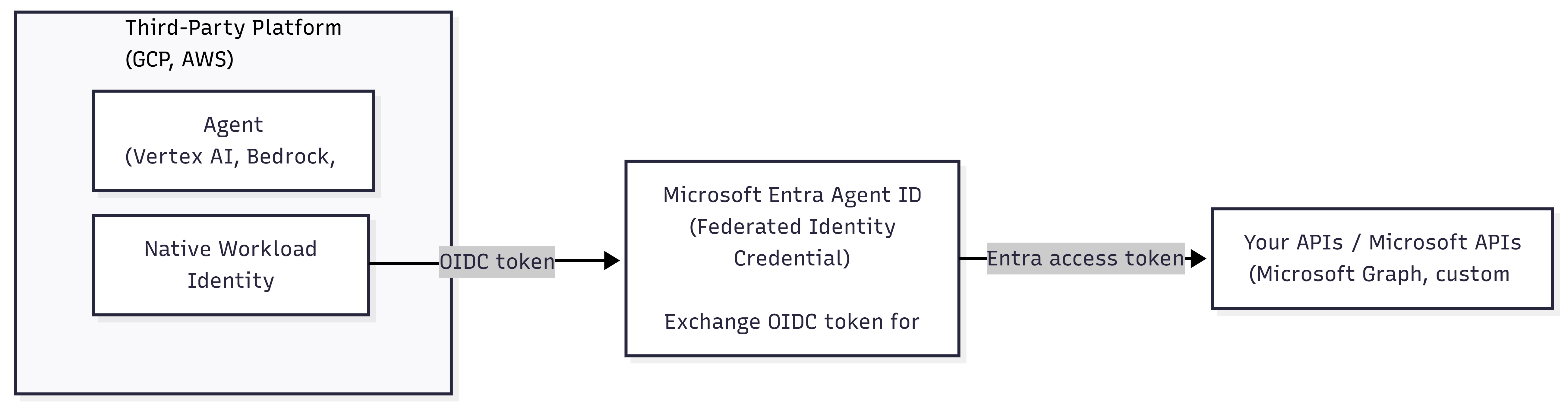
Workload identity federation exchanges a token from an external identity provider for a Microsoft Entra token. Use it when an agent runs in a supported cloud environment, can't run the sidecar, and needs to call APIs as the agent.
This path:
- Doesn't require an authentication SDK or stored client credential.
- Requires a federated identity credential in Microsoft Entra.
- Requires a platform that can issue a supported OpenID Connect (OIDC) token.
- Supports app-only access. It doesn't authenticate users or support calls as a signed-in user or an agent's user account.
The following diagram shows an agent exchanging a token from its cloud identity provider for a Microsoft Entra access token.
For supported issuers and configuration steps, see workload identity federation.
Use the Agent 365 SDK
Use the Agent 365 SDK to extend agents with identity, notifications, security, and governed access to Microsoft 365 data. The SDK supports all Agent ID authentication flows. For supported languages, channels, and authentication options, see the Agent 365 SDK documentation.
Agent fleets
An agent fleet is a set of agents hosted on a shared cloud runtime, such as a platform where teams or customers deploy their own agents. Choose this path when each agent needs its own identity and access to resources.
Use the advanced fleet paths when your runtime hosts agents that are added and removed over time, or your scenario needs an agent's dedicated user account. For the design and setup choices, see Plan an agent fleet on a shared runtime.
| Integration path | When to use it | Authenticate users | Call APIs as agent | Call APIs as signed-in user | Call APIs as agent's user account | Guidance |
|---|---|---|---|---|---|---|
| ASP.NET Core (Microsoft.Identity.Web) | The runtime is built with C# and ASP.NET Core. | Yes | Yes | Yes | Yes | Provision agent identities with ASP.NET Core |
| Microsoft Entra ID Auth SDK sidecar | The runtime uses another language and runs in a containerized environment. | Yes | Yes | Yes | Yes | Provision agent identities with the Auth SDK sidecar |
Use OAuth protocols directly
Implement OAuth protocols directly only when no supported platform integration or Microsoft SDK meets the requirements. Direct implementations require expertise in token validation, credential protection, token caching, and OAuth security.
Use a supported OAuth or OpenID Connect library instead of constructing protocol requests by hand. For flow selection and protocol references, see Choose an authentication protocol for an agent.