Note
Access to this page requires authorization. You can try signing in or changing directories.
Access to this page requires authorization. You can try changing directories.
Microsoft Entra Backup and Recovery supports recovery for a defined set of tenant object types and selected properties on those objects.
Note
The set of supported objects and properties expands over time. Recovery applies only to supported properties listed in this article and doesn't imply full object rollback.
Backups are created automatically once per day. Difference reports compare a selected backup with the current tenant state and show changes to supported properties and links.
Recovery scope levels
When you create a difference report or start recovery, you can scope the operation to all supported objects, selected object types, or specific object IDs. Some related objects are grouped for scoping. For example, service principals, OAuth2 permission grants, and app role assignments are grouped under a single filter in the Microsoft Entra admin center.
Note
Microsoft Entra Backup and Recovery covers Microsoft Entra Agent ID objects through their underlying directory object types. An agent's user account is a user object. An agent identity blueprint is an application object. Agent identities and agent identity blueprint principals are service principal objects. Only the supported properties listed for each object type are included in backup, difference reports, and recovery.
User
Recovery for user objects supports these properties:
AccountEnabledAgeGroupCityCompanyNameConsentProvidedForMinorCountryDepartmentDisplayNameEmployeeHireDateEmployeeIdEmployeeLeaveDateEmployeeOrgDataEmployeeTypeFaxNumberGivenNameJobTitleMailMailNicknameMobileOtherMailPasswordPoliciesPerUserMfaStatePhysicalDeliveryOfficeNamePostalCodePreferredDataLocationPreferredLanguageStateStreetAddressSurnameTelephoneNumberUsageLocationUserPrincipalNameUserType
Note
Manager and sponsor changes aren't in scope.
For reference, view the full set of user properties in the Microsoft Graph user resource type.
Group
Recovery for group objects supports these properties:
ClassificationDescriptionDisplayNameGroupTypeIsPublicMailMailEnabledMailNicknamePreferredDataLocationPreferredLanguageSecurityEnabledTheme
Note
Group ownership changes aren't in scope. Dynamic groups can be restored or soft-deleted during recovery, but dynamic group rule changes aren't in scope.
For reference, view the full set of group properties in the Microsoft Graph group resource type.
Conditional access policy
All properties of conditional access policies are in scope. View all conditional access policy properties in the Microsoft Graph conditionalAccessPolicy resource type.
Named location policy
All properties of named location policies are in scope. View all named location policy properties in the Microsoft Graph namedLocation resource type.
Authorization policy
Recovery for authorization policy objects supports these properties:
blockMsolPowerShellguestUserRoleId
Here's a mapping of guest user role IDs with guest user permission levels:
| Permission level | Description | Role ID |
|---|---|---|
| Member User | Guest users have the same access as members | a0b1b346-4d3e-4e8b-98f8-753987be4970 |
| Guest User | Guest users have limited access to properties and memberships of directory objects | 10dae51f-b6af-4016-8d66-8c2a99b929b3 |
| Restricted Guest User | Guest user access is restricted to properties and memberships of their own directory objects | 2af84b1e-32c8-42b7-82bc-daa82404023b |
For reference, view the full set of authorization policy properties in the Microsoft Graph authorizationPolicy resource type.
Authentication methods policy
Recovery supports these authentication method policies:
- Email one-time password (OTP)
- FIDO2 passkey
- Authenticator app
- Voice call
- SMS
- Third-party software OATH
- Temporary Access Pass
- Certificate-based authentication
For reference, view the full set of authentication methods policy properties in the Microsoft Graph authenticationMethodConfiguration resource type.
Application
Recovery for application objects supports these properties:
DisplayNameDescriptionNotesApplicationTagAppIdentifierUriAppCreatedDateTimePublicClientPublisherDomainIsDeviceOnlyAuthSupportedServiceManagementReferenceRequiredResourceAccessNativeAuthenticationApisEnabledSignInAudienceGroupMembershipClaimsOptionalClaimsIsDisabledAddInsServicePrincipalLockConfigurationAppInformationalUrl
For reference, view the full set of application properties in the Microsoft Graph application resource type.
Service principal
Recovery for service principal objects supports these properties:
AccountEnabledAlternativeNamesExplicitAccessGrantRequiredDescriptionLoginUrlNotesNotificationEmailAddressesPreferredTokenSigningKeyThumbprintServicePrincipalTagServicePrincipalTypePreferredSingleSignOnModePublisherNameSamlSingleSignOnSettingsServicePrincipalName
For reference, view the full set of service principal properties in the Microsoft Graph servicePrincipal resource type.
Service principal recovery is the anchor for related permissions. When a service principal is recovered, Microsoft Entra Backup and Recovery also restores:
- OAuth2 permission grants where the recovered service principal is the target object
- App role assignments where the recovered service principal is the target object
OAuth2 (delegated) permission grant
OAuth2 permission grant represents the delegated permissions granted to an application's service principal. An administrator can create delegated permission grants when a user consents to an application's request to access an API, or an administrator can grant them on behalf of all users. Permission grants that an admin creates on behalf of all users are in scope. You can identify these permission grants by consentType = AllPrincipals and principalId = null.
Permission grants created as a result of user consent aren't supported. View OAuth2 (delegated) permission grant properties in the Microsoft Graph oauth2PermissionGrant resource type.
OAuth2 permission grants aren’t recovered independently. For difference report and recovery scoping, service principals, OAuth2 permission grants, and app role assignments are grouped under a single filter in the Microsoft Entra admin center.
App role assignment
An app role assignment records when a user, group, or service principal is assigned an app role for an app. All properties of app role assignment are in scope. View all app role assignment details and properties in the Microsoft Graph appRoleAssignment resource type.
App role assignments aren’t recovered independently. For difference report and recovery scoping, service principals, OAuth2 permission grants, and app role assignments are grouped under a single filter in the Microsoft Entra admin center.
Organization
Recovery for the organization object supports these properties:
Tenant-level per-user multifactor authentication (MFA) settings:
StrongAuthenticationDetailsavailableMFAMethods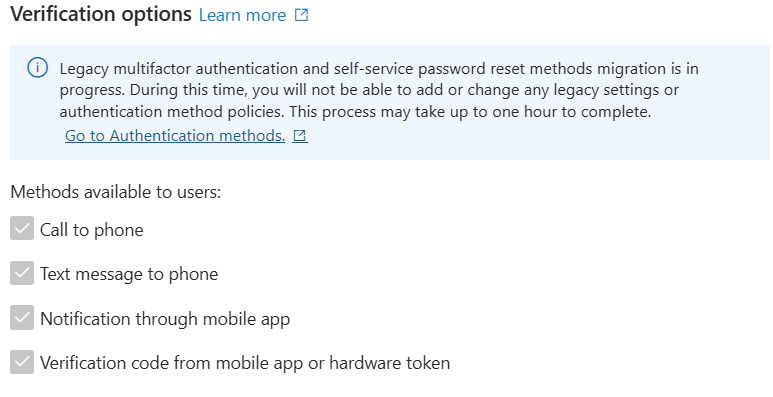
IsApplicationPasswordBlocked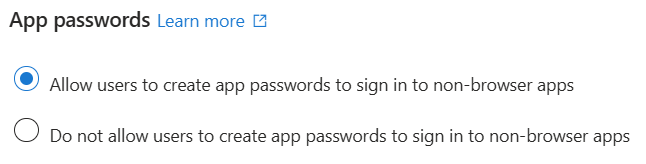
IsRememberDevicesEnabled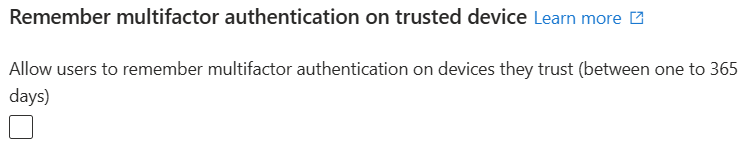
rememberDevicesDurationInDays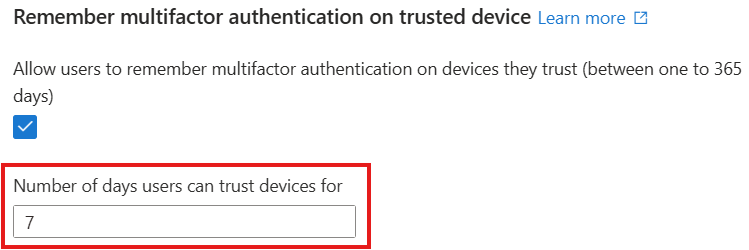
StrongAuthenticationPolicyenabled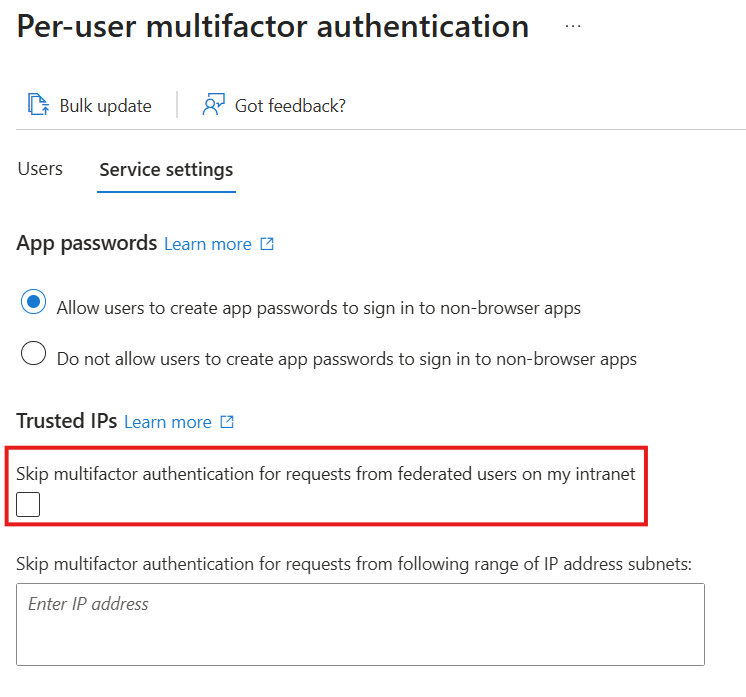
ipAllowList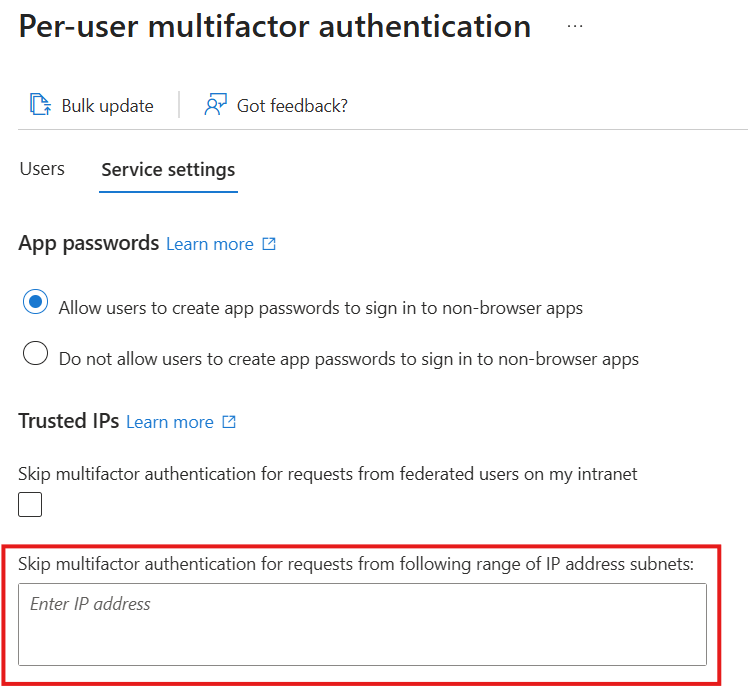
Limitations
Consider the following limitations when you use Microsoft Entra Backup and Recovery.
Job completion time
Completion time for difference reports and recovery depends on data loading and processing.
The first time you access a backup through a difference report or recovery, the recovery service loads the backup data. This loading takes a fixed amount of time, even for small tenants. The service reuses loaded data across operations that reference the same backup, so subsequent operations complete faster. Creating a difference report before recovery can reduce recovery time by preloading the data.
After data loading completes, the operation moves into processing. For difference reports, processing identifies changes between the backup and the current tenant. For recovery, processing applies the required changes to restore the backup state. Processing time varies based on the number of objects, the scope of the operation, and the number of changes involved.
Hard-deleted objects
Microsoft Entra Backup and Recovery doesn't support the recovery or re-creation of hard-deleted objects. Only soft-deleted or modified objects can be restored.
Soft-deleted users, Microsoft 365 Groups, cloud security groups, application registrations, and service principals can be restored for 30 days. For more information about how soft deletion relates to Backup and Recovery, see Soft deletion in Microsoft Entra Backup and Recovery. Backup and Recovery focuses on restoring supported properties and links from retained backups and doesn't replace soft-delete recovery.
Objects managed in on-premises Active Directory Domain Services
Any changes made to on-premises synced objects (except group memberships) appear in difference reports, but are automatically excluded from recovery. Organizations that use hybrid identity with Microsoft Entra ID can use difference reports to identify changes to objects synchronized from on-premises. For certain object types, such as users and groups, you can move the source of authority from on-premises to the cloud. After conversion, all Backup and Recovery functionality is available for those objects. Back up and recover objects managed on-premises by using an alternative solution.
If a user or group is converted to cloud-managed after the backup was taken, recovering from that backup doesn't revert the source of authority to on-premises Active Directory. Other supported changed attributes are recovered.
Broader recoverability
Microsoft Entra Backup and Recovery should be used as part of a broader approach to recoverability that helps your organization be more resilient. To reduce the risk of malicious and accidental directory data loss, follow recoverability best practices in Microsoft Entra ID. These practices include:
- Establishing preventative operational security measures
- Regularly documenting the known good state by using Microsoft Graph APIs
- Preparing processes to recover from deletion and misconfiguration