Note
Access to this page requires authorization. You can try signing in or changing directories.
Access to this page requires authorization. You can try changing directories.
Applies to:  External tenants (learn more)
In this tutorial, you register a strong authentication method for a user in your React single-page application (SPA) by using native authentication's JavaScript SDK.
If you enable multifactor authentication (MFA), but the user has no registered strong authentication method, you need to have the user register one before tokens can be issued.
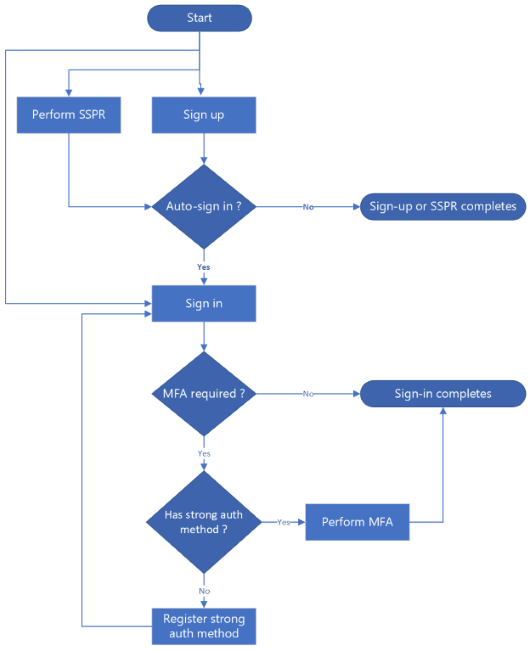
The strong authentication method registration flow occurs in three scenarios:
- During sign-in: The user signs in but does not have a strong authentication method registered.
- After sign-up: The user successfully signs up and automatically proceeds to sign in.
- After self-service password reset (SSPR): The user successfully resets their password and automatically proceeds to sign in.
When strong authentication method registration is required, the user selects a method of choice from a list of supported methods. The available methods are email and SMS one-time passcode.
The flow diagram below illustrates the three scenarios:
Prerequisites
- Complete the steps in sign up, sign in and password reset tutorials.
- Visual Studio Code or another code editor.
- Node.js 20.x or later.
- Enable multifactor authentication (MFA) for your app.
Enable app to handle strong authentication method registration
To enable the strong authentication method registration in your React app, update the app configuration by adding the required capability.
Locate the src/config/auth-config.ts file.
In the
customAuthobject, add or update thecapabilitiesproperty to include theregistration_requiredvalue in the array as shown in the following code snippet:const customAuthConfig: CustomAuthConfiguration = { customAuth: { ... capabilities: ["registration_required"], ... }, ... };
The capability value registration_required informs Microsoft Entra that your app can handle strong authentication method registration flow. Learn more about native authentication challenge types and capabilities.
Create UI components
You require form components to handle strong authentication method registration. Use the following steps to add these components to your app:
- Create a new folder named src/app/shared/components to store reusable components.
- In the new folder, create a file named
AuthMethodRegistrationForm.tsxto display a form that allows users to select and register a strong authentication method. Add the code in AuthMethodRegistrationForm into the file. - In the new folder, create another file named
AuthMethodRegistrationChallengeForm.tsxto display a form for verifying the strong authentication method by using the one-time passcode that the user receives. Add the code in AuthMethodRegistrationChallengeForm into the file.
When needed, you can import and use reusable components in your sign-in, sign-in after sign-up, and sign-in after SSPR flows.
Register strong authentication method during sign-in
Update the src/app/sign-in/page.tsx file to enable your app to handle strong authentication method registration flow during sign-in. See the complete code in page.tsx:
Import the required types and components as shown in the following code snippet:
import {
    CustomAuthPublicClientApplication,
    ICustomAuthPublicClientApplication,
    SignInCodeRequiredState,
    SignInCompletedState,
    AuthFlowStateBase,
    SignInAuthMethodRegistrationRequiredState,
    SignInAuthMethodRegistrationChallengeRequiredState,
} from "@azure/msal-browser/custom-auth";
import { AuthMethodRegistrationForm } from "../components/shared/AuthMethodRegistrationForm";
import { AuthMethodRegistrationChallengeForm } from "../components/shared/AuthMethodRegistrationChallengeForm";
...
Add new state variables for strong authentication method registration:
export default function SignIn() {
    ...
    // Authentication method registration states
    const [authMethodsForRegistration, setAuthMethodsForRegistration] = useState<AuthenticationMethod[]>([]);
    const [selectedAuthMethodForRegistration, setSelectedAuthMethodForRegistration] = useState<AuthenticationMethod | undefined>(undefined);
    const [verificationContactForRegistration, setVerificationContactForRegistration] = useState("");
    const [challengeForRegistration, setChallengeForRegistration] = useState("");

    // ... initialization code
}
Update the
startSignIn,handlePasswordSubmitandhandleCodeSubmitfunctions to check if strong authentication method registration is required:const startSignIn = async (e: React.FormEvent) => { // Start the sign-in flow const result = await authClient.signIn({ username, }); ... // Check for auth method registration requirement if (result.isAuthMethodRegistrationRequired()) { setAuthMethodsForRegistration(result.state.getAuthMethods()); // Set default selection to the first auth method const methods = result.state.getAuthMethods(); setSelectedAuthMethodForRegistration(methods.length > 0 ? methods[0] : undefined); } ... }; const handlePasswordSubmit = async (e: React.FormEvent) => { if (signInState instanceof SignInPasswordRequiredState) { const result = await signInState.submitPassword(password); ... // Check for auth method registration requirement if (result.isAuthMethodRegistrationRequired()) { const methods = result.state.getAuthMethods(); setAuthMethodsForRegistration(methods); setSelectedAuthMethodForRegistration(methods.length > 0 ? methods[0] : undefined); setSignInState(result.state); } ... } }; const handleCodeSubmit = async (e: React.FormEvent) => { if (signInState instanceof SignInCodeRequiredState) { const result = await signInState.submitCode(code); ... // Check for auth method registration requirement if (result.isAuthMethodRegistrationRequired()) { const methods = result.state.getAuthMethods(); setAuthMethodsForRegistration(methods); setSelectedAuthMethodForRegistration(methods.length > 0 ? methods[0] : undefined); setSignInState(result.state); } ... } };In each of the functions, notice that we check if strong authentication method registration is required by using the following code snippet:
if (result.isAuthMethodRegistrationRequired()) {...}Add the handler for strong authentication method selection:
const handleAuthMethodRegistrationSubmit = async (e: React.FormEvent) => {
    e.preventDefault();
    setError("");
    setLoading(true);

    if (!selectedAuthMethodForRegistration || !verificationContactForRegistration) {
        setError("Please select an authentication method and enter a verification contact.");
        setLoading(false);
        return;
    }

    if (signInState instanceof AuthMethodRegistrationRequiredState) {
        const result = await signInState.challengeAuthMethod({
            authMethodType: selectedAuthMethodForRegistration,
            verificationContact: verificationContactForRegistration,
        });

        if (result.isFailed()) {
            if (result.error?.isInvalidInput()) {
                setError("Incorrect verification contact.");
            } else if (result.error?.isVerificationContactBlocked()) {
                setError(
                    "The verification contact is blocked. Consider using a different contact or a different authentication method"
                );
            } else {
                setError(
                    result.error?.errorData?.errorDescription ||
                        "An error occurred while verifying the authentication method"
                );
            }
        }

        if (result.isCompleted()) {
            setData(result.data);
            setCurrentSignInStatus(true);
            setSignInState(result.state);
        }

        if (result.isVerificationRequired()) {
            setSignInState(result.state);
        }
    }

    setLoading(false);
};
Add the handler for strong authentication method verification:
const handleAuthMethodRegistrationChallengeSubmit = async (e: React.FormEvent) => {
    e.preventDefault();
    setError("");
    setLoading(true);

    if (!challengeForRegistration) {
        setError("Please enter a code.");
        setLoading(false);
        return;
    }

    if (signInState instanceof AuthMethodVerificationRequiredState) {
        const result = await signInState.submitChallenge(challengeForRegistration);

        if (result.isFailed()) {
            if (result.error?.isIncorrectChallenge()) {
                setError("Incorrect code.");
            } else {
                setError(
                    result.error?.errorData?.errorDescription ||
                        "An error occurred while verifying the challenge response"
                );
            }
        }

        if (result.isCompleted()) {
            setData(result.data);
            setCurrentSignInStatus(true);
            setSignInState(result.state);
        }
    }

    setLoading(false);
};
Update the
renderForm()function to display the correct strong authentication method registration forms (method selection or verification):const renderForm = () => { if (loadingAccountStatus) { return; } ... // Display AuthMethodRegistrationForm if the current state is authentication method registration required state if (signInState instanceof AuthMethodRegistrationRequiredState) { return ( <AuthMethodRegistrationForm onSubmit={handleAuthMethodRegistrationSubmit} authMethods={authMethodsForRegistration} selectedAuthMethod={selectedAuthMethodForRegistration} setSelectedAuthMethod={setSelectedAuthMethodForRegistration} verificationContact={verificationContactForRegistration} setVerificationContact={setVerificationContactForRegistration} loading={loading} styles={styles} /> ); } // Display AuthMethodRegistrationChallengeForm if the current state is authentication method verification required state if (signInState instanceof AuthMethodVerificationRequiredState) { return ( <AuthMethodRegistrationChallengeForm onSubmit={handleAuthMethodRegistrationChallengeSubmit} challenge={challengeForRegistration} setChallenge={setChallengeForRegistration} loading={loading} styles={styles} /> ); } ... };
Register strong authentication method after sign-up or password reset
Strong authentication method registration flow after sign-up and password reset works similar to the method registration during sign-in flow. After a successful sign-up or password reset, the SDK can automatically continue with the sign-in. If the user doesn't have a strong authentication method registered, the flow transitions to the authentication method registration states.
Register strong authentication method after sign-up
For strong authentication method registration after sign-up flow, you need you update the /src/app/sign-up/page.tsx file. See the complete code in page.tsx:
Make sure you import the required types and components.
Handle the strong authentication method registration states in a similar manner as it happens in the sign-in flow. After sign-up completes successfully, you can use the result to automatically trigger a sign-in as shown in the following code snippet:
// In your sign-up completion handler
if (signUpState instanceof SignUpCompletedState) {
    // Continue with sign-in using the continuation token
    const result = await signUpState.signIn();

    ...

    // Check for auth method registration requirement
    if (result.isAuthMethodRegistrationRequired()) {
        setAuthMethodsForRegistration(result.state.getAuthMethods());
        const methods = result.state.getAuthMethods();
        setSelectedAuthMethodForRegistration(methods.length > 0 ? methods[0] : undefined);
        setSignUpState(result.state);
    }

    ...
}

// Then use the same renderForm logic to display AuthMethodRegistrationForm
// and AuthMethodRegistrationChallengeForm components
Register strong authentication method after password reset
For strong authentication method registration after SSPR, you need to update the /src/app/reset-password/page.tsx file. See the complete code in page.tsx:
Make sure you import the required types and components.
Handle the strong authentication method registration states in a similar manner as in the sign-in flow. After SSPRS completes successfully, you can use the result to automatically trigger a sign-in as shown in the following code snippet:
// In your password reset completion handler
if (resetPasswordState instanceof ResetPasswordCompletedState) {
    // Continue with sign-in using the continuation token
    const result = await signUpState.signIn();

    ...

    // Check for auth method registration requirement
    if (result.isAuthMethodRegistrationRequired()) {
        setAuthMethodsForRegistration(result.state.getAuthMethods());
        const methods = result.state.getAuthMethods();
        setSelectedAuthMethodForRegistration(methods.length > 0 ? methods[0] : undefined);
        setSignUpState(result.state);
    }

    ...
}

// Then use the same renderForm logic to display AuthMethodRegistrationForm
// and AuthMethodRegistrationChallengeForm components
Run and test your app
Use the steps in Run and test your app to run your app, but this time, test the strong authentication method registration flow.
Test authentication method registration after sign-up
Navigate to http://localhost:3000/sign-up to display the sign-up form.
Enter the required details, then sign up by following prompts. After you successfully sign up, the app automatically continues to the sign-in flow by displaying the strong authentication method registration form.
Select the strong authentication method of choice, such as Emails OTP, then enter an email address.
Select Continue to submit the form details. You should receive a verification code to your email address.
Enter the verification code in the challenge form textbox, then select Continue button. After the code is verified, your strong authentication method is registered and you're signed in.
Test strong authentication method registration during sign-in
To test strong authentication method registration during sign-in, make sure you have a user account that doesn't have a strong authentication method registered.
Navigate to http://localhost:3000/sign-in to display the sign-in form.
Input your details, select the Continue button, then follow the prompts. The app enters strong authentication method registration flow.
Follow the app prompts to complete strong authentication method registration.
Test authentication method registration after password reset
To test strong authentication method registration after SSPR, make sure you have a user account that doesn't have a strong authentication method registered.
Navigate to http://localhost:3000/reset-password to display the password reset form.
Input your details, select the Continue button, then follow app prompts to complete the password reset flow. After you successfully reset your password, the app continues to sign-in flow by displaying the strong authentication method registration form.
Follow the app prompts to complete strong authentication method registration.