Note
Access to this page requires authorization. You can try signing in or changing directories.
Access to this page requires authorization. You can try changing directories.
Conditional Access is an intelligent policy engine that helps organizations control how users and agents access corporate resources. It brings together real-time signals such as user's and agent's context, device, location, and session risk information to determine when to allow, block, or limit access, or require more verification steps.
Conditional Access for agents requires Microsoft Entra ID P1 or P2 and a Microsoft Agent 365 license for each user. Enforcement of Agent 365 licensing is coming soon. Network controls for agents require Microsoft Entra Internet Access. For more information, see What is Microsoft Entra Agent ID.
Learn about Conditional Access for agents:
- High-level overview of Conditional Access: What is Conditional Access?
- Guide to managing agent identities across your organization: Manage agent identities in your organization.
- Configure policies for autonomous agent access
How Conditional Access evaluates agent access requests
To access a corporate resource such as SharePoint file, MCP servers, or Open API services, a user or agent first requests an access token from Microsoft Entra ID.
When a Conditional Access policy applies, Microsoft Entra ID evaluates the configured policy requirements before issuing the token. If the requirements are satisfied, an access token is issued. The token is then presented to the target resource, which validates the token and uses its claims to make authorization decisions.
The following diagram illustrates this process.
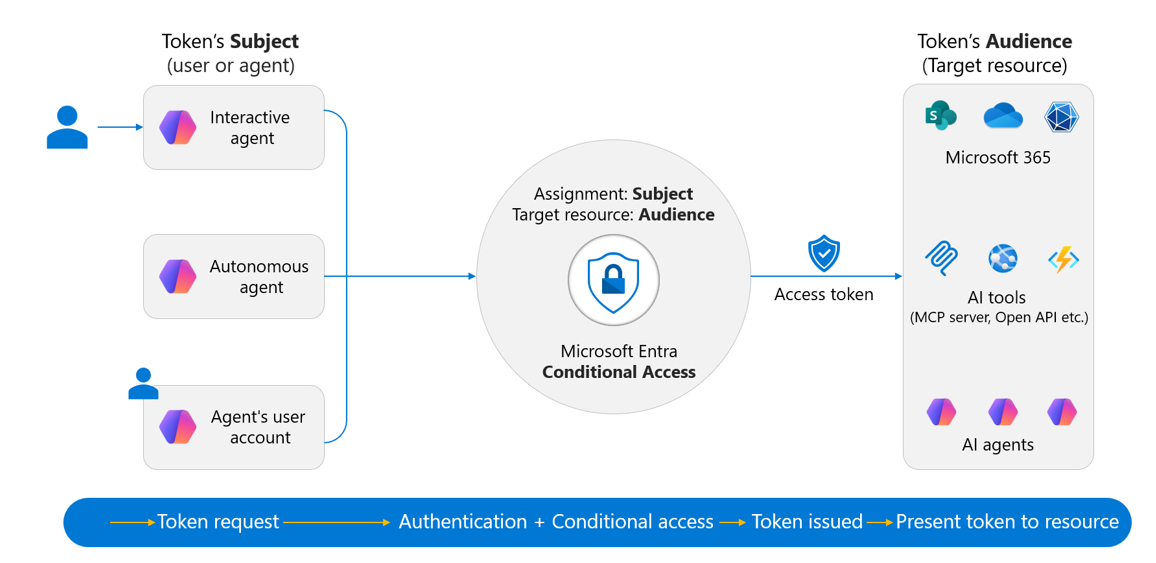
How subjects and audiences are used
Microsoft Entra ID issues an access token to a subject for a specific audience (resource). Each access token has exactly one subject and one audience.
Subject: The identity receiving the token.
- In delegated access scenarios, the token represents the user while also identifying the calling application or agent.
- In application-only scenarios, the application or autonomous agent is the subject.
- In agent's user account scenarios, the agent's user account is the subject.
Audience: The target resource the token is intended for.
- The resource must be registered in Microsoft Entra ID.
- If a subject needs to access multiple resources (for example, multiple MCP servers or APIs), it typically requires a separate access token for each resource, each with its own audience and permissions.
Conditional Access policies are evaluated based on both the subject requesting access and the audience being accessed.
How Conditional Access decisions are made
Conditional Access policies operate as if-then statements:
- If the conditions defined in a policy are met, the configured access controls are enforced.
- If the required controls are satisfied, access is granted.
- If the required controls are not satisfied, access is denied.
For example, an organization may require multifactor authentication before a user can authorize an agent to access their email. Similarly, an organization may configure a policy to block access from agents identified as high risk.
When Conditional Access is evaluated
Conditional Access is evaluated whenever Microsoft Entra ID issues or refreshes an access token. Some resources also support Continuous Access Evaluation, which can trigger near-real-time enforcement for specific events.
Agent access patterns
Agents can access Microsoft Entra-protected resources using one of the following patterns:
Agents acting on behalf of a user
The most common access pattern is the on-behalf-of (OBO) flow. In this flow, a user signs in to an agent application, and the agent accesses downstream resources using the user's identity and delegated permissions. For example, when an agent reads your emails, it accesses your mailbox on your behalf. For more information about how the OBO flow works for agents, see Agent OAuth flows: On-behalf-of.
Note
The on-behalf-of flow is also known as delegated access. Agents using this type of access are sometimes called interactive agents or assistive agents, as they involve a user interface for human interaction.
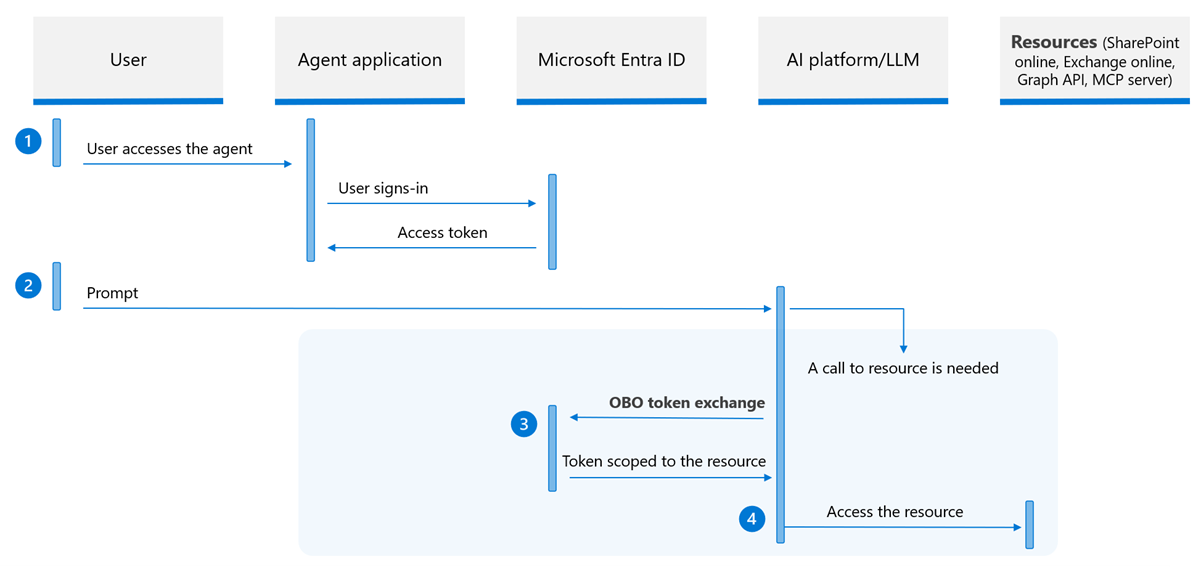
In this flow, the agent can't reuse the user's original token because it was issued for a different audience. Instead, the agent uses the OBO flow to exchange tokens with Microsoft Entra ID, obtaining a new token scoped to the target resource. This token exchange is also evaluated by Conditional Access, letting admins enforce granular controls over which resources agents can access on behalf of the user.
Because the user is the subject in this flow, Conditional Access policies target users and groups, not agent identities. For step-by-step policy configuration, see Conditional Access for agents operating on-behalf-of a user.
Agents acting as an application
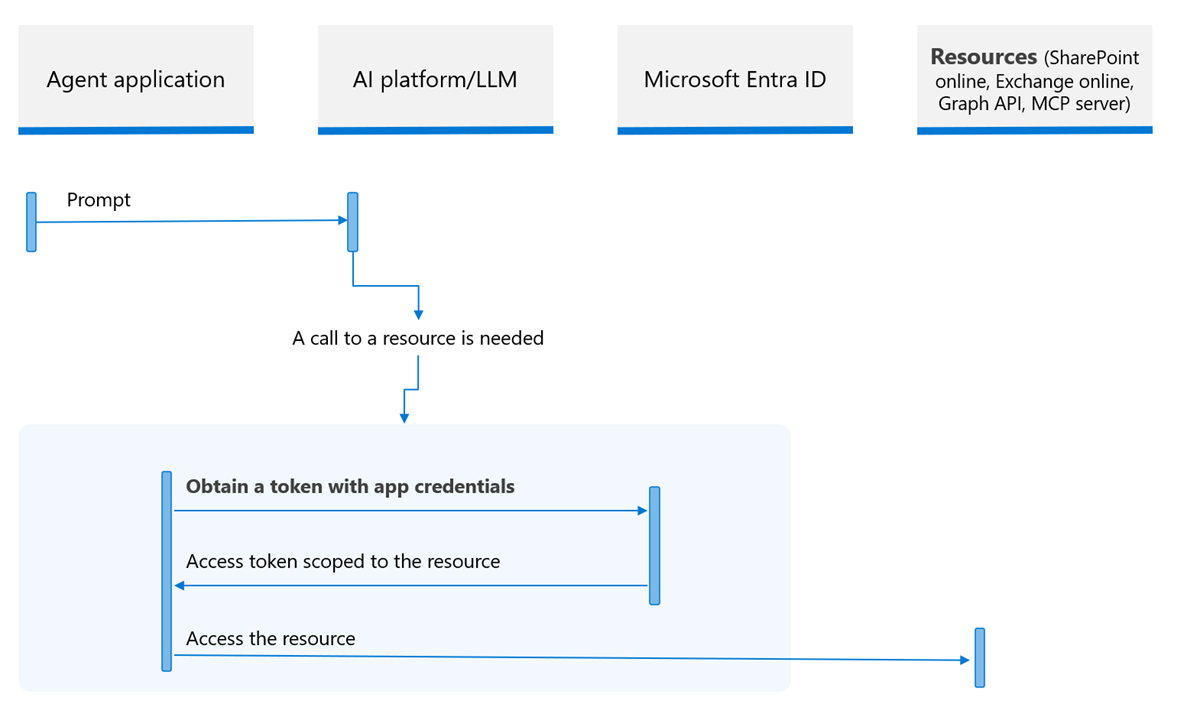
Agents might access resources without a signed-in user. In this case the agent accesses the resource with its own identity. This flow is also known as client credentials flow, or app only access. All types of agents might use this flow. For more information about how agents authenticate with their own identity, see Agent OAuth flows: Autonomous apps.
The following diagram shows the application only access authorization flow.
This flow applies in the following common scenarios:
- Autonomous agents that operate independently:
- These agents run in the background, respond to events, or run on a schedule.
- For example, an agent that generates a daily report and sends the result to a group of employees. In this scenario, there's no user present, and the agent operates on its own.
- Interactive agents that use their own identity:
- These agents don't always access resources on a user's behalf; sometimes they use their own identity.
- For example, if an agent calls a backend SMS service that users don't have access to, the OBO flow doesn't apply, and the agent authenticates directly as itself.
- Agents published on the web for public use:
- These agents either don't authenticate the user or don't support delegating the user's context to corporate resources.
In these scenarios, the agent requests an access token using its own agent identity and credentials managed through the agent identity blueprint. The token is issued to the agent identity (not the user). Therefore, Conditional Access policies are scoped to the agent identity rather than the user. You can target agents acting as applications in Conditional Access using the following options:
- All agent identities: Targets all agent identities in your directory.
- Select agent identities: Target specific agent identities individually.
For step-by-step policy configuration, see Conditional Access for autonomous agents.
Agents acting as a user
Sometimes it's not enough for an agent to perform tasks on behalf of a user or operate with its own identity. In certain scenarios, an agent has its own agent's user account. For example, digital workers that function as team members with their own mailboxes, access to chat, and can participate in collaborative workflows as a team member.
In this model, an admin creates a user account in the directory and links it to the agent's identity. From there, it's like any other user account. Licenses can be assigned to access Microsoft 365 resources such as a mailbox and calendar. The account can be added to administrative units and security groups just like a human user account.
Agents using this flow are sometimes called "digital worker," or "AI teammate." They're also considered autonomous agents as they don't involve a user interface for human interaction. In this model, the access token is issued to the agent's user account (the token subject), and policy is evaluated against the agent's user account, not the agent identity. You can target agent user accounts in Conditional Access using the following options:
- All agent users (Preview): Targets all agent user accounts in your directory.
- Select agent users (Preview): Target specific agent user accounts individually.
For step-by-step policy configuration, see Conditional Access for autonomous agents. For more information about the agent user OAuth flow, see Agent user OAuth flow.
Agents running on managed endpoints like Windows 365 Cloud PCs for Agents can also be subject to device compliance and compliant network controls. Use the Agent execution environments (Preview) condition to scope these policies to endpoint-based sessions only. For more information, see Require a compliant device for agents' user accounts.
Ways to select agents to apply Conditional Access policies
In addition to the specific agent access patterns, you can also select agent identity blueprints to apply Conditional Access policies to a class of agents. Custom security attributes can also be used to categorize and target agents for Conditional Access.
Agent identity blueprints
Another way to apply a Conditional Access policy to multiple agent identities at once is by targeting their parent agent identity blueprint. Every agent identity is derived from an agent identity blueprint, which defines its configuration and governance model. Applying a policy at the blueprint level automatically covers all agent identities derived from it, including any new ones added in the future. Targeting the agent identity blueprint does not cover agents' user accounts.
The following diagram shows that only agent identities associated with blueprint "A" are granted access; all other agents are excluded and blocked.
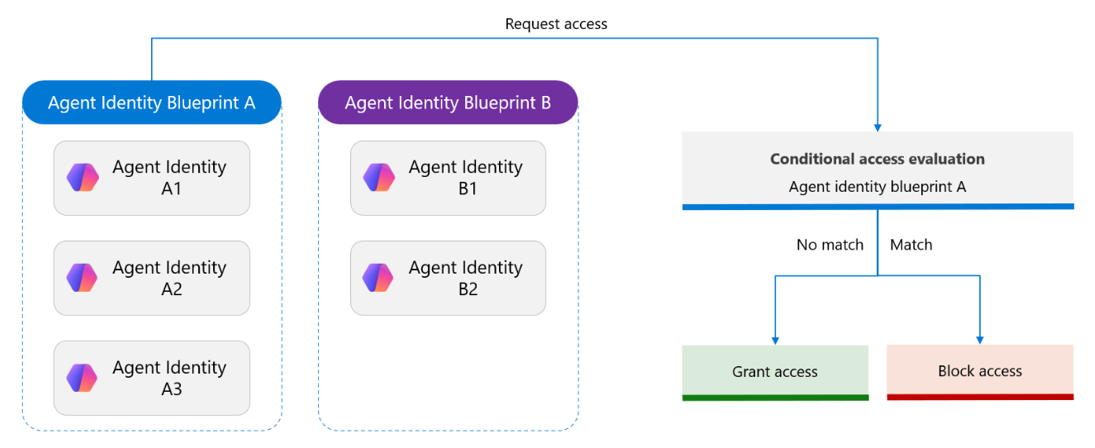
For example, imagine a project where you have several agents, each with its own purpose. Some operate independently, while others collaborate with other agents (A2A) to complete tasks. If they're all created under the same blueprint, a single policy applied to that blueprint enforces consistent access controls across the entire collection.
Attribute-driven Conditional Access
As the number of agent identities grows, individually managing each one across every policy becomes unsustainable. Custom security attributes let you categorize agent identities and resources with business-specific labels, then target those attributes in Conditional Access policies. Policies automatically apply to every agent with matching attributes, including ones added in the future.
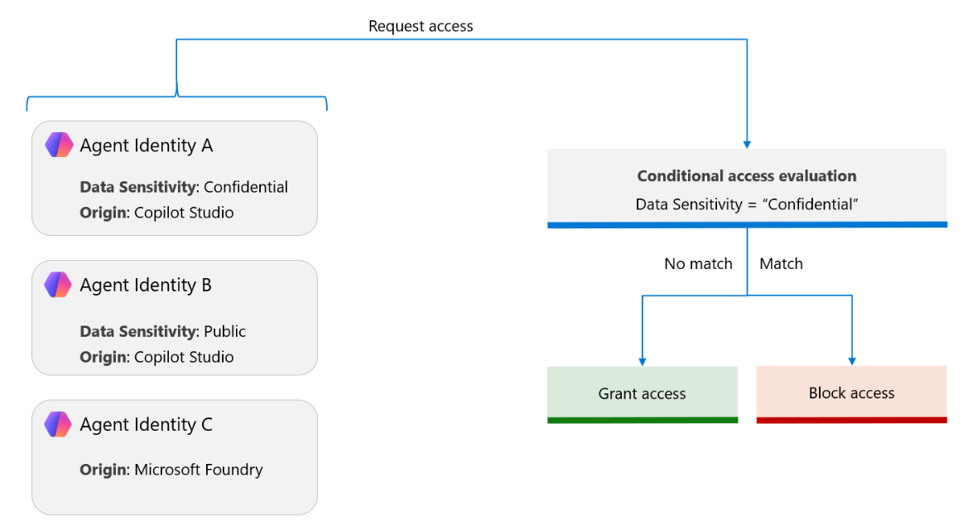
For a full walkthrough on creating custom security attributes and using them in a Conditional Access policy, see Conditional Access for autonomous agents.
Target resource considerations
To select a target resource in a Conditional Access policy, the resource must have an enterprise application (service principal) in your Microsoft Entra ID tenant. This requirement applies regardless of the data access pattern or resource type, including Microsoft Graph, MCP servers, Open API tools, and custom tools you build. For more information, see Targeting resources with Conditional Access.
For custom MCP servers, Open API-based tools, or other custom tool types, register the tool as an application in Microsoft Entra ID and expose its permissions. For more information, see How to configure an application to expose a web API.
Conditional Access boundaries and limitations
Conditional Access policies don't apply when:
- An agent identity blueprint acquires a token for Microsoft Graph to create an agent identity or agent's user account.
- Agent blueprints have limited functionality. They can't act independently to access resources and are only involved in creating agent identities and agents' user accounts.
- Agent tasks are always performed by the agent identity.
- An agent identity blueprint or agent identity performs an intermediate token exchange at the
AAD Token Exchange Endpoint: Publicendpoint (Resource ID:fb60f99c-7a34-4190-8149-302f77469936).- Tokens scoped to the
AAD Token Exchange Endpoint: Publiccan't call Microsoft Graph. - Agent flows are protected because Conditional Access protects token acquisition from the agent identity or agent's user account.
- Tokens scoped to the
- Security defaults are enabled.
- Conditional Access only protects resources secured by Microsoft Entra ID. For example, if an agent accesses resources using an API key, it bypasses the Microsoft Entra ID authentication and token issuance pipeline entirely and Conditional Access policies won't apply to them.
The following configurations aren't currently supported:
- Policies targeting all users don't include agent's user accounts.
- Scoping a Conditional Access policy to include or exclude agent's user account based on their group membership
- A Conditional Access policy targeting agent identities won't apply to the agent's user account.
- A Conditional Access policy targeting agent identities using agent identity blueprint covers only the agent identity, not the agent's user account.
Investigating policy evaluation using sign-in logs
Use the sign-in logs to investigate why a Conditional Access policy did or didn't apply. Filter for agentType to find agent-specific entries. For more information, see Microsoft Entra Agent ID sign-in and audit logs.
Next steps
Learn how to configure Conditional Access policies for agents: