Note
Access to this page requires authorization. You can try signing in or changing directories.
Access to this page requires authorization. You can try changing directories.
IT administrators can now automatically accept SSO permissions on managed Windows devices using a supported registry setting. In this context, SSO, or single sign-on, refers to using the Microsoft credentials from a user’s Windows sign-in to access other Microsoft apps and services without any prompts. This new capability is available beginning with the July 2026 monthly security update for Windows 11, version 24H2 and 25H2 via the 2026—KB5101650 security update.
Important
- Scope: ✅ Applies only to Windows managed enterprise devices with Microsoft Entra ID accounts
- Personal accounts: ❌ No admin control available — Prompts remain for personal Microsoft accounts (MSA)
- Unmanaged devices: ❌ No admin control available —prompts remain for non-policy-controlled environments
- Supported OS: Windows 11, version 24H2 and 25H2 (with the 2026—KB5101650 security update)
Background: What changed and why
In the European Economic Area (EEA), Microsoft updated the Windows sign-in experience so that users are not automatically signed in to other Microsoft applications and services after signing in to Windows. Instead, Windows asks users whether they want to use the same credentials to sign in to additional apps or services — giving users choice over how their Windows account is used for sign-in. For reference, review the original blog post.
The notice appears the first time a user uses an app that enables sign-in with a personal Microsoft account, or work or school Entra ID, after signing in to Windows. If the user chooses to use the same credentials they used to sign in to Windows, this notice will not appear again.
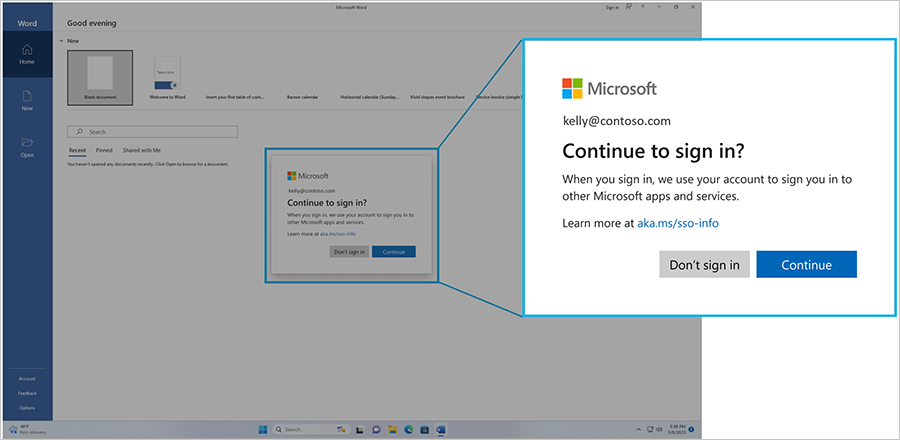
For managed enterprise environments, some organizations wanted additional flexibility to manage the SSO prompt experience on devices where their organizations already manage sign-in policies and trust relationships. To support those scenarios, we’ve developed a registry-based control that lets IT administrators automatically accept SSO permissions on eligible managed Windows devices.
Enterprise admin control for sign-in behavior
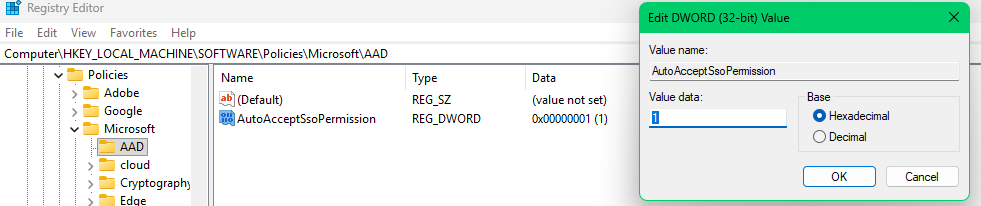
Starting with the security update (as stated above) for Windows 11, version 24H2 and 25H2, IT administrators can deploy the following registry policy to automatically accept SSO permissions on managed devices:
Registry Path: HKLM\SOFTWARE\Policies\Microsoft\Windows\AAD
Value: AutoAcceptSsoPermission (DWORD) = 1
Getting started
To use the admin control for the SSO Prompt:
- Ensure that your devices are running the supported Windows version and have applied the security update mentioned above.
- This policy can be deployed via:
- Group Policy (GPO)
- Microsoft Intune or similar mobile device management (MDM) tool
- Microsoft Configuration Manager
- Any management tool that supports registry policy deployment
- Validate SSO behavior across your managed device fleet.