Note
Access to this page requires authorization. You can try signing in or changing directories.
Access to this page requires authorization. You can try changing directories.
Anonymous data access lets a Fabric app expose selected data operations to users who aren't signed in. You control this access at the Fabric tenant level and in each data model. Anonymous access is an authorization option, not a replacement for authentication. The same app can provide public access to some entities while requiring users to sign in for other entities or operations.
Important
Anyone who can reach the app URL can use the operations assigned to the anonymous role. Don't expose personal, confidential, financial, or internal business data through this role.
Use cases
Consider anonymous data access when an app must provide limited functionality without a sign-in requirement.
| Scenario | Example access | Recommended scope |
|---|---|---|
| Public reference data | View product catalogs, schedules, or public datasets | read |
| Feedback collection | Submit comments or survey responses | create |
Anonymous access isn't appropriate when an app must identify the user, enforce ownership, or provide access based on identity claims. Use authenticated roles for those scenarios.
How anonymous access works
Anonymous data access uses independent controls:
- Tenant setting: A Fabric tenant administrator grants anonymous data access for the organization or selected security groups.
- Data-model role: An entity uses the
anonymousrole to define the operations that unauthenticated users can perform.
The tenant setting is the organization-wide boundary. The app setting allows anonymous requests to reach the app's data service. The entity role determines which data and operations those requests can access. Enabling only one or two of these controls doesn't grant anonymous access.
Enable the tenant setting
A Fabric tenant administrator must enable anonymous data access before app developers can use it. The setting is disabled by default.
Sign in to the Fabric admin portal.
Select Tenant settings.
Under Fabric apps (preview), find Anonymous data access.
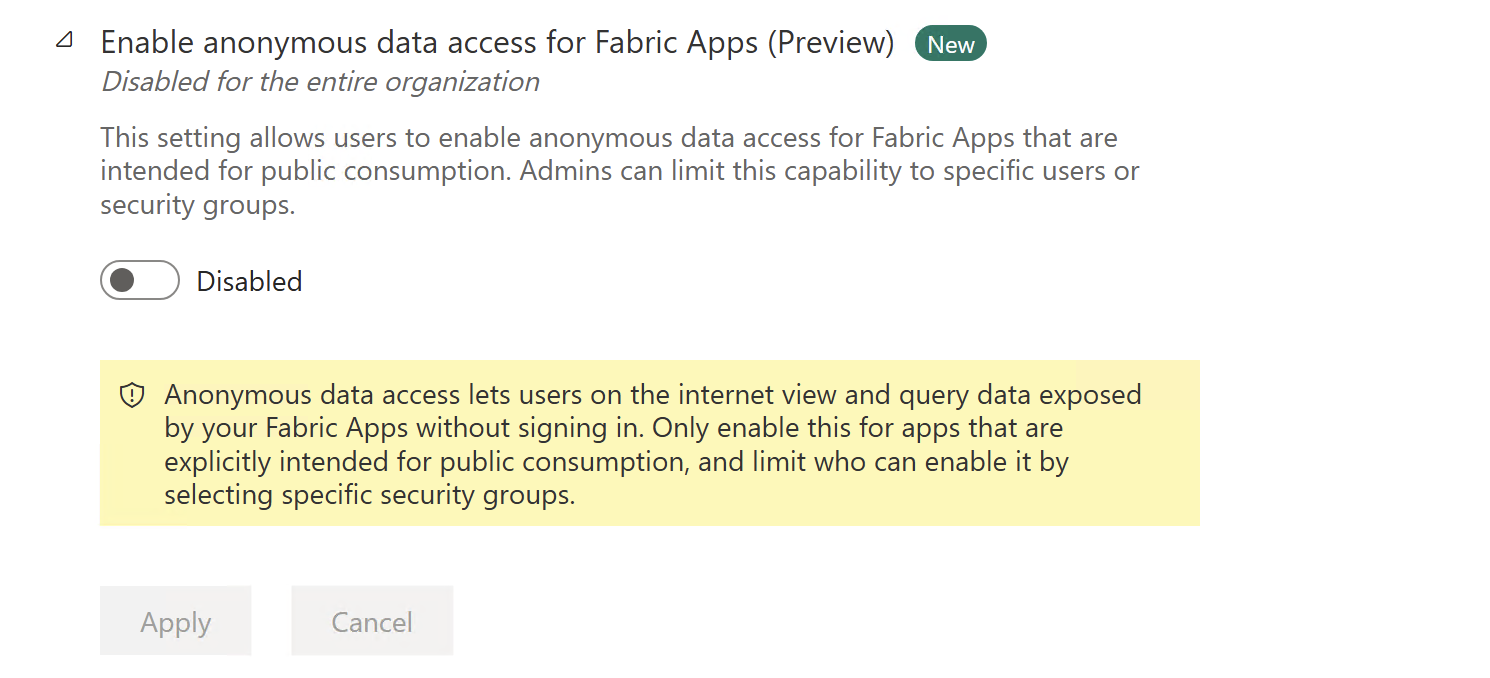
Set the toggle to Enabled.
Apply the setting to the entire organization or to specific security groups.
Select Apply.
Changes might take a few minutes to take effect. When you limit the setting to security groups, confirm that the app developer or app owner is included in an allowed group.
Define anonymous access in a data model
Use the @role decorator on an entity and specify anonymous as the role name. The second argument defines the allowed data operations: create, read, update, or delete.
Parameters
| Parameter | Type | Description |
|---|---|---|
roleName |
string |
The role name, such as authenticated or a custom application role |
actions |
string \| string[] |
Single action or array: create, read, update, delete, or * for all |
options |
object |
Optional object with check, include, and exclude properties |
The following example allows unauthenticated users to read public announcements:
import { entity, role, uuid, text } from '@microsoft/rayfin-core';

@entity()
@role('anonymous', 'read')
export class Announcement {
  @uuid() id!: string;
  @text() title!: string;
  @text() content!: string;
}
The anonymous role doesn't use identity claims because no signed-in identity is available. Define the narrowest set of operations that supports your scenario.
Allow users to submit data
For a feedback form, grant create access without granting read, update, or delete access:
import { entity, role, uuid, text } from '@microsoft/rayfin-core';

@entity()
@role('anonymous', 'create')
export class Feedback {
  @uuid() id!: string;
  @text() comment!: string;
}
This model lets users submit feedback, but it doesn't let them view or change submitted entries.
Allow multiple operations
Pass an array when a scenario requires more than one operation:
import { boolean, entity, role, text, uuid } from '@microsoft/rayfin-core';

@entity()
@role('anonymous', ['create', 'read', 'update'])
export class SharedTodo {
  @uuid() id!: string;
  @text() title!: string;
  @boolean({ default: false }) completed!: boolean;
}
Anyone with access to this app can create, view, and update every shared todo. They can't delete todos because delete isn't included. Use broad permissions like these only for public or temporary data where users are expected to share access.
Combine anonymous and authenticated roles
Apply both roles to an entity when public and signed-in users require different permissions. For example, anyone can read a blog post, but only its signed-in owner can change it:
import { entity, role, uuid, text } from '@microsoft/rayfin-core';

@entity()
@role('anonymous', 'read')
@role('authenticated', ['create', 'update', 'delete'], {
  policy: (claims, item) => claims.sub.eq(item.createdBy),
})
export class BlogPost {
  @uuid() id!: string;
  @text() title!: string;
  @text() content!: string;
  @text() createdBy!: string;
}
The anonymous role permits public reads without evaluating identity claims. The authenticated role uses the signed-in user's claims to restrict changes to content that the user owns.
Security guidance
- Grant the minimum access required. Prefer
readorcreatealone. Grantupdateordeleteonly when the public workflow requires it. - Limit exposed fields. Use
includeorexcludeoptions to prevent access to fields that anonymous users don't need. For more information, see Define data permissions. - Don't rely on the app UI for protection. Permissions must be defined on the data model because callers can send requests without using your frontend.
- Plan for untrusted input. Validate submitted data and design public write operations for spam, automation, and unexpected traffic.
- Test denied operations. Confirm that operations omitted from the role are rejected for users without a session.
Disable anonymous access
To remove public access from an app:
- Remove the
anonymousrole from each data model. - Redeploy the app by running
npx rayfin up.
A tenant administrator can also disable the tenant setting to block anonymous data access for all apps within a tenant and limit access to selected security groups.