Note
Access to this page requires authorization. You can try signing in or changing directories.
Access to this page requires authorization. You can try changing directories.
The Enforce a strict content security policy for static-hosted Fabric Apps (preview) tenant setting controls whether Fabric applies a strict content security policy (CSP) to static-hosted app frontends. A Fabric tenant administrator can enable the policy for the entire organization or limit its scope to specific users or security groups.
The policy restricts the requests a frontend can make and the content it can load. It applies regardless of whether an app is public, requires sign-in, or runs embedded-only.
How the setting affects apps
For apps in the setting's scope, the enabled policy allows frontend requests to supported endpoints and blocks requests and content from sources outside the policy. You can't customize the policy.
The strict policy allows:
- Fabric URLs
- Power BI URLs
- The AppBackend item endpoints and its dependencies
| Setting state | App behavior |
|---|---|
| Enabled and in scope. | Fabric serves the app with the strict policy. Frontend requests and content loads that the policy doesn't allow are blocked. |
| Disabled. | Fabric serves apps without this tenant-controlled policy. |
| Enabled with a limited scope. | The policy applies only within the configured scope, rather than across the entire organization. |
Compatibility impact
Enabling the policy can break apps that are already deployed and running. Review app dependencies before you turn it on, especially if the frontend:
- Calls external services that the policy doesn't allow.
- Loads scripts, styles, fonts, or images from sources that the policy doesn't allow.
- Uses WebAssembly.
An app might load its initial page but lose functionality when the browser blocks a required request or resource. For example, a frontend that loads a script or font from an external site might stop working or display differently.
Because the policy isn't customizable, you can't add an exception for an external domain through this setting. Review how the app loads resources and calls services before expanding enforcement.
Warning
Test existing apps in a limited scope before enabling the policy for the entire organization. Changes to the setting can take up to one hour to take effect.
Configure the tenant setting
You must be a Fabric tenant administrator to change this setting.
Sign in to the Fabric admin portal.
Select Tenant settings.
Find Enforce a strict content security policy for static-hosted Fabric Apps (preview).
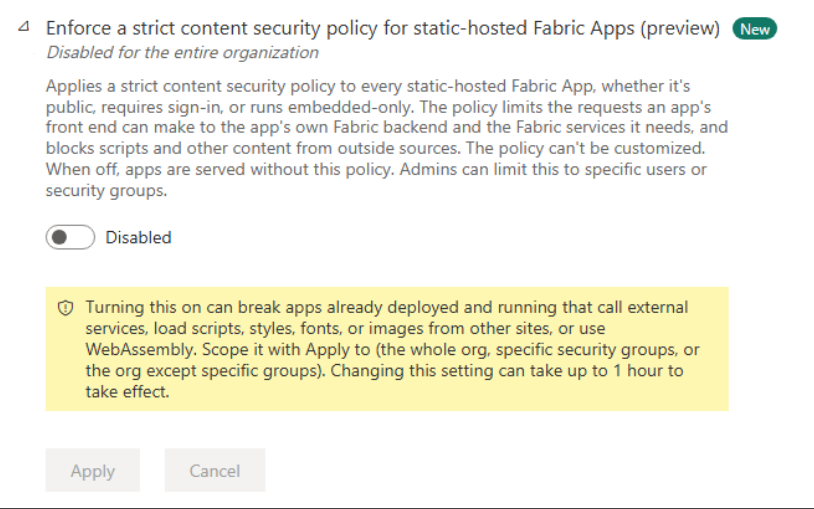
Set the toggle to Enabled.
Use Apply to to select the entire organization or specific security groups. Configure group exclusions if needed.
Select Apply.
Allow up to one hour for the change to take effect before assessing app behavior. The following screenshot shows the setting disabled for the entire organization.
To turn off this policy, return to the setting, set the toggle to Disabled, and select Apply. The same propagation window applies.
Check apps after enabling the policy
After the setting takes effect, open apps in the configured scope and exercise their main workflows. Check pages that depend on external resources, service calls, or WebAssembly rather than checking only whether the initial page loads.
If an app stops working, inspect the browser's developer tools for CSP violations. Identify the blocked request or resource and review whether the app can work within the policy's restrictions. If you need to restore service while you assess compatibility, adjust the setting's scope or disable it, and allow up to one hour for the change to take effect.