Note
Access to this page requires authorization. You can try signing in or changing directories.
Access to this page requires authorization. You can try changing directories.
Applies to: ✅ Fabric Data Engineering and Data Science
The Fabric Livy API lets you submit Spark batch and session jobs from a remote client directly to Fabric Spark compute, without using the Fabric portal. In this article, you create a lakehouse, authenticate with a Microsoft Entra token, discover the Livy API endpoint, and submit and monitor a Spark session job.
Prerequisites
Fabric Premium or Trial capacity with a lakehouse
Enable the Tenant Admin Setting for Livy API
A remote client such as Visual Studio Code with Jupyter notebook support, PySpark, and Microsoft Authentication Library (MSAL) for Python
Either a Microsoft Entra app token. Register an application with the Microsoft identity platform
Or a Microsoft Entra SPN (Service Principal) token. Add and manage application credentials in Microsoft Entra ID
Choose a REST API client
You can interact with the Livy API from any client that supports HTTP requests, including tools like curl or any language with an HTTP library. The examples in this article use Visual Studio Code with Jupyter Notebooks, PySpark, and the Microsoft Authentication Library (MSAL) for Python.
How to authorize the Livy API requests
To use the Livy API, you need to authenticate your requests using Microsoft Entra ID. There are two authorization methods available:
Entra SPN Token (Service Principal): The application authenticates as itself using credentials such as a client secret or certificate. This method is suitable for automated processes and background services where no user interaction is required.
Entra app token (Delegated): The application acts on behalf of a signed-in user. This method is suitable when you want the application to access resources with the permissions of the authenticated user.
Choose the authorization method that best fits your scenario and follow the corresponding section below.
How to authorize the Livy API requests with a Microsoft Entra SPN Token
To work with Fabric APIs including the Livy API, you first need to create a Microsoft Entra application and create a secret and use that secret in your code. Your application needs to be registered and configured adequately to perform API calls against Fabric. For more information, see Add and manage application credentials in Microsoft Entra ID
After creating the app registration, create a client secret.
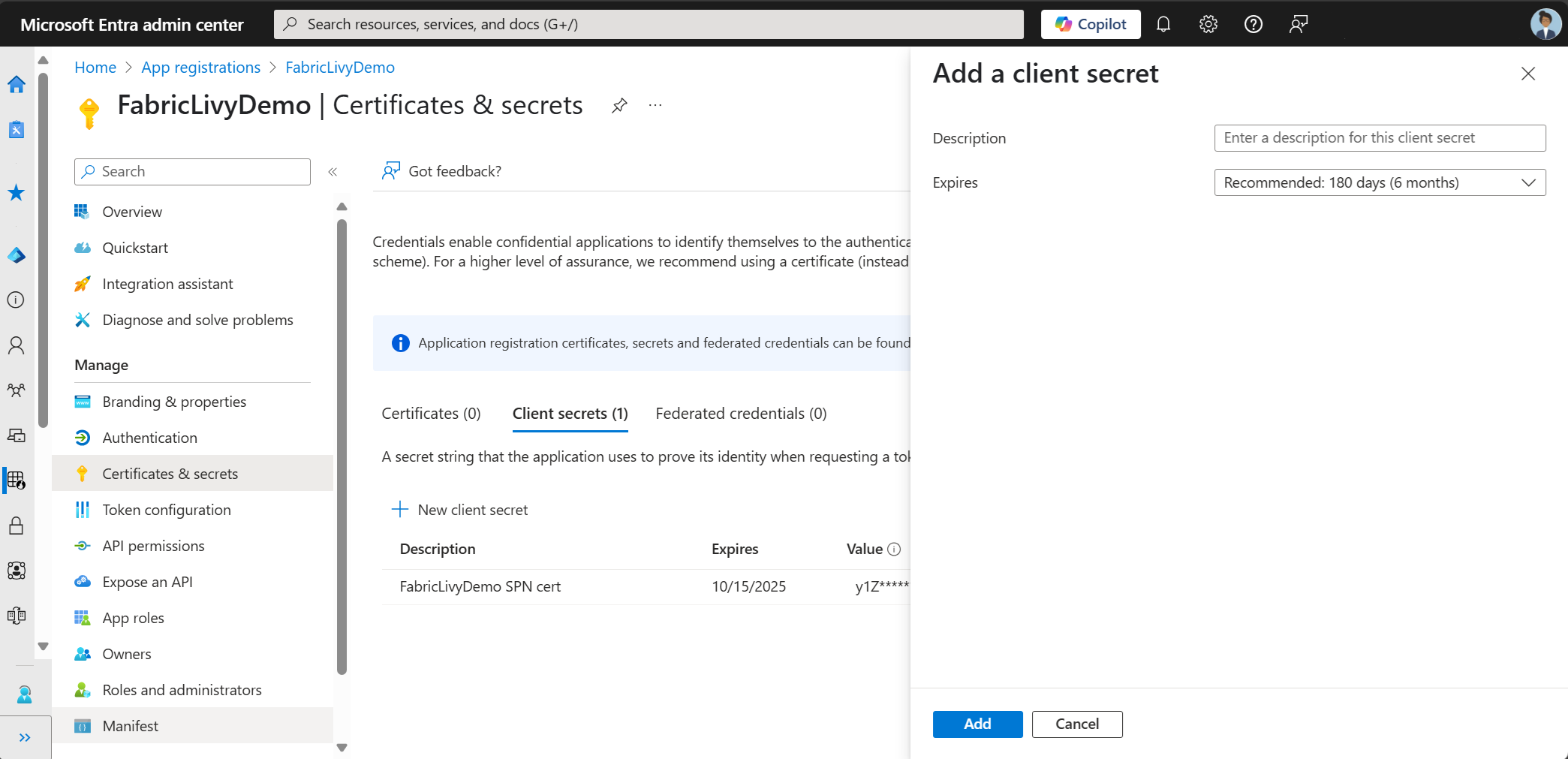
As you create the client secret, make sure to copy the value. You need this later in the code, and the secret can't be seen again. You also need the Application (client) ID and the Directory (tenant ID) in addition to the secret in your code.
Next, add the service principal to your workspace.
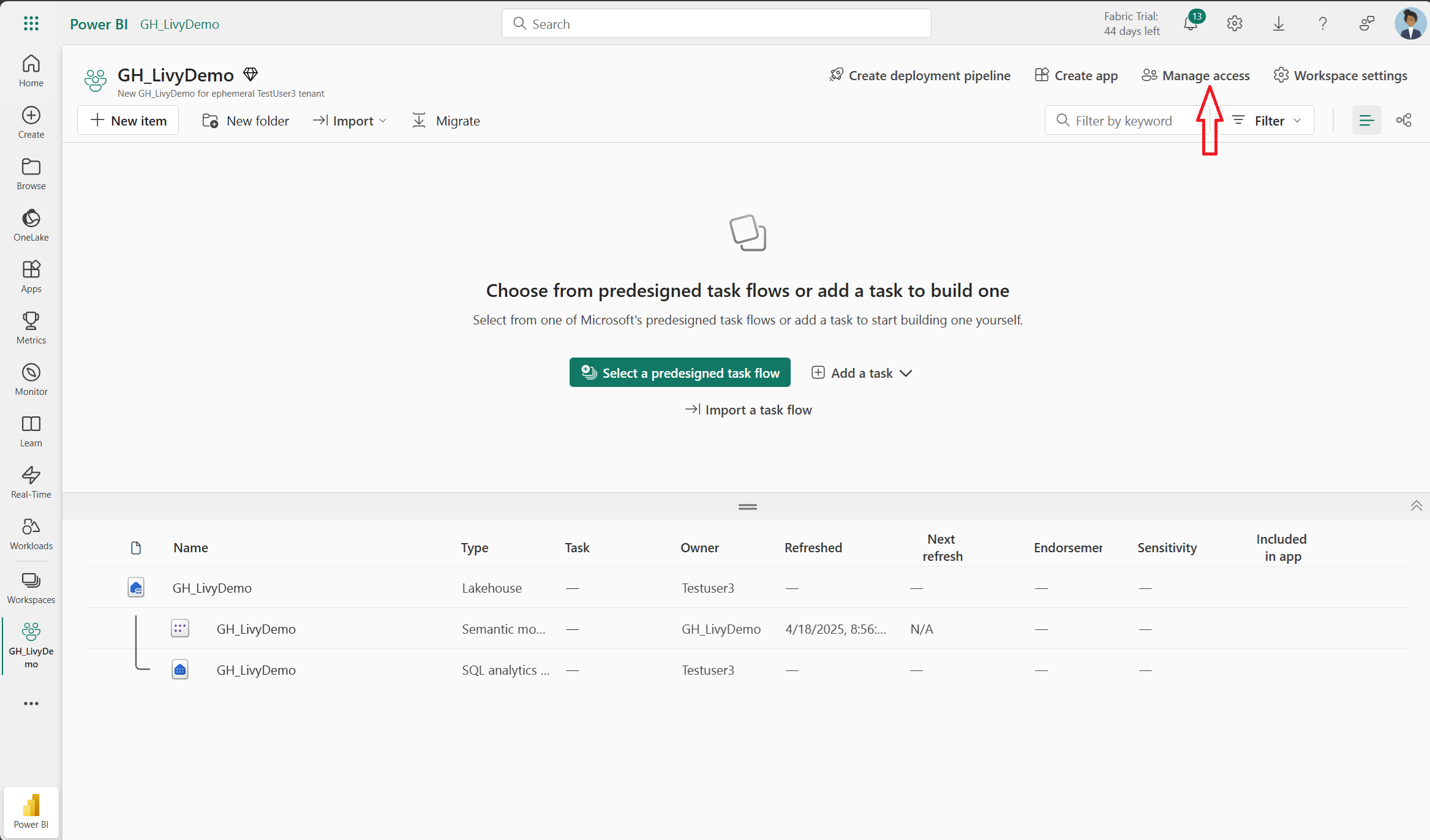
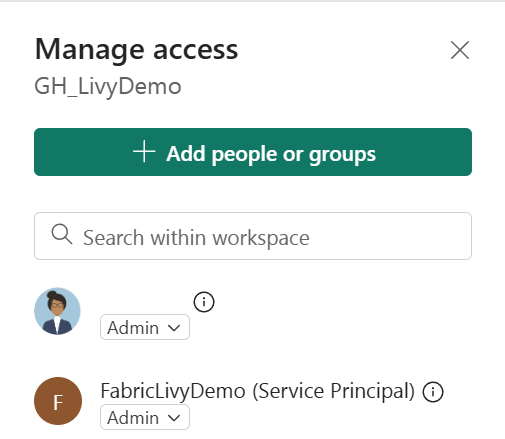
Search for the Microsoft Entra application using the Application (client) ID or name, add it to the workspace, and make sure the service principal has Contributor permissions.
How to authorize the Livy API requests with an Entra app token
To work with Fabric APIs including the Livy API, you first need to create a Microsoft Entra application and obtain a token. Your application needs to be registered and configured adequately to perform API calls against Fabric. For more information, see Register an application with the Microsoft identity platform.
The following Microsoft Entra scope permissions are required to execute Livy API jobs:

Required scopes
| Scope | Description |
|---|---|
Lakehouse.Execute.All |
Execute operations in Fabric lakehouses. |
Lakehouse.Read.All |
Read lakehouse metadata. |
Code.AccessFabric.All |
Allows getting access tokens to Fabric. Required for all Livy API operations. |
Code.AccessStorage.All |
Allows getting access tokens to OneLake and Azure storage. Required for reading and writing data in lakehouses. |
Optional Code.* scopes
Add these scopes only if your Spark jobs need to access the corresponding Azure services at runtime.
| Scope | Description | When to use |
|---|---|---|
Code.AccessAzureKeyvault.All |
Allows getting access tokens to Azure Key Vault. | Your Spark code retrieves secrets, keys, or certificates from Azure Key Vault. |
Code.AccessAzureDataLake.All |
Allows getting access tokens to Azure Data Lake Storage Gen1. | Your Spark code reads from or writes to Azure Data Lake Storage Gen1 accounts. |
Code.AccessAzureDataExplorer.All |
Allows getting access tokens to Azure Data Explorer (Kusto). | Your Spark code queries or ingests data to/from Azure Data Explorer clusters. |
Code.AccessSQL.All |
Allows getting access tokens to Azure SQL. | Your Spark code needs to connect to Azure SQL databases. |
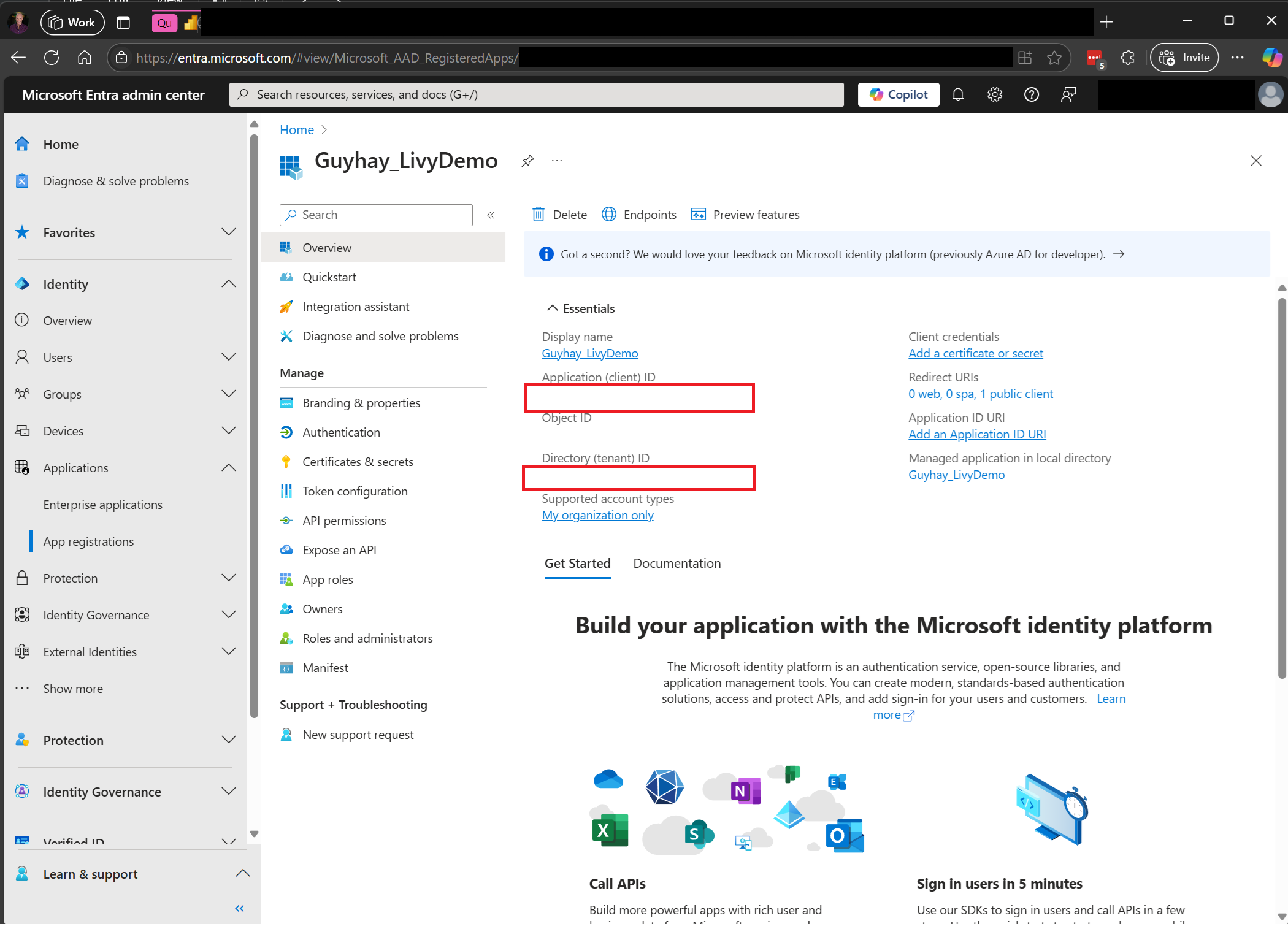
When you register your application, you need both the Application (client) ID and the Directory (tenant) ID.
The authenticated user calling the Livy API needs to be a workspace member where both the API and data source items are located with a Contributor role. For more information, see Give users access to workspaces.
Understanding Code.* scopes for the Livy API
When your Spark jobs run via the Livy API, the Code.* scopes control what external services the Spark Runtime
can access on behalf of the authenticated user. Two are required; the rest are optional depending on your workload.
Required Code.* scopes
| Scope | Description |
|---|---|
Code.AccessFabric.All |
Allows getting access tokens to Fabric. Required for all Livy API operations. |
Code.AccessStorage.All |
Allows getting access tokens to OneLake and Azure storage. Required for reading and writing data in lakehouses. |
Optional Code.* scopes
Add these scopes only if your Spark jobs need to access the corresponding Azure services at runtime.
| Scope | Description | When to use |
|---|---|---|
Code.AccessAzureKeyvault.All |
Allows getting access tokens to Azure Key Vault. | Your Spark code retrieves secrets, keys, or certificates from Azure Key Vault. |
Code.AccessAzureDataLake.All |
Allows getting access tokens to Azure Data Lake Storage Gen1. | Your Spark code reads from or writes to Azure Data Lake Storage Gen1 accounts. |
Code.AccessAzureDataExplorer.All |
Allows getting access tokens to Azure Data Explorer (Kusto). | Your Spark code queries or ingests data to/from Azure Data Explorer clusters. |
Code.AccessSQL.All |
Allows getting access tokens to Azure SQL. | Your Spark code needs to connect to Azure SQL databases. |
Note
The Lakehouse.Execute.All and Lakehouse.Read.All scopes are also required but aren't part of the Code.* family. They grant permission to execute operations in and read metadata from Fabric lakehouses respectively.
How to discover the Fabric Livy API endpoint
A lakehouse item is required to access the Livy endpoint. Once the lakehouse is created, the Livy API endpoint can be located within the settings panel.
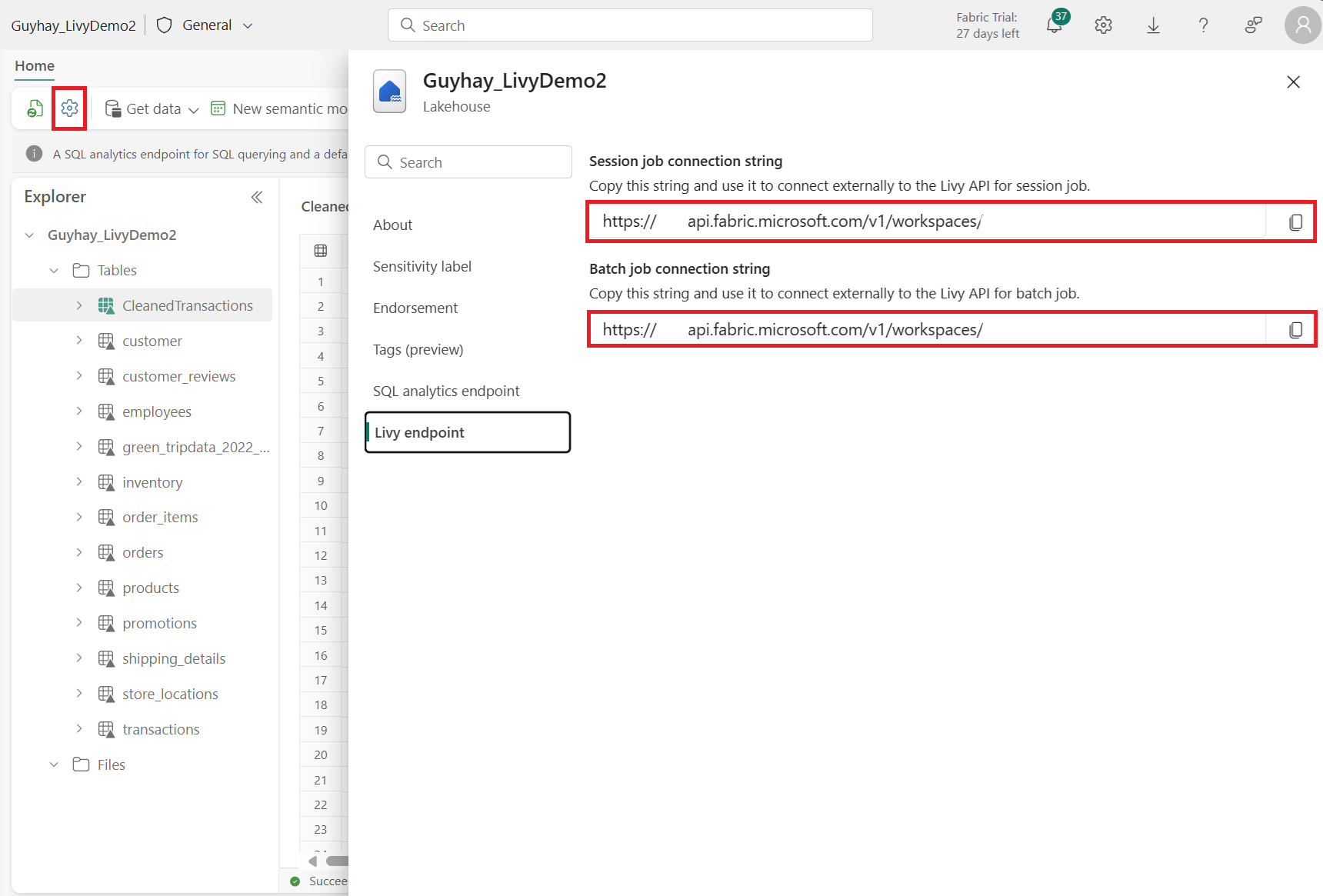
The endpoint of the Livy API would follow this pattern:
https://api.fabric.microsoft.com/v1/workspaces/><ws_id>/lakehouses/<lakehouse_id>/livyapi/versions/2023-12-01/
The URL is appended with either <sessions> or <batches> depending on what you choose.
Download the Livy API Swagger files
The full swagger files for the Livy API are available here.
High concurrency sessions
High concurrency (HC) support enables concurrent Spark execution by allowing clients to acquire multiple independent execution contexts, called high concurrency sessions.
Each HC session represents a logical execution context that maps to a Spark REPL (Read-Eval-Print Loop). Spark statements submitted under different HC sessions can execute concurrently.
This allows:
- Parallel execution across HC sessions
- Predictable resource usage
- Isolation between concurrent requests
- Lower overhead compared to creating a new session per request
Using a single session for all requests causes statements to execute sequentially. Creating a new session for every request introduces unnecessary overhead and resource underutilization.
Note
HC session acquisition is not idempotent. Multiple acquire requests with the same sessionTag return different HC session IDs, even when they are backed by the same underlying Livy session.
For a step-by-step walkthrough with example code, see Get started with the Livy API for Fabric High Concurrency Sessions. For a conceptual overview, see High concurrency support in the Fabric Livy API.
Submit a Livy API jobs
Now that setup of the Livy API is complete, you can choose to submit either batch or session jobs.
Integration with Fabric Environments
By default, this Livy API session runs against the default starter pool for the workspace. Alternatively you can use Fabric Environments Create, configure, and use an environment in Fabric to customize the Spark pool that the Livy API session uses for these Spark jobs.
To use a Fabric Environment in a Livy Spark session, update the json to include this payload.
create_livy_session = requests.post(livy_base_url, headers = headers, json={
    "conf" : {
        "spark.fabric.environmentDetails" : "{\"id\" : \""EnvironmentID""}"}
    }
)
To use a Fabric Environment in a Livy Spark batch session, update the json payload as shown here:
payload_data = {
"name":"livybatchdemo_with"+ newlakehouseName,
"file":"abfss://YourABFSPathToYourPayload.py",
"conf": {
    "spark.targetLakehouse": "Fabric_LakehouseID",
    "spark.fabric.environmentDetails" : "{\"id\" : \""EnvironmentID"\"}"  # Replace "EnvironmentID" with your environment ID, or remove this line to use starter pools instead of an environment
    }
}
How to monitor the request history
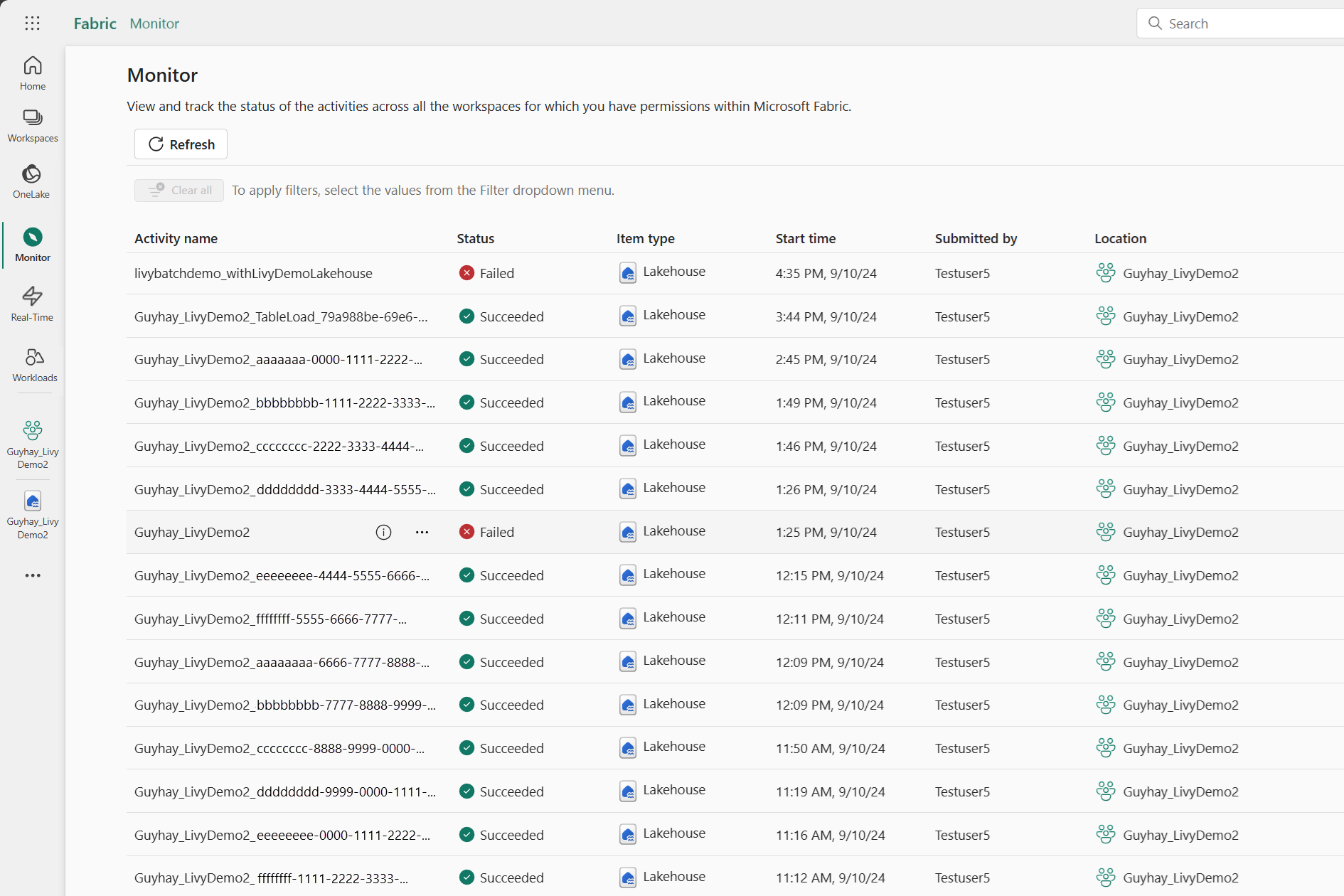
You can use the Monitoring Hub to see your prior Livy API submissions, and debug any submissions errors.
Related content
- Apache Livy REST API documentation
- Get Started with Admin settings for your Fabric Capacity
- Apache Spark workspace administration settings in Fabric
- Register an application with the Microsoft identity platform
- Microsoft Entra permission and consent overview
- Fabric REST API Scopes
- Apache Spark monitoring overview
- Apache Spark application detail