Note
Access to this page requires authorization. You can try signing in or changing directories.
Access to this page requires authorization. You can try changing directories.
Example queries (also called "few-shot examples") give the Data Agent concrete patterns to learn from. They are sample questions and their corresponding query logic that creators supply to guide how the agent should respond. When a user asks a question against a data source, the Data Agent automatically retrieves the most relevant examples—typically the top four—and feeds them into its generation process. By referencing these examples, the agent can better understand the expected structure, filters, and joins, which helps it produce more accurate, consistent, and context-aware query results.
Provide example queries
When providing example queries, you must include both a natural language question and its corresponding query answer. Each question should be unique to give the Data Agent a diverse set of reference points. Every example query is validated against the schema of the selected data source—queries that don't pass validation aren't sent to the agent. To ensure your examples are used, it's essential to confirm they pass this validation step.
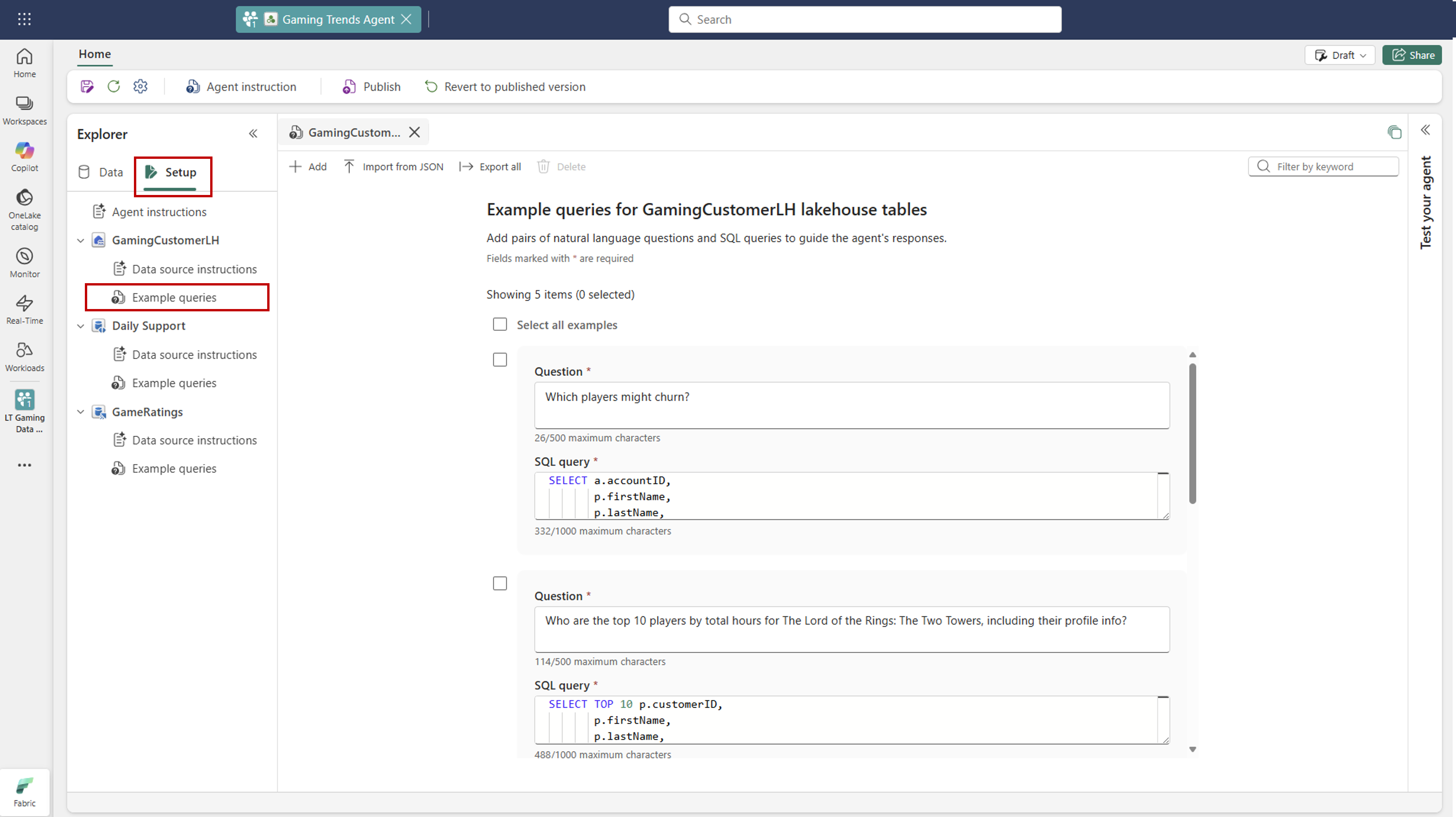
The table shows which data sources currently support example queries in the Data Agent. These examples help guide the agent's query generation process by providing patterns and context.
| Data Source Type | Supports Example Queries? |
|---|---|
| Lakehouse | ✅ Yes |
| Warehouse | ✅ Yes |
| Eventhouse KQL Databases | ✅ Yes |
| Semantic Models | ❌ No |
| Ontology | ❌ No |
You can also use the run steps view to debug which example queries were retrieved and applied to a user's question. This view is especially useful for confirming that the right examples are being used and for diagnosing why certain results are being generated. If the wrong examples appear, try refining your questions or adding clearer, more targeted examples.

Best practices for writing example queries
When creating example queries for the Data Agent, following best practices ensures they provide clear, reliable guidance during query generation. Well-crafted examples help the agent understand how natural language questions translate into SQL/KQL logic, highlight complex joins or calculations, and improve the accuracy of its results. Use the guidelines to make your examples more effective and representative of real user scenarios.
| # | Best Practice | Why It Matters |
|---|---|---|
| 1 | Ensure questions clearly map to the query | The Data Agent uses these examples to learn the pattern between the question and the resulting SQL/KQL. Ambiguity reduces accuracy. |
| 2 | Include comments in the query to guide the agent | Comments ( -- substitute customer_id here) help the agent understand where to substitute values or apply important logic. |
| 3 | Highlight join logic or complex patterns | Use example queries to show how to handle multi-table joins, aggregations, or other advanced logic that's hard to describe in plain instructions. |
| 4 | Avoid overlap or contradictions | Each example should be distinct and non-conflicting to give the agent a clean signal of how to behave. |
| 5 | Use run steps to debug which examples are passed | Run steps let you see which examples were retrieved for a given user question — if the wrong ones show up, adjust your questions or add more specific examples. |
| 6 | Reflect real user behavior | Add example queries that represent the kinds of questions your users ask to maximize relevance and accuracy. |
Validate example queries
The Fabric Data Agent SDK provides built-in tools to evaluate and improve the quality of your example queries. Using the evaluate_few_shots function, you can validate each natural-language/SQL pair to confirm it's clear, correct, and aligned with your data source schema. The SDK runs each example through the Data Agent's evaluation process, returning a detailed summary of which examples passed and which need refinement.
Provide example queries
examples_to_add = {
    "What was total revenue for Product Alpha in Q1 2024?": "SELECT SUM(amount) AS revenue FROM sales WHERE product = 'Alpha' AND fiscal_quarter = '2024-Q1';",
    "Show me average deal size in the North region during 2023.": "SELECT AVG(amount) AS avg_deal FROM deals WHERE region = 'North' AND YEAR(closed_date) = 2023;",
    "How many support tickets were closed in January 2024?": "SELECT COUNT(*) AS tickets_closed FROM support_tickets WHERE status = 'Closed' AND DATE_TRUNC('month', closed_at) = '2024-01-01';",
    "What is the total revenue for Product Alpha in the first quarter of 2024?": "SELECT COUNT(DISTINCT order_id) AS revenue FROM order_facts WHERE product = 'Alpha' AND fiscal_quarter = '2024-Q1';",
    "How many new leads were generated from the website in February 2024?": "SELECT COUNT(*) AS web_leads FROM leads WHERE source = 'Web' AND DATE_TRUNC('month', created_at) = '2024-02-01';",
    "List total marketing touches for campaign Ignite in March 2024.": "SELECT SUM(touches) AS total_touches FROM campaign_metrics WHERE campaign_name = 'Ignite' AND DATE_TRUNC('month', activity_date) = '2024-03-01';",
    "What was the average deal amount in the North region during 2023?": "SELECT SUM(amount) / COUNT(*) AS avg_deal FROM deal_summary WHERE region = 'North' AND YEAR(closed_date) = 2023;",
    "Which products exceeded 1M revenue in 2023?": "SELECT product FROM sales WHERE YEAR(order_date) = 2023 GROUP BY product HAVING SUM(amount) > 1000000;",
    "Show me how many support tickets were closed during January 2024.": "SELECT COUNT(ticket_id) AS tickets_closed FROM ticket_events WHERE event_type = 'Closed' AND MONTH(event_time) = 1 AND YEAR(event_time) = 2024;",
    "What is the churn rate for subscription tier Gold in 2024 so far?": "SELECT SUM(churned_accounts)::float / NULLIF(SUM(active_accounts), 0) AS churn_rate FROM subscription_health WHERE tier = 'Gold' AND YEAR(snapshot_date) = 2024;",
}

# Add the examples to the datasource
try:
    datasource.add_fewshots(examples_to_add)
    print(f"Added {len(examples_to_add)} few-shot examples to the datasource")
except Exception as e:
    print(f"Note: {e}")
    print("Few-shots may already exist in the datasource")
Evaluate through SDK
By reviewing the success rate and feedback, you can iteratively adjust your examples—clarifying questions, improving SQL logic, or adding comments—so the Data Agent learns from higher-quality patterns and produces more accurate results for new questions.
# Evaluate few-shot examples using the Data Agent SDK.
# This runs validation on your natural-language/SQL pairs and returns a summary of results.
result = datasource.evaluate_few_shots(batch_size=20)


# Print out the overall success rate of your examples.
# This shows how many examples passed validation vs. the total tested.
print(f"Success rate: {result.success_rate:.2f}% ({result.success_count}/{result.total_examples})")
Track feedback
After running the validator, you'll receive a clear breakdown of which examples passed and which failed. This feedback makes it easy to identify strengths and weaknesses in your few-shot examples.
- Success Cases: Examples where the SQL matched the expected answers. These examples are strong references you can model future examples after.
- Failure Cases: Examples where the SQL didn't match the expected answer, or where the question/query pair may be unclear or invalid. These cases should be reviewed and refined.
# Access success and failure cases as pre-computed Pandas DataFrames
success_df = result.success_cases
failure_df = result.failure_cases

print("Success Cases:")
display(success_df)  # Shows examples where the SQL matched the user question

print("Failure Cases:")
display(failure_df)  # Shows examples that need review or improvement
Use this feedback to iterate and improve your example queries. Regularly strengthening weaker examples will help the Data Agent produce more accurate SQL and answers over time.

To explore a full working example, you can check out the sample notebook in the Fabric Data Agent SDK GitHub repository:
Note
This evaluation utility is currently available only for SQL-based example queries. KQL or other query types aren't yet supported.
Detect conflicts between example queries
After quality validation completes, the Evaluation SDK automatically performs conflict detection on the approved example queries or few-shot examples. Conflict detection identifies inconsistencies that may cause the Data Agent to produce unpredictable or incorrect results.
A conflict is detected when two or more examples:
- Represent the same intent (based on a normalized version of the natural language question) but reference different tables or views
- Compute the same metric using different aggregation logic or different levels of granularity
- Generate SQL queries that would return materially different results for the same business question
These conflicts indicate ambiguity or inconsistency within provided few shot examples. Resolving them helps improve query determinism, accuracy, and overall agent behavior.
Review conflict details
When conflicts are detected, the SDK expands each conflict into per-example rows, providing detailed diagnostics, including:
- The examples involved in the conflict
- The natural language question and corresponding SQL for each example
- A description of the conflict explaining how the examples diverge
- A confidence score indicating the reliability of the conflict detection
Use this detailed view to understand which examples are in conflict and why, and to determine which examples should be updated or removed.
# Display conflict summary
print(f"\nConflicts Detected: {result.conflict_count}")
print("Confidence Ratings: 5=High, 4=Medium, 3=Low, 2=Very Low, 1=Speculative\n")

# Access detailed conflict information as a pre-computed DataFrame
if result.conflict_count > 0:
    conflict_details_df = result.conflict_details
    display(conflict_details_df)
else:
    print("No conflict details to display.")
The following example shows the conflict detection output, their associated questions and SQL, and the confidence level of each detected conflict.

Understand validator scores
When you run the validator on your example queries, it generates three key scores for each example: Clarity, Relatedness, and Mapping. These scores are derived from how well your natural language questions and SQL queries align with best practices.
Clarity
Measures whether the natural language question is clear and unambiguous. Questions should be specific, include necessary metrics, timeframes, and filters, and avoid vague or multi-intent phrasing.Example – Good: "Total revenue by region for 2024."
Example – Needs Improvement: "Show performance."Relatedness
Evaluates how closely the SQL query matches the intent of the natural language question. The SQL should return the correct metric, apply the proper filters, and match the requested granularity.Example – Good: A question asks for count of customers in March 2025 → SQL counts customers with
WHERE month='2025-03'.
Example – Needs Improvement: A question asks for count, but the SQL returns SUM(revenue) or filters a different period.Mapping
Checks whether all literals in the natural language question appear in the SQL query. Every number, date, or category mentioned in the question should be explicitly represented in the SQL.Example – Good: "Orders over 100 in March 2025 for 'West'" → SQL includes
> 100,2025-03, and'West'.
Example – Needs Improvement: SQL is missing one of those literals (for example, no month filter).
An example is considered high quality only if all three scores—Clarity, Relatedness, and Mapping—are positive. Use these scores to refine your example queries: rewrite unclear questions, align SQL more closely with the question intent, and ensure every literal in the question appears in the SQL query. This iterative process helps the Data Agent learn from better patterns and produce more accurate results.