Note
Access to this page requires authorization. You can try signing in or changing directories.
Access to this page requires authorization. You can try changing directories.
Ontology provides governed business context to a Fabric data agent. It describes business entities, their properties and relationships, definitions, synonyms, mappings, and bindings to underlying data sources.
The data agent uses this context to interpret a question and identify a relevant underlying data source. It then generates a source-native SQL, KQL, or DAX query, runs the query against that source, and presents the result.
Ontology is a context source in this integration. It provides semantic meaning but isn't the query execution endpoint.
Important
This feature is in preview.
How Ontology context works
The integration separates semantic context, orchestration, and query execution:
- Ontology provides semantic meaning. It defines the business entities in a domain, their properties, how they relate, the language people use to describe them, and how they map to physical data.
- Fabric data agent interprets and orchestrates. It applies relevant Ontology context to the user's question, selects an underlying source, and generates an appropriate source-native query.
- The underlying data source executes the query. The source runs the generated SQL, KQL, or DAX query under the user's permissions.
For example, an airline Ontology might define Crew Member, Flight, Airport, and Carrier entities and the relationships between them. A user can ask a question using those business terms without knowing the tables, columns, or joins in the underlying source.
Add Ontology as a context source
To add Ontology context to a data agent:
- Open the Fabric data agent.
- In the Sources experience, select Add sources.
- Select Add an ontology.
- Choose the Ontology that you want the data agent to use.
- Expand the Ontology to review its entity types and associated Ontology data sources.
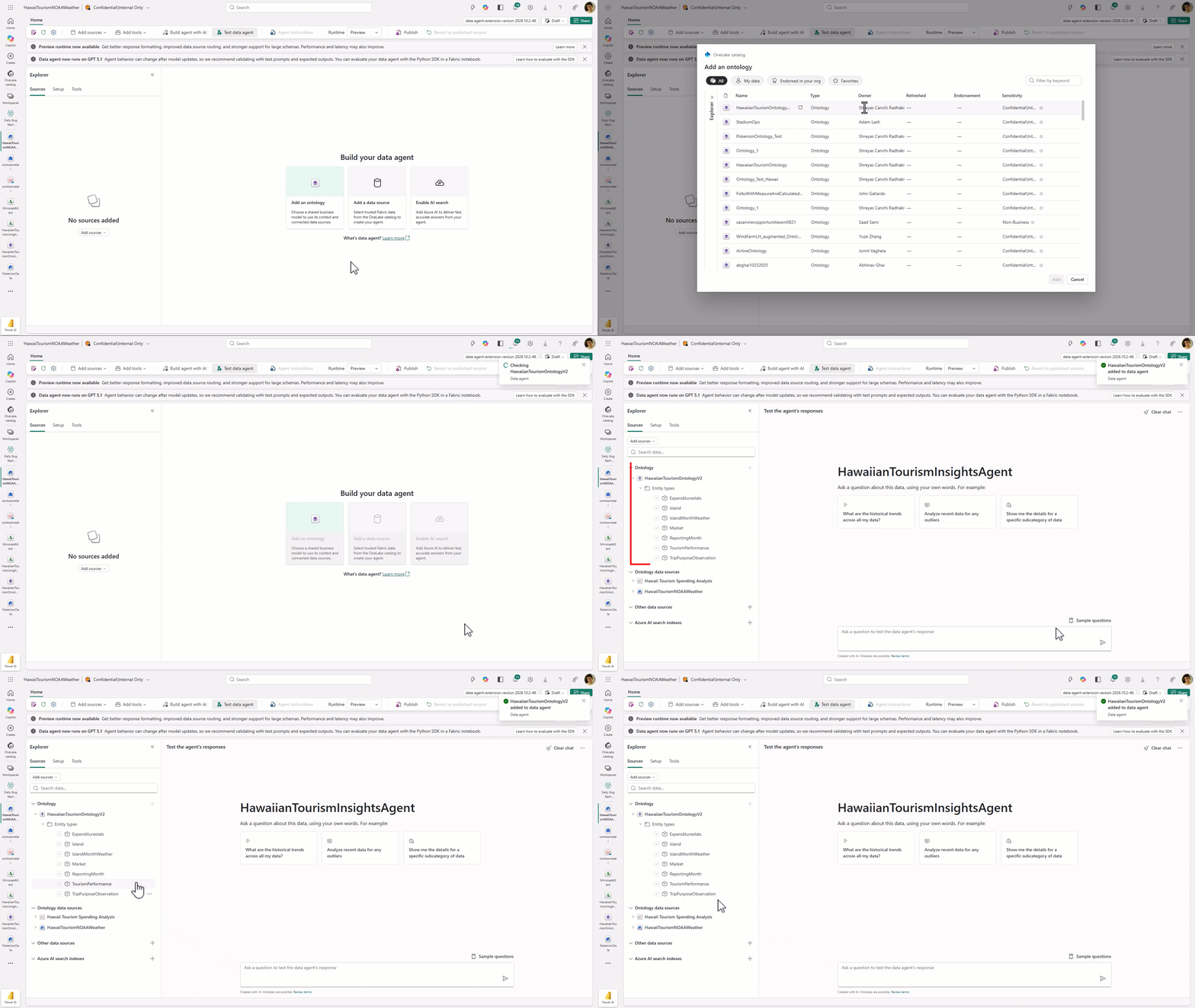
The data agent loads a read-only representation of the Ontology context. The associated underlying sources provide the schemas and data that the agent can query.
Supported configurations for underlying sources
Most semantic configuration, including entity definitions, synonyms, relationships, mappings, and bindings, lives in the Ontology. You can supplement this governed context by configuring eligible underlying sources associated with the Ontology.
You must mount an eligible underlying data source in the data agent before you can add configurations such as data source instructions, a data source description, and example queries. These data-agent-specific configurations are used only by the data agent. They aren't committed or written back to the Ontology.
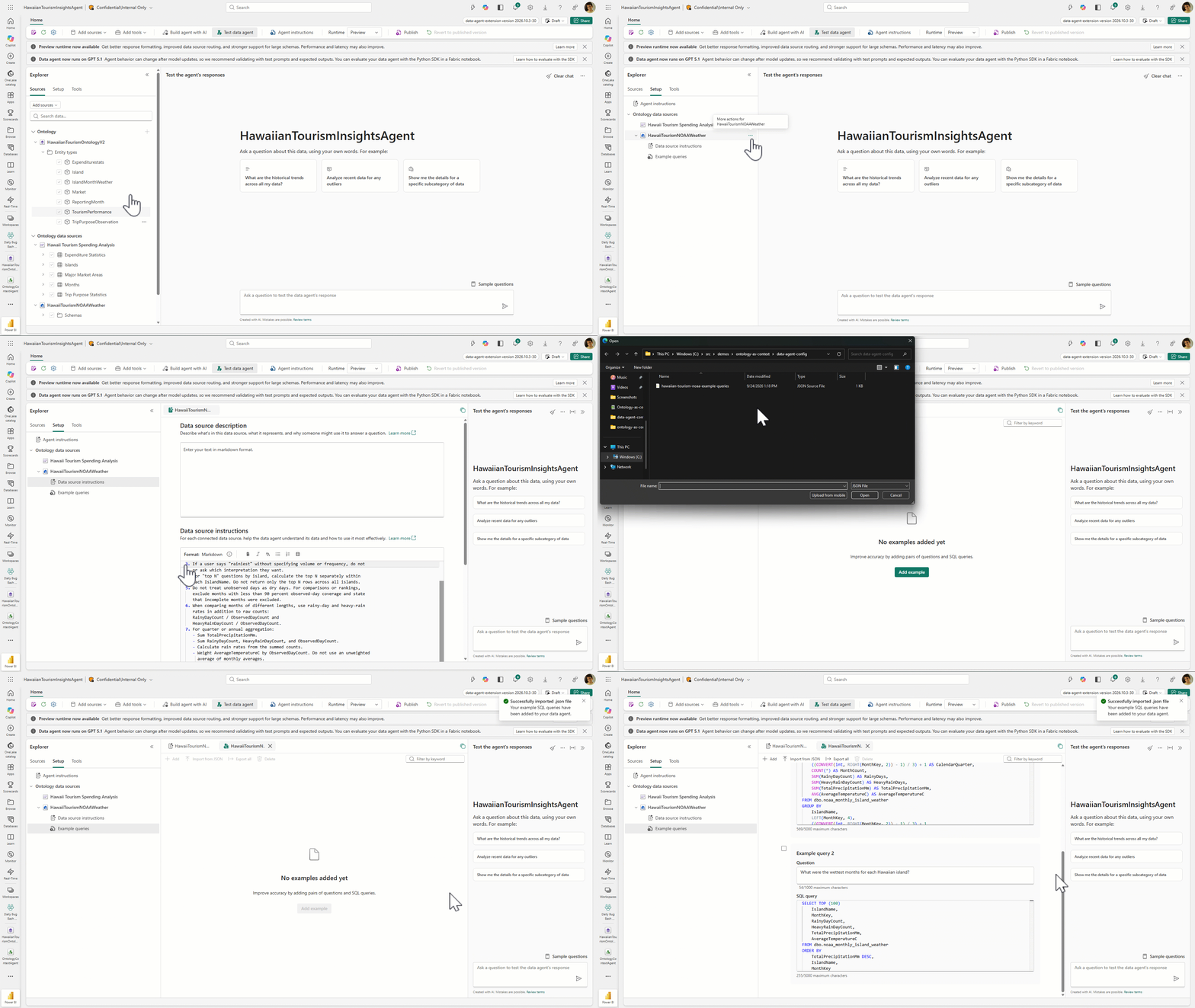
Data source instructions
Data source instructions provide guidance that the data agent applies when it generates a query for a specific underlying source. Use these instructions to identify authoritative tables, explain join paths and date semantics, define required filters, or specify source-specific business rules.
Keep instructions focused on how to query the source. To change shared business definitions, synonyms, entity relationships, mappings, or bindings, update the Ontology instead.
Data source description
A data source description summarizes the data that an underlying source contains and the types of questions it can answer. The data agent uses this description to determine when the source is relevant to a user's question.
Example queries
Example queries pair a natural-language question with the expected source-native query. Use them to demonstrate query patterns that might be difficult to infer from the schema and Ontology context alone, such as complex joins, filters, exclusions, and aggregations.
Add examples that represent questions users are likely to ask and verify that each query returns the expected result. The data agent retrieves relevant examples when it generates a query for the underlying source.
Support for data source instructions, data source descriptions, and example queries depends on the underlying source type. For configuration support by data source, see Add and configure data sources in a Fabric data agent. For general guidance, see Configure your data agent.
Debug a response
If a response is incorrect, incomplete, or fails, review the run steps and downloaded Ontology context to identify where the problem occurred.
Review the run steps
The run steps show how the data agent processed the question and interacted with the underlying source.
- Run the question again in the data agent test experience.
- Open the run steps and identify the underlying source selected for the question.
- Review the generated SQL, KQL, or DAX query and any errors returned by the underlying source.
- Run or inspect the generated query against the underlying source to verify whether it returns the expected data.
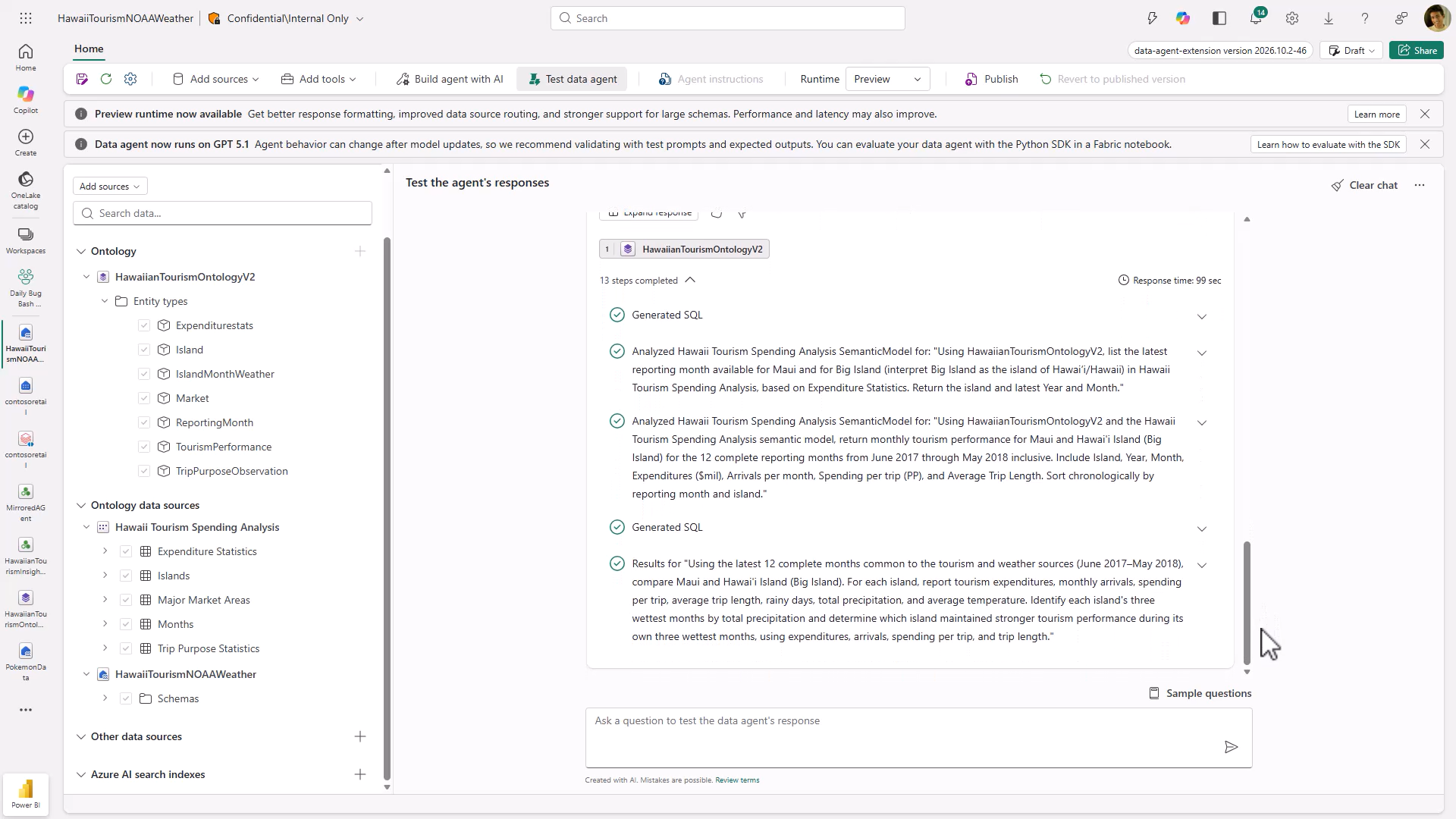
Review the downloaded Ontology context
The downloaded Ontology context is a readable, read-only representation of the semantic metadata available to the data agent.
- Open the Ontology's more-options menu, and then select Download ontology context.
- Review the downloaded context to confirm that the data agent received the expected entities, properties, relationships, definitions, synonyms, mappings, and bindings.
- If the downloaded context doesn't reflect recent Ontology changes, select Refresh, and then test the question again.
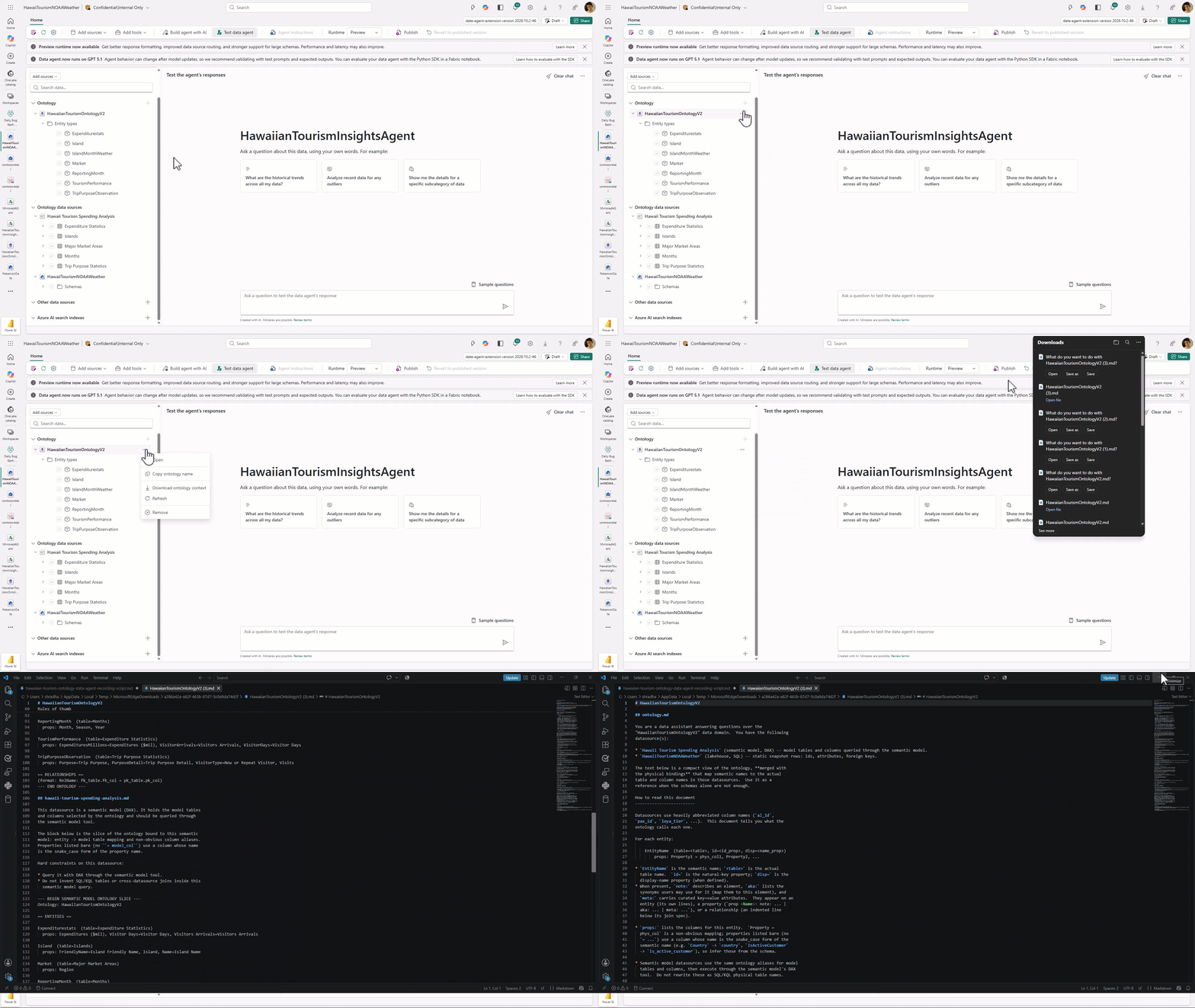
Use these details to isolate the source of the problem:
| What you observe | What to check |
|---|---|
| The data agent selects the wrong underlying source. | Confirm that the Ontology mappings and bindings associate the relevant entities with the intended source. Review supplemental data source descriptions and instructions. |
| The generated query uses an unexpected table, column, property, or filter. | Compare the query with the downloaded Ontology context. Verify the entity definitions, synonyms, relationships, mappings, and bindings in the Ontology. |
| The generated query is correct, but the result is wrong or empty. | Run the query against the underlying source and verify the source data and your permissions. |
| The response doesn't reflect a recent Ontology update. | Refresh the Ontology context in the data agent, and then run the question again. |
| Query execution fails. | Review the run-step error and validate the generated query against the selected source. |
You can't edit the downloaded context to change agent behavior. Make changes in the Ontology item, refresh its context in the data agent, and then retest the response.
Permissions
Important
The data agent executes a generated query by using the requesting user's permissions on the selected underlying data source. Users need access to the relevant Ontology objects and the underlying data objects required to answer their questions.
Sharing a data agent doesn't grant access to its underlying sources. For general sharing guidance, see Share a Fabric data agent.
Limitations
Consider the following limitations during preview:
- Only eligible underlying sources support supplemental data source instructions, descriptions, and example queries.
- Power BI semantic models don't support supplemental data-agent-specific context. When you select a semantic model as the underlying source, the query generation process might not use some Ontology context.
- The documented source-native query languages are SQL, KQL, and DAX.
- The data agent retrieves the latest Ontology context every 10 minutes, so a change such as adding an entity can take up to 10 minutes to appear unless you manually refresh the context.
- The initial experience doesn't support entity selection within an Ontology.
- A question routes to a relevant underlying source. Don't assume that a single question performs cross-source joins or federated execution.