Note
Access to this page requires authorization. You can try signing in or changing directories.
Access to this page requires authorization. You can try changing directories.
A Microsoft Entra service principal (SPN) is a non-interactive, application-based identity that can be granted precise permissions on Azure and Microsoft Fabric resources. Fabric data agents now support service principal authentication, so you can call a published data agent from automation, background services, custom applications, and CI/CD pipelines without relying on a signed-in user.
This article explains how to register a service principal, grant it the right access in your Fabric workspace and on the underlying data sources, and then use it to authenticate to a Fabric data agent.
Important
This feature is in preview.
Prerequisites
- A paid F2 or higher Fabric capacity, or a Power BI Premium per capacity (P1 or higher) capacity with Microsoft Fabric enabled.
- Enable cross-geo processing and cross-geo storing for AI based on requirements explained in Fabric data agent tenant settings.
- At least one of these data sources, with data: A warehouse, a lakehouse, a Power BI semantic model, a KQL database, a mirrored database, or an ontology. You must have read access to the data source.
- Permissions to register an application in your Microsoft Entra tenant (for example, the Cloud Application Administrator role), or an Entra ID administrator who can provide you with the SPN credentials (App ID, secret, and tenant ID).
- Microsoft Fabric tenant admin access to enable Service principals can use Fabric APIs in the Fabric admin portal.
- Workspace Admin or Member role membership to grant the SPN access to the workspace that hosts the data agent.
How service principal authentication works with Fabric data agent
When a service principal calls a Fabric data agent, the data agent treats the SPN like any other Microsoft Entra identity:
- The SPN must have access to the workspace where the data agent is published.
- The SPN must have read access to each data source attached to the data agent (warehouse, lakehouse, semantic model, KQL database, mirrored database, or ontology). The data agent only reads schemas and runs the query on the data sources that the calling identity can access.
- The SPN acquires a Microsoft Entra access token for the Fabric resource and uses that token as a bearer token when asking questions to the data agent. This endpoint is for querying the data agent with natural language questions, not for managing or configuring it.
Step 1: Create a service principal in Microsoft Entra ID
Follow the steps in Create a Microsoft Entra application and service principal that can access resources. The summary is:
- Sign in to the Microsoft Entra admin center as at least a Cloud Application Administrator.
- Browse to Entra ID > App registrations, and then select New registration.
- Give the application a name, for example fabric-data-agent-spn.
- Under Supported account types, select Accounts in this organizational directory only.
- Select Register.
- From the app registration's Overview page, copy the Application (client) ID and Directory (tenant) ID . They might be required later.
- Configure a credential for the app registration. Depending on your organization's security policies, you can use a certificate, federated identity credential, or client secret. For guidance, see Add a credential to your application.
Note
Service principal management is part of Entra ID administration duties. If you can't register applications yourself, ask your Entra ID administrator to provide the App ID, secret, and tenant ID.
Step 2: Enable service principals to use Fabric APIs
A Fabric tenant administrator must allow service principals to call Fabric APIs:
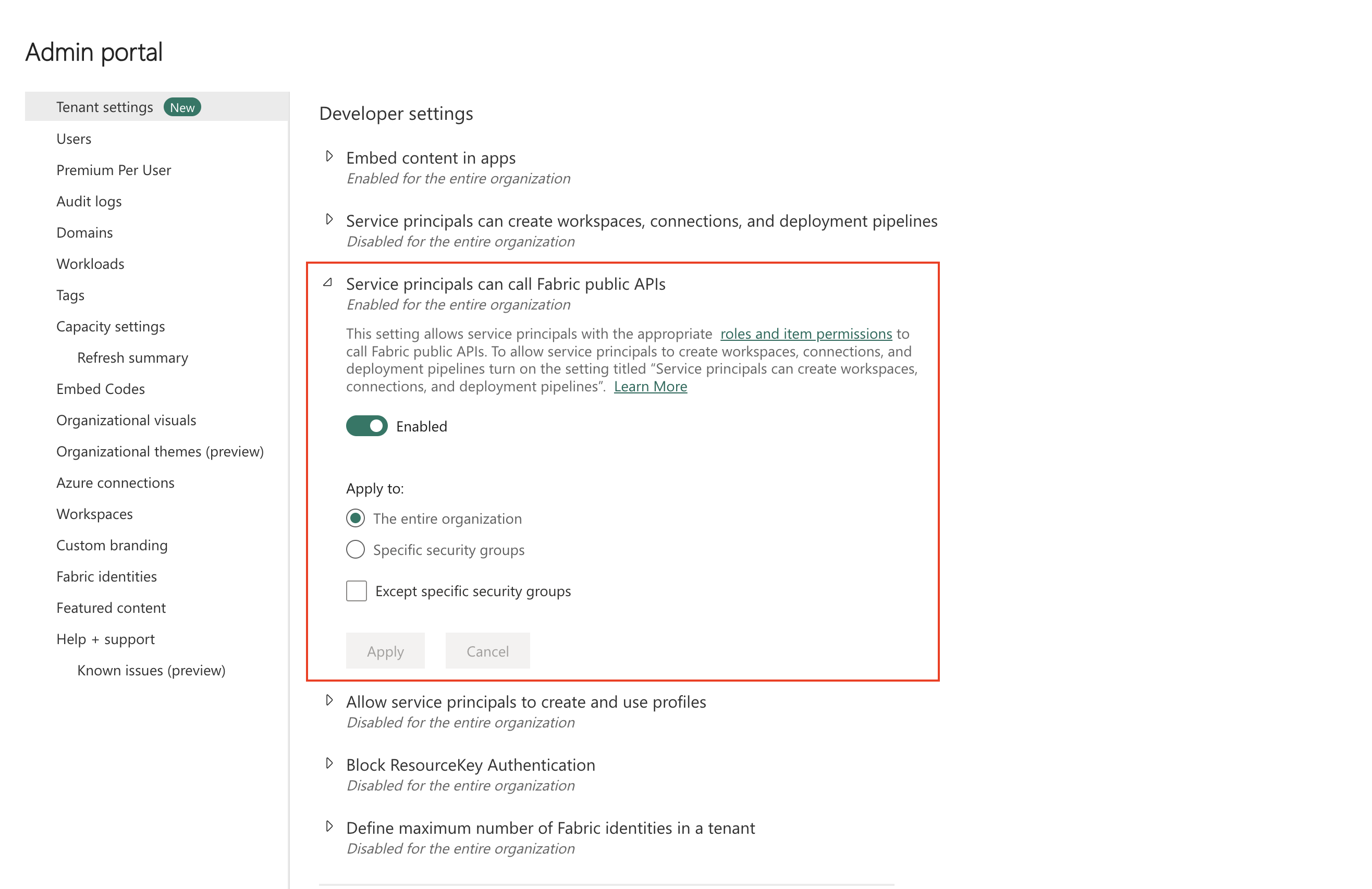
In the Fabric admin portal, go to Tenant settings > Developer settings.
Enable Service principals can use Fabric APIs.
Scope the setting to The entire organization or to a specific security group that contains your service principal.
For more details, see Service principals in Microsoft Fabric.
Step 3: Grant the service principal access to the workspace
A workspace Admin or Member must grant the service principal access to the workspace that hosts the Fabric data agent:
Open the workspace in Fabric.
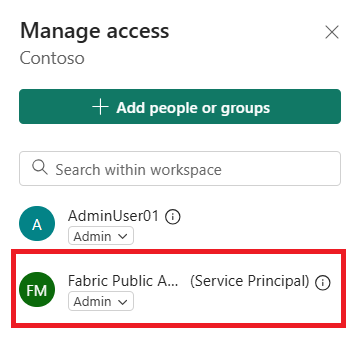
Select Manage access.
Select Add people or groups, search for the service principal by its app name, and add it.
Assign the Member or Contributor role. Admin is only required if the SPN must also manage the workspace.
Step 4: Grant the service principal access to the data sources
The Fabric data agent runs queries against its attached data sources under the calling identity. Make sure the SPN has at least read access on each source. The SPN can only see and query data that it has been granted access to, even if the data agent itself is shared with it.
Step 5: Acquire a token and call the Fabric data agent
The service principal authenticates to Microsoft Entra ID using the client credentials flow to request a token for the Fabric resource (https://analysis.windows.net/powerbi/api/.default). It then uses the resulting access token as a bearer token when calling the data agent.
Limitations
- Managed identities aren't currently supported for Fabric data agent authentication. You need to use a service principal instead.
- The SPN must have explicit access to every data source added to the data agent. Sharing only the data agent item isn't enough if the SPN lacks read access to the underlying data sources.
- Service principal authentication is not yet supported for data agents connected to a KQL database (Kusto).