Note
Access to this page requires authorization. You can try signing in or changing directories.
Access to this page requires authorization. You can try changing directories.
Applies to: ✅ Warehouse in Microsoft Fabric
Important
This feature is in preview.
In Fabric Data Warehouse, T-SQL developers can call Fabric user data functions from T-SQL queries. A T-SQL proxy function in a warehouse calls the referenced Python function in a published user data functions item.
Use this integration to extend T-SQL with reusable Python logic for scenarios such as:
- Using specialized PyPI packages for spatial, numeric, or data science workloads.
- Implementing custom business logic in Python.
- Calling external APIs.
- Interacting with other Fabric items and Azure services, such as warehouses, lakehouses, SQL databases, or a Cosmos DB.
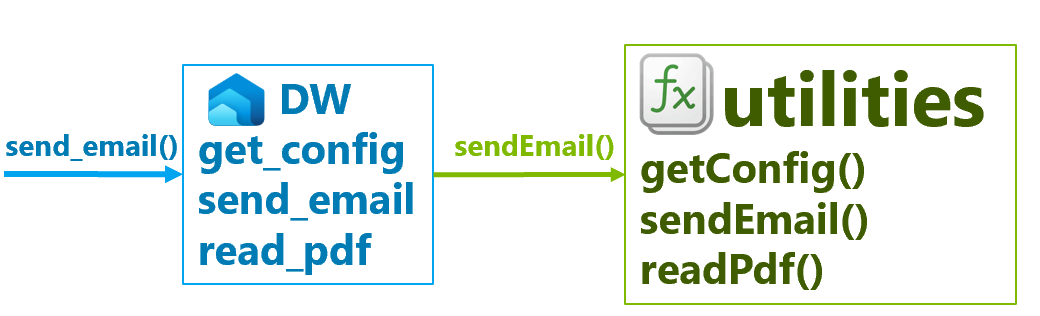
This article shows how to reference a published user data function from Fabric Data Warehouse and use it in T-SQL queries.
Prerequisites
To use user data functions from Fabric Data Warehouse, you need:
A Fabric warehouse.
A published user data functions item that contains the Python function you want to invoke.
Read access to the user data functions item and permission to invoke its published functions.
Permission to create a function in the target warehouse.
A Python function that follows the user data functions programming model. For syntax requirements, supported input and output types, and decorator usage, see Fabric user data function programming model overview.
If you need to create a new user data functions item, you also need a Fabric capacity in a supported region and a Fabric workspace assigned to that capacity. For details, see Create a user data functions item in Fabric and Service details and limitations of Fabric user data functions.
Create and publish a user data function
Before you can call a user data function from a warehouse, create and publish the function in a user data functions item. For complete steps and sample Python functions, see Create a user data functions item in Fabric.
A Python user data function that you could create is shown in the following example:
import fabric.functions as fn

udf = fn.UserDataFunctions()

@udf.function()
def hello_fabric(name: str) -> str:
    # Your function logic here
    return name
You use the user data function item name to bind a T-SQL proxy function to the Python function.
Create a T-SQL proxy function
Create a T-SQL function in your warehouse and bind it to the published Python function by using the AS EXTERNAL FUNCTION clause.
CREATE OR ALTER FUNCTION dbo.hello_fabric
AS EXTERNAL FUNCTION FunctionSetName.hello_fabric;
Replace FunctionSetName with the name of your user data functions item, and replace hello_fabric with the name of the published Python function.
Tip
You can generate the invocation code from the user data functions experience and use it as the starting point for the warehouse proxy function.
By default, the CREATE FUNCTION statement infers the parameter list and return type from the definition of the remote Fabric User Data Function (UDF). You can override the inferred return type by specifying it explicitly in the function definition. Providing the return type is useful when you want to expose a more precise return type than the type inferred from the remote function metadata.
CREATE OR ALTER FUNCTION dbo.hello_fabric
RETURNS VARCHAR(100)
AS EXTERNAL FUNCTION FunctionSetName.hello_fabric;
For example, a Python str return value is typically inferred as VARCHAR(MAX), but if the function always returns a value with a known maximum length, you can explicitly define the return type as VARCHAR(100) or another appropriate length to provide more accurate metadata and type information.
Use proxy functions in T-SQL queries
After you create the proxy function, call it from T-SQL like any other user-defined function.
Use the proxy function in query expressions such as:
SELECTlists.WHEREclauses.GROUP BYclauses.- Expressions in
UPDATEandINSERTstatements.
The following pattern shows how to call a proxy function from a query:
SELECT dbo.<proxy_function_name>(<arguments>) AS function_result;
For advanced Python patterns, supported types, connections, and context objects, see Fabric user data function programming model overview.
Configure batch mode execution
Fabric Data Warehouse can execute external user data functions in batch mode.
Batch mode execution sends multiple function invocations in a single request to the remote Fabric User Data Function (UDF) service, reducing network overhead and request latency. A batch can contain up to 900 function calls.
Batch mode is typically used when the same function is applied to values from one or more table columns, allowing the query processor to evaluate many rows in a single remote call instead of issuing a separate request for each row. This method can significantly improve query performance, particularly for large datasets and high-latency external function calls.
For example, when a query applies a user data function to every value in a column, Fabric Data Warehouse can group the input values into batches and submit them together for remote processing. The remote service returns a corresponding batch of results, which are then integrated into the query execution pipeline.
To enable batch mode for a user data function:
- Open the User data functions item.
- Go to Library management > Settings.
- Turn on Preview features.
Set max_batch_size=900 in the @udf.function() decorator to allow the warehouse to send up to 900 input rows in each invocation:
Note
The max_batch_size argument is available only when the batch-mode preview is enabled.
import fabric.functions as fn

udf = fn.UserDataFunctions()

@udf.function(max_batch_size=900)
def normalizeText(value: str) -> str:
    return value.strip().lower()
After you create a T-SQL proxy function that references a batch-enabled user data function (UDF), Fabric Data Warehouse automatically detects the batch configuration, including the maximum batch size defined by the remote function. When the query pattern supports batching, the query processor groups multiple function invocations into batches and sends them to the remote service for execution instead of issuing individual requests for each row.
List user data functions in a warehouse
User data functions you create with AS EXTERNAL FUNCTION appear in sys.objects with the object type XF.
To list user data functions in a warehouse, filter sys.objects by type = 'XF'.
SELECT SCHEMA_NAME(schema_id) AS schema_name, name, object_id, type, type_desc
FROM sys.objects
WHERE type = 'XF';
To list both regular scalar functions (FN) and user data functions (XF) along with their parameter and return type signatures, use sys.parameters and sys.types:
WITH metadata AS
(
    SELECT o.schema_id, o.object_id, o.name, p.parameter_id, p.name AS parameter_name, t.name AS type_name
    FROM sys.objects AS o
    INNER JOIN sys.parameters AS p
        ON p.object_id = o.object_id
    INNER JOIN sys.types AS t
        ON t.user_type_id = p.user_type_id
    WHERE o.type IN ('FN', 'XF')
),
signature AS
(
    SELECT SCHEMA_NAME(schema_id) AS schema_name,
           name,
           ANY_VALUE(
               CASE WHEN parameter_id = 0 THEN type_name END
           ) AS return_type,
           CONCAT(
               SCHEMA_NAME(schema_id),
               '.',
               name,
               '(',
               STRING_AGG(
                   CASE
                       WHEN parameter_id > 0
                       THEN CONCAT(parameter_name, ' ', type_name)
                   END,
                   ', '
               ) WITHIN GROUP (ORDER BY parameter_id),
               ') -> ',
               MAX(CASE WHEN parameter_id = 0 THEN type_name END)
           ) AS signature
    FROM metadata
    GROUP BY schema_id, object_id, name
)
SELECT *
FROM signature;
Remarks
- The T-SQL proxy function depends on the published user data functions item and function name. If you rename or delete the Python function, update the warehouse proxy function accordingly.
- The user data functions programming model defines the supported input and output types. Verify that the Python parameter and return annotations support the values your T-SQL queries pass.
- User data functions have service limits for request payload size, execution timeout, response size, library size, and log retention. For current limits, see Service details and limitations of Fabric user data functions.
- Parameter names must use camelCase and include type annotations. Functions decorated with
@udf.function()must also specify a return type. For the complete syntax rules, see Fabric user data function programming model overview. - For built-in text transformation functions that don't require custom Python code, see Use AI functions (preview).
- User data functions have service limits for request payload size, execution timeout, response size, library size, and log retention. For current limits, see Service details and limitations of Fabric user data functions.
- Parameter names must use camelCase and include type annotations. Functions decorated with
@udf.function()must also specify a return type. For the complete syntax rules, see Fabric user data function programming model overview. - For built-in text transformation functions that don't require custom Python code, see Use AI functions (preview).
Examples
The following scenarios show common ways to extend Fabric Data Warehouse with user data functions.
A. Extend T-SQL with IP address parsing
Use a Python user data function when your warehouse query needs functionality that isn't available as a built-in T-SQL function. For example, you can use an IP address package to return the subnet for an IP address. You can apply this function in batches when a query processes IP addresses from many rows. For configuration steps, see Configure batch mode.
Note
If the function uses a package that isn't part of the Python standard library, add the package in Library management before publishing the user data function item. This example uses the netaddr package.
Define and publish the Python function in a user data functions item:
from netaddr import IPNetwork
import fabric.functions as fn

udf = fn.UserDataFunctions()

@udf.function(max_batch_size=900)
def ipSubnet(ipAddress: str, prefixLength: int = 24) -> str:
    return str(IPNetwork(f"{ipAddress}/{prefixLength}").cidr)
Create a T-SQL proxy function in the warehouse that references the published Python function:
CREATE OR ALTER FUNCTION dbo.ip_subnet
AS EXTERNAL FUNCTION inet.ipSubnet;
Call the proxy function from a warehouse query:
SELECT dbo.ip_subnet('192.168.1.25', 24) AS subnet;
Expected result: 192.168.1.0/24
B. Invoke an external public API
Use a user data function when a warehouse query needs to call an external API as part of a data enrichment workflow.
In SQL database in Fabric, Azure SQL Database, and Azure SQL Managed Instance, sys.sp_invoke_external_rest_endpoint invokes an HTTPS REST endpoint. In Fabric Data Warehouse, a user data function can provide an alternative pattern by wrapping an HTTPS call in Python and exposing it to T-SQL through a proxy function.
Caution
Calling an external endpoint can transfer data outside your warehouse. Use approved endpoints, avoid sending sensitive data unless authorized, and follow your organization's security and compliance requirements.
Note
Add required third-party libraries, such as requests, in Library management before publishing the function.
Define and publish the Python function in a user data functions item. This example uses parameter names similar to sys.sp_invoke_external_rest_endpoint:
import json
import requests
import fabric.functions as fn

udf = fn.UserDataFunctions()

@udf.function()
def invokeExternalRestEndpoint(
    url: str,
    method: str = "GET",
    payload: str | None = None,
    headers: str | None = None,
    timeout: int = 30
) -> str:
    requestHeaders = json.loads(headers) if headers else None
    requestPayload = payload if payload else None

    response = requests.request(
        method=method,
        url=url,
        data=requestPayload,
        headers=requestHeaders,
        timeout=timeout
    )
    response.raise_for_status()
    return response.text
Create a T-SQL proxy function in the warehouse:
CREATE OR ALTER FUNCTION dbo.invoke_external_rest_endpoint
AS EXTERNAL FUNCTION api.invokeExternalRestEndpoint;
Call the proxy function from a warehouse query:
SELECT dbo.invoke_external_rest_endpoint(
    'https://ipapi.co/8.8.8.8/country_name/',
    'GET',
    NULL,
    NULL,
    30
) AS response;
C. Use a configurable retention period
Use a user data function when warehouse queries need centrally managed configuration values from a Fabric variable library. For example, store a retention period in the variable library, retrieve it through a proxy function, and use it as the number argument of the DATEADD T-SQL function.
Before you publish the function, add a connection from the user data functions item to the variable library and note the connection alias. The variable library in this example contains a RETENTION_DAYS value such as 90.
Define and publish the Python function in a user data functions item:
import fabric.functions as fn

udf = fn.UserDataFunctions()

@udf.connection(argName="varLib", alias="WarehouseConfig")
@udf.function()
def getRetentionDays(varLib: fn.FabricVariablesClient) -> int:
    variables = varLib.getVariables()
    return int(variables["RETENTION_DAYS"])
Replace WarehouseConfig with the alias of your variable library connection.
Create a T-SQL proxy function in the warehouse:
CREATE OR ALTER FUNCTION dbo.get_retention_days
AS EXTERNAL FUNCTION config.getRetentionDays;
On a persistent T-SQL connection, retrieve the configured value once and store it by using sp_set_session_context:
DECLARE @retention_days int = dbo.get_retention_days();

EXECUTE sys.sp_set_session_context
    @key = N'retention_days',
    @value = @retention_days,
    @read_only = 1;
The value remains available for the lifetime of the session. Retrieve it with SESSION_CONTEXT and convert it from sql_variant to int before using it with DATEADD and GETDATE. For example, calculate a retention cutoff:
SELECT DATEADD(
    day,
    -CONVERT(int, SESSION_CONTEXT(N'retention_days')),
    GETDATE()
) AS retention_cutoff;
Reuse the same session value in another statement to filter a table:
SELECT *
FROM dbo.events
WHERE event_timestamp >= DATEADD(
    day,
    -CONVERT(int, SESSION_CONTEXT(N'retention_days')),
    GETDATE()
);
Important
Use this pattern from a client that maintains a persistent T-SQL connection,
such as SQL Server Management Studio or the MSSQL extension for Visual Studio
Code. The SQL query editor in the Fabric portal doesn't support
sp_set_session_context, and each run uses a separate session. For more
information, see SQL query editor limitations.
Troubleshoot user data functions
Query Insights provides the execution and performance information you need to troubleshoot Fabric functions. You can identify queries that invoked a function, determine whether the function used batch or row execution, and investigate external service latency, retries, failed rows, and payload size. Use the following two views to move from a query-level overview to detailed statistics for each function:
- Use
queryinsights.exec_requests_historyto identify queries that invoked Fabric or AI functions. The view includes the query text, status, submit time, and total elapsed time. - Use
queryinsights.external_api_call_statsto get detailed statistics for each function invoked by a query. The view includes the function type, execution mode, call and retry counts, external service wait time, payload size, and row outcomes.
The views use distributed_statement_id to identify the same query execution.
Find queries that used Fabric functions
Use queryinsights.exec_requests_history to find recent statements that invoked a Fabric or AI function:
SELECT TOP 100
       h.distributed_statement_id,
       h.submit_time,
       h.status,
       h.total_elapsed_time_ms,
       h.command
FROM queryinsights.exec_requests_history AS h
WHERE h.is_using_external_api = 1
ORDER BY h.submit_time DESC;
Copy the distributed_statement_id for the statement that you want to investigate. The next query filters the detailed statistics to Fabric functions.
View statistics for each function in a statement
Replace <distributed_statement_id> with an identifier returned by the previous query. The following query returns one row for each distinct Fabric function invoked by the statement:
DECLARE @distributed_statement_id uniqueidentifier =
    '<distributed_statement_id>';

SELECT function_name,
       execution_mode,
       call_count,
       batch_call_count,
       row_call_count,
       call_retry_count,
       external_service_wait_time_ms,
       external_service_wait_time_ms
           / call_count AS average_wait_time_ms_per_call,
       rows_total,
       rows_succeeded,
       rows_failed,
       data_sent_bytes,
       data_received_bytes
FROM queryinsights.external_api_call_stats
WHERE distributed_statement_id = @distributed_statement_id
  AND function_type = 'FABRIC_FUNCTION'
ORDER BY external_service_wait_time_ms DESC;
The results resemble the following example:
| function_name | execution_mode | call_count | batch_call_count | row_call_count | call_retry_count | external_service_wait_time_ms | average_wait_time_ms_per_call | rows_total | rows_succeeded | rows_failed | data_sent_bytes | data_received_bytes |
|---|---|---|---|---|---|---|---|---|---|---|---|---|
inet.ipSubnet |
batch |
12 | 12 | 0 | 0 | 840 | 70 | 600 | 600 | 0 | 12,000 | 9,600 |
api.invokeExternalRestEndpoint |
row |
4 | 0 | 4 | 1 | 1,920 | 480 | 4 | 4 | 0 | 1,024 | 512 |
Troubleshooting tips
- A high
row_call_countor anexecution_modevalue ofrowcan indicate that the function isn't using batch execution. If you expect batching, confirm that the batch-mode preview is enabled and that the function uses themax_batch_sizeargument. - Use
external_service_wait_time_msandaverage_wait_time_ms_per_callto identify slow external responses. If these values are high whiledata_sent_bytesanddata_received_bytesare low, the external service response time is likely the primary delay. - Large
data_sent_bytesordata_received_bytesvalues can also increase execution time. Reduce the input or output payload when the function transfers more data than the scenario requires.