Note
Access to this page requires authorization. You can try signing in or changing directories.
Access to this page requires authorization. You can try changing directories.
Applies to: ✅ Warehouse in Microsoft Fabric
This tutorial explains how to use IDENTITY columns in Fabric Data Warehouse to create and manage surrogate keys. You learn how to create tables with identity columns, insert data, insert explicit values with IDENTITY_INSERT, and reseed the identity range with DBCC CHECKIDENT.
Prerequisites
- Access to a Warehouse item in a workspace with Contributor or higher permissions.
- A query tool. This tutorial uses the SQL query editor in the Microsoft Fabric portal, but you can use any T-SQL querying tool.
- A basic understanding of T-SQL.
What is an IDENTITY column?
An IDENTITY column is a numeric column that automatically generates unique values for new rows. This behavior makes it ideal for implementing surrogate keys because each row gets a unique identifier without manual input.
Create an IDENTITY column
To define an IDENTITY column, specify the IDENTITY keyword in the column definition of the CREATE TABLE T-SQL syntax:
CREATE TABLE { warehouse_name.schema_name.table_name | schema_name.table_name | table_name } (
    [column_name] BIGINT IDENTITY,
    [ ,... n ],
    -- Other columns here
);
Create a table with an IDENTITY column
In this tutorial, you create a simpler version of the Trip table from the NY Taxi open dataset and add a TripID IDENTITY column. Each new row gets a TripID value that's unique in the table.
Define a table with an
IDENTITYcolumn:CREATE TABLE dbo.Trip ( TripID bigint IDENTITY, tpepPickupDateTime datetime2(6), tpepDropoffDateTime datetime2(6), passengerCount int, tripDistance float, fareAmount float, totalAmount float );Use
COPY INTOto ingest data into the table. When you useCOPY INTOwith anIDENTITYcolumn, provide the column list and map it to columns in the source data.COPY INTO dbo.Trip (tpepPickupDateTime, tpepDropoffDateTime, passengerCount, tripDistance, fareAmount, totalAmount) FROM 'https://azureopendatastorage.blob.core.windows.net/nyctlc/yellow/puYear=2013/puMonth=1/*.parquet' WITH( FILE_TYPE = 'PARQUET');Preview the data and the values assigned to the
IDENTITYcolumn:SELECT TOP 10 * FROM Trip;The output includes the automatically generated
TripIDvalue for each row.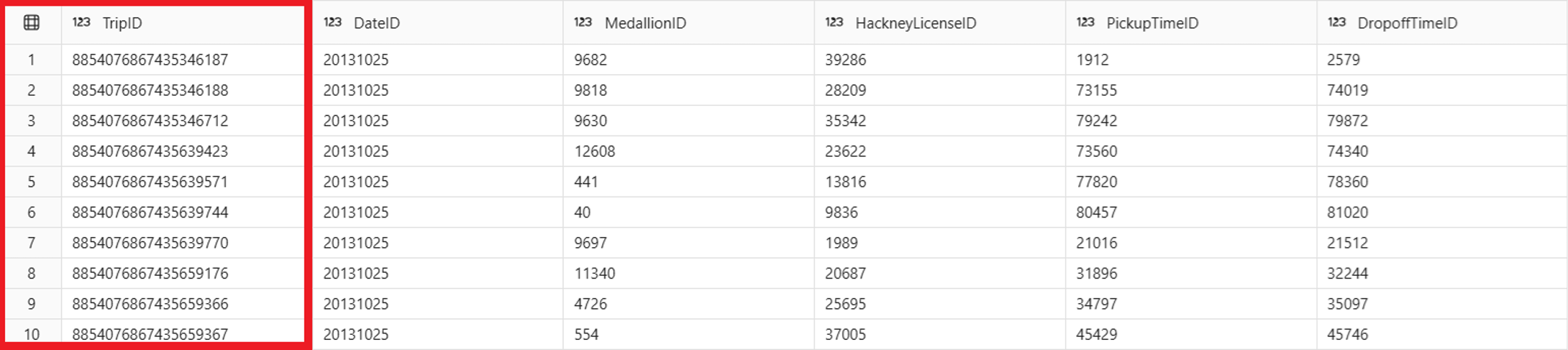
Important
Your values might differ from the values in this article.
IDENTITYcolumns produce values that are guaranteed unique, but the values aren't necessarily sequential or ordered, and gaps can occur.Use
INSERT INTOto ingest new rows:INSERT INTO dbo.Trip VALUES ('2026-01-01T00:00:00', '2013-01-01T00:12:00', 1, 2.4, 10.5, 13.0);A column list is optional with
INSERT INTO. When you provide one, specify the names of all columns for which you provide input data, except theIDENTITYcolumn:INSERT INTO dbo.Trip (tpepPickupDateTime, tpepDropoffDateTime, passengerCount, tripDistance, fareAmount, totalAmount) VALUES ('2026-01-01T08:15:00', '2013-01-01T08:42:00', 2, 6.8, 24.5, 30.0);Review the inserted rows:
 SELECT *
 FROM dbo.Trip
 WHERE CAST(tpepPickupDateTime AS date) = '2026-01-01';
Observe the values assigned to the new rows:

Insert explicit values with IDENTITY_INSERT
You might need to insert specific values into an identity column during data migration, when populating sentinel values, or when restoring data from a backup. Use SET IDENTITY_INSERT to enable these inserts.
In this section, you create a dimension table and use IDENTITY_INSERT to add sentinel rows with well-known key values.
Create a dimension table with an
IDENTITYcolumn:CREATE TABLE dbo.DimCustomer ( CustomerKey BIGINT IDENTITY, CustomerName VARCHAR(100), CustomerType VARCHAR(20) );Insert regular rows. The identity values are generated automatically:
INSERT INTO dbo.DimCustomer (CustomerName, CustomerType)
VALUES ('Contoso Ltd', 'Enterprise'),
       ('Fabrikam Inc', 'SMB'),
       ('Northwind Traders', 'Enterprise');
Enable
IDENTITY_INSERTto add sentinel values. WhenIDENTITY_INSERTisON, provide a column list that includes the identity column:SET IDENTITY_INSERT dbo.DimCustomer ON; INSERT INTO dbo.DimCustomer (CustomerKey, CustomerName, CustomerType) VALUES (-1, 'Unknown', 'Sentinel'), (-2, 'Not Applicable', 'Sentinel'); SET IDENTITY_INSERT dbo.DimCustomer OFF;After inserting explicit values, reseed the identity column with
DBCC CHECKIDENTto ensure that future automatically generated values don't collide with inserted values:DBCC CHECKIDENT('dbo.DimCustomer', RESEED);Verify that the sentinel rows appear alongside automatically generated rows:
SELECT *
FROM dbo.DimCustomer
ORDER BY CustomerKey;
Insert a row and confirm that the automatically generated value doesn't conflict:
INSERT INTO dbo.DimCustomer (CustomerName, CustomerType)
VALUES ('Adventure Works', 'Enterprise');

SELECT *
FROM dbo.DimCustomer
ORDER BY CustomerKey;
Clean up tutorial resources
Optionally, drop the tables created during this tutorial:
DROP TABLE IF EXISTS dbo.Trip;
DROP TABLE IF EXISTS dbo.DimCustomer;
DROP TABLE IF EXISTS dbo.DimProduct;