Note
Access to this page requires authorization. You can try signing in or changing directories.
Access to this page requires authorization. You can try changing directories.
Applies to: ✅ SQL database in Microsoft Fabric
In this article, you learn how to control and monitor compute usage for a SQL database in Fabric.
Control maximum compute usage with max vCore limits
This setting defines an upper bound on the Fabric capacity units (CUs) a database can consume while autoscaling. The following table summarizes the maximum vCore limits and corresponding resources.
| Max vCores | 2 vCores | 4 vCores | 32 vCores (default) |
|---|---|---|---|
| Max memory | 6 GB | 12 GB | 96 GB |
| Max storage | 512 GB | 756 GB | 4 TB |
In SQL database in Fabric, autoscaling dynamically scales compute based on demand, but it will never exceed the configured maximum vCore limit or corresponding memory limit.
When to limit maximum vCore
Configuring a maximum vCore limit is useful in scenarios such as:
- Controlling peak compute usage in shared Fabric capacities.
- Preventing unexpected cost spikes and throttling during workload bursts.
- Applying guardrails for development, test, or early preview workloads.
Configure maximum vCore limit in the Fabric portal (preview)
You can configure the maximum vCore limit for SQL database in Fabric in the Fabric portal.
Important
This feature is in preview.
- Navigate to your SQL database in the Fabric portal.
- Select the Settings icon.
- Select the Compute page.
- Under Max vCore limit, select a value in the dropdown list. This is the new maximum for vCore utilization for this SQL database.
- Select Save.
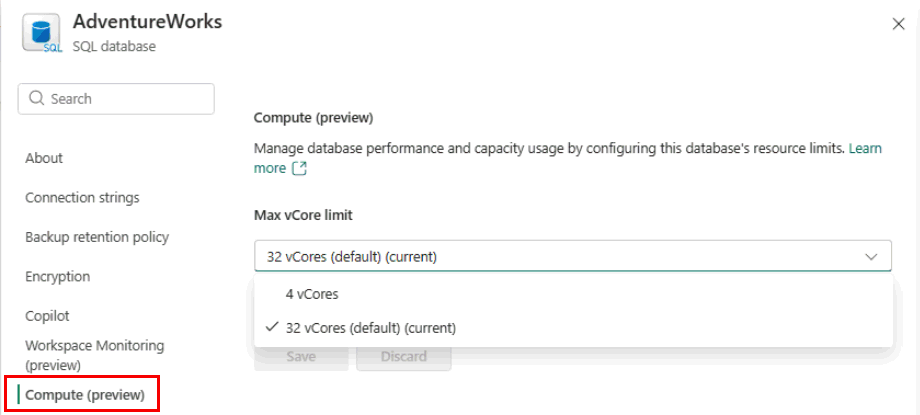
Effects of changing maximum vCore limit
The maximum vCore limit directly influences how compute usage appears in billing and utilization, and performance monitoring reports.
- Reported compute consumption reflects the capped vCore ceiling.
- Peak usage will not exceed the configured maximum, even during workload spikes.
- This makes it easier to control Fabric capacity usage and cost exposure in shared Fabric capacities.
When a maximum vCore limit is configured, the SQL database continues to autoscale dynamically based on demand.
Autoscaling is bounded by the configured maximum vCore limit.
If workload demand exceeds the limit, the database will not scale beyond the cap.
Regardless of the maximum vCore configuration, the database scales down to zero compute after idle usage periods.
Decreasing a database's max vCore limit also decreases the maximum storage. If the database is already larger than the lowered maximum storage limit, the maximum vCore setting cannot be enforced.
- You can find the amount of space allocated to your database with the following T-SQL query.
SELECT file_id, type_desc,
       CAST(FILEPROPERTY(name, 'SpaceUsed') AS decimal(19,4)) * 8 / 1024. AS space_used_mb,
       CAST(size/128.0 - CAST(FILEPROPERTY(name, 'SpaceUsed') AS int)/128.0 AS decimal(19,4)) AS space_unused_mb,
       CAST(size AS decimal(19,4)) * 8 / 1024. AS space_allocated_mb,
       CAST(max_size AS decimal(19,4)) * 8 / 1024. AS max_size_mb
FROM sys.database_files;
To free unused space, use DBCC SHRINKDATABASE (Transact-SQL) or DBCC SHRINKFILE (Transact-SQL).