Note
Access to this page requires authorization. You can try signing in or changing directories.
Access to this page requires authorization. You can try changing directories.
This article explains the difference between a calendar year and a fiscal year. It also describes how to set up a fiscal calendar in planning for planning, reporting, and forecasting by using fiscal years (FY).
What is a fiscal year?
A fiscal calendar organizes reporting periods based on an organization's financial year instead of the standard January-to-December calendar year. Depending on the organization, the fiscal year might begin in April, July, August, October, or another month.
Standard calendar and fiscal calendar
The following tables and images compare standard and fiscal calendar years.
Standard calendar
A standard calendar year always begins in January.
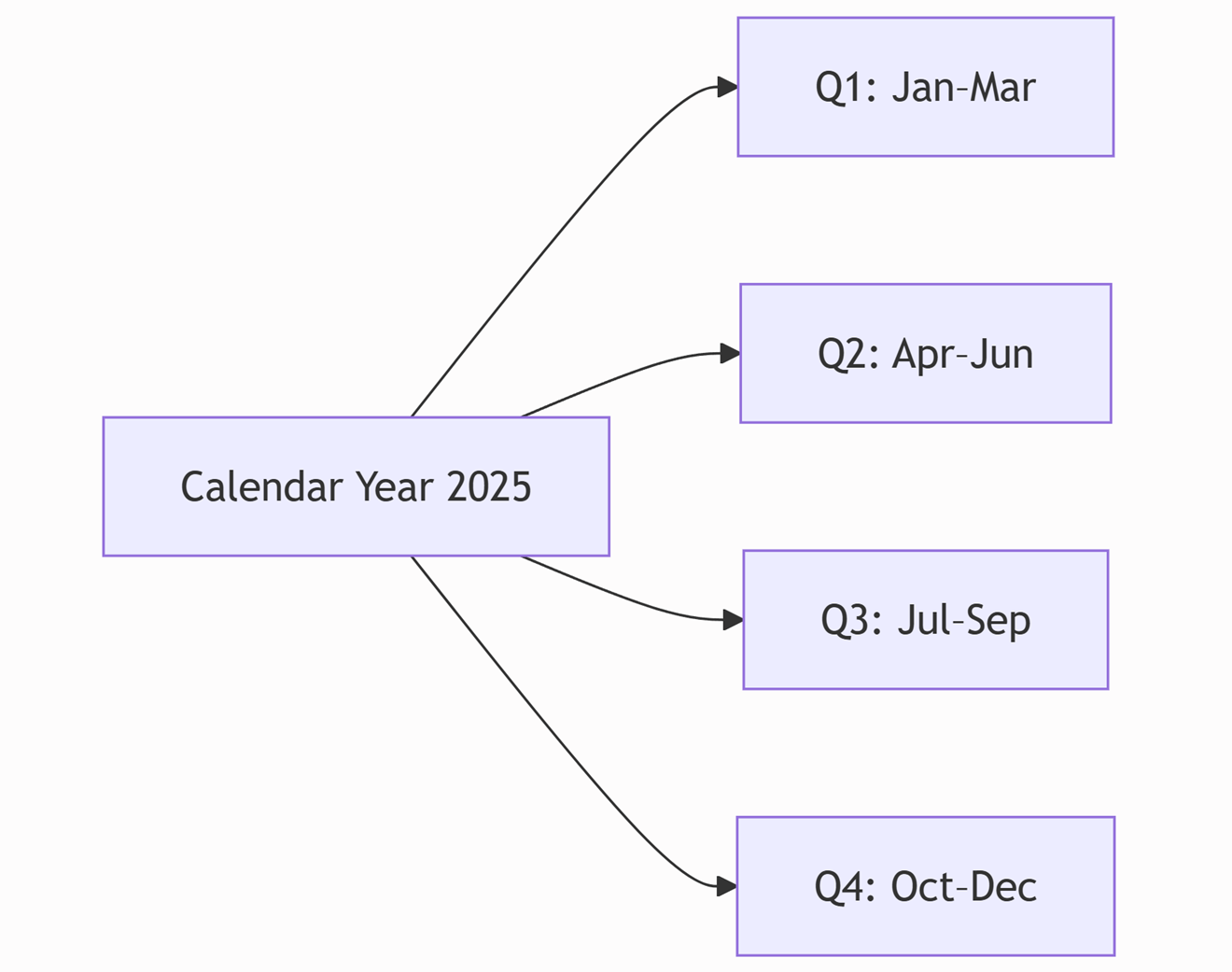
| Calendar year | Quarter | Months |
|---|---|---|
| 2025 | Q1 | January, February, March |
| 2025 | Q2 | April, May, June |
| 2025 | Q3 | July, August, September |
| 2025 | Q4 | October, November, December |
Fiscal calendar
A fiscal calendar year begins in the month that your organization selects. Quarter boundaries move with that start month.
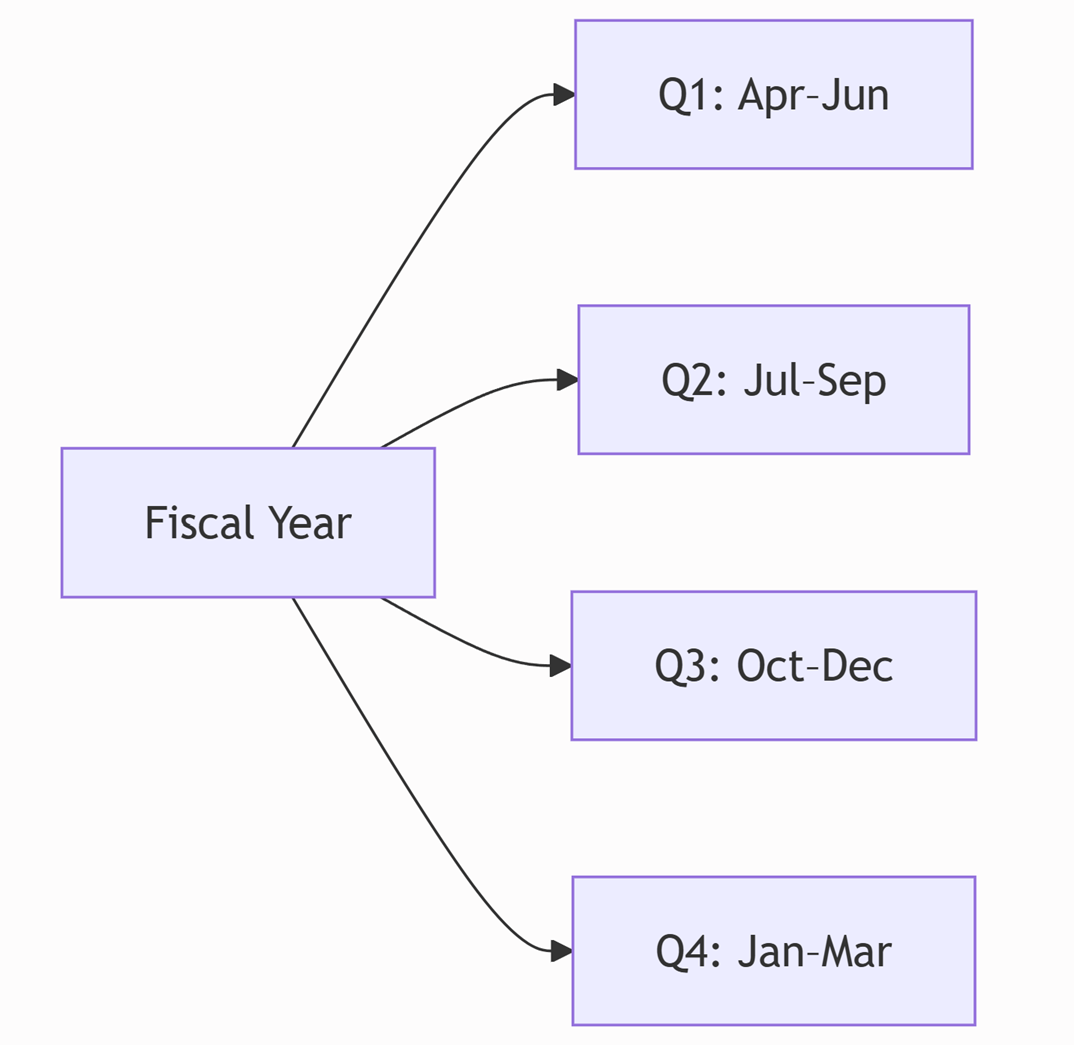
The following table and image show the fiscal quarters and months for an April-start fiscal calendar.
| Fiscal quarter | Months |
|---|---|
| Q1 | April, May, June |
| Q2 | July, August, September |
| Q3 | October, November, December |
| Q4 | January, February, March |
For an August-start fiscal calendar:
| Fiscal quarter | Months |
|---|---|
| Q1 | August, September, October |
| Q2 | November, December, January |
| Q3 | February, March, April |
| Q4 | May, June, July |
In planning, you can set any month as the fiscal year start month.
Important
Planning doesn't create or manage the fiscal calendar. You must set up a fiscal calendar table that includes fiscal period fields such as Year, Quarter, and Month in your semantic model. Then, configure the planning sheet or matrix to use those fields.
Use fiscal calendars across the following time-intelligence features:
- Forecast measures
- Time extension and future periods
- Open and closed periods
- Time-based planning
Set up fiscal date calendar in planning
When you set up fiscal date calendars in planning, you can organize planning and reporting around your financial year instead of the calendar year.
To do this, create a fiscal date table in your semantic model and map the calendar and fiscal years accordingly.
Semantic model requirements
Before configuring the visual,
- Create a fiscal date table in the semantic model that maps each calendar date to the corresponding fiscal periods.
- At a minimum, include the fiscal fields required for your reporting granularity, such as Fiscal Year, Fiscal Quarter, and Fiscal Month.
- If your organization reports at finer levels of detail, also include: Fiscal Week and Fiscal Day.
The fiscal date table should:
- Provide a complete and consistent fiscal mapping.
- Include the historical and future dates required for planning and extended forecasting.
- Include consistent fiscal labels and corresponding numeric sort fields so that fiscal periods appear in the correct order on the matrix grid.
- Follow your organization's fiscal year naming convention.
Note
Planning uses the fiscal fields that you provide in the semantic model. It doesn't automatically generate, modify, repair, or relabel fiscal periods.
Add a numeric sort column for sorting requirements
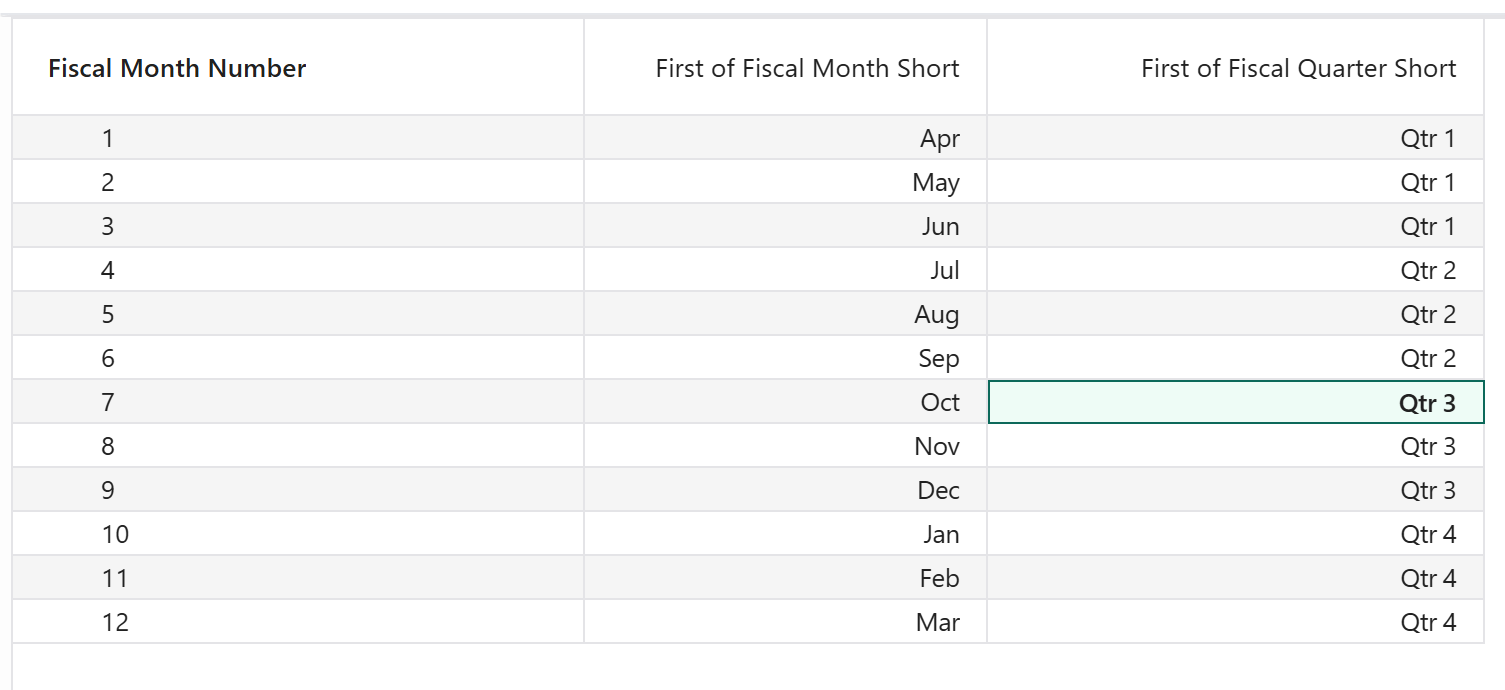
Add numeric sort fields for the fiscal display fields. Configure each display field to use its corresponding fiscal-order field in the semantic model so that fiscal periods appear in the correct order. Otherwise, the periods appear in alphabetical order by default.
For an April-start fiscal calendar, the fiscal months appear in the following order:
| Fiscal month order | Display value |
|---|---|
| 1 | Apr |
| 2 | May |
| 3 | Jun |
| 4 | Jul |
| 5 | Aug |
| 6 | Sep |
| 7 | Oct |
| 8 | Nov |
| 9 | Dec |
| 10 | Jan |
| 11 | Feb |
| 12 | Mar |
Similarly, sort the fiscal quarters as Q1, Q2, Q3, and Q4 if your sheet includes quarter-level granularity. Incorrect semantic-model sorting can result in unexpected hierarchy order in the sheet.
Build the fiscal hierarchy
Assign the fiscal fields to the sheet's Columns field in order from the highest to the lowest level of granularity:
Fiscal Year
  → Fiscal Quarter
      → Fiscal Month
The recommended hierarchy is:
Fiscal Year → Fiscal Quarter → Fiscal Month
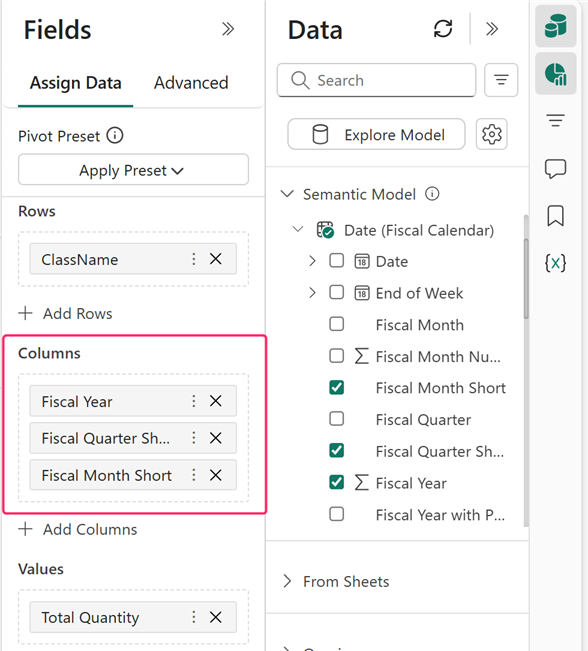
Depending on the available data and required granularity, supported fiscal paths can also include the following options:
Fiscal YearFiscal Year → Fiscal Half-YearFiscal Year → Fiscal QuarterFiscal Year → Fiscal MonthFiscal Year → Fiscal WeekFiscal Year → Fiscal Month → Fiscal DayFiscal Year → Fiscal Quarter → Fiscal MonthFiscal Year → Fiscal Quarter → Fiscal Month → Fiscal DayFiscal Year → Fiscal Week → Fiscal Day
Include Fiscal Year whenever the dataset spans multiple fiscal years. Keep the fiscal fields together and order them from the highest to the lowest level of granularity.
Configure the planning visual
Configure these settings before creating forecast measures or extending time periods.
- After assigning the fiscal hierarchy, go to Format > Appearance > Misc.
- Configure both these fiscal settings: Fiscal Year Start Month and Fiscal Year Convention.
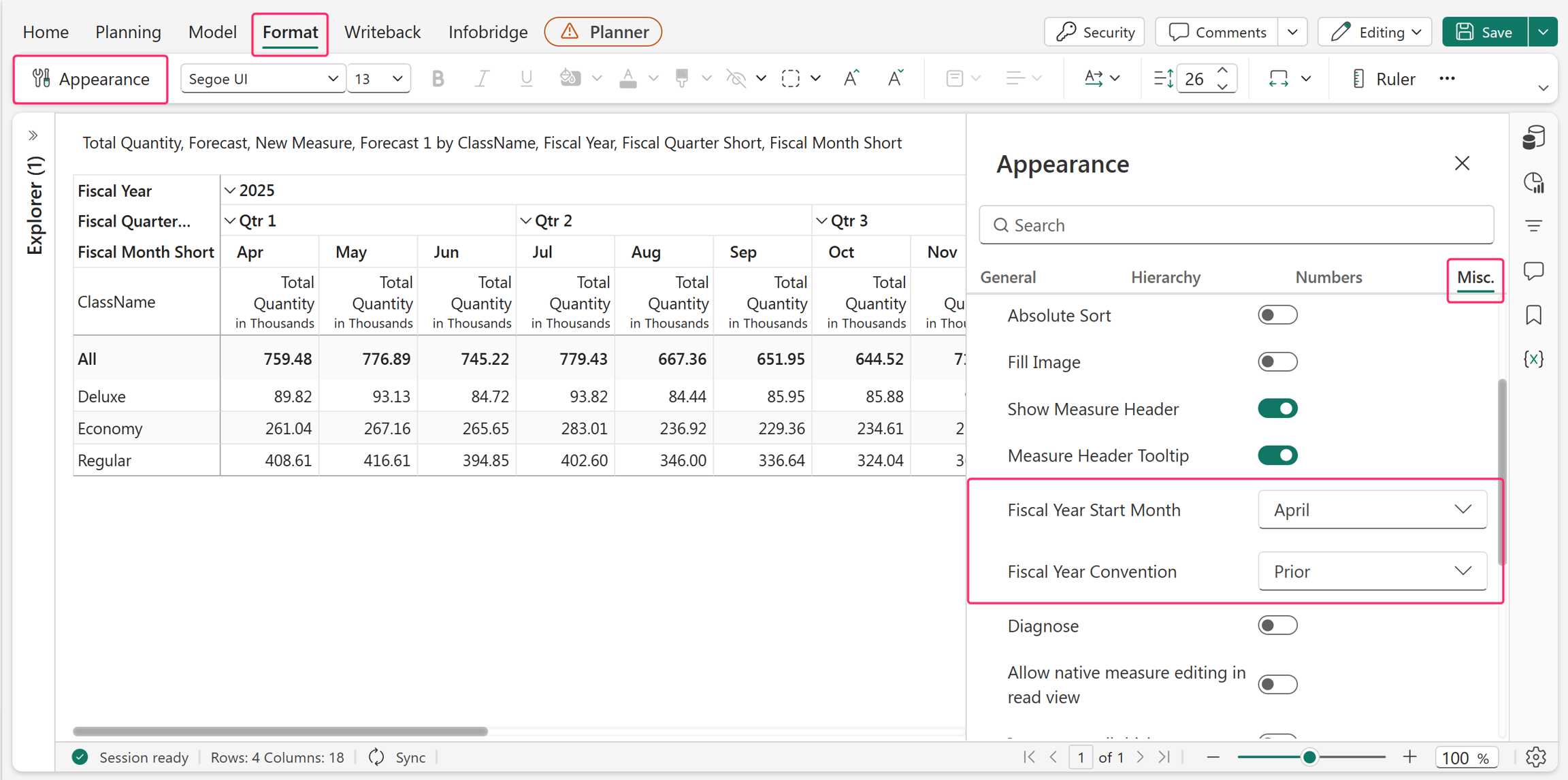
Fiscal year start month
This option identifies the first month of the organization's fiscal year. It determines fiscal quarter boundaries and how planning extends future fiscal periods. Select the month that exactly matches the fiscal date table.
| Business calendar | Select |
|---|---|
| April–March | April |
| July–June | July |
| August–July | August |
| October–September | October |
For example, when April is selected:
- Q1 is April–June.
- Q2 is July–September.
- Q3 is October–December.
- Q4 is January–March.
If the selected month doesn't match the semantic model, planning can interpret quarters and forecast periods incorrectly.
Fiscal year convention
The Fiscal Year Convention determines how fiscal year labels map to the calendar year in which the fiscal year begins.
Planning supports the following conventions: Prior and Same.
Forecasting under prior
Prior: The fiscal year begins in the calendar year immediately before the fiscal year label. For example, FY 2025 begins in April 2024. The start year is one less than the fiscal-year label.
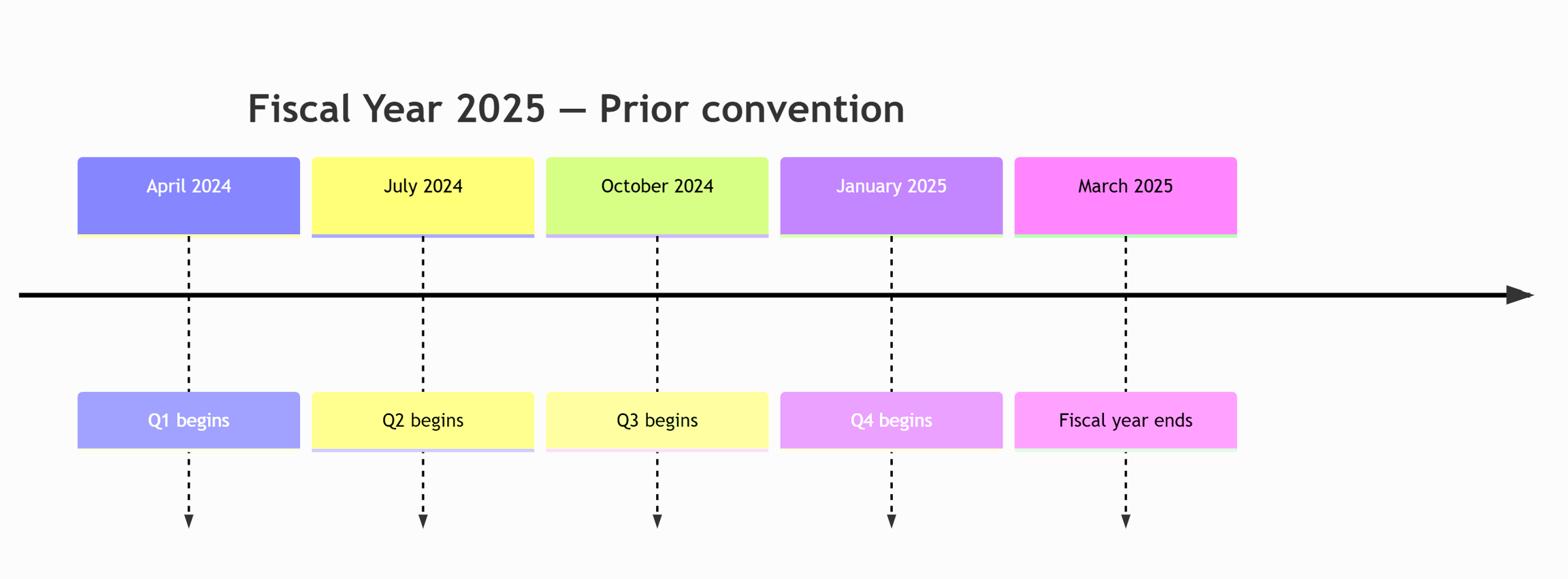
For an April-start fiscal year when you use the Prior convention:
| Fiscal hierarchy value | Actual calendar period |
|---|---|
| FY2025 → Q1 → Apr | April 2024 |
| FY2025 → Q1 → May | May 2024 |
| FY2025 → Q2 → Jul | July 2024 |
| FY2025 → Q4 → Jan | January 2025 |
| FY2025 → Q4 → Mar | March 2025 |
The fiscal label remains 2025 throughout the hierarchy, but the first nine fiscal months fall in calendar year 2024.
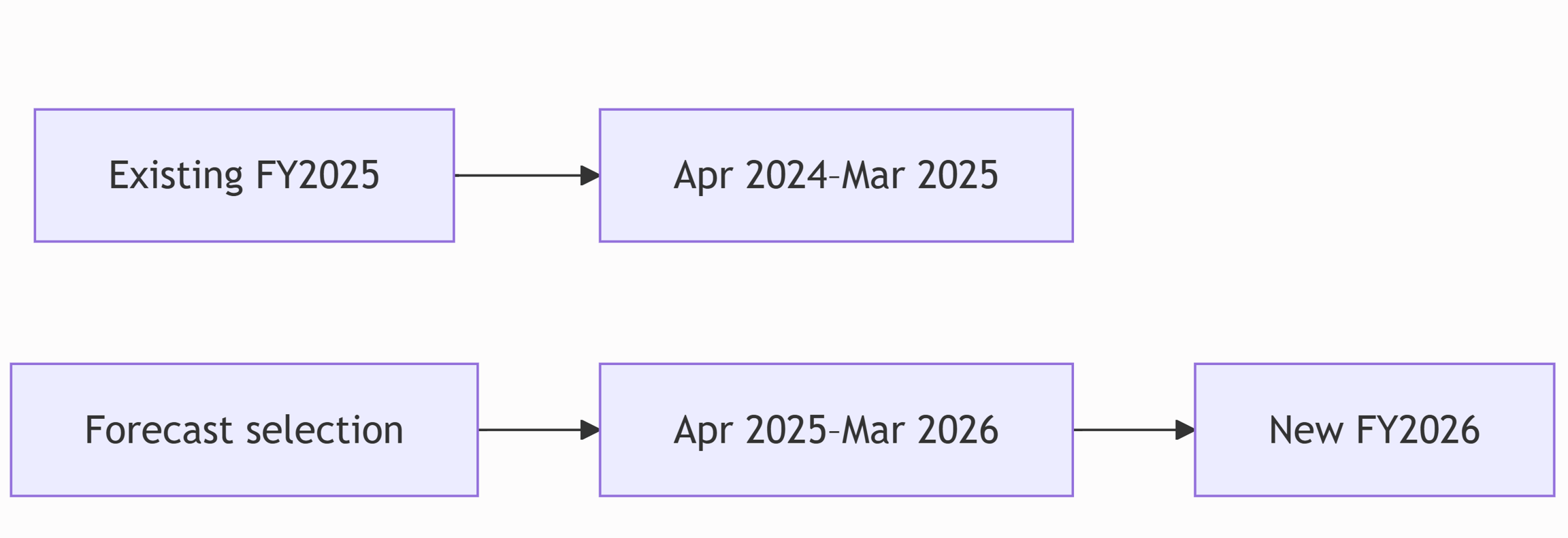
Suppose the visual contains Fiscal Year 2025, representing April 2024 through March 2025. To forecast for the next fiscal year, select the actual calendar range:
April 2025 → March 2026
Planning maps that range to Fiscal Year 2026.
Forecasting under same
Same: The fiscal year begins in the same calendar year as the fiscal year label. Use Same when the organization expects Fiscal Year 2025 to begin in April 2025.
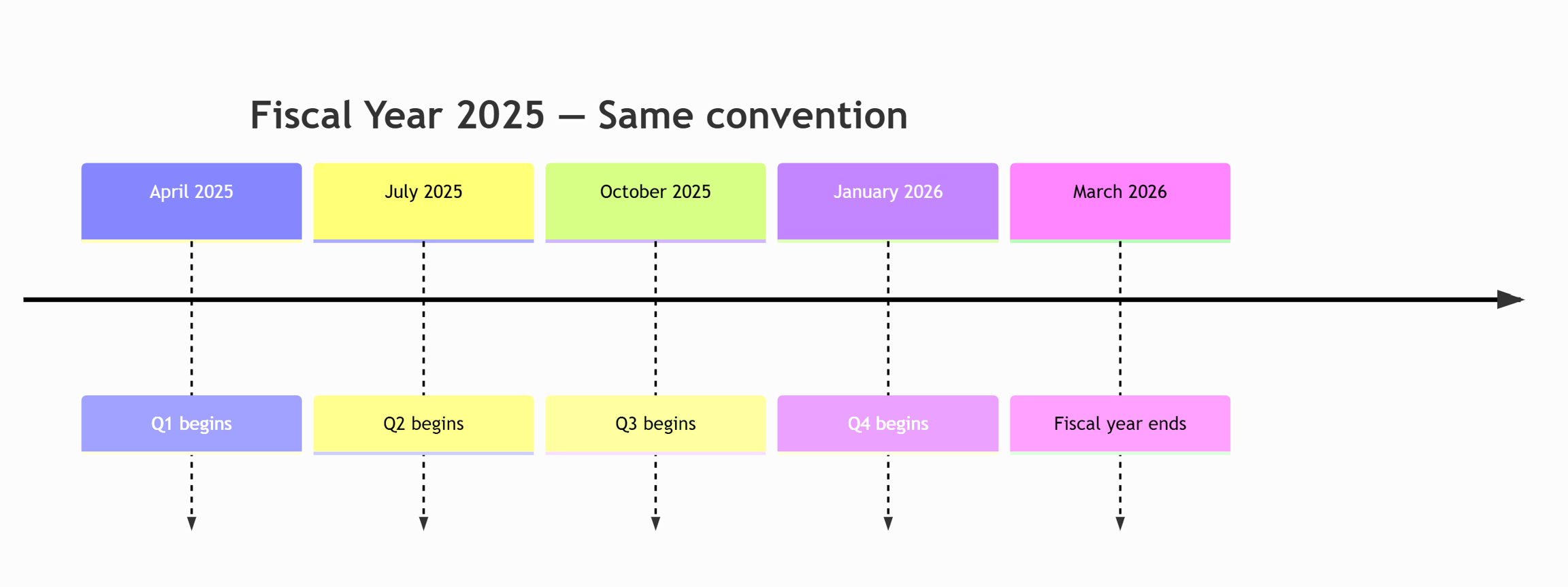
For an April-start fiscal year when you use the Same convention:
| Fiscal hierarchy value | Actual calendar period |
|---|---|
| FY2025 → Q1 → Apr | April 2025 |
| FY2025 → Q1 → May | May 2025 |
| FY2025 → Q2 → Jul | July 2025 |
| FY2025 → Q4 → Jan | January 2026 |
| FY2025 → Q4 → Mar | March 2026 |
Prior versus same comparison
For a fiscal year starting in April:
| Visual label | Convention | Actual fiscal-year range |
|---|---|---|
| Fiscal Year 2025 | Prior | April 2024–March 2025 |
| Fiscal Year 2025 | Same | April 2025–March 2026 |
Tip
Identify the first month of a known fiscal year in your source data. If Fiscal Year 2025 starts in April 2024, select Prior. If Fiscal Year 2025 starts in April 2025, select Same.
Planning maps the fiscal dates
After these configurations, the fiscal date table connects each actual calendar date to its fiscal reporting period.
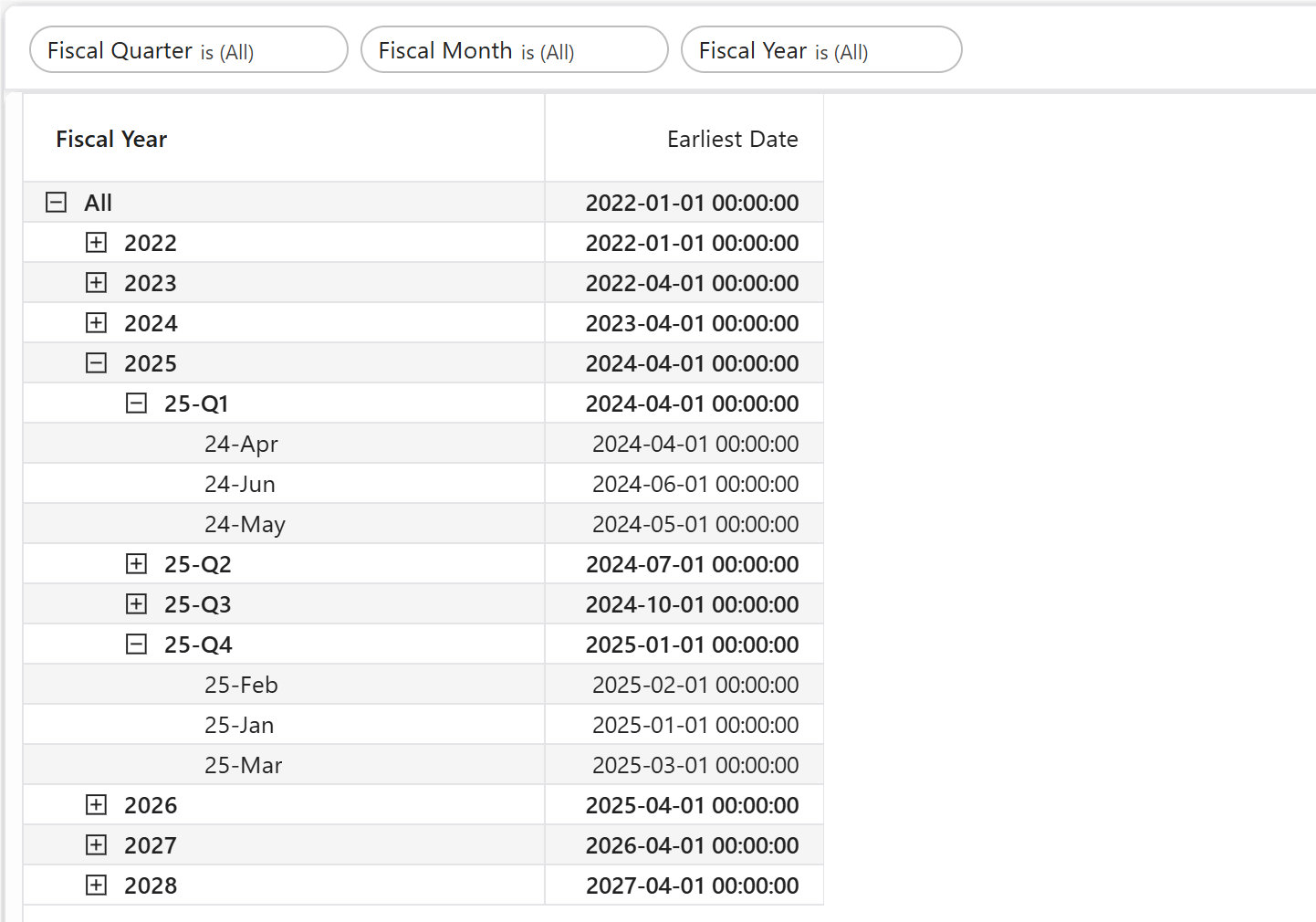
For example, for a fiscal calendar that starts in April and uses the Prior convention, the fiscal date fields appear as shown in the following image.
| Calendar date | Fiscal year | Fiscal quarter | Fiscal month |
|---|---|---|---|
| April 1, 2024 | 2025 | Q1 | Apr |
| May 1, 2024 | 2025 | Q1 | May |
| June 1, 2024 | 2025 | Q1 | Jun |
| July 1, 2024 | 2025 | Q2 | Jul |
| January 1, 2025 | 2025 | Q4 | Jan |
| March 1, 2025 | 2025 | Q4 | Mar |

The following image shows the updated table with the fiscal year after you complete all the earlier configurations.
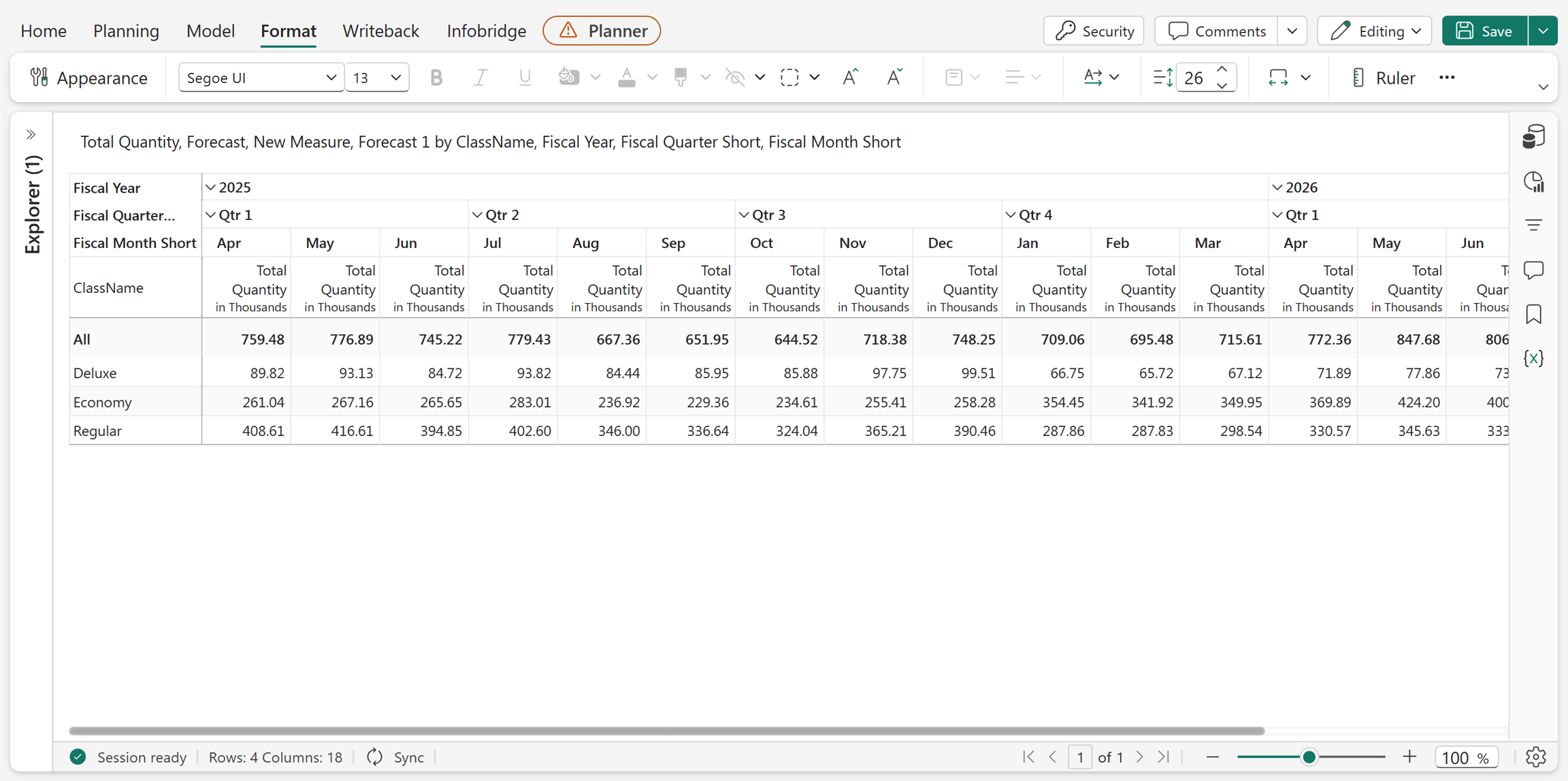
Create forecast measure with a fiscal calendar
In forecasting, when you use a fiscal calendar, translate the fiscal period into its corresponding calendar start and end dates before selecting the forecast period. For example, April in Fiscal Year 2025 might represent April 2024, depending on your organization's fiscal calendar.
During forecasting, use the corresponding calendar dates instead of the fiscal period labels to avoid selecting an incorrect forecast period.
- Ensure you complete the requirements and configurations: Semantic model requirements, sorting requirements, building the hierarchy, and configuring the visual.
- Select Model > Forecast.
- Enter the measure name.
- Select the Forecast Period using actual calendar dates.
- Complete the remaining forecast settings and create the measure.
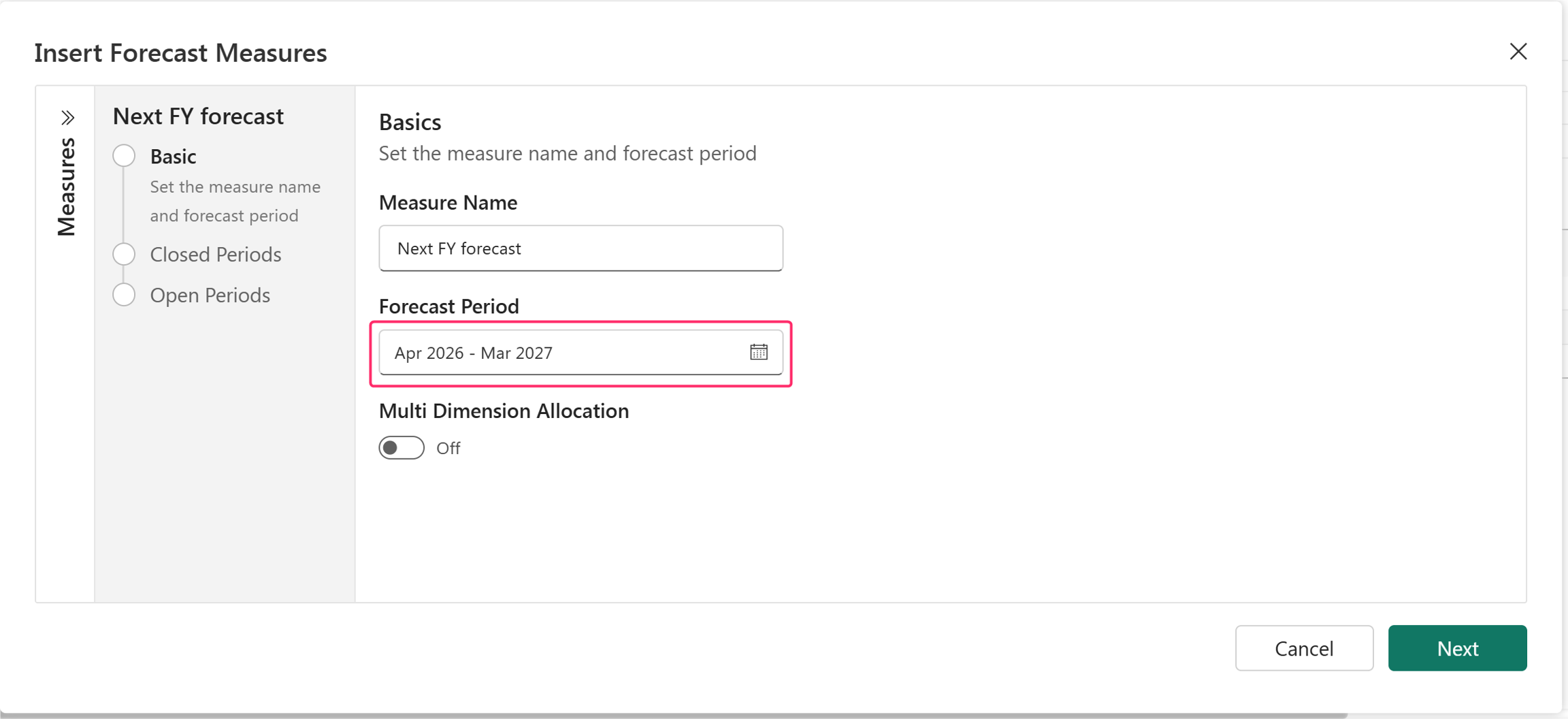
Important
The Forecast Period picker uses calendar periods, not fiscal periods.
For more information about creating forecast measures, see Forecast data.
Example: extend an April-start fiscal calendar
If the existing FY2027 uses Prior, it represents April 2026–March 2027. Select April 2026–March 2027 to create the next fiscal planning year.
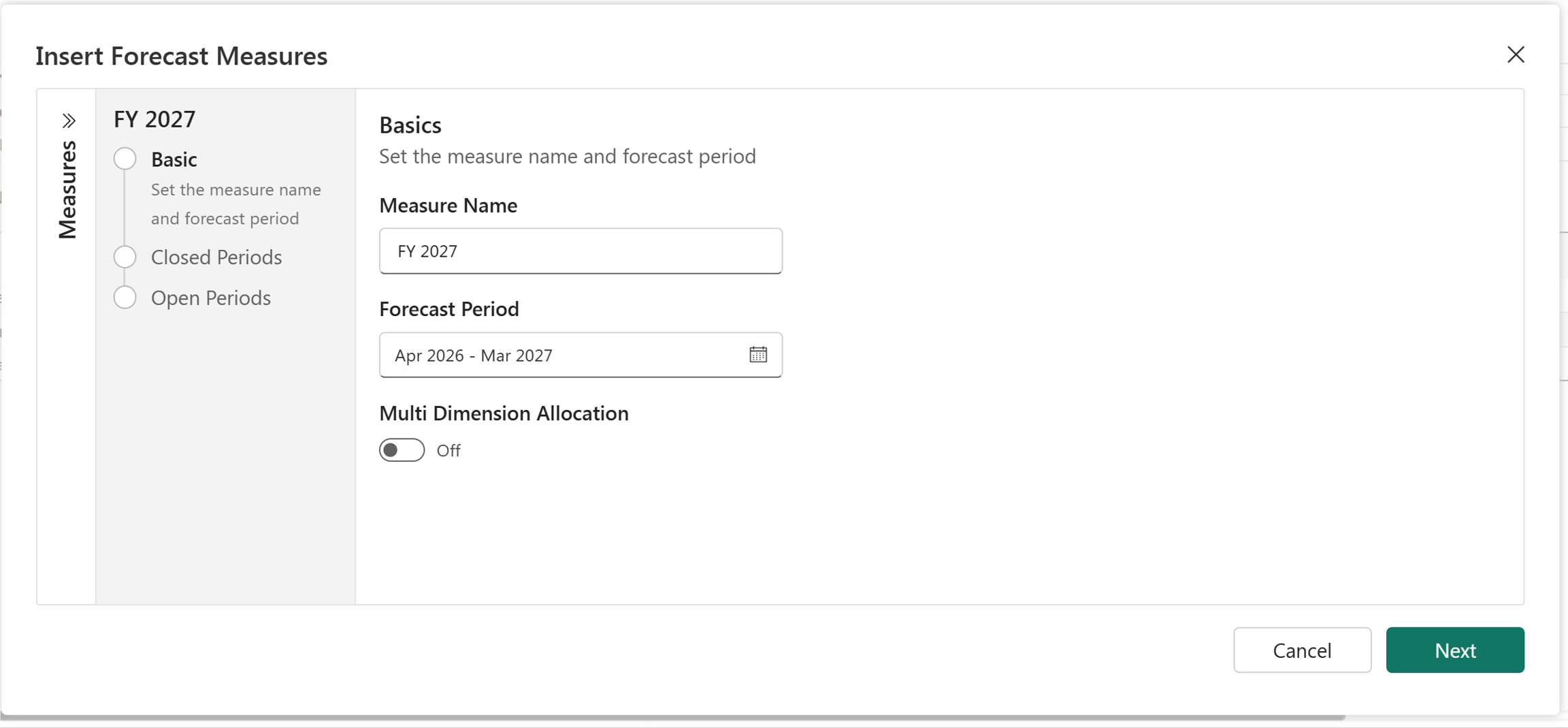
After the time extension, the hierarchy contains FY2026 followed by FY2027. The sheet adds forecast periods under the fiscal hierarchy.
More examples
April start with 'Prior'
| Setting | Value |
|---|---|
| Fiscal Year Start Month | April |
| Fiscal Year Convention | Prior |
| FY2025 actual range | April 2024–March 2025 |
| Next complete forecast range | April 2025–March 2026 |
| New fiscal label | FY2026 |
April start with 'Same'
| Setting | Value |
|---|---|
| Fiscal Year Start Month | April |
| Fiscal Year Convention | Same |
| FY2025 actual range | April 2025–March 2026 |
| Next complete forecast range | April 2026–March 2027 |
| New fiscal label | FY2026 |
August start with 'Prior'
| Setting | Value |
|---|---|
| Fiscal Year Start Month | August |
| Fiscal Year Convention | Prior |
| FY2025 actual range | August 2024–July 2025 |
| Q1 | August–October 2024 |
| Q2 | November 2024–January 2025 |
| Q3 | February–April 2025 |
| Q4 | May–July 2025 |
| Next complete forecast range | August 2025–July 2026 |
October start with 'Same'
| Setting | Value |
|---|---|
| Fiscal Year Start Month | October |
| Fiscal Year Convention | Same |
| FY2025 actual range | October 2025–September 2026 |
| Q1 | October–December 2025 |
| Q2 | January–March 2026 |
| Q3 | April–June 2026 |
| Q4 | July–September 2026 |
Best practices
- Use a single, authoritative fiscal date table.
- Include Fiscal Year and all lower-level fiscal fields that the visual requires.
- Include future dates before users create planning periods.
- Sort fiscal labels by their corresponding numeric fiscal-order columns.
- Use fiscal fields instead of standard calendar fields in the fiscal hierarchy.
- Configure the fiscal start month before creating forecast measures.
- Validate the Prior or Same convention against a known date-to-fiscal-year mapping.
- Select forecast periods using actual calendar dates instead of fiscal period labels.
- Test fiscal year boundaries, especially the transition from Q4 to the following Q1.
- Use consistent fiscal settings across all visuals that share the same fiscal calendar.
Troubleshooting
Forecast periods appear one year early or late
The Fiscal Year Convention is probably incorrect. Compare one known fiscal label and calendar date, then select Prior or Same accordingly.
Quarters contain the wrong months
Confirm that Fiscal Year Start Month matches the semantic model's fiscal calendar.
Months appear alphabetically
Configure Fiscal Month to sort by a numeric fiscal-month-order field in the semantic model.
Planning sheet doesn't recognize the fiscal hierarchy
Verify that:
- The visual uses fiscal fields from the fiscal date table.
- The fiscal hierarchy runs from the highest to the lowest level of granularity.
- The fiscal fields use supported time labels consistently.
- Fiscal Year appears when the data spans multiple fiscal years.
Forecast extension starts in the wrong month
Verify both the fiscal start month and the calendar dates selected in Forecast Period.
Future fiscal periods are missing
Confirm that the fiscal date table contains mappings for the required future calendar dates.
Frequently asked questions (FAQs)
Can Planning create a fiscal calendar automatically?
No. You must create and maintain the fiscal date mapping in the semantic model before using it for planning.
Can the fiscal year start in any month?
Yes. Select the required month in Fiscal Year Start Month and ensure the semantic model uses the same start month.
What is the difference between Prior and Same?
Prior starts the fiscal year one calendar year before its label. Same starts in the calendar year shown by its label.
For an April start:
- FY2025 + Prior convention = April 2024–March 2025.
- FY2025 + Same convention = April 2025–March 2026.
How should I select the 'Forecast Period' while configuring the forecast measures?
Select the actual calendar start and end periods to add. Don't select dates based only on the fiscal-year label.
Can calendar and fiscal fields both exist in the model?
Yes. Use the fiscal hierarchy in visuals intended for fiscal planning and the calendar hierarchy in visuals intended for standard calendar reporting. Avoid mixing calendar and fiscal levels within one time hierarchy.
What happens when the fiscal year starts in August?
Q1 becomes August–October, Q2 becomes November–January, Q3 becomes February–April, and Q4 becomes May–July. Prior or Same then determines the calendar year in which that August occurs.
Are Fiscal Quarter and Fiscal Month always mandatory?
Use the levels required by the visual's granularity. Fiscal Year is essential for distinguishing multiple fiscal years. Quarter and Month are required when users need quarterly or monthly drill-down and forecasting.
Why does January belong to Q4 in an April-start calendar?
Planning counts fiscal quarters from the selected start month. With April as month 1, January is fiscal month 10 and therefore belongs to Q4.
Configuration checklist
- The semantic model includes a fiscal date table.
- The fiscal date table contains all required historical and future dates.
- The Fiscal Year, Fiscal Quarter, and Fiscal Month mappings align with the organization's fiscal calendar.
- You sort fiscal display fields by their corresponding numeric fiscal-order fields.
- The visual uses the fiscal hierarchy from the highest to the lowest level of granularity.
- The Fiscal Year Start Month setting matches the fiscal date table.
- The Fiscal Year Convention setting matches a verified fiscal year mapping.
- You select the Forecast Period by using actual calendar dates.
- You validate the fiscal hierarchy and future planning periods.
Summary
Planning supports fiscal forecasting and time-based planning when the semantic model provides a correctly configured fiscal date table and the visual uses the appropriate fiscal settings.
Configure the Fiscal Year Start Month and Fiscal Year Convention to match your organization's fiscal calendar, and verify the mapping before creating forecast measures. The most important distinction is the meaning of Prior and Same.
After you correctly configure the fiscal calendar mapping, select forecast periods by using their actual calendar dates.