Note
Access to this page requires authorization. You can try signing in or changing directories.
Access to this page requires authorization. You can try changing directories.
This article provides answers to frequently asked questions about the writeback feature in planning. Review these common scenarios to understand how data updates, storage, and security operate.
If a user updates a data input column in reading mode and closes the report, is the latest data available when reopening?
Yes. Planning in Fabric captures changes to data input columns and stores them in the backend database. This process works in both reading and edit modes. When the report reopens, planning retrieves the latest values and loads the report with updated data.
How does row-level security (RLS) work in planning?
Planning in Fabric respects the RLS defined in the original Power BI dataset. The planning sheet shows only the rows that you can see. RLS in Power BI applies to users with Viewer access in the workspace.
How does writeback work with RLS?
Planning in Fabric writes back only the rows visible to you. If you see a limited set of dimension categories based on RLS, planning writes back only those rows. You can write back only the data that's visible in the planning sheet.
How is data stored when multiple users perform writeback? When are rows overwritten or appended?
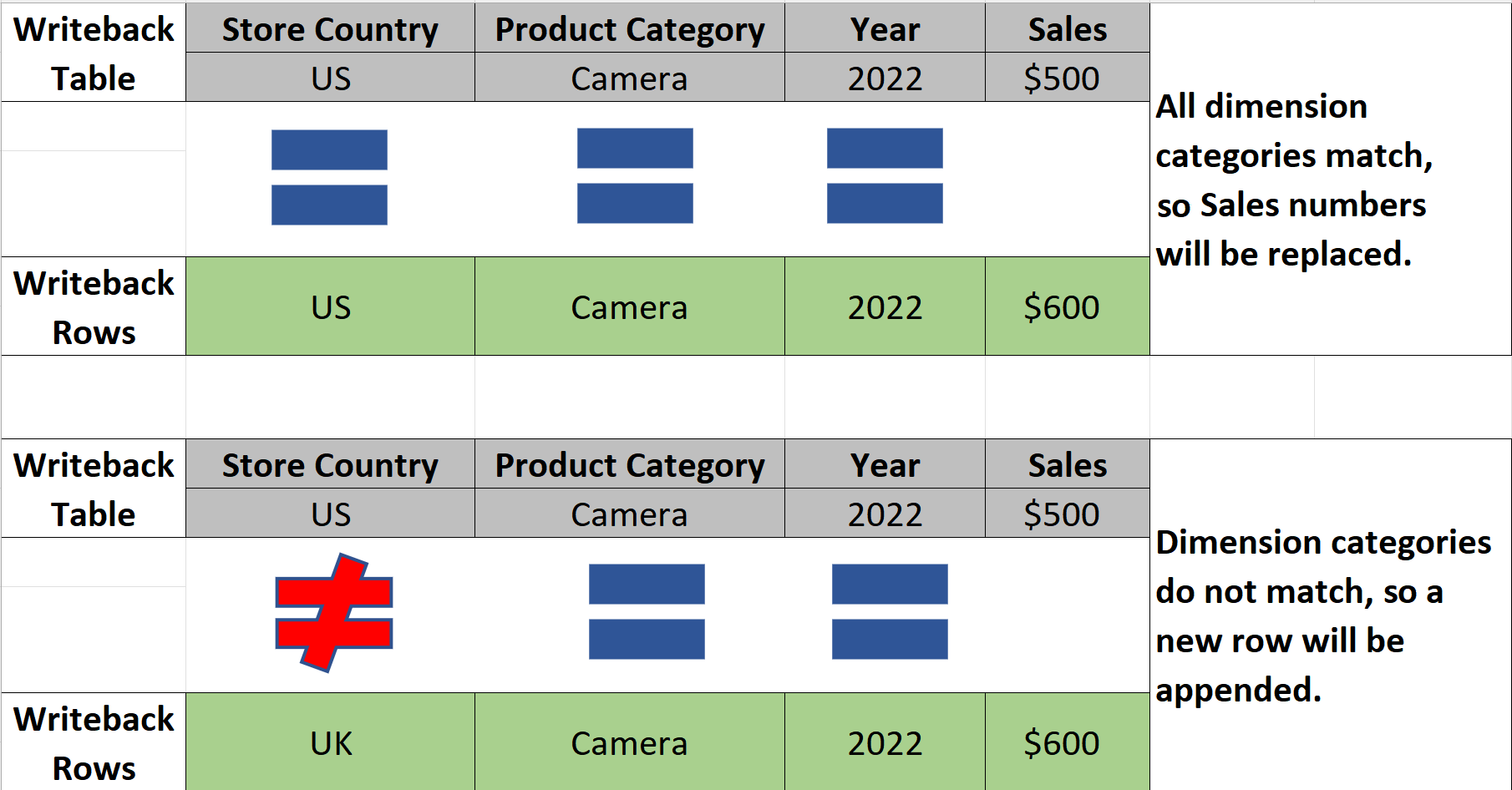
Planning in Fabric processes writeback operations sequentially. During writeback, planning compares incoming rows with existing rows in the destination. If all dimension columns and values match, planning overwrites the existing row. However, if you prefer that planning doesn't overwrite rows during writeback commits, select Writeback only changes/Delta writeback as the writeback type. Under this mode, planning retains previous values.
If a user can't add a writeback destination from a planning sheet, is that always a writeback configuration issue, or could it be a permissions issue?
It can be either issue, so check permissions first. You control writeback-specific access separately under Security > Writeback. If you're missing from that list, you can't write back regardless of how correctly you configure the destination.
Where do I grant writeback access for a specific user?
Go to Security in the Writeback ribbon, and then search for the user by name or email. Add them individually to the list of people who can write back data from that planning sheet.
Is writeback access tied to general report access, or is it a separate permission layer?
It's a separate layer. General report access controls who can open and interact with the planning sheet, while the Writeback tab under Security controls who can write data back.
What is the difference between Long, Wide, and Long with Changes writeback formats?
Long format writes one row per data point—each combination of dimension members and time period is a separate row. Wide format writes one row per dimension combination with each measure or time period as a separate column—closer to an unpivot table structure. Long with Changes writes only the rows that you added or modified since the last writeback, making it faster and more storage-efficient for large datasets.
Can I write back to more than one destination from the same planning sheet?
Yes—you can configure multiple Fabric SQL DB destinations for a single planning sheet. Each destination can have its own writeback type, column mapping, and filter settings. You can toggle each destination on or off independently from the Destinations tab in writeback settings.
Can I write back multiple sheets to the same SQL table?
Yes—you can write back multiple sheets from the same plan item to the same SQL database. You need to configure the SQL DB destination in every sheet that you want to write back.
Can I control which columns get written back?
Yes—in the Data tab of writeback settings, you can choose which columns to include or exclude. This control is useful if you have workflow columns (Submitted, Approval Status, Comments) that you want to write back alongside the plan data, or if you want to exclude certain columns from the destination table.
What does Decimal Precision control, and does it affect the values in the plan item?
It controls how many decimal places the SQL table stores. It doesn't affect the values displayed or used within the plan item—it only impacts the precision of the written data in the database.
What happens if I run writeback twice—does it create duplicate rows?
It depends on the writeback type. For Long and Wide formats, running writeback again replaces the existing rows with the current values and creates no duplicates. For Long with Changes and Wide with Changes, writeback adds a new row only when the data changes—if nothing changes since the last writeback, running it again adds no new rows. This behavior makes the With Changes formats useful for audit trails: writeback records each change as a new row, while unchanged data stays as is.
What information does the writeback log capture?
It records the status (success or failure), duration of the writeback, the user who triggered it, the measures written back, and the writeback type used. This information provides a full audit trail for governance and troubleshooting.
What happens if writeback fails partway through—is any data written?
The logs show a failed or partial status. It's best to investigate the log details, resolve the issue, and re-run writeback rather than assuming the table is complete.
If I verify the SQL table and the data looks wrong, what should I check first?
Check the writeback logs in the Writeback ribbon. If the writeback failed or completed only partially, the logs show the status, duration, and any errors. If the writeback completed successfully, check the writeback type—Long versus Wide affects how the table structures data. Also confirm you're viewing the correct scenario in the SQL table—if you wrote back Scenario 1 but you're previewing the Base scenario rows, the values appear mismatched. Finally, verify that you didn't unintentionally set the filter type to something restrictive, and confirm that you selected the correct measures in the Data tab before running writeback.
If I delete a row in the planning sheet, does writeback delete it from the SQL database?
No—writeback is additive. Deleting a row in the planning sheet doesn't remove it from the destination table. To remove data from the SQL database, you need to delete it directly in the database.
Can I write back to a destination outside of Fabric SQL—for example, to a SharePoint list or an Excel file?
No. Planning in Fabric writes back exclusively to Fabric SQL databases. For downstream consumption in other tools, you can query the data in the Fabric SQL database directly or expose it via a semantic model, Power BI report, or dataflow.