Note
Access to this page requires authorization. You can try signing in or changing directories.
Access to this page requires authorization. You can try changing directories.
Resource Instance Rules let workspace admins restrict public network access to OneLake by allowing inbound access only from trusted Azure resource instances, such as an Azure Databricks workspace or an Azure SQL Server. Setup is simple — it requires only the Azure resource ID.
Existing inbound protection options like IP firewall rules and Private Links are effective for managing access based on network location, but they can require complex setup when traffic originates from Azure services that use dynamic or shared outbound addresses.
Resource Instance Rules offer a simpler alternative — admins add a trusted Azure resource by its resource ID, and Fabric verifies the resource identity on each inbound request. This approach works alongside existing Fabric inbound protection features.
This article explains how Resource Instance Rules work for OneLake and when to use them. To learn about other inbound protection options, see Inbound network protection in Microsoft Fabric.
Note
Resource Instance Rules for OneLake are currently in public preview. Features and behavior might change before general availability.
How Resource Instance Rules work
When Resource Instance Rules are enabled on a workspace, OneLake allows inbound public network access only from Azure resource instances that are explicitly added by the workspace admin. Inbound requests may also be allowed when they originate from workspace private endpoints or from allowed public IP ranges (if configured).
For example:
- Workspace A allows access only from Azure Resource X.
- A request from Azure Resource Y is denied because it isn't on the approved list.
- A request from Azure Resource X is allowed because it matches an approved resource instance.
Allowing a resource instance through Resource Instance Rules doesn't grant that resource access to all data in the workspace. The resource must still satisfy the applicable authentication, authorization, and item-level permission requirements for the OneLake data that it tries to access.
When to use Resource Instance Rules
Resource Instance Rules are useful when you need to allow OneLake access from Azure-hosted services. Configuration requires only the Azure resource ID — no IP address tracking or network infrastructure changes needed.
Common scenarios include:
- Allowing access from specific Azure resource instances whose outbound IP addresses are dynamic or shared.
- Restricting access based on the identity of a trusted Azure resource instead of a network range.
- Combining resource-based access restrictions with workspace private links or IP firewall rules for layered protection.
If you need to allow user access from office networks, VPN gateways, or partner public IP ranges, use workspace IP firewall rules.
Configure Resource Instance Rules
You can manage Resource Instance Rules through the same workspace inbound networking experience that you use for other workspace-level inbound protections, or by using the Fabric REST APIs. The available configuration method depends on your tenant-level inbound access settings.
Prerequisites
Before you configure Resource Instance Rules, ensure the following requirements are met:
- A Fabric admin enables the tenant setting that allows workspace-level inbound network protections.
- You have the workspace admin role for the workspace that you want to protect.
- The Azure resource that you want to allow must be a supported resource type and must be able to present a verifiable Azure resource identity to Fabric.
Access requirements for portal and API configuration
How you configure Resource Instance Rules depends on your tenant's inbound network settings:
- If tenant-level public internet access to Fabric is enabled, workspace admins can configure Resource Instance Rules directly in the Fabric portal.
- If your tenant requires access through Private Link, you can open workspace network settings in the portal only from a network that is connected through the tenant Private Link.
- The REST API remains available through the supported endpoint and network path, which gives you a recovery option if portal access isn't available.
Go to the workspace that you want to protect, and then select Workspace settings > Inbound networking.
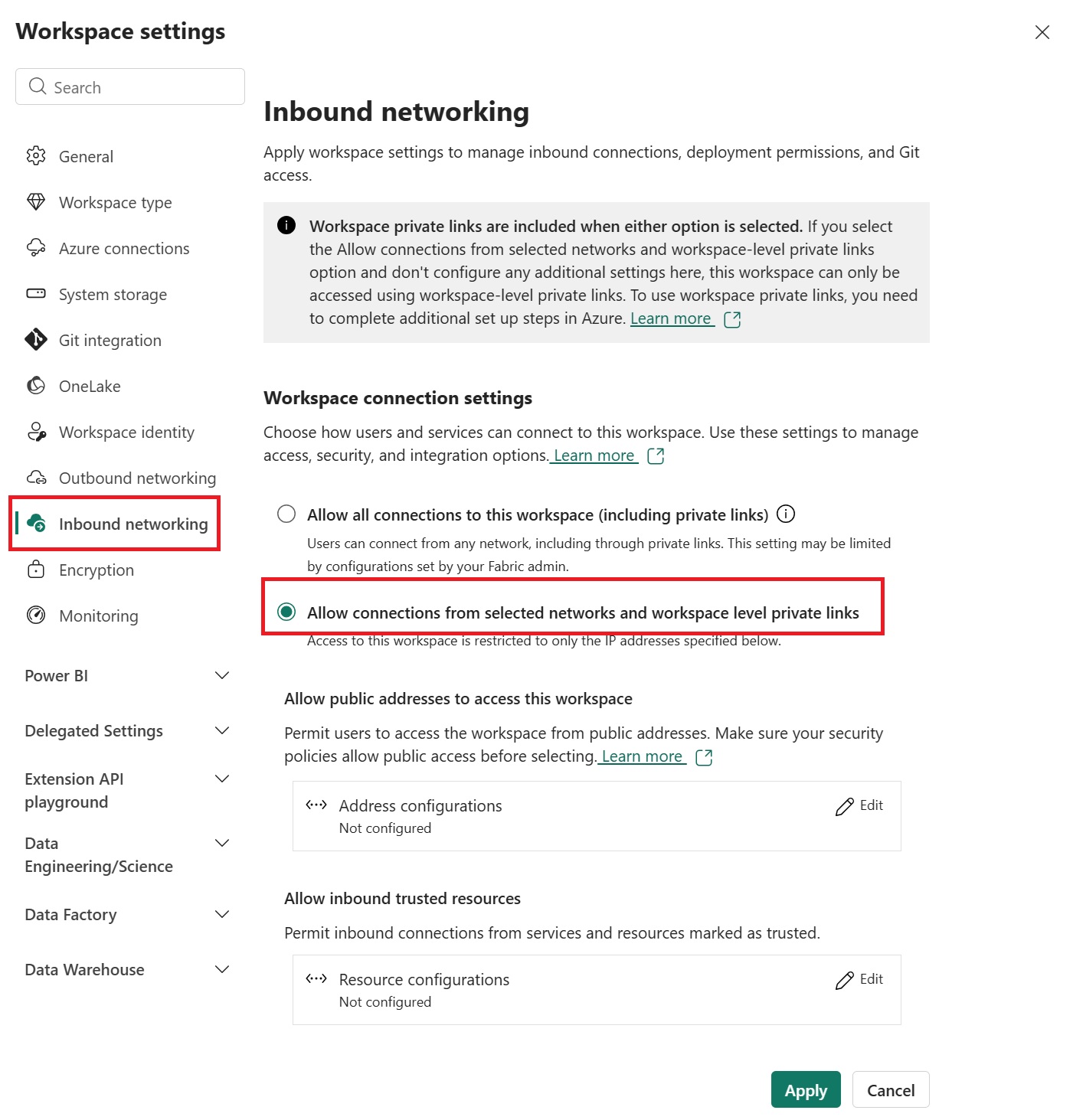
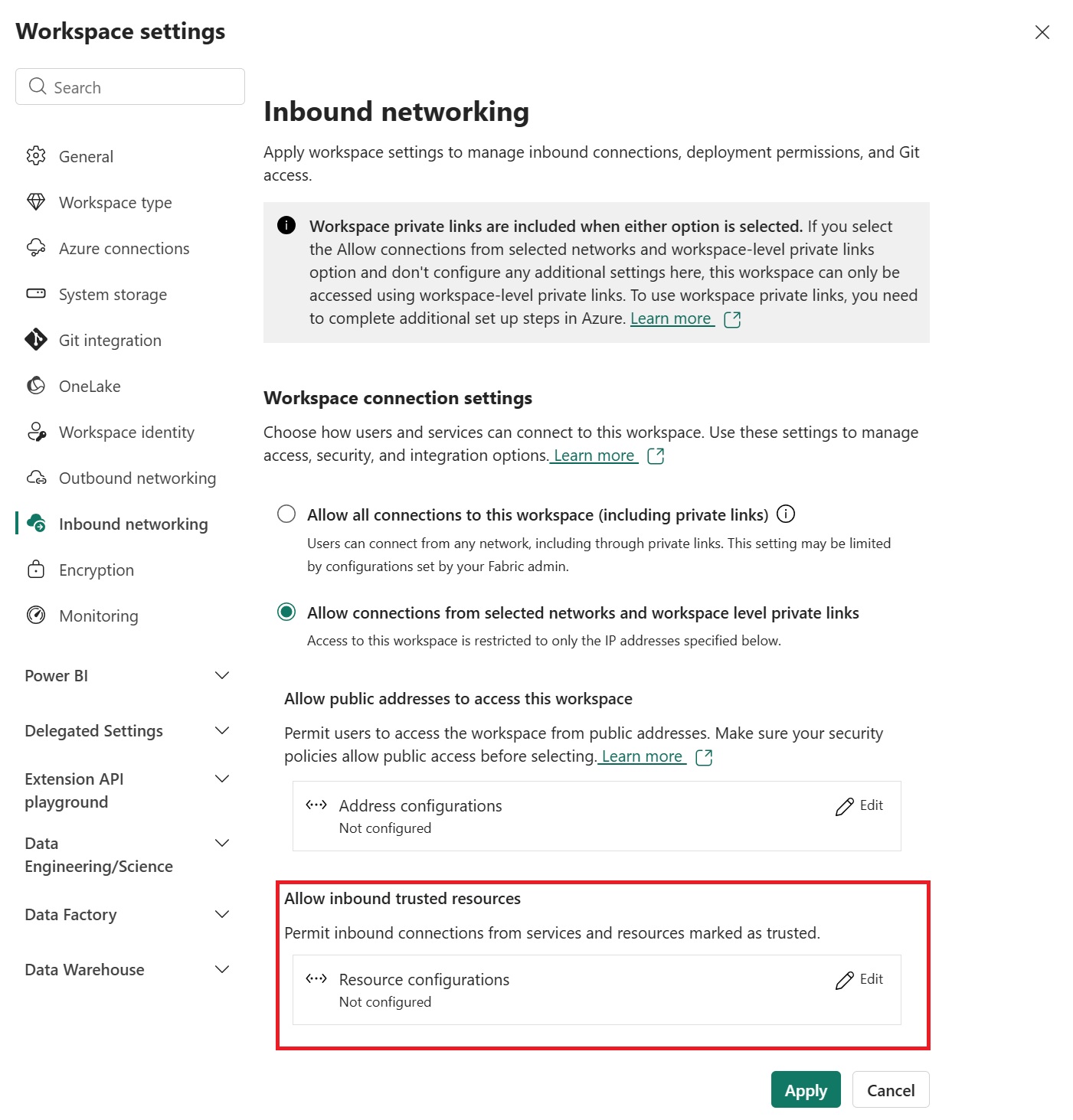
In the workspace inbound settings, select the option that restricts access to selected networks and approved resources.
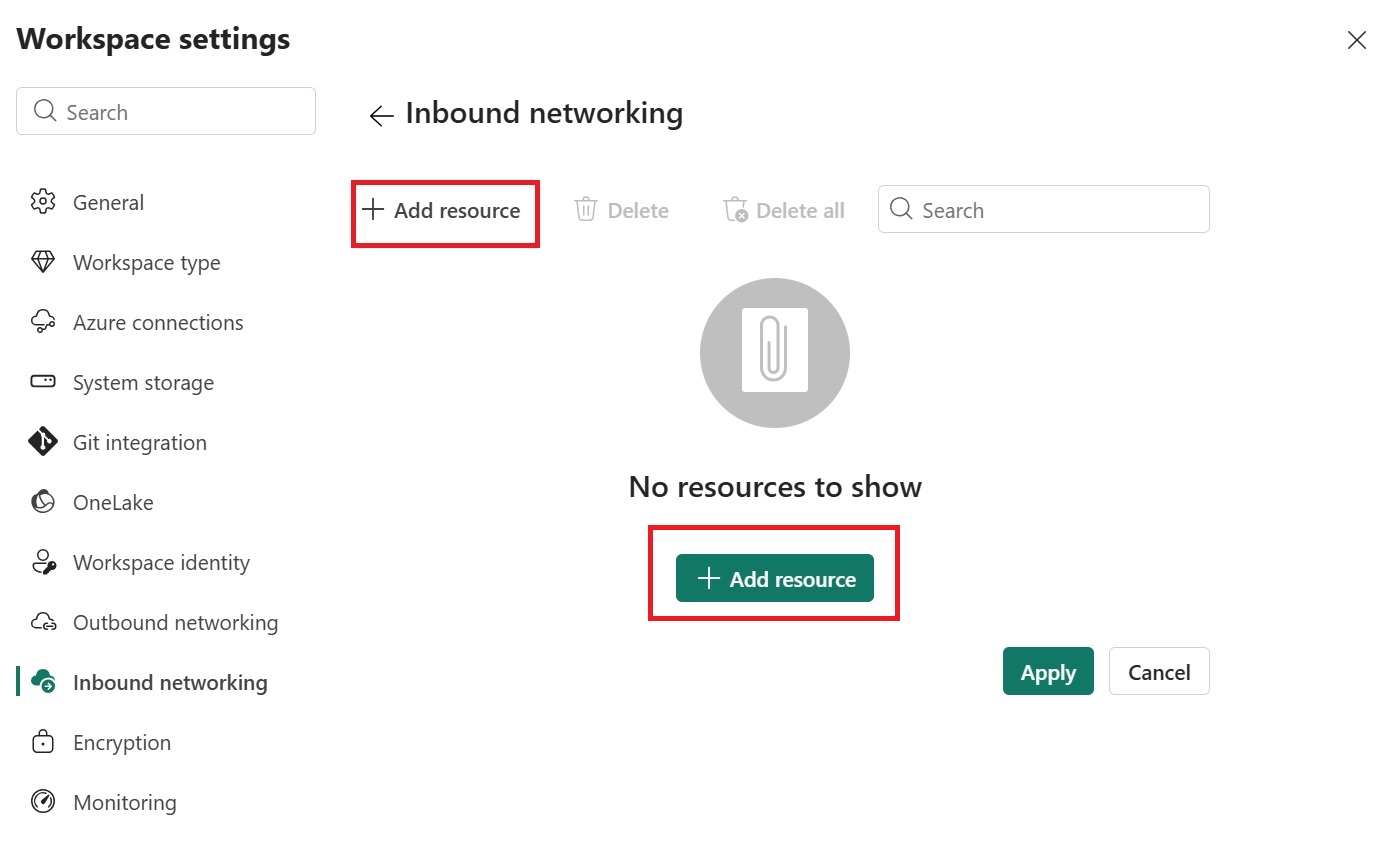
Add the Azure resource instances that should be allowed to access OneLake. When you add a resource, specify the full Azure Resource Manager (ARM) resource ID for that Azure resource instance.
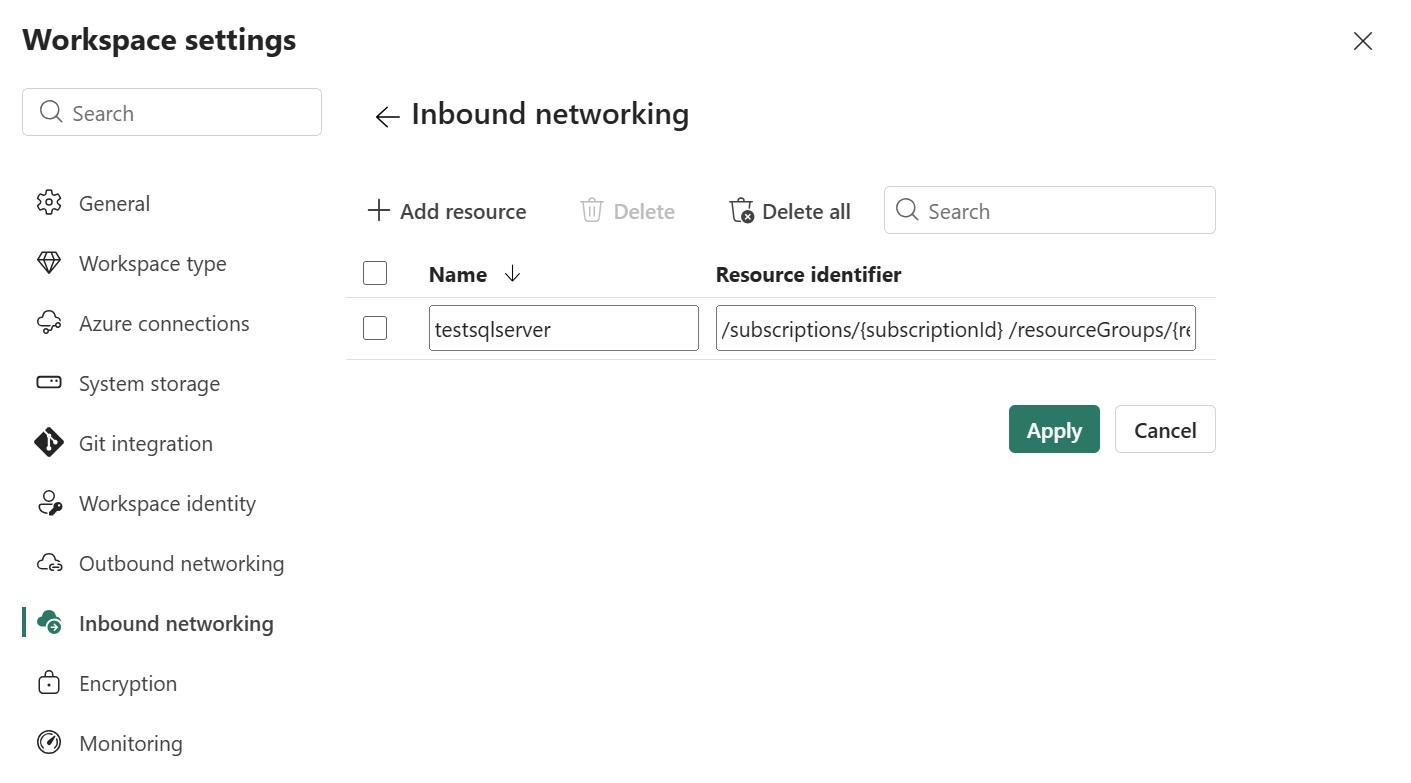
Review the selected resource details, and then save the configuration.
Supported resource types
Only Azure resources that can authenticate using a verifiable resource identity (managed identity) and claims are eligible to be added as trusted resource instances. The following Azure resource types are expected to work:
| Azure service | Resource name |
|---|---|
| Azure Databricks | Microsoft.Databricks/accessConnectors |
| Azure Data Factory | Microsoft.DataFactory/factories |
| Azure Data Explorer | Microsoft.Kusto/clusters |
| Azure Machine Learning | Microsoft.MachineLearningServices/workspaces |
| Azure AI Search | Microsoft.Search/searchServices |
| Azure Stream Analytics | Microsoft.StreamAnalytics/streamingjobs |
| Azure Event Grid | Microsoft.EventGrid/systemTopics |
| Azure Healthcare APIs | Microsoft.HealthcareApis/workspaces |
| Azure Purview | Microsoft.Purview/accounts |
| Azure Data Share | Microsoft.DataShare/accounts |
| Azure Backup Vault | Microsoft.DataProtection/BackupVaults |
| Azure Device Registry | Microsoft.DeviceRegistry/schemaRegistries |
| Azure Cognitive Services | Microsoft.CognitiveServices/accounts |
| Azure Logic Apps | Microsoft.Logic/workflows |
| Azure Site Recovery | Microsoft.RecoveryServices/vaults |
| Azure SQL Server | Microsoft.Sql/servers |
| Azure Managed HSM | Microsoft.KeyVault/managedHSMs |
| Azure Migrate | Microsoft.Migrate/migrateprojects |
Considerations
- Resource Instance Rules apply only to inbound access to the workspace.
- Resource Instance Rules restrict which resource instances can connect to OneLake, but they don't expand the data scope that the resource is authorized to access.
- Resource instances must be registered within the same Microsoft Entra tenant as the workspace.
- You can configure 25 Resource Instance Rules per workspace.
- Resource Instance Rules can be used together with workspace Private Link and workspace IP firewall rules.
- If you misconfigure the rules, you might block access to the workspace. Use API-based management as a recovery path if portal access isn't available.